
搭建自己的框架WedeNet(四)
WedeNet2018.Web-UI层:
结构如下:
首先,在Controller中定义BaseController,以便加入统一处理逻辑,如下:
using log4net;

using System;

using System.Collections.Generic;

using System.Linq;

using System.Web;

using System.Web.Mvc;

using WedeNet2018.Common;

namespace WedeNet2018.Web.Controllers

{

    /// <summary>

    /// 控制器基类

    /// </summary>

    public class BaseController : Controller

    {

        protected ILog log { get; set; }

        protected override void OnActionExecuting(ActionExecutingContext filterContext)

        {

            base.OnActionExecuting(filterContext);

            log.Info("---进入BaseController---");

        }

    }

}
在这里我们也声明了log4net变量,可在其派生类中决定使用哪一种配置的log。
以默认控制器为例:
using System;

using System.Collections.Generic;

using System.Linq;

using System.Web;

using System.Web.Mvc;

using WedeNet2018.BussinessLogic;

using PagedList;

using WedeNet2018.Infrastructure;

using System.Text.RegularExpressions;

using WedeNet2018.Common;

using WedeNet2018.Common.Models;

using log4net;

namespace WedeNet2018.Web.Controllers

{

    public class HomeController : BaseController

    {

        private OrdersBussinessLogic orderBll;

        private ElongOrdersDetailsBussinessLogic elongBll;

        private EmployeesBussinessLogic employeeBll;

        public HomeController(OrdersBussinessLogic BLL, ElongOrdersDetailsBussinessLogic ElongBll, EmployeesBussinessLogic EmployeeBll)

        {

            log = LoggerHelper.WedeNetLogger;

            orderBll = BLL;

            elongBll = ElongBll;

            employeeBll = EmployeeBll;

            log.Info("----HomeController初始化完成。----");

        }

        public ActionResult Index(int? page)

        {

            log.InfoFormat("初始化首页数据,page={0}", page);

            int pageSize = 10;

            int pageNum = (page ?? 1);

            var orders = orderBll.GetOrders(46).OrderBy(o => o.Id);

            return View(orders.ToPagedList(pageNum,pageSize));

        }

        public ActionResult Create()

        {

            return View();

        }

        [HttpPost]

        public ActionResult Create(Orders order)

        {

            if (string.IsNullOrEmpty(order.OrderSn))

            {

                ModelState.AddModelError("OrderSn", "OrderSn不能为空");

            }

            if (order.UserId<0)

            {

                ModelState.AddModelError("UserId", "UserId必须大于0");

            }

            if (string.IsNullOrEmpty(order.UserName))

            {

                ModelState.AddModelError("UserName", "UserName不能为空");

            }

            if (string.IsNullOrEmpty(order.UserMobile))

            {

                ModelState.AddModelError("UserMobile", "UserMobile不能为空");

            }

            if (string.IsNullOrEmpty(order.Email))

            {

                ModelState.AddModelError("Email", "Email不能为空");

            }

            else

            {

                if (!ModelState.IsValidField(order.Email) || !new Regex(@"\w+([-+.]\w+)*@\w+([-.]\w+)*\.\w+([-.]\w+)*", RegexOptions.IgnoreCase).IsMatch(order.Email))

                {

                    ModelState.AddModelError("Email", "Email不是正确的格式");

                }

            }

            if (ModelState.IsValid)

            {

                order.MerchantId = 46;

                order.UserMobile = "18210928340";

                order.DeliveryTypeId = 0;

                order.ServiceCost = 0;

                order.DeliveryCost = 0;

                order.PayCardType = 0;

                order.Enabled = true;

                order.IsSettledUp = true;

                order.HasRecievePay = true;

                order.HaveGetRecievePay = true;

                order.Created = DateTime.Now;

                order.LastModified = DateTime.Now;

                order.PaySn = "";

                order.OrderType = 46;

                order.Satisfaction = 0;

                orderBll.Add(order);

                //插入ElongOrdersDetails表

                ElongOrdersDetails detail = new ElongOrdersDetails();

                detail.OrderGuid = Guid.NewGuid();

                detail.OrderSn = order.OrderSn;

                detail.OrderId = 0;

                detail.Status = order.Status;

                detail.Created = DateTime.Now;

                detail.LastModified = DateTime.Now;

                elongBll.Add(detail);

                orderBll.Commit();

                return RedirectToAction("Index");

            }

            return View();

        }

        public ActionResult Details(int id)

        {

            Orders order = orderBll.Find(id);

            return View(order);

        }

        public ActionResult Edit(int id)

        {

            Orders order = orderBll.Find(id);

            return View(order);

        }

        [HttpPost]

        public ActionResult Edit(Orders orderEdit)

        {

            Orders order = orderBll.Find(orderEdit.Id);

            if (string.IsNullOrEmpty(orderEdit.Email))

            {

                ModelState.AddModelError("Email", "Email不能为空");

            }

            else

            {

                if (!ModelState.IsValidField(orderEdit.Email) || !new Regex(@"\w+([-+.]\w+)*@\w+([-.]\w+)*\.\w+([-.]\w+)*", RegexOptions.IgnoreCase).IsMatch(orderEdit.Email))

                {

                    ModelState.AddModelError("Email", "Email不是正确的格式");

                }

            }

            if (ModelState.IsValid) {

                order.Email = orderEdit.Email;

                order.Status = orderEdit.Status;

                order.ServiceCost = orderEdit.ServiceCost;

                orderBll.Update(order);

            }

            return RedirectToAction("Index");

        }

        public ActionResult Delete(int id)

        {

            orderBll.Delete(id);

            return RedirectToAction("Index");

        }

        public JsonResult GetEmployees() {

            ResponseBase<List<Employees>> result = new ResponseBase<List<Employees>>();

            try

            {

                var employees = employeeBll.GetAll().ToList();

                result.IsSuccess = true;

                result.Message = "查询成功!";

                result.resultCode = "200";

                result.ResultData = employees;

            }

            catch (Exception ex) {

                result.IsSuccess = false;

                result.Message = "查询异常!"+ex.Message;

                result.resultCode = "500";

            }

            return Json(result);

        }

    }

}
注意到了,我在构造函数中进行了一些初始化,有日志的,有需要用到的BussinessLogic处理类,这些BussinessLogic处理类是依赖NInject注入实例化的,而且这三个处理类是属于不同的UnitOfWork和dbcontext(OrdersBussinessLogic和ElongOrdersDetailsBussinessLogic属于IWedeUnitOfWorks,而EmployeesBussinessLogic属于IXF0816UnitOfWorks)。
这里要说一下日志,在这个控制器中我把基类的日志初始化为WedeNetLogger,其实要分类打印的日志可以有很多,如:
根据需要对日志进行分类,并且在控制器的构造函数中根据情况进行初始化。
Ninject映射
要配置NInject,就需要先实现一个工厂,如:
using Ninject;

using System;

using System.Collections.Generic;

using System.Data.Entity;

using System.Linq;

using System.Web;

using System.Web.Mvc;

using System.Web.Routing;

using WedeNet2018.BussinessLogic;

using WedeNet2018.Infrastructure;

using WedeNet2018.Infrastructure.Components;

namespace WedeNet2018.Web.Controllers

{

    /// <summary>

    /// Ninject工厂类

    /// </summary>

    public class NinjectControllerFactory : DefaultControllerFactory

    {

        private IKernel ninjectKernel;

        public NinjectControllerFactory()

        {

            ninjectKernel = new StandardKernel();

            AddBindings();

        }

        private void AddBindings()

        {

            ninjectKernel.Bind<AbsWedeDBContex>().To<WedeDBContex>();

            ninjectKernel.Bind<IWedeUnitOfWorks>().To<WedeUnitOfWorks<AbsWedeDBContex>>().InSingletonScope();

            ninjectKernel.Bind<OrdersBussinessLogic>().ToSelf();

            ninjectKernel.Bind<ElongOrdersDetailsBussinessLogic>().ToSelf();

            ninjectKernel.Bind<AbsXF0816DBContex>().To<XF0816DBContex>();

            ninjectKernel.Bind<IXF0816UnitOfWorks>().To<XF0816UnitOfWorks<AbsXF0816DBContex>>().InSingletonScope();

            ninjectKernel.Bind<EmployeesBussinessLogic>().ToSelf();

        }

        protected override IController GetControllerInstance(RequestContext requestContext, Type controllerType)

        {

            return controllerType == null ? null : (IController)ninjectKernel.Get(controllerType);

        }

    }

}
我在工厂类的AddBindings()方法里进行了各种映射关系配置。
实现了工厂以后,还需要在Global.asax中注册这个工厂类,如:
然后,我们就可以使用NInject了。
MVC4的Bundles
UI项目里往往需要加载很多js和css,一些通用的可以放在Bundles里让MVC帮忙,如:
bundles.Add(new ScriptBundle("~/bundles/jss").Include(

					"~/Scripts/jquery-{version}.js",

					"~/Bootstrap/js/bootstrap.js",

					"~/js/common.js",

					"~/js/layer/layer.js"

					));

bundles.Add(new StyleBundle("~/Content/css").Include(

			"~/Content/site.css",

			"~/Bootstrap/css/bootstrap.css",

			"~/Bootstrap/css/bootstrap-grid.css",

			"~/Bootstrap/css/bootstrap-reboot.css",

			"~/js/layer/skin/layer.css",

			"~/js/layer/skin/default/layer.css"

			));
然后,就可以在视图模板中使用了,如: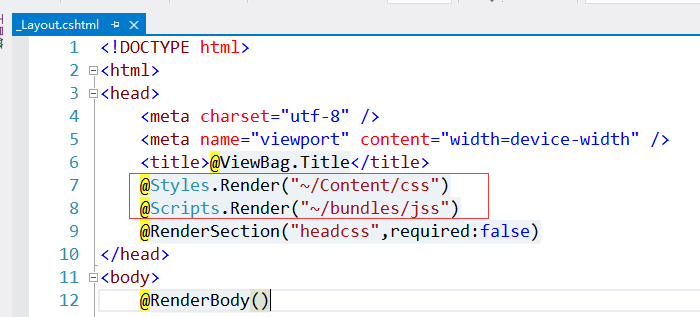
UI展示层主要说明的就这些,另外Bootstrap、layer、jQuery、H5+CSS3内容不介绍了。
搭建自己的框架WedeNet(四)的更多相关文章
- 搭建自己的框架WedeNet(五)
WedeNet2018.WedeWcfServices-WCF服务层:结构如下: 就是定义了服务契约接口和服务类,以OrderServices为例,如下: using System; using Sy ...
- 搭建自己的框架WedeNet(一)
框架用到的技术: EF.UnitOfWork+Repository.Ninject.log4net.WCF.MVC.T4.windows服务.AOP前端技术:Bootstrap.layer.jQuer ...
- 搭建自己的框架WedeNet(三)
WedeNet2018.BussinessLogic-业务逻辑层:结构如下: 基类: using System; using System.Collections.Generic; using Sys ...
- 搭建自己的框架WedeNet(二)
WedeNet2018.Infrastructure-基础设施层:结构如下: Tools结构如下: 考虑到系统可能会有多个数据上下文(暂时以两个为例),所以根据需要定义两个T4模板用来生成对应的ent ...
- 搭建App主流框架_纯代码搭建(OC)
转载自:http://my.oschina.net/hejunbinlan/blog/529778?fromerr=EmSuX7PR 搭建主流框架界面 源码地址在文章末尾 达成效果 效果图 注:本文部 ...
- 10分钟搭建 App 主流框架
搭建主流框架界面 0.达成效果 我们玩iPhone应用的时候,有没发现大部分的应用都是上图差不多的结构,下面的TabBar控制器可以切换子控制器,上面又有Navigation导航条 我们本文主要是搭建 ...
- express + mongodb 搭建一个简易网站 (四)
express + mongodb 搭建一个简易网站 (四) 目前网站整体页面都已经能全部展示了,但是,整个网站还有两个块需要做完才能算完整,一个连接数据库,目前网站上的数据都是抓取的本地假数据,所以 ...
- 【SSH网上商城项目实战03】使用EasyUI搭建后台页面框架
转自:https://blog.csdn.net/eson_15/article/details/51312490 前面两节,我们整合了SSH并且抽取了service和action部分的接口,可以说基 ...
- 十分钟搭建App主流框架
搭建主流框架界面 0.达成效果 Snip20150904_5.png 我们玩iPhone应用的时候,有没发现大部分的应用都是上图差不多的结构,下面的TabBar控制器可以切换子控制器,上面又有Navi ...
随机推荐
- 如何在linux中发送邮件,使用163邮箱发信。
linux中,可以使用mail命令往外发送邮件,在使用前,只需要指定如下简单配置即可,这里演示用 163.com 邮箱发送至 qq.com 编辑 /etc/mail.rc,写入下方的参数 se ...
- activemq备忘
ActiveMQ队列消息积压问题调研 http://blog.51cto.com/winters1224/2049432ActiveMQ的插件开发介绍 https://blog.csdn.net/zh ...
- vsCoad设置代码自动换行
- driver.switch_to.window(driver.window_handles[0])切换到最新打开窗口
有时,使用selenium 定位页面元素时,浏览器明明打开的是需要定位的页面,但就是定位不到元素.打印一下元素page_source,会发现源码与页面不同. 主要问题是页面没有加载完成导致,需要设置 ...
- idea中maven右键没有show dependencies选项
如图,idea高版本(2018.3.4)中maven 的右键没有show dependencies菜单 查看依赖包方法,双击pom.xml文件,在文件编辑页面右键maven或者diagrams弹出依赖 ...
- Python中使用第三方库xlrd来写入Excel文件示例
Python中使用第三方库xlrd来写入Excel文件示例 这一篇文章就来介绍下,如何来写Excel,写Excel我们需要使用第三方库xlwt,和xlrd一样,xlrd表示read xls,xlwt表 ...
- C语言JS引擎
基础知识 SpiderMonkey 简介 和其他的 JavaScript 引擎一样,SpiderMonkey 不直接提供像 DOM 这样的对象,而是提供解析,执行 JavaSccript 代码,垃圾回 ...
- cmake编译排除文件夹
在CMakeLists.txt中,要对某些子文件夹全部进行编译则使用 add_subdirectory(examples) 那如果在examples文件夹中建立了某个目录如examples/venv, ...
- uni-app 实现热更新
前端打包 app 即把写好的静态资源文件套壳打包成 app ,而热更新即下载并替换 app 内部的静态资源文件,实现 app 的版本升级. 在uni-app 中,我们是如何实现热更新的呢?下面来看代码 ...
- Vuex模块:开启命名空间
模块开启命名空间后,享有独自的命名空间. { "模块1":{ state:{}, getters:{}, mutations:{}, actions:{} }, "模块2 ...