
selenium 模拟登陆豆瓣,爬取武林外传的短评
selenium 模拟登陆豆瓣,爬去武林外传的短评:
在最开始写爬虫的时候,抓取豆瓣评论,我们从F12里面是可以直接发现接口的,但是最近豆瓣更新,数据是JS异步加载的,所以没有找到合适的方法爬去,于是采用了selenium来模拟浏览器爬取。
豆瓣登陆也是改了样式,我们可以发现登陆页面是在另一个frame里面
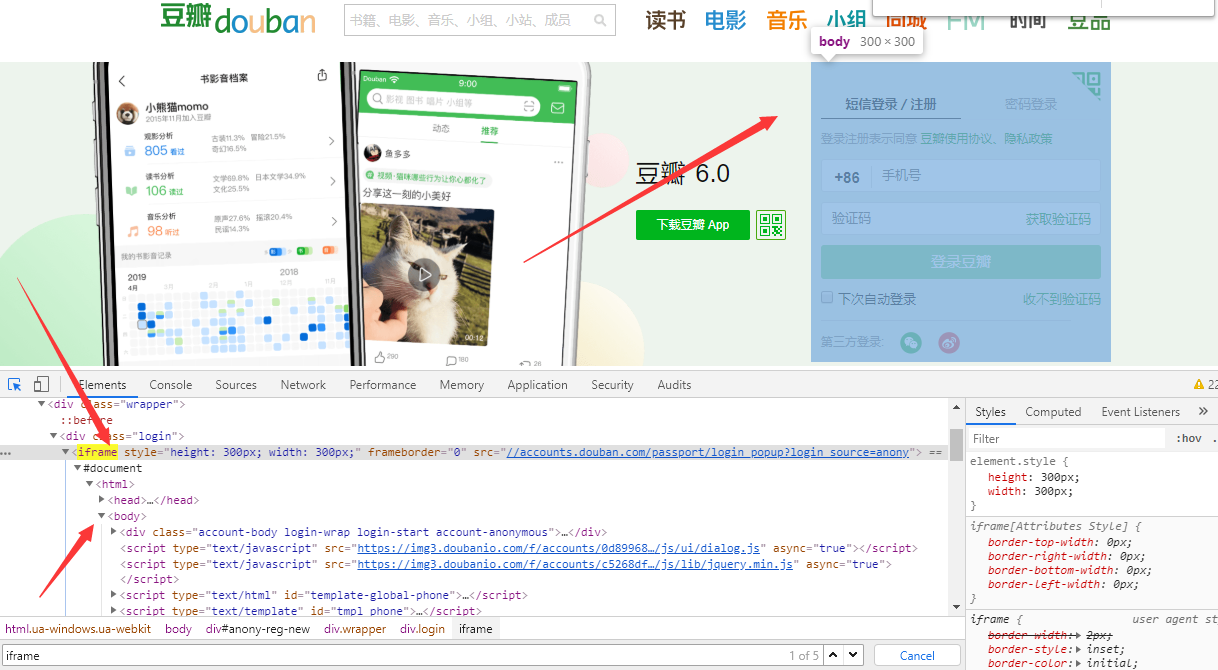
所以代码如下:
# -*- coding:utf-8 -*-

# 导包

import time

from selenium import webdriver

from selenium.webdriver.common.keys import Keys

# 创建chrome参数对象

opt = webdriver.ChromeOptions()

# 把chrome设置成无界面模式,不论windows还是linux都可以,自动适配对应参数

opt.set_headless()

# 用的是谷歌浏览器

driver = webdriver.Chrome(options=opt)

driver=webdriver.Chrome()

# 登录豆瓣网

driver.get("http://www.douban.com/")

# 切换到登录框架中来

driver.switch_to.frame(driver.find_elements_by_tag_name("iframe")[0])

# 点击"密码登录"

bottom1 = driver.find_element_by_xpath('/html/body/div[1]/div[1]/ul[1]/li[2]')

bottom1.click()

# # 输入密码账号

input1 = driver.find_element_by_xpath('//*[@id="username"]')

input1.clear()

input1.send_keys("xxxxx")

input2 = driver.find_element_by_xpath('//*[@id="password"]')

input2.clear()

input2.send_keys("xxxxx")

# 登录

bottom = driver.find_element_by_class_name('account-form-field-submit ')

bottom.click()
然后跳转到评论界面 https://movie.douban.com/subject/3882715/comments?sort=new_score
点击下一页发现url变化 https://movie.douban.com/subject/3882715/comments?start=20&limit=20&sort=new_score 所以我们观察到变化后可以直接写循环
获取用户的姓名
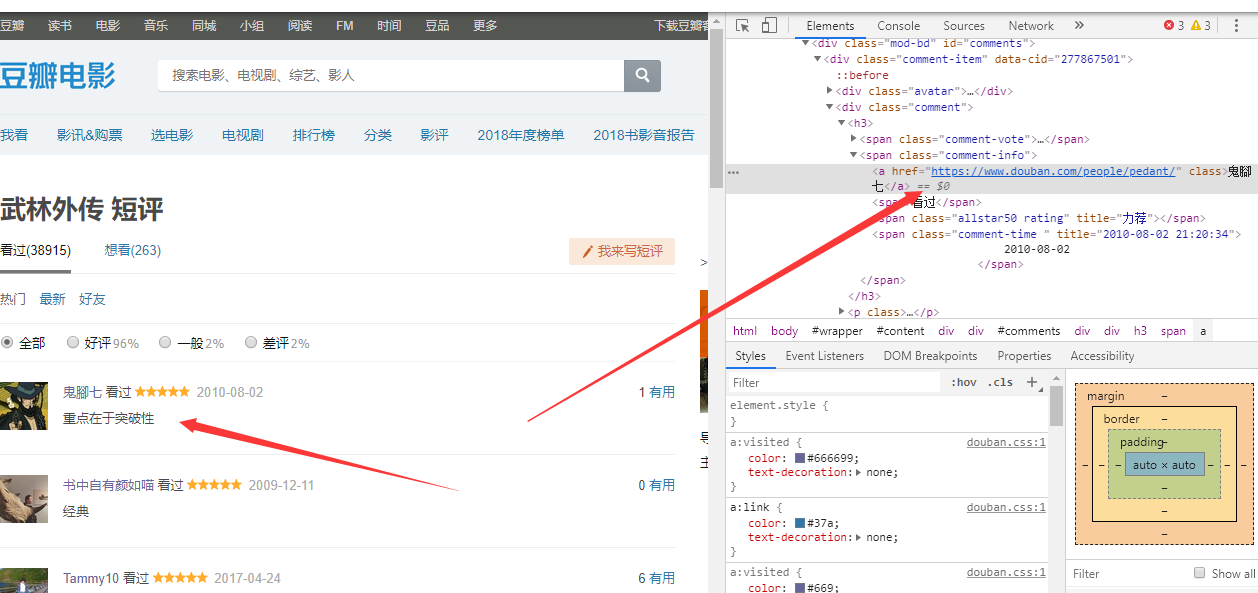
driver.find_element_by_xpath('//*[@id="comments"]/div[{}]/div[2]/h3/span[2]/a'.format(str(i))).text
用户的评论
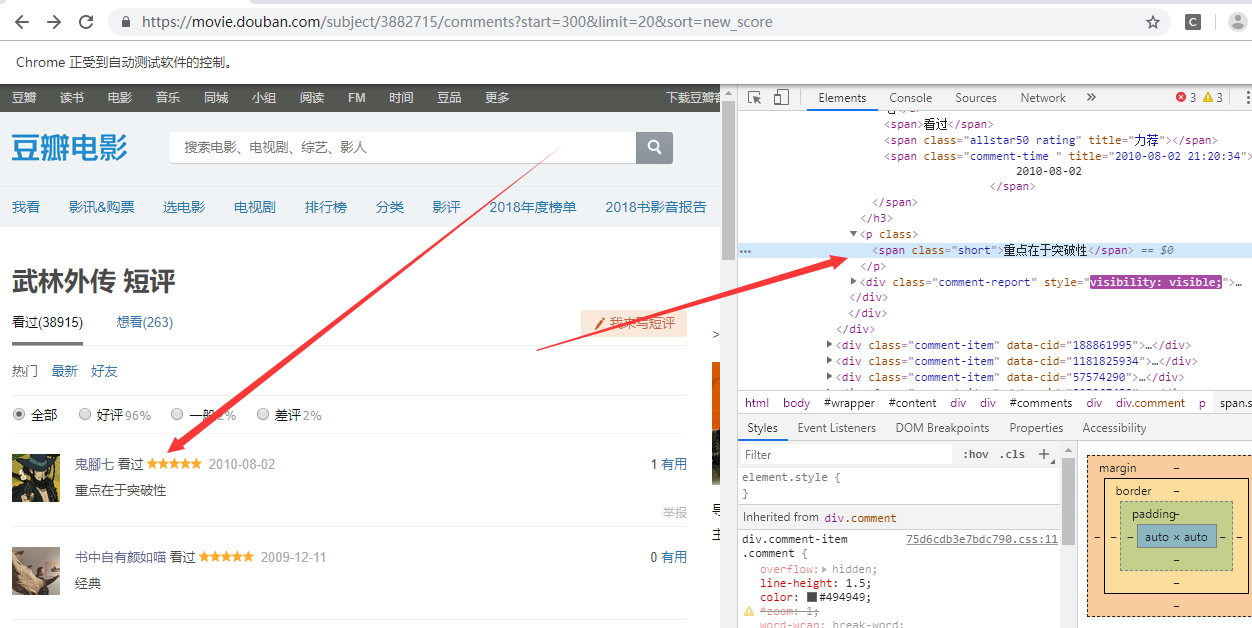
driver.find_element_by_xpath('//*[@id="comments"]/div[{}]/div[2]/p/span'.format(str(i))).text
然后我们想要知道用户的居住地:
    #获取用户的url然后点击url获取居住地

             userInfo=driver.find_element_by_xpath('//*[@id="comments"]/div[{}]/div[2]/h3/span[2]/a'.format(str(i))).get_attribute('href')

             driver.get(userInfo)

             try:

                 userLocation = driver.find_element_by_xpath('//*[@id="profile"]/div/div[2]/div[1]/div/a').text

                 print("用户的居之地是:  ")

                 print(userLocation)

             except Exception as e:

                 print(e)
这里要注意有些用户没有写居住地,所以必须要捕获异常
完整代码
# -*- coding:utf-8 -*-

# 导包

import time

from selenium import webdriver

from selenium.webdriver.common.keys import Keys

class doubanwlwz_spider():

    def __init__(self):

        # 创建chrome参数对象

        opt = webdriver.ChromeOptions()

        # 把chrome设置成无界面模式,不论windows还是linux都可以,自动适配对应参数

        opt.set_headless()

        # 用的是谷歌浏览器

        driver = webdriver.Chrome(options=opt)

        driver=webdriver.Chrome()

        self.getInfo(driver)

    def getInfo(self,driver):

    # 切换到登录框架中来

    # 登录豆瓣网

        driver = driver

        driver.get("http://www.douban.com/")

        driver.switch_to.frame(driver.find_elements_by_tag_name("iframe")[0])

        # 点击"密码登录"

        bottom1 = driver.find_element_by_xpath('/html/body/div[1]/div[1]/ul[1]/li[2]')

        bottom1.click()

        # # 输入密码账号

        input1 = driver.find_element_by_xpath('//*[@id="username"]')

        input1.clear()

        input1.send_keys("ZZZ2")

        input2 = driver.find_element_by_xpath('//*[@id="password"]')

        input2.clear()

        input2.send_keys("ZZZ")

        # 登录

        bottom = driver.find_element_by_class_name('account-form-field-submit ')

        bottom.click()

        time.sleep(1)

        driver.get('https://movie.douban.com/subject/3882715/comments?start=300&limit=20&sort=new_score')

        search_window = driver.current_window_handle

        # pageSource=driver.page_source

        # print(pageSource)

        #获取用户的名字 每页20个

        for i in range(1,21):

            print("用户的评论是:  ")

            print(driver.find_element_by_xpath('//*[@id="comments"]/div[{}]/div[2]/h3/span[2]/a'.format(str(i))).text)

     #  获取用户的评论

        # print(driver.find_element_by_xpath('//*[@id="comments"]/div[1]/div[2]/p/span').text)

            print("用户的名字是: ")

            print(driver.find_element_by_xpath('//*[@id="comments"]/div[{}]/div[2]/p/span'.format(str(i))).text)

    #获取用户的url然后点击url获取居住地

            userInfo=driver.find_element_by_xpath('//*[@id="comments"]/div[{}]/div[2]/h3/span[2]/a'.format(str(i))).get_attribute('href')

            driver.get(userInfo)

            try:

                userLocation = driver.find_element_by_xpath('//*[@id="profile"]/div/div[2]/div[1]/div/a').text

                print("用户的居之地是:  ")

                print(userLocation)

            except Exception as e:

                print(e)

            driver.back()

pageNum=int(input("请输入您想要爬去的步行街的页数: "))

AAA=doubanwlwz_spider()
selenium 模拟登陆豆瓣,爬取武林外传的短评的更多相关文章
- 模拟登陆并爬取Github
因为崔前辈给出的代码运行有误,略作修改和简化了. 书上例题,不做介绍. import requests from lxml import etree class Login(object): def ...
- 模拟登陆+数据爬取 (python+selenuim)
以下代码是用来爬取LinkedIn网站一些学者的经历的,仅供参考,注意:不要一次性大量爬取会被封号,不要问我为什么知道 #-*- coding:utf-8 -*- from selenium impo ...
- Scrapy模拟登陆豆瓣抓取数据
scrapy startproject douban 其中douban是我们的项目名称 2创建爬虫文件 进入到douban 然后创建爬虫文件 scrapy genspider dou douban. ...
- Python爬虫(二十二)_selenium案例:模拟登陆豆瓣
本篇博客主要用于介绍如何使用selenium+phantomJS模拟登陆豆瓣,没有考虑验证码的问题,更多内容,请参考:Python学习指南 #-*- coding:utf-8 -*- from sel ...
- 使用Selenium&PhantomJS的方式爬取代理
前面已经爬取了代理,今天我们使用Selenium&PhantomJS的方式爬取快代理 :快代理 - 高速http代理ip每天更新. 首先分析一下快代理,如下 使用谷歌浏览器,检查,发现每个代理 ...
- 【转】详解抓取网站,模拟登陆,抓取动态网页的原理和实现(Python,C#等)
转自:http://www.crifan.com/files/doc/docbook/web_scrape_emulate_login/release/html/web_scrape_emulate_ ...
- python模拟登陆豆瓣——简单方法
学爬虫有一段时间了,前面没有总结又重装了系统,导致之前的代码和思考都没了..所以还是要及时整理总结备份.下面记录我模拟登陆豆瓣的方法,方法一登上了豆瓣,方法二重定向到了豆瓣中“我的喜欢”列表,获取了第 ...
- Selenium模拟登陆百度贴吧
Selenium模拟登陆百度贴吧 from selenium import webdriver from time import sleep from selenium.webdriver.commo ...
- 通过scrapy,从模拟登录开始爬取知乎的问答数据
这篇文章将讲解如何爬取知乎上面的问答数据. 首先,我们需要知道,想要爬取知乎上面的数据,第一步肯定是登录,所以我们先介绍一下模拟登录: 先说一下我的思路: 1.首先我们需要控制登录的入口,重写star ...
随机推荐
- HTML页面间传值
页面一: window.location="./showUserMsg.html?IDno="+IDno+"&&thedate="+thedat ...
- LC 833. Find And Replace in String
To some string S, we will perform some replacement operations that replace groups of letters with ne ...
- Jsp中的四个域对象
四个域对象: pageContext page域 request request域 session session域 application ...
- Nginx OCSP
#开启 vim /path/to/path/conf/nginx.conf ..... events{ ...... 省略..... } http { ..... server{ listen 44 ...
- Python 自动化
一.Win32 GUI自动化测试模块: 1. pywinauto: 下载链接:http://sourceforge.net/projects/pywinauto/ 在线文档:http://pywina ...
- 初探ASP.NET Web API (转)
http://www.cnblogs.com/mejoy/p/6402821.html 什么是ASP.NET Web API? 官方的解释是 ASP.NET Web API is a framewor ...
- 【Linux】【四】linux 删除文件
1.rm -f * 删除当前目录下的文件 application/file/test/tools/logs/ #最经典的方法,删除当前目录下的所有类型的文件 2.rm -rf /ro ...
- Python面试-websocket及web框架
一.Websocket 1. websocket概念 在讲websocket之前,我们先来看看ajax轮询和long poll的实现机制. A. ajax轮询 ajax轮询的原理非常简单,让浏览器隔 ...
- sql注入知识点整理(基础版)
sql注入知识点整理(基础版) 基本步骤 判断是否报错 判断闭合符号 判断注入类型 构建payload 手工注入或者编写脚本 基本注入类型 报错型注入 floor公式(结果多出一个1):and (se ...
- 从入门到自闭之Python名称空间
名称空间: 内置空间:python解释器自带的一块空间 全局空间:py文件中顶格写的就是全局空间 局部空间:函数体中就是局部空间 加载顺序: 内置空间 全局空间 局部空间 # def func(): ...