
Flutter 移动端屏幕适配方案和制作
flutter_screenutil插件
flutter 屏幕适配方案,让你的UI在不同尺寸的屏幕上都能显示合理的布局!
注意:此插件仍处于开发阶段,某些API可能尚未推出。
安装依赖:
安装之前请查看最新版本
# 添加依赖

  flutter_screenutil: ^0.5.
在每个使用的地方导入包:
import 'package:flutter_screenutil/flutter_screenutil.dart';
属性
| 属性 | 类型 | 默认值 | 描述 |
|---|---|---|---|
| width | double | 1080px | 设计稿中设备的宽度,单位px |
| height | double | 1920px | 设计稿中设备的高度,单位px |
| allowFontScaling | bool | false | 设置字体大小是否根据系统的“字体大小”辅助选项来进行缩放 |
初始化并设置适配尺寸及字体大小是否根据系统的“字体大小”辅助选项来进行缩放
在使用之前请设置好设计稿的宽度和高度,传入设计稿的宽度和高度(单位px) 一定在MaterialApp的home中的页面设置(即入口文件,只需设置一次),以保证在每次使用之前设置好了适配尺寸:
//填入设计稿中设备的屏幕尺寸

//默认 width : 1080px , height:1920px , allowFontScaling:false

ScreenUtil.instance = ScreenUtil.getInstance()..init(context);

//假如设计稿是按iPhone6的尺寸设计的(iPhone6 750*1334)

ScreenUtil.instance = ScreenUtil(width: , height: )..init(context);

//设置字体大小根据系统的“字体大小”辅助选项来进行缩放,默认为false

ScreenUtil.instance = ScreenUtil(width: , height: , allowFontScaling: true)..init(context);
使用:
适配尺寸:
传入设计稿的px尺寸:
根据屏幕宽度适配 width: ScreenUtil.getInstance().setWidth(540),
根据屏幕高度适配 height: ScreenUtil.getInstance().setHeight(200),
也可以使用 ScreenUtil() 替代 ScreenUtil.getInstance(), 例如:ScreenUtil().setHeight(200)
注意
高度也根据setWidth来做适配可以保证不变形(当你想要一个正方形的时候)
setHeight方法主要是在高度上进行适配, 在你想控制UI上一屏的高度与实际中显示一样时使用.
 //初始化设计尺寸

ScreenUtil.instance = ScreenUtil(width: , height: )..init(context);

print('设备的像素密度:${ScreenUtil.pixelRatio}');

print('设备的高:${ScreenUtil.screenHeight}');

print('设备的宽:${ScreenUtil.screenWidth}');
适配字体:
传入设计稿的px尺寸:
//传入字体大小,默认不根据系统的“字体大小”辅助选项来进行缩放(可在初始化ScreenUtil时设置allowFontScaling)

ScreenUtil.getInstance().setSp()

//传入字体大小,根据系统的“字体大小”辅助选项来进行缩放(如果某个地方不遵循全局的allowFontScaling设置)

ScreenUtil(allowFontScaling: true).setSp()

//for example:

Column(

              crossAxisAlignment: CrossAxisAlignment.start,

              children: <Widget>[

                Text('我的文字大小在设计稿上是25px,不会随着系统的文字缩放比例变化',

                    style: TextStyle(

                        color: Colors.black, fontSize: ScreenUtil.getInstance().setSp())),

                Text('我的文字大小在设计稿上是25px,会随着系统的文字缩放比例变化',

                    style: TextStyle(

                        color: Colors.black, fontSize: ScreenUtil(allowFontScaling: true).setSp())),

              ],

  )
其他相关api:
ScreenUtil.pixelRatio       //设备的像素密度

ScreenUtil.screenWidth      //设备宽度

ScreenUtil.screenHeight     //设备高度

ScreenUtil.bottomBarHeight  //底部安全区距离,适用于全面屏下面有按键的

ScreenUtil.statusBarHeight  //状态栏高度 刘海屏会更高  单位px

ScreenUtil.textScaleFactory //系统字体缩放比例

ScreenUtil.getInstance().scaleWidth  // 实际宽度的dp与设计稿px的比例

ScreenUtil.getInstance().scaleHeight // 实际高度的dp与设计稿px的比例
完整demo示例代码:
import 'package:flutter/material.dart';

import 'package:flutter_screenutil/flutter_screenutil.dart';

void main() => runApp(new MyApp());

class MyApp extends StatelessWidget {

  // This widget is the root of your application.

  @override

  Widget build(BuildContext context) {

    return new MaterialApp(

      debugShowCheckedModeBanner: false,

      title: 'Flutter_ScreenUtil',

      theme: new ThemeData(

        primarySwatch: Colors.blue,

      ),

      home: new MyHomePage(title: 'FlutterScreenUtil Demo'),

    );

  }

}

class MyHomePage extends StatefulWidget {

  MyHomePage({Key key, this.title}) : super(key: key);

  final String title;

  @override

  _MyHomePageState createState() => new _MyHomePageState();

}

class _MyHomePageState extends State<MyHomePage> {

  @override

  Widget build(BuildContext context) {

    //设置适配尺寸 (填入设计稿中设备的屏幕尺寸) 假如设计稿是按iPhone6的尺寸设计的(iPhone6 750*1334)

    ScreenUtil.instance = ScreenUtil(width: , height: )..init(context);

    print('设备宽度:${ScreenUtil.screenWidth}'); //Device width

    print('设备高度:${ScreenUtil.screenHeight}'); //Device height

    print('设备的像素密度:${ScreenUtil.pixelRatio}'); //Device pixel density

    print(

        '底部安全区距离:${ScreenUtil.bottomBarHeight}dp'); //Bottom safe zone distance,suitable for buttons with full screen

    print(

        '状态栏高度:${ScreenUtil.statusBarHeight}dp'); //Status bar height , Notch will be higher Unit px

    print('实际宽度的dp与设计稿px的比例:${ScreenUtil.getInstance().scaleWidth}');

    print('实际高度的dp与设计稿px的比例:${ScreenUtil.getInstance().scaleHeight}');

    print(

        '宽度和字体相对于设计稿放大的比例:${ScreenUtil.getInstance().scaleWidth * ScreenUtil.pixelRatio}');

    print(

        '高度相对于设计稿放大的比例:${ScreenUtil.getInstance().scaleHeight * ScreenUtil.pixelRatio}');

    print('系统的字体缩放比例:${ScreenUtil.textScaleFactory}');

    return Scaffold(

      appBar: AppBar(

        title: Text(widget.title),

      ),

      floatingActionButton: FloatingActionButton(

        onPressed: () {

          print(

              'ScreenUtil.getInstance().width:${ScreenUtil.getInstance().width}');

          print('ScreenUtil().width:${ScreenUtil().width}');

        },

        child: Icon(Icons.accessible_forward),

      ),

      body: new Center(

        child: Column(

          crossAxisAlignment: CrossAxisAlignment.center,

          children: <Widget>[

            Row(

              children: <Widget>[

                Container(

                  width: ScreenUtil.getInstance().setWidth(),

                  height: ScreenUtil.getInstance().setHeight(),

                  color: Colors.red,

                  child: Text(

                    '我的宽度:${ScreenUtil.getInstance().setWidth(375)}dp',

                    style: TextStyle(

                      color: Colors.white,

                      fontSize: ScreenUtil.getInstance().setSp(),

                    ),

                  ),

                ),

                Container(

                  width: ScreenUtil.getInstance().setWidth(),

                  height: ScreenUtil.getInstance().setHeight(),

                  color: Colors.blue,

                  child:

                      Text('我的宽度:${ScreenUtil.getInstance().setWidth(375)}dp',

                          style: TextStyle(

                            color: Colors.white,

                            fontSize: ScreenUtil.getInstance().setSp(),

                          )),

                ),

              ],

            ),

            Text('设备宽度:${ScreenUtil.screenWidth}px'),

            Text('设备高度:${ScreenUtil.screenHeight}px'),

            Text('设备宽度:${ScreenUtil.screenWidthDp}dp'),

            Text('设备高度:${ScreenUtil.screenHeightDp}dp'),

            Text('设计稿宽度:${ScreenUtil.getInstance().width}'),

            Text('设备的像素密度:${ScreenUtil.pixelRatio}'),

            Text('底部安全区距离:${ScreenUtil.bottomBarHeight}dp'),

            Text('状态栏高度:${ScreenUtil.statusBarHeight}dp'),

            Text(

              '实际宽度的dp与设计稿px的比例:${ScreenUtil.getInstance().scaleWidth}',

              textAlign: TextAlign.center,

            ),

            Text(

              '实际高度的dp与设计稿px的比例:${ScreenUtil.getInstance().scaleHeight}',

              textAlign: TextAlign.center,

            ),

            SizedBox(

              height: ScreenUtil.getInstance().setHeight(),

            ),

            Text('系统的字体缩放比例:${ScreenUtil.textScaleFactory}'),

            Column(

              crossAxisAlignment: CrossAxisAlignment.start,

              children: <Widget>[

                Text('我的文字大小在设计稿上是24px,不会随着系统的文字缩放比例变化',

                    style: TextStyle(

                        color: Colors.black,

                        fontSize: ScreenUtil.getInstance().setSp())),

                Text('我的文字大小在设计稿上是24px,会随着系统的文字缩放比例变化',

                    style: TextStyle(

                        color: Colors.black,

                        fontSize:

                            ScreenUtil(allowFontScaling: true).setSp())),

              ],

            )

          ],

        ),

      ),

    );

  }

}
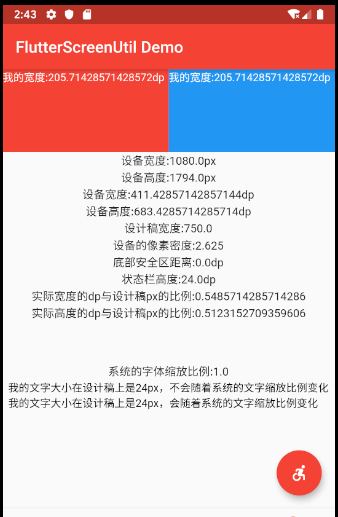
总结:这次学习了使用flutter_ScreenUtil来适配Flutter的APP应用,需要注意的是这个插件再不断升级中,所以使用的时候要使用最新版。
github地址:https://github.com/OpenFlutter/flutter_screenutil
Flutter 移动端屏幕适配方案和制作的更多相关文章
- Flutter移动电商实战 --(11)首页_屏幕适配方案和制作
1.flutter_ScreenUtil插件简介 flutter_ScreenUtil屏幕适配方案,让你的UI在不同尺寸的屏幕上都能显示合理的布局. 插件会让你先设置一个UI稿的尺寸,他会根据这个尺寸 ...
- Web 端屏幕适配方案
基础知识 像素相关 1.像素 :像素是屏幕显示最小的单位. 2.设备像素 :设备像素又称物理像素(physical pixel),设备能控制显示的最小单位,我们可以把这些像素看作成显示器上一个个的点. ...
- 11-Flutter移动电商实战-首页_屏幕适配方案和制作
1.flutter_ScreenUtil插件简介 flutter_ScreenUtil屏幕适配方案,让你的UI在不同尺寸的屏幕上都能显示合理的布局. 插件会让你先设置一个UI稿的尺寸,他会根据这个尺寸 ...
- 移动端font-size适配方案
概述 这是我研究移动端页面时的思考,记录下来供以后开发时参考,相信对其他人也有用.由于我写移动端页面写的还比较少,一些问题都还没遇到,所以我的这篇博文不免有些错误的地方,还请大佬多多指正. 这篇文章是 ...
- Flutter实战视频-移动电商-11.首页_屏幕适配方案讲解
11.首页_屏幕适配方案讲解 国人写的屏幕适配插件: https://github.com/OpenFlutter/flutter_screenutil 最新版本是0.5.1 在pubspec.yam ...
- 01-02 Flutter仿京东商城项目 功能分析、底部导航Tab切换以及路由配置、架构搭建:(Flutter仿京东商城项目 首页布局以及不同终端屏幕适配方案)
Flutter和Dart交流学习群:交流群:452892873 01Flutter仿京东商城项目 功能分析.底部导航Tab切换以及路由配置.架构搭建 02Flutter仿京东商城项目 首页布局以及不同 ...
- 移动端屏幕适配(rem+js)
什么是移动端适配 在制作webapp时,一个很关键的问题就是适配各种机型不同屏幕的大小,让每种机型上的布局看起来都尽量一样. 也就是说用同一套代码在不同分辨率的手机上跑时,页面元素间的间距.留白,以及 ...
- JavaScript强化教程 —— Cocos2d-JS的屏幕适配方案
1. 设置屏幕适配策略(Resolution Policy) 如果你还没有用过Resolution Policy,只需要在游戏载入过程完成之后(cc.game.onStart函数回调中),调用下面的代 ...
- Cocos2d-JS的屏幕适配方案
Cocos2d引擎为游戏开发者提供了屏幕适配策略(Resolution Policy)解决方案. 使用方式 1. 设置屏幕适配策略(Resolution Policy) 如果你还没有用过Resolut ...
随机推荐
- 可能是最全面的 Python 字符串拼接总结
来源: 枫恋寒 链接: https://segmentfault.com/a/119000001.png"font-size: 12px;"> 在 Python 中字符串连接 ...
- Selenium(五)鼠标和键盘事件
1.模拟鼠标找到大分类下的子分类.以网易严选为例. 如果直接找到 坚果炒货 这个元素,然后点击它来实现跳转,是会报错的. 模拟鼠标停留--点击行为: 页面已成功跳转 2.键盘事件 模拟搜索操作: ...
- 浅谈JavaScript严格模式(use strict)
"use strict" 的目的是指定代码在严格条件下执行. 严格模式下你不能使用未声明的变量. 严格模式声明 严格模式通过在脚本或函数的头部添加 "use strict ...
- DbVisualizer 连接AS400
1.安装DbVisualizer 2.下载JTopen 里面会有jt400.jar http://sourceforge.net/projects/jt400/files/latest/downloa ...
- codevs 1166 矩阵取数游戏
二次联通门 : codevs 1166 矩阵取数游戏 /* codevs 1166 矩阵取数游戏 SB区间dp dp[l][r] = max (dp[l + 1][r] + number[l], dp ...
- 【概率论】4-3:方差(Variance)
title: [概率论]4-3:方差(Variance) categories: - Mathematic - Probability keywords: - Variance - Standard ...
- Java操作文件那点事
刚开始学Java时候,一直搞不懂Java里面的io关系,在网上找了很多大多都是给个结构图草草描述也看的不是很懂.而且没有结合到java7 的最新技术,所以自己结合API来整理一下,有错的话请指正,也希 ...
- ASP.NET的MVC设计模式
当开发者听到“设计模式”这个词时,他们通常联想到两个场景.一组开发者正在讨论许多创造性意见,正在开会,但是却没有进行编码.另外一组人能制定出正确的计划,保证系统能够开发成功,代码可以重用. 而现实一般 ...
- 通过JDBC API访问数据库的基本步骤
1.获取要访问的数据库的JDBC驱动程序的类库文件,把它放到classpath中. 2.在程序中加载并注册JDBC驱动程序.例如,以下代码用于加载并注册MySQL驱动程序: //加载MySQL Dri ...
- Mybatis 传入多个参数查询数据 (3种方法)
第一种方案 DAO层的函数方法 public User selectUser(String name,String area); 对应的Mapper.xml <select id="s ...