
pip install mysql-python报错1. Unable to find vcvarsall.bat 2 fatal error C1083: Cannot open include file: 'config-win.h': No such file or directory 3.error: command 'mt.exe' failed with exit statu
最近在安装mysql -python 时报错折腾了半天,通过以下方法解决:
1. pip install mysql-python报错 Unable to find vcvarsall.bat
(参考网上链接http://blog.csdn.net/secretx/article/details/17472107)
解决方法:我的vs版本是2013所以设置环境变量: VS90COMNTOOLS=%VS120COMNTOOLS%
设置好后错误Unable to find vcvarsall.bat不再出现,但出现 fatal error C1083: Cannot open include file: 'config-win.h': No such file or directory
2. 解决错误:fatal error C1083: Cannot open include file: 'config-win.h': No such file or directory
(参考网上链接:http://blog.csdn.net/xxm524/article/details/48754139)
1) 安装mysql connector, 可根据系统版本选择安装32位或64位的, 下载地址:
http://dev.mysql.com/downloads/connector/c/6.0.html#downloads
2) 安装Microsoft Visual C++ Compiler for Python 2.7,要是安装mysql-python需要乃至vc的一些运行库,下载地址:
http://www.microsoft.com/en-us/download/confirmation.aspx?id=44266
再次 pip install mysql-python仍然有错误
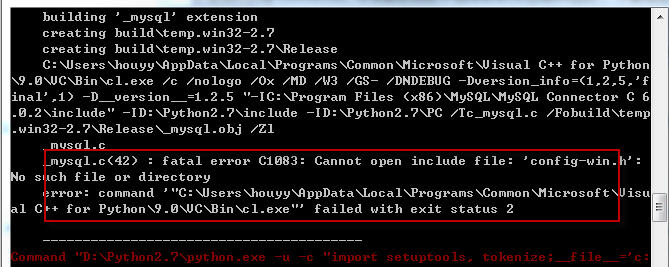
3)解决方法:mysql connector之前安装的是64位,安装到了C:\Program Files \MySQL\MySQL Connector C 6.0.2目录,但从提示中看它要的是安装到C:\Program Files (x86)\MySQL\MySQL Connector C 6.0.2,因此应该安装32位的mysql connector;
重新安装32位的mysql connector, 重新执行pip install MySQL-python
仍然报错error: command 'mt.exe' failed with exit status 31
3.解决错误error: command 'mt.exe' failed with exit status 31
编辑Python27\Lib\distutils\msvc9compiler.py,查找ld_args.append('/MANIFESTFILE:' + temp_manifest)一行,在其后添加一行,内容为ld_args.append('/MANIFEST')
再次pip install mysql-python 安装成功
pip install mysql-python报错1. Unable to find vcvarsall.bat 2 fatal error C1083: Cannot open include file: 'config-win.h': No such file or directory 3.error: command 'mt.exe' failed with exit statu的更多相关文章
- 安装visual stdio 2017后依然报错:Unable to find vcvarsall.bat
安装visual stdio 2017后依然报错:Unable to find vcvarsall.bat 解决办法:更新setuptools 原文章:https://blog.csdn.net/wl ...
- pip install cv2 安装报错
pip install cv2 安装报错是一个常见现象: ERROR: Could not find a version that satisfies the requirement cv2 (fro ...
- python pip install XXX出现报错问题
重装Anacondas后,将pip 和python.exe路径加入到环境变量后直接在cmd窗口进行pip 操作,报错如下 报错内容为: pip is configured with locations ...
- Python3.6.2安装pip install paramike模块报错
问题描述: 在有几台电脑上pip install paramike报错 报错内容: Could not find a version that satisfies the requirement sq ...
- pip install selenium==版本号 报错
安装selenium是注意不要带版本号直接用如下命令: pip install selenium
- 简单解决python安装中的Unable to find vcvarsall.bat问题
使用python36安装python的murmurhash的时候遇到上述问题,原因是没有找到vcvarsall.bat.查找vcvarsall.bat的方法是定义在_msvccompiler.py文件 ...
- vs2013 报错error C1083: 无法打开包括文件:“gl\glew.h”: No such file or directory\
vs报错诸如如无法打开“gl\xxx.h”时, 解决方法: 1.去http://glew.sourceforge.net/下载相关文件,2.在下载下来的文件里找到xxx.h,将其复制到vs的相关目录下 ...
- pip install urllib3[secure] 报错 error: ffi.h: No such file or directory
解决 sudo apt-get install build-essential autoconf libtool pkg-config python-opengl python-imaging pyt ...
- python27(32位)安装模块报错“error: Unable to find vcvarsall.bat”
1)首先,下载一个Microsoft Visual C++ Compiler for Python 2.7的补丁,下载地址在这里: http://www.microsoft.com/en-us/dow ...
随机推荐
- Q: 微信小程序登录
这里使用的mpvue 第一步组件DOM部分 /pages/index <button class="app_btn" open-type="getUserInfo& ...
- c++ 在类函数后加const的意义
我们定义的类的成员函数中,常常有一些成员函数不改变类的数据成员,也就是说,这些函数是"只读"函数,而有一些函数要修改类数据成员的值.如果把不改变数据成员的函数都加上const关键字 ...
- NX二次开发-UFUN获取当前导出CGM选项设置UF_CGM_ask_session_export_options
文章转载自唐康林NX二次开发论坛,原文出处: http://www.nxopen.cn/thread-126-1-1.html 刚才有同学问到这个问题,如果是用NXOpen来做,直接录制一下就可以了: ...
- Android 配置正式签名和debug签名
为了测试微信分享,微信分享必须有签名信息才能成功调用微信,所以需要debug 下设置签名,方便调试build.gradle里,配置2个签名: signingConfigs { release { ke ...
- Linux date命令 crontab每个月最后一天
###使用date获取日期时间等 # 当前日期 openstack@ubuntu:~$ date 2019年 01月 15日 星期二 15:10:49 CST # 明天 openstack@ubunt ...
- hexo next主题深度优化(三),引入require.js,适配pjax。
文章目录 require.js的好处, hexo next中加入require.js 新建一个main.js作为所有js的入口 pjax的require.js实现 关于require js适配过程中报 ...
- git学习记录2(远程库管理)
学习参考地址:https://www.liaoxuefeng.com/wiki/0013739516305929606dd18361248578c67b8067c8c017b000 本编随笔只是自己对 ...
- Tomacat7启动报错-org.apache.catalina.deploy.WebXml addFilter
java.lang.NoSuchMethodException: org.apache.catalina.deploy.WebXml addFilter at org.apache.tomcat.ut ...
- 2016CCPC杭州现场赛 B-Bomb /// tarjan缩点
题目大意: 给定n个爆破点的信息 x y r w 表示爆破点位置为 (x,y) 爆破范围是以位置为圆心 半径为r的圆 引爆这个点的代价为w 引爆某个点时 其他位置在该爆破范围内的爆破点也会被引爆 求引 ...
- 随笔-ansible-3
关于循环的一些事: 是否是因为模块的原因? item适用于copy,但不适用于yum.虽然出现了警告,但并不表示不能用.功能还是不受影响的. 在上例中,我们使用了yum.copy.service模块( ...