
pip install mysql-python报错1. Unable to find vcvarsall.bat 2 fatal error C1083: Cannot open include file: 'config-win.h': No such file or directory 3.error: command 'mt.exe' failed with exit statu
最近在安装mysql -python 时报错折腾了半天,通过以下方法解决:
1. pip install mysql-python报错 Unable to find vcvarsall.bat
(参考网上链接http://blog.csdn.net/secretx/article/details/17472107)
解决方法:我的vs版本是2013所以设置环境变量: VS90COMNTOOLS=%VS120COMNTOOLS%
设置好后错误Unable to find vcvarsall.bat不再出现,但出现 fatal error C1083: Cannot open include file: 'config-win.h': No such file or directory
2. 解决错误:fatal error C1083: Cannot open include file: 'config-win.h': No such file or directory
(参考网上链接:http://blog.csdn.net/xxm524/article/details/48754139)
1) 安装mysql connector, 可根据系统版本选择安装32位或64位的, 下载地址:
http://dev.mysql.com/downloads/connector/c/6.0.html#downloads
2) 安装Microsoft Visual C++ Compiler for Python 2.7,要是安装mysql-python需要乃至vc的一些运行库,下载地址:
http://www.microsoft.com/en-us/download/confirmation.aspx?id=44266
再次 pip install mysql-python仍然有错误
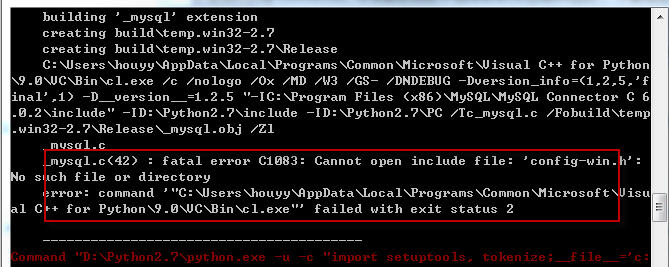
3)解决方法:mysql connector之前安装的是64位,安装到了C:\Program Files \MySQL\MySQL Connector C 6.0.2目录,但从提示中看它要的是安装到C:\Program Files (x86)\MySQL\MySQL Connector C 6.0.2,因此应该安装32位的mysql connector;
重新安装32位的mysql connector, 重新执行pip install MySQL-python
仍然报错error: command 'mt.exe' failed with exit status 31
3.解决错误error: command 'mt.exe' failed with exit status 31
编辑Python27\Lib\distutils\msvc9compiler.py,查找ld_args.append('/MANIFESTFILE:' + temp_manifest)一行,在其后添加一行,内容为ld_args.append('/MANIFEST')
再次pip install mysql-python 安装成功
pip install mysql-python报错1. Unable to find vcvarsall.bat 2 fatal error C1083: Cannot open include file: 'config-win.h': No such file or directory 3.error: command 'mt.exe' failed with exit statu的更多相关文章
- 安装visual stdio 2017后依然报错:Unable to find vcvarsall.bat
安装visual stdio 2017后依然报错:Unable to find vcvarsall.bat 解决办法:更新setuptools 原文章:https://blog.csdn.net/wl ...
- pip install cv2 安装报错
pip install cv2 安装报错是一个常见现象: ERROR: Could not find a version that satisfies the requirement cv2 (fro ...
- python pip install XXX出现报错问题
重装Anacondas后,将pip 和python.exe路径加入到环境变量后直接在cmd窗口进行pip 操作,报错如下 报错内容为: pip is configured with locations ...
- Python3.6.2安装pip install paramike模块报错
问题描述: 在有几台电脑上pip install paramike报错 报错内容: Could not find a version that satisfies the requirement sq ...
- pip install selenium==版本号 报错
安装selenium是注意不要带版本号直接用如下命令: pip install selenium
- 简单解决python安装中的Unable to find vcvarsall.bat问题
使用python36安装python的murmurhash的时候遇到上述问题,原因是没有找到vcvarsall.bat.查找vcvarsall.bat的方法是定义在_msvccompiler.py文件 ...
- vs2013 报错error C1083: 无法打开包括文件:“gl\glew.h”: No such file or directory\
vs报错诸如如无法打开“gl\xxx.h”时, 解决方法: 1.去http://glew.sourceforge.net/下载相关文件,2.在下载下来的文件里找到xxx.h,将其复制到vs的相关目录下 ...
- pip install urllib3[secure] 报错 error: ffi.h: No such file or directory
解决 sudo apt-get install build-essential autoconf libtool pkg-config python-opengl python-imaging pyt ...
- python27(32位)安装模块报错“error: Unable to find vcvarsall.bat”
1)首先,下载一个Microsoft Visual C++ Compiler for Python 2.7的补丁,下载地址在这里: http://www.microsoft.com/en-us/dow ...
随机推荐
- Linux下安装.NETCore3.0
今天把.NETCore从2.2升到3.0记录一下 Download .NET Core 3.0 :https://dotnet.microsoft.com/download/dotnet-core/ ...
- Struts功能详解——ValidatorForm
ActionForm和ValidatorForm区别: 一个Form继承了ValidatorForm 就不用写具体的验证,但是需要提供:validation-rules.xml 和 val ...
- 【SPOJ DQUERY】区间数字统计
[链接] 我是链接,点我呀:) [题意] 题意 [题解] 因为区间的端点移动一个单位的话,只会涉及到一个元素的增多或减少. 因此可以用莫队算法来解决. 只需要开一个数组(大小1百万),用下标来快速检索 ...
- Python内置的一个用于命令项选项与参数解析的模块argparse
一.argparse简单使用 我们先来看一个简单示例.主要有三个步骤: 创建 ArgumentParser() 对象 调用 add_argument() 方法添加参数 使用 parse_args() ...
- hdu多校第十场 1003 (hdu6693) Valentine's Day 贪心/概率
题意: 有许多物品,每个物品有一定概率让女朋友开心.你想让女朋友开心且只开心一次,让你挑一些物品,使得这个只开心一次的概率最大,求最大概率. 题解: 设物品i让女朋友开心的概率为$p_i$ 若你挑选了 ...
- hdu多校第六场1008 (hdu6641)TDL 暴力
题意: 设f(n,m)为比n大的第m个和n互质的数,给定一个k=(f(n,m)-n)xor n和m,求最小的n 题解: 对于给定的m而言,一个k周围合法的n分布的很密,因此在k的邻域暴力搜索即可. # ...
- Oracle sql判断一个字段是否全数字 或含有中文
update (select length(t.name), t.* -- name,length(name) from g_enterprise_info t where nvl2(translat ...
- ionic-CSS:ionic tab(选项卡)
ylbtech-ionic-CSS:ionic tab(选项卡) 1.返回顶部 1. ionic tab(选项卡) ionic tab(选项卡) 是水平排列的按钮或者链接,用以页面间导航的切换.它可以 ...
- Call解析
有且仅有三种Call存在:foregroundcall, backgroundcall, ringingcall Call的基本状态:IDLE,ACTIVE,HOLDING,DIALING,ALERT ...
- spark集群进入 bin 下面目录./spark-shell 出现Unable to load native-hadoop library for your platform... using builtin-java classes where applicable
spark集群启动的时候可以正常,进入 ./spark-shell 就会出现如下错误 配置文件:spark-env.sh export JAVA_HOME=/usr/java/jdk1.7.0_51e ...