
docker-Gitlab、GitLab Runner安装
以下操作均在CentOs下操作
1、Gitlab install
① 启动gitlab
docker run --detach \

  --hostname 115.30.149.35 \

  --publish 8888:8888 --publish 24:22 \

  --name gitlab \

  --restart always \

  --volume /data/docker/gitlab/config:/etc/gitlab \

  --volume /data/docker/gitlab/logs:/var/log/gitlab \

  --volume /data/docker/gitlab/data:/var/opt/gitlab \

  --privileged=true \

  gitlab/gitlab-ce:latest
--hostname 当前服务器的域名
--publish 24:22 SSH访问端口 默认22:22
--publish 8888:8888 http访问的端口 默认是80:80
--publish 443:443 https访问的端口
--privileged=true 授权
--volume 三个卷挂载gitlab的数据,需要提前创建好
443是https端口 80默认是http端口 根据官网文档,更改端口需要更改对应的配置文件。所在的配置信息存放在
/etc/gitlab/gitlab.rb。映射在主机的/data/docker/gitlab/config。
② 配置GitLab
由于我们没用使用默认的暴露端口,因此需要修改 /data/docker/gitlab/config/gitlab.rb。
Ⅰ、修改external_url:
# For HTTP external_url "http://115.30.149.35:8888"
or
For HTTPS (notice the https)
external_url "http://115.30.149.35:8888"
Ⅱ、修改gitlab_shell_ssh_port:
itlab_rails['gitlab_shell_ssh_port'] = 24
更多配置信息可以参考官方文档。
③ 重启gitlab
docker restart gitlab
④ 访问gitlab
浏览器输入 http://115.30.149.35:8888
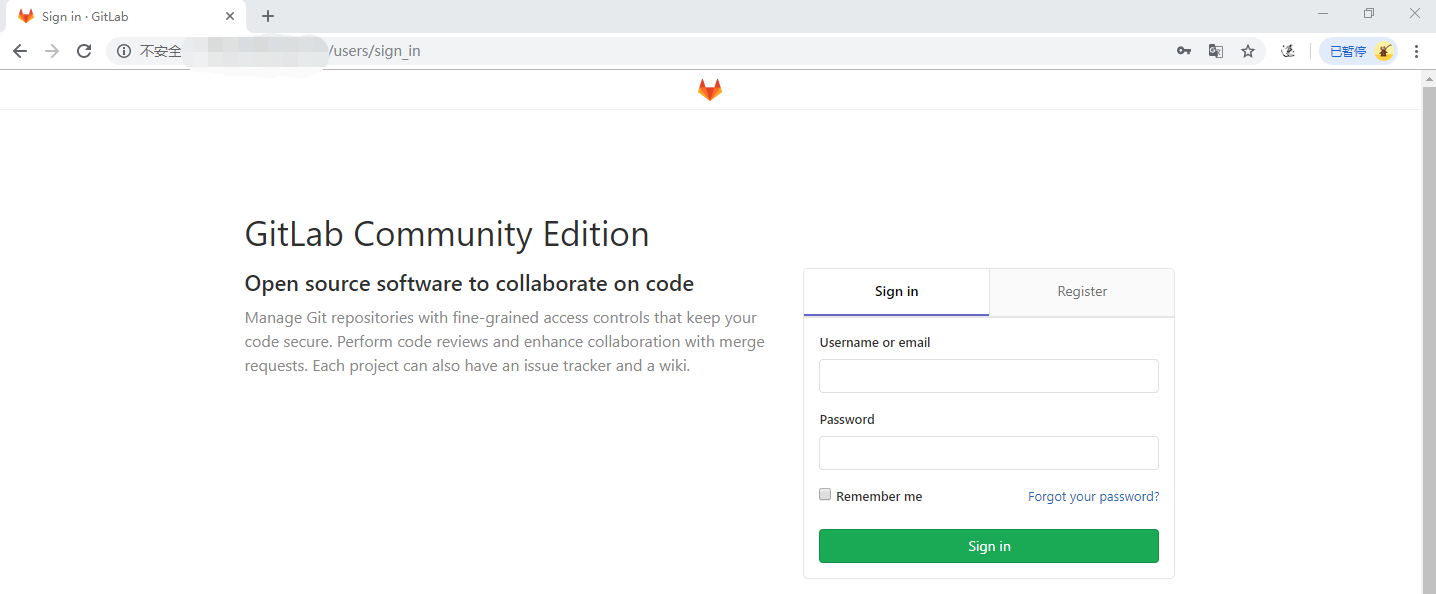
官方建议4G内存,启动gitlab很吃CPU。
1核2G gitlab启动服务器卡死。解决方案:
https://yq.aliyun.com/articles/52098
2、Gitlab Runner Install
①安装gitlab-runnner rpm包
在这里选择适合你系统的gitlab runner包https://gitlab-runner-downloads.s3.amazonaws.com/latest/index.html
curl -LJO https://gitlab-runner-downloads.s3.amazonaws.com/latest/rpm/gitlab-runner_amd64.rpm
②安装rpm 包
rpm -i gitlab-runner_amd64.rpm
③注册Runner
Ⅰ、Run the following command
gitlab-runner register
Ⅱ、Enter your GitLab instance URL:(GitLab实例地址,上面GitLab的地址)
Please enter the gitlab-ci coordinator URL (e.g. https://gitlab.com )

http://115.30.149.35:8888
Ⅲ、Enter the token you obtained to register the Runner(输入注册Runner的token):
Please enter the gitlab-ci token for this runner

hUCad4cXYPEKTt
token所在地方:
1、登入GitLabhttp://115.30.149.35:8888
2、点击工具刀
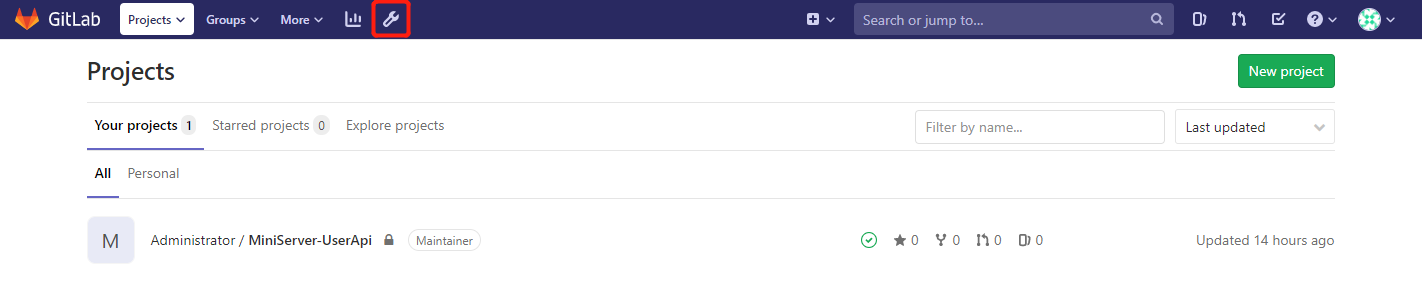
3、Overview->Runners
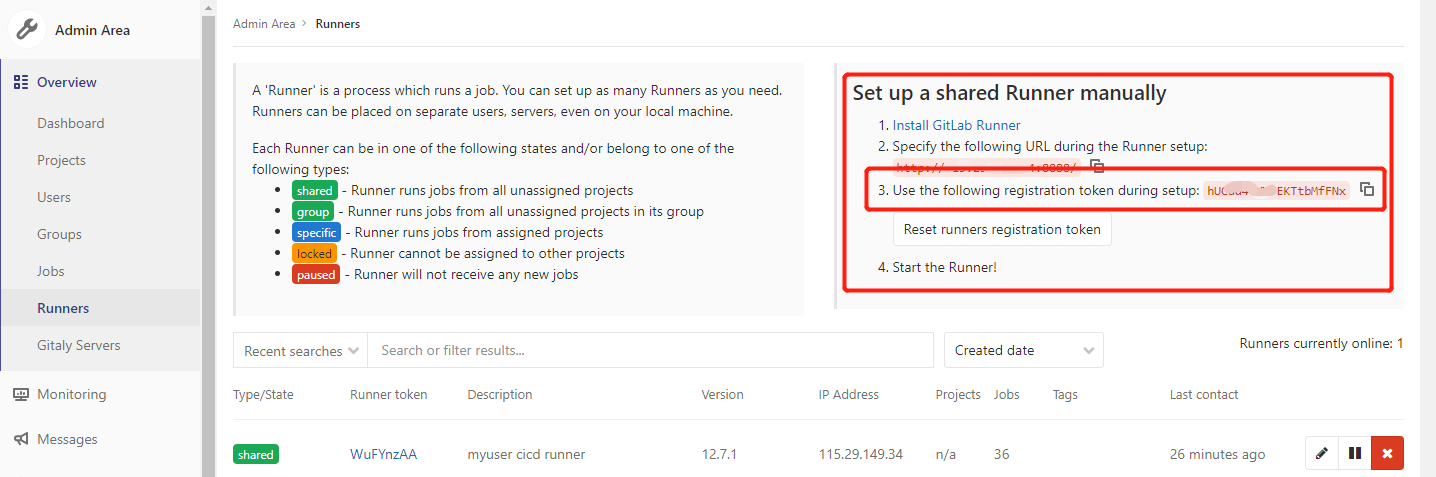
红色框里面即为token。
Ⅳ、Enter a description for the Runner, you can change this later in GitLab’s UI(添加Runner描述):
Please enter the gitlab-ci description for this runner

my-runner
Ⅴ、Add a Tag
Please enter the gitlab-ci tags for this runner (comma separated):
Ⅵ、Enter the Runner executor:
Please enter the executor: ssh, docker+machine, docker-ssh+machine, kubernetes, docker, parallels, virtualbox, docker-ssh, shell:

shell
④刷新GitLab页面
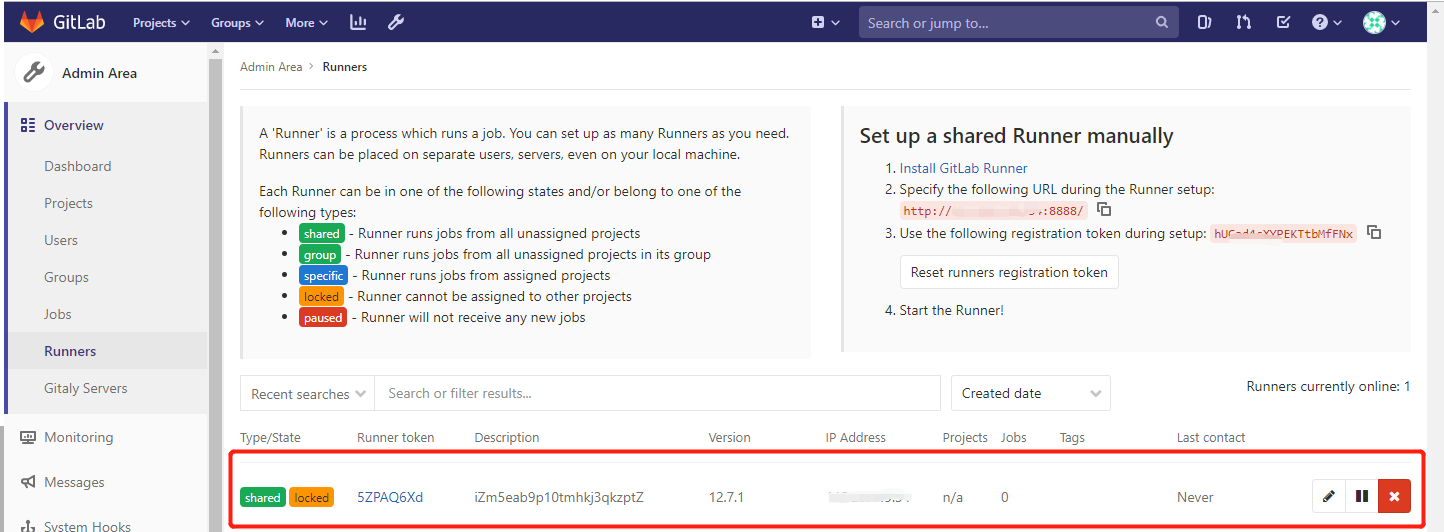
可看到注册的Runner。
3、提交项目到gitlab
1、创建一个项目
2、按照提示将我们的项目提交到gitlab上(Push an existing folder)
git remote add origin http://115.30.149.35:8888/root/miniserver-userapi.git

关闭VS
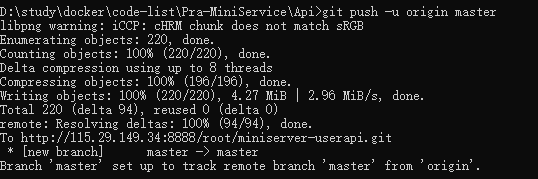
git push 的提示要输入gitlab的用户名和密码
编写以下.gitlab-ci.yml文件(需要放在整个项目的根目录)
提交 在具体的project 的CICD下即可看到项目在跑
4、问题集合
问题一、

docker gitlab 的用户组没有加入docker
usermod -aG docker gitlab-runner

sudo service docker restart
问题二、某次CI失败后再启动
fatal: git fetch-pack: expected shallow list
fatal: The remote end hung up unexpectedly
原因是git版本太老不持之新API,需要升级一下git:
#安装源

yum install http://opensource.wandisco.com/centos/7/git/x86_64/wandisco-git-release-7-2.noarch.rpm

#安装git

yum install git

#更新git

yum update git
参考资料:
Gitlab:https://docs.gitlab.com/omnibus/docker/
GitLab Runner:https://docs.gitlab.com/runner/install/linux-manually.html
docker-Gitlab、GitLab Runner安装的更多相关文章
- Docker搭建自己的Gitlab CI Runner
转载自:https://cloud.tencent.com/developer/article/1010595 1.Gitlab CI介绍 CI:持续集成,我们通常使用CI来做一些自动化工作,比如程序 ...
- Docker安装GitLab与Runner(网关),常规设置,自动化用到k8s+token
[转]图文详解k8s自动化持续集成之GitLab CI/CD Windows里面使用Debian命令行工具完成 和Docker网络相关的命令 查看某一个容器的网络 docker inspect 容器I ...
- docker搭建gitlab,设置邮件提醒,并运行runner
接着http://www.cnblogs.com/wsy1030/p/8431837.html 在另一台机子运行gitlab: docker run --name='gitlab' -d -p 222 ...
- 在 Kubernetes 上安装 Gitlab CI Runner Gitlab CI 基本概念以及 Runner 的安装
简介 从 Gitlab 8.0 开始,Gitlab CI 就已经集成在 Gitlab 中,我们只要在项目中添加一个.gitlab-ci.yml文件,然后添加一个Runner,即可进行持续集成.在介绍 ...
- 3.在 Kubernetes 上安装 Gitlab CI Runner
结合文章:1. 在 Kubernetes 上安装 Gitlab ,地址:https://www.cnblogs.com/sanduzxcvbnm/p/13852854.html 总结: 结合开头的文章 ...
- 利用docker compose启动gitlab及runner
添加docker compose配置文件 新建文件docker-compose.yml,输入如下内容: gitlab: image: 'gitlab/gitlab-ce:latest' contain ...
- [转] Gitlab 8.x runner安装与配置
[From]http://muchstudy.com/2018/07/13/Gitlab-8-x-runner%E5%AE%89%E8%A3%85%E4%B8%8E%E9%85%8D%E7%BD%AE ...
- Gitlab CI持续集成 - GitLab Runner 安装与注册
GitLab Runner安装 需要添加gitlab官方库: # For Debian/Ubuntu/Mint curl -L https://packages.gitlab.com/install/ ...
- Linux下GitLab的快速安装以及备份
源码安装 GitLab 步骤繁琐:需要安装依赖包,Mysql,Redis,Postfix,Ruby,Nginx……安装完毕还得一个个手动配置这些软件,容易出错 一.安装 在Ubuntu 14上 修改/ ...
随机推荐
- geoip ip2region2 with spark
上一篇文章中 我使用 maxmind的免费库开发了一个waterdrop的 插件,测试数据发现,国内的有些市级还是不准确,而且香港并不是显示中国,这就不友好了. 找了一下,发下 ip2region 这 ...
- jquery file upload + asp.net 异步多文件上传
百度了很久,国内一直 找不到 使用jquery file upload 插件 +asp.net 的相关代码 一开始使用 jquery uploadify ,一款基于 flash的插件,但是不支持 Sa ...
- mysql中的表操作
------------恢复内容开始------------ 创建数据库 create database 数据库名 切换数据库 use 数据库名 建表: create table 表名 ( 字段名1, ...
- 别怕,"卷积"其实很简单(上)
文章来自我的CSDN同名博客,欢迎文末扫码关注~ 前言 相信很多时候,当我们在看到“卷积”时,总是处于一脸懵逼的状态,不但因为它的本身概念比较难理解,还因为它在不同的应用中发挥出的变幻莫测的作用也 ...
- 小小知识点(四十七)——发送端已知CSI,基于注水算法的功率分配方法,实现功率受限下的信道容量最大化
1. 注水算法的使用条件和推导 注水算法是根据某种准则,并根据信道状况对发送功率进行自适应分配,通常是信道状况好的时刻,多分配功率,信道差的时候,少分配功率,从而最大化传输速率.实现功率的“注水”分配 ...
- 用python做推荐系统(二)
一.简介 继上一篇基于用户的推荐算法,这一篇是要基于商品的,基于用户的好处是可以根据用户的评价记录找出跟他兴趣相似的用户,再推荐这些用户也喜欢的电影,但是万一这个用户是新用户呢?或是他还没有对任何电影 ...
- 用python做推荐系统(一)
一.简介: 推荐系统是最常见的数据分析应用之一,包含淘宝.豆瓣.今日头条都是利用推荐系统来推荐用户内容.推荐算法的方式分为两种,一种是根据用户推荐,一种是根据商品推荐,根据用户推荐主要是找出和这个用户 ...
- 如何验证docker-compose安装成功
安装过程及如何验证docker-compose安装成功 步骤1: 通过运行 curl 从GitHub上进行安装下载 sudo curl -L "https://github.com/dock ...
- Salesforce LWC学习(十一) port 1717报错的处理
使用vs code开发lwc的步骤,通常为先创建项目(create project)然后授权一个org(authorize an org),授权以后我们通常便会download代码到本地或者Uploa ...
- 《工具》centos 7.x 下安装 JDK,超详细总结一看就会
第一步 检查 JDK 查看JDK版本,在命令行输入:java -version [root@test ~]# java -version bash: java: command not found 如 ...