
springboot整合elasticJob实战(纯代码开发三种任务类型用法)以及分片系统,事件追踪详解
一 springboot整合
介绍就不多说了,只有这个框架是当当网开源的,支持分布式调度,分布式系统中非常合适(两个服务同时跑不会重复,并且可灵活配置分开分批处理数据,贼方便)!
这里主要还是用到zookeeper,如果没有zk环境,可以百度或者参考我之前的博客搭建
添加依赖,这里有一点,如果是在springcloud中的话,需要排除自带的curator依赖,因为cloud已经集成一些,会冲突:
  <!-- elastic-job -->

         <dependency>

             <groupId>com.dangdang</groupId>

             <artifactId>elastic-job-lite-core</artifactId>

             <version>2.1.5</version>

             <exclusions>

                 <exclusion>

                     <artifactId>curator-client</artifactId>

                     <groupId>org.apache.curator</groupId>

                 </exclusion>

                 <exclusion>

                     <artifactId>curator-framework</artifactId>

                     <groupId>org.apache.curator</groupId>

                 </exclusion>

                 <exclusion>

                     <artifactId>curator-recipes</artifactId>

                     <groupId>org.apache.curator</groupId>

                 </exclusion>

             </exclusions>

         </dependency>

         <dependency>

             <groupId>com.dangdang</groupId>

             <artifactId>elastic-job-lite-spring</artifactId>

             <version>2.1.5</version>

         </dependency>

         <dependency>

             <groupId>org.apache.curator</groupId>

             <artifactId>curator-framework</artifactId>

             <version>2.10.0</version>

         </dependency>

         <dependency>

             <groupId>org.apache.curator</groupId>

             <artifactId>curator-client</artifactId>

             <version>2.10.0</version>

         </dependency>

         <dependency>

             <groupId>org.apache.curator</groupId>

             <artifactId>curator-recipes</artifactId>

             <version>2.10.0</version>

         </dependency>

     </dependencies>
然后就是配置zk注册中心,分布式功能主要依赖这个,所有属性都从yml中注入,这里注意一点,可以把超时时间设置大一点:
@Configuration

public class ElasticRegCenterConfig {

    /**

     * 配置zookeeper注册中心

     */

    @Bean(initMethod = "init")  // 需要配置init执行初始化逻辑

    public ZookeeperRegistryCenter regCenter(

            @Value("${regCenter.serverList}") final String serverList,

            @Value("${regCenter.namespace}") final String namespace) {

        ZookeeperConfiguration zookeeperConfiguration = new ZookeeperConfiguration(serverList, namespace);

        zookeeperConfiguration.setMaxRetries(3); //设置重试次数,可设置其他属性

        zookeeperConfiguration.setSessionTimeoutMilliseconds(500000); //设置会话超时时间,尽量大一点,否则项目无法正常启动

        return new ZookeeperRegistryCenter(zookeeperConfiguration);

    }

}
然后就是配置job了,其实和spring的quartz配置都差不多,一个job类,一个调度类
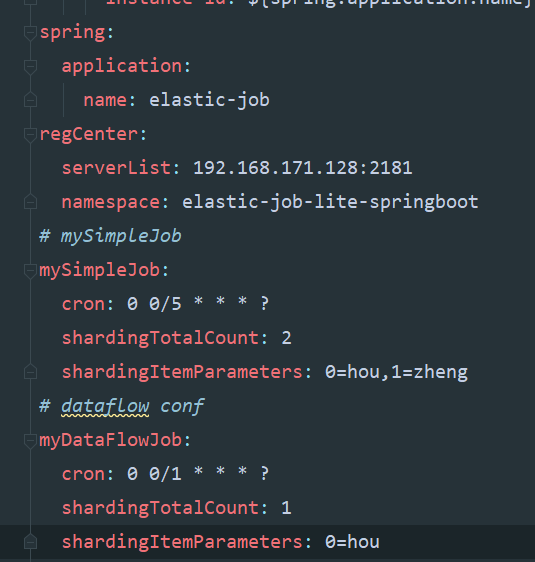
这里先贴我的yml配置,任务执行周期,分片个数都从这里注入即可,分片使用后面单独说明:
二 simplejob
job类:
@Component

public class MySimpleJob implements SimpleJob {

    @Override

    public void execute(ShardingContext shardingContext) {

        System.out.println(shardingContext.getJobName()+"执行:"+

                "分片参数:"+shardingContext.getShardingParameter()+

                ",当前分片项:"+shardingContext.getShardingItem()+

                ",time:"+ LocalDate.now());

    }

}
配置类,这里用到了一个工具方法,工具类放下面:
/**

 * 配置MySimpleJob

 */

@Configuration

public class MySimpleJobConf {

    @Autowired ZookeeperRegistryCenter regCenter;

    @Autowired MySimpleJob mySimpleJob;

    /**

     * 配置任务调度: 参数:  任务

     *                    zk注册中心

     *                    任务详情

     */

    @Bean(initMethod = "init")

    public JobScheduler simpleJobScheduler(@Value("${mySimpleJob.cron}") final String cron,  //yml注入

                                           @Value("${mySimpleJob.shardingTotalCount}") final int shardingTotalCount,

                                           @Value("${mySimpleJob.shardingItemParameters}") final String shardingItemParameters) {

        return new SpringJobScheduler(mySimpleJob, regCenter,

                                      ElasticJobUtils.getSimpleJobConfiguration(

                                              mySimpleJob.getClass(),

                                              cron,

                                              shardingTotalCount,

                                              shardingItemParameters)

                                              //,new MyElasticJobListener() 可配置监听器

        );

    }

}
工具类:
public class ElasticJobUtils {

    /**

     * 创建简单任务详细信息

     */

    public static LiteJobConfiguration getSimpleJobConfiguration(final Class<? extends SimpleJob> jobClass, //任务类

                                                                final String cron,    // 运行周期配置

                                                                final int shardingTotalCount,  //分片个数

                                                                final String shardingItemParameters) {  // 分片参数

        return LiteJobConfiguration.newBuilder(new SimpleJobConfiguration(

                JobCoreConfiguration.newBuilder(jobClass.getName(), cron, shardingTotalCount)

                        .shardingItemParameters(shardingItemParameters).build()

                , jobClass.getCanonicalName())

        ).overwrite(true).build();

    }

    /**

     * 创建流式作业配置

     */

    public static LiteJobConfiguration getDataFlowJobConfiguration(final Class<? extends DataflowJob> jobClass, //任务类

                                                                   final String cron,    // 运行周期配置

                                                                   final int shardingTotalCount,  //分片个数

                                                                   final String shardingItemParameters,

                                                                   final Boolean streamingProcess   //是否是流式作业

                                                                   ) {  // 分片参数

        return LiteJobConfiguration.newBuilder(new DataflowJobConfiguration(

                JobCoreConfiguration.newBuilder(jobClass.getName(), cron, shardingTotalCount)

                        .shardingItemParameters(shardingItemParameters).build()

                // true为流式作业,除非fetchData返回数据为null或者size为0,否则会一直执行

                // false 非流式,只会按配置时间执行一次

                , jobClass.getCanonicalName(),streamingProcess)

        ).overwrite(true).build();

    }

}
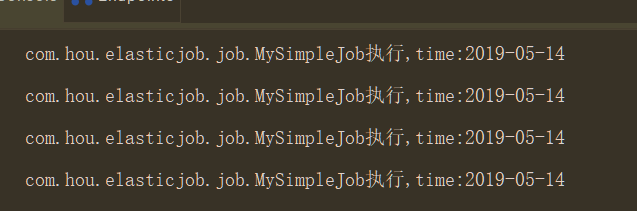
测试:
三 dataflowjob
job类:
@Component

public class MyDataFlowJob implements DataflowJob<String> {

    @Override

    public List<String> fetchData(ShardingContext shardingContext) { //抓取数据

        System.out.println("---------获取数据---------");

        return Arrays.asList("1","2","3");

    }

    @Override

    public void processData(ShardingContext shardingContext, List<String> list) {//处理数据

        System.out.println("---------处理数据---------");

        list.forEach(x-> System.out.println("数据处理:"+x));

    }

}
配置类:
@Configuration

public class MyDataFlowJobConf {

    @Autowired ZookeeperRegistryCenter regCenter;

    @Autowired MyDataFlowJob myDataFlowJob;

    /**

     * 配置任务调度: 参数:  任务

     *                    zk注册中心

     *                    任务详情

     */

    @Bean(initMethod = "init")

    public JobScheduler dataFlowJobScheduler(@Value("${myDataFlowJob.cron}") final String cron,  //yml注入

                                           @Value("${myDataFlowJob.shardingTotalCount}") final int shardingTotalCount,

                                           @Value("${myDataFlowJob.shardingItemParameters}") final String shardingItemParameters) {

        return new SpringJobScheduler(myDataFlowJob, regCenter,

                ElasticJobUtils.getDataFlowJobConfiguration(

                        myDataFlowJob.getClass(),

                        cron,

                        shardingTotalCount,

                        shardingItemParameters,true)

                //,new MyElasticJobListener() 可配置监听器

        );

    }

}
测试:
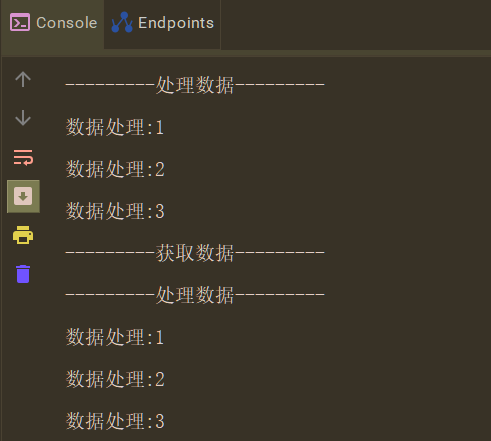
需要注意一点流式作业如果数据不为空会一直跑
四 scriptjob
脚本任务有一点,不需要创建类实例,否则会报错,参数直接传null即可
配置类:
@Configuration

public class MyScriptJobConf {

    @Autowired ZookeeperRegistryCenter regCenter;

    /**

     * 配置任务调度: 参数:  任务

     *                    zk注册中心

     *                    任务详情

     */

    @Bean(initMethod = "init")

    public JobScheduler scriptJobScheduler(@Value("${myScriptJob.cron}") final String cron,  //yml注入

                                           @Value("${myScriptJob.shardingTotalCount}") final int shardingTotalCount,

                                           @Value("${myScriptJob.shardingItemParameters}") final String shardingItemParameters) {

        return new SpringJobScheduler(null, regCenter,

                                      ElasticJobUtils.getScriptJobConfiguration(

                                              "script_job",

                                              cron,

                                              shardingTotalCount,

                                              //命令或者脚本路径

                                              shardingItemParameters,"echo hello")

                                              //,new MyElasticJobListener() 可配置监听器

        );

    }

}
工具添加静态方法:
/**

     * 创建脚本作业配置

     */

    public static LiteJobConfiguration getScriptJobConfiguration(final String jobName, //任务名字

                                                                 final String cron,    // 运行周期配置

                                                                 final int shardingTotalCount,  //分片个数

                                                                 final String shardingItemParameters,

                                                                 final String scriptCommandLine   //是脚本路径或者命令

    ) {  // 分片参数

        return LiteJobConfiguration.newBuilder(new ScriptJobConfiguration(

                JobCoreConfiguration.newBuilder(jobName, cron, shardingTotalCount)

                        .shardingItemParameters(shardingItemParameters).build()

                // 此处配置文件路径或者执行命令

                , scriptCommandLine)

        ).overwrite(true).build();

    }
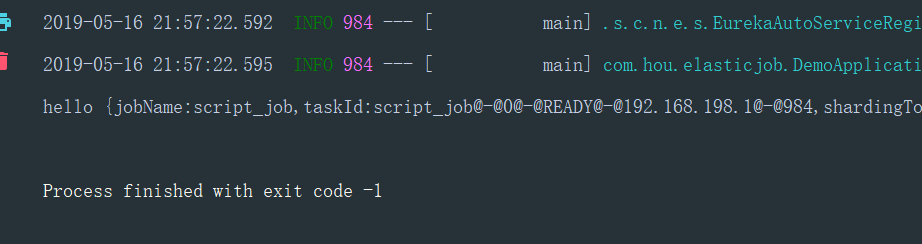
测试:
五 分片用法
分片的目的就是通过配置分片个数,让不同的分片参数到不同的服务中去,比如配置了分片个数是2,那么分片一会到服务一中,分片二到服务二中
项目中根据分片参数来决定哪个服务处理哪些数据,比如 0=客户甲,1=客户乙,但是分片item是从1开始
分片算法默认是平均,可自定义,然后参数就是上面yml那种配置,比如2,就是 0=,1= 4就是0=,1=,2=,3=,两个服务的话服务一就是0,1的参数,服务二就是2,3的参数,并且分片item是3,4
然后要注意一点的是,这个分片识别是根据ip的,也就是说同一台电脑,跑两个程序没用,两个程序都会全部执行,还是会重复
主要是这个分片保证分布式中处理数据不重复,分片也会转移,即一个服务挂了之后,分片参数和item会自动转移到剩下服务中
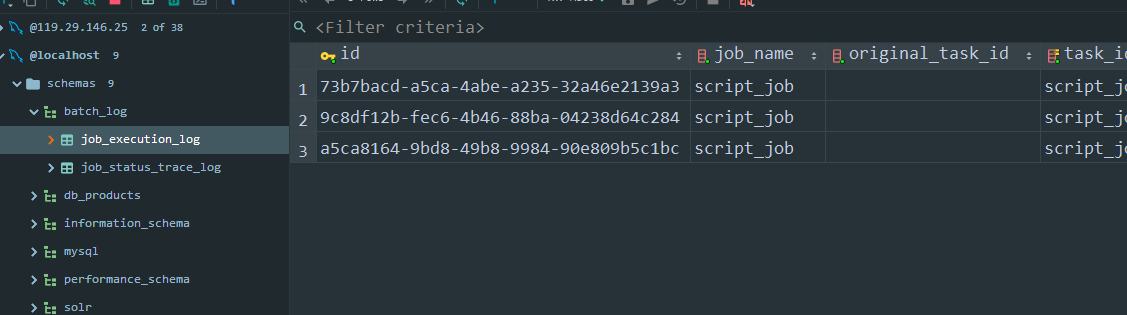
六 事件追踪(即任务信息持久化到mysql)
需要提前创建btach_log数据库
配置数据源Bean,在任务配置中添加event
@Configuration

@ConfigurationProperties(prefix = "spring.datasource")

public class JobDataSourceConf {

    private String url;

    private String username;

    private String password;

    private String driver_class_name;

    @Bean

    @Primary

    public DataSource hikariDataSource() {

        HikariDataSource dataSource = new HikariDataSource();

        dataSource.setJdbcUrl(url);

        dataSource.setUsername(username);

        dataSource.setPassword(password);

        dataSource.setDriverClassName(driver_class_name);

        return dataSource;

    }
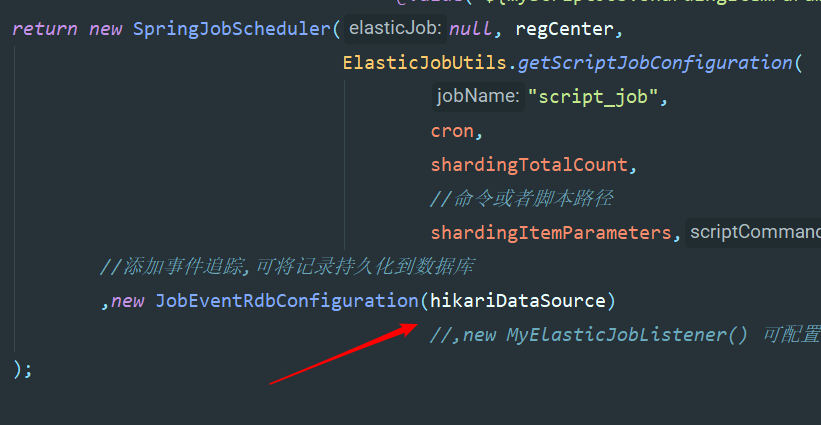
程序会自动创建两张表并添加记录
七 容易踩的坑
一 配置类中配置bean的时候,方法名不要重复,否则会发现任务不跑,
二 测试分布式的时候,必须跑在ip不一样的服务上,否则不会实现分片
三 我的版本再pom里面,springboot版本是2.0.6,版本不一样可能用法也有些区别
四 理论上xml更简单,但是我个人比较喜欢代码风格,哈哈
五 脚本任务不能新建实例,参数传null,且确认命令是否有权限
springboot整合elasticJob实战(纯代码开发三种任务类型用法)以及分片系统,事件追踪详解的更多相关文章
- Linux - 虚拟机中的三种网络连接,桥接、NAT、Host-only详解
虚拟机中的三种网络连接 1.桥接 2.NAT 3.Host-only 桥接方便做实验,配置ip方便.可以和局域网中的其他机器进行通信,也可以和公网进行通信.缺点是会占用一个ip. NAT,可以和主机进 ...
- Springboot整合Elastic-Job(二)
上文我们讲到Springboot整合Elastic-Job整合的demo,只是简单的实现了主要功能.本文在上文基础上,进行新的调整. 事件追踪 Elastic-Job提供了事件追踪功能,可通过事件订阅 ...
- Springboot整合Elastic-Job
Elastic-Job是当当网的任务调度开源框架,有以下功能 分布式调度协调 弹性扩容缩容 失效转移 错过执行作业重触发 作业分片一致性,保证同一分片在分布式环境中仅一个执行实例 自诊断并修复分布式不 ...
- iOS UITableViewCell UITableVIewController 纯代码开发
iOS UITableViewCell UITableVIewController 纯代码开发 <原创> .纯代码 自定义UITableViewCell 直接上代码 ////// #imp ...
- GitHub 多人协作开发 三种方式:
GitHub 多人协作开发 三种方式: 一.Fork 方式 网上介绍比较多的方式(比较大型的开源项目,比如cocos2d-x) 开发者 fork 自己生成一个独立的分支,跟主分支完全独立,pull代码 ...
- YbSoftwareFactory 代码生成插件【二十五】:Razor视图中以全局方式调用后台方法输出页面代码的三种方法
上一篇介绍了 MVC中实现动态自定义路由 的实现,本篇将介绍Razor视图中以全局方式调用后台方法输出页面代码的三种方法. 框架最新的升级实现了一个页面部件功能,其实就是通过后台方法查询数据库内容,把 ...
- App开发三种模式
APP开发三种模式 现在App开发的模式包含以下三种: Native App 原生开发AppWeb App 网页AppHybrid App 混合原生和Web技术开发的App 详细介绍: http:// ...
- 关于Jenkins部署代码权限三种方案
关于Jenkins部署代码权限三种方案 作者:尹正杰 版权声明:原创作品,谢绝转载!否则将追究法律责任. 一.修改Jenkins进程用户为root [root@jenkins ~]# cat /etc ...
- Eclipse远程调试Java代码的三种方法
Eclipse远程调试Java代码的三种方法, 第1种方法是用来调试已经启动的Java程序,Eclipse可以随时连接到远程Java程序进行调试, 第2种方法可以调试Java程序启动过程,但是Ecli ...
随机推荐
- 2020 中国 .NET 开发者调查问卷
随着.NET Core 3.1的发布,国内2019 中国.NET开发者峰会在上海的成功举办.从技术采用生命周期的角度来说,随着.NET Core 3.1的发布,有越来越多的厂商开始采用.NET Cor ...
- Spring Boot 整合 slf4j+log4j2 实现日志管理
背景 Java 中比较常用的日志框架: log4j(Log for Java):Apache 的一个开源项目,七种日志级别:OFF.FATAL.ERROR.WARN.INFO.DEBUG.TRACE ...
- asp.net core 3.x 通用主机原理及使用
一.前言 只是讲asp.net core 3.x通用主机的大致原理,这些东西是通过查看源码以及自己根据经验总结得来的,在文章中不会深入源码,因为个人觉得懂原理就晓得扩展点,后期碰到有需求的时候再仔细去 ...
- vue使用axios调用接口
vue本身不支持ajax接口的请求,所以在vue中经常使用axios这个接口请求工具,这个axios也是vue官方推荐的库.axios的官方github: https://github.com/mza ...
- shell点名脚本不重复人名
效果如图: 代码如下: #!/bin/bash #Author:GaoHongYu #QQ: #Time:-- :: #Name:dm.sh #Version:V1. stu=(刘一 陈二 张三 李四 ...
- 通俗易懂理清mybatis中SqlSessionSql、SqlSessionTemplate、SessionFactory和SqlSessionFactoryBean之间的关系
我潇洒的灰大狼又回来啦.今天送大家的一句话是: 保持耐心,永远年轻,永远热泪盈眶. 前言 先容我哭一会儿,呜呜呜~昨晚写了一半的文章,还没保存就盖上盖子准备回家,拔下电源准备把电脑塞进书包带回家完成时 ...
- git submodule 管理子项目
使用场景 拆分项目,当项目越来越大之后,我们希望 子模块 可以单独管理,并由 专门 的人去维护,这个时候只可以使用 git submodule 去完成. 常用命令 git clone <repo ...
- css常用单词
<!-- type = circle表示空心圆 --> <!-- type = disc 表示实心圆 --> <!-- type = square表示方块 ...
- Java爬虫一键爬取结果并保存为Excel
Java爬虫一键爬取结果并保存为Excel 将爬取结果保存为一个Excel表格 官方没有给出导出Excel 的教程 这里我就发一个导出为Excel的教程 导包 因为个人爱好 我喜欢用Gradle所以这 ...
- echarts更改折线图区域颜色、折线颜色、折点颜色
series : [ { name:'订单流入总数', type:'line', stack: '总量', areaStyle: { normal: { color: '#8cd5c2' //改变区域 ...