
Typora自动编号设置
找到C:\Users\用户名\AppData\Roaming\Typora\themes\路径下的base.user.css,用文本编辑器打开(若不存在,则自己创建一个),将一下内容复制进去,然后重启Typora即可。
以下是我的Typora自动编号配置:
/* 正文标题区: #write */

/* [TOC]目录树区: .md-toc-content */

/* 侧边栏的目录大纲区: .sidebar-content */

/** initialize css counter */

#write, .sidebar-content,.md-toc-content{

    counter-reset: h2

}

#write h1, .outline-h1, .md-toc-item.md-toc-h1 {

    counter-reset: h2

}

#write h2, .outline-h2, .md-toc-item.md-toc-h2 {

    counter-reset: h3

}

#write h3, .outline-h3, .md-toc-item.md-toc-h3 {

    counter-reset: h4

}

#write h4, .outline-h4, .md-toc-item.md-toc-h4 {

    counter-reset: h5

}

#write h5, .outline-h5, .md-toc-item.md-toc-h5 {

    counter-reset: h6

}

/** put counter result into headings */

/* 一级标题不展示 */

#write h1:before,

.outline-h1>.outline-item>.outline-label:before,

.md-toc-item.md-toc-h1>.md-toc-inner:before {

    /* counter-increment: h1;

    content: counter(h1) ". " */

}

/* 二级标题 */

#write h2:before,

.outline-h2>.outline-item>.outline-label:before,

.md-toc-item.md-toc-h2>.md-toc-inner:before {

    counter-increment: h2;

    content: counter(h2) ".   ";

    /* content: counter(h2) ". " */

}

/* 三级标题 */

#write h3:before,

h3.md-focus.md-heading:before, /** override the default style for focused headings */

.outline-h3>.outline-item>.outline-label:before,

.md-toc-item.md-toc-h3>.md-toc-inner:before {

    text-decoration: none;

    counter-increment: h3;

    /* content: counter(h1) "." counter(h2) "." counter(h3) ". " */

    /* content: counter(h2) "." counter(h3) ". " */

    content: counter(h2) "." counter(h3) "   "

}

/* 四级标题 */

#write h4:before,

h4.md-focus.md-heading:before,

.outline-h4>.outline-item>.outline-label:before,

.md-toc-item.md-toc-h4>.md-toc-inner:before {

    text-decoration: none;

    counter-increment: h4;

    /* content: counter(h1) "." counter(h2) "." counter(h3) "." counter(h4) ". " */

    /* content: counter(h2) "." counter(h3) "." counter(h4) ". " */

    content: counter(h2) "." counter(h3) "." counter(h4) "   "

}

/* 五级标题 */

#write h5:before,

h5.md-focus.md-heading:before,

.outline-h5>.outline-item>.outline-label:before,

.md-toc-item.md-toc-h5>.md-toc-inner:before {

    text-decoration: none;

    counter-increment: h5;

    /* content: counter(h1) "." counter(h2) "." counter(h3) "." counter(h4) "." counter(h5) ". " */

    /* content: counter(h2) "." counter(h3) "." counter(h4) "." counter(h5) ". " */

    content: counter(h2) "." counter(h3) "." counter(h4) "." counter(h5) "   "

}

/* 六级标题 */

#write h6:before,

h6.md-focus.md-heading:before,

.outline-h6>.outline-item>.outline-label:before,

.md-toc-item.md-toc-h6>.md-toc-inner:before {

    text-decoration: none;

    counter-increment: h6;

    /* content: counter(h1) "." counter(h2) "." counter(h3) "." counter(h4) "." counter(h5) "." counter(h6) ". " */

    /* content: counter(h2) "." counter(h3) "." counter(h4) "." counter(h5) "." counter(h6) ". " */

    content: counter(h2) "." counter(h3) "." counter(h4) "." counter(h5) "." counter(h6) "   "

}

/** override the default style for focused headings */

#write>h3.md-focus:before,

#write>h4.md-focus:before,

#write>h5.md-focus:before,

#write>h6.md-focus:before,

h3.md-focus:before,

h4.md-focus:before,

h5.md-focus:before,

h6.md-focus:before {

    color: inherit;

    border: inherit;

    border-radius: inherit;

    position: inherit;

    left:initial;

    float: none;

    top:initial;

    font-size: inherit;

    padding-left: inherit;

    padding-right: inherit;

    vertical-align: inherit;

    font-weight: inherit;

    line-height: inherit;

}

/* 设置行距 */

/* 设置一级标题行距 */

#write h1 {

    margin-bottom:50px;

    margin-top:50px;

}

#write h2 {

    margin-bottom:30px;

    margin-top:50px;

}

#write h3 {

    margin-bottom:30px;

    margin-top:30px;

}

#write h4 {

    margin-bottom:30px;

    margin-top:30px;

}

#write h5 {

    margin-bottom:30px;

    margin-top:30px;

}
效果如下,
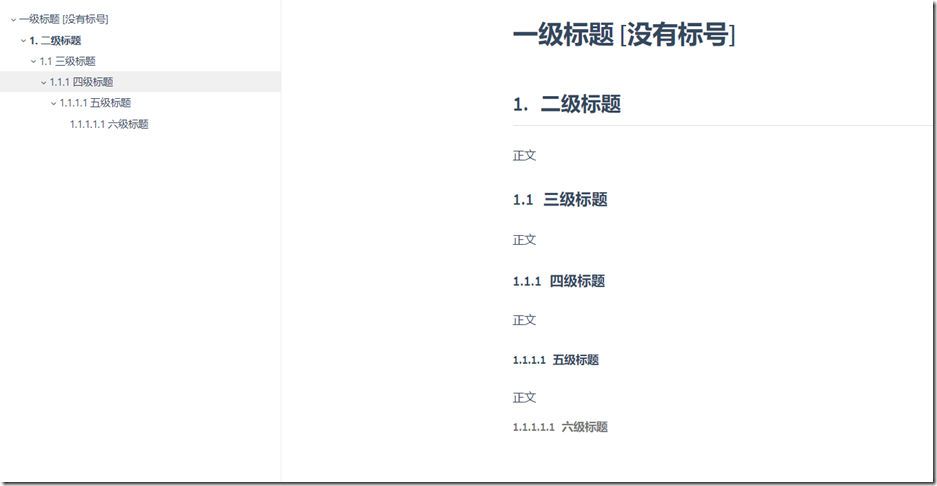
使用起来非常方便,再也不用自己手动来维护这个标号了。
Typora自动编号设置的更多相关文章
- Word 2010 制作文档结构之图标自动编号设置
注意: 使用图片自动编号时,如果文档标题使用的样式是通过“将所选内容保存为新快速样式”所生成的样式,则图片自动编号不会生效 因此设置标题样式时,不要 新建样式,直接使用word预设的“标题 1”样式和 ...
- word2010 标题自动编号设置
今天打算写篇文档,发现生成标题时无法自动生成编号,上网查了一下,现在把解决办法跟附图一块儿奉上. 新建word文档: 默认版式: 设置自动编号所在工具栏位置: 设置选择: 最终结果:
- Word2013对公式处理:样式、自动编号、交叉引用
因快写毕业论文,专门研究了一下Word2013对公式的处理,有一点小心得,记在这里. 文章中公式展示的预期效果是:公式居中,尾端有编号,同时在文章中可以实现引用.实现该效果有很多方法,这里就说一种,其 ...
- 轻松搞定word中让人抓狂的自动编号
在word中使用自动编号时,如果一级编号是2,想让其后面的二级编号自动编号为2.1.2.2--,三级编号自动编号为2.1.1.2.1.2--:且在该一级编号调整为3时,后面的二级编号和三级编号的第一位 ...
- Typora标题自动编号+设定快捷键技巧
Typora标题自动编号 提示:要了解将这些CSS片段放在哪里,请参阅添加自定义CSS. 打开Typora偏好设置,打开主题文件夹,在主题文件夹中创建base.user.css文件,放置以下内容,则T ...
- Access自动编号的初始值设置及重置编号
项目上需要在Access数据库,发现自动编号的列无法设置初始值和步长,但是可以使用SQL语句来设置它. 方法如下: ALTER TABLE tableName ALTER COLUMN ID COUN ...
- 关于设置oracle中系统编号SYSID自动编号的问题;
http://liye9801.blog.163.com/blog/static/601970320086210039591/ 如何在oracle里设置自动编号列 2008-07-21 12:00:3 ...
- SQL2005中设置自动编号字段【转】
如果希望重新定义在表中添加新记录时该列中自动生成并存储于列中的序列号,则可以更改该列的标识属性.在每个表中只能设置一个列的标识属性. 具有标识属性的列包含系统生成的连续值,该值唯一地标识表中的每一行( ...
- Access自动编号的初始值设置及重置编号 转
方法如下: ALTER TABLE tableName ALTER COLUMN Id COUNTER (100, 5) 其中:tableName为要修改的表名,Id为自动编号列,100为初始值,5为 ...
随机推荐
- CentOS 6.6 下源码编译安装MySQL 5.7.5
版权声明:转自:http://www.linuxidc.com/Linux/2015-08/121667.htm 说明:CentOS 6.6 下源码编译安装MySQL 5.7.5 1. 安装相关工具# ...
- HDU 3839 Ancient Messages(DFS)
In order to understand early civilizations, archaeologists often study texts written in ancient lang ...
- Unicode编码解析
概述 转载自博文浅谈Unicode编码 参考博文,结合自己实际情况进行部分内容添加修改 一 需求 java源码中尤其是数字部分用到了很多Unicode方面知识,如果不懂,看源码的时候会很懵逼 java ...
- UNIX 版本
一般UNIX系统都来源于AT&T公司的System V UNIX系统,BSD UNIX或其他类UNIX系统. System V UNIX:当今市场上大多数主要的商业UNIX系统都是基于AT&a ...
- Hyper-V虚拟机设置外部网络访问
在Hyper-V管理器中新建一个虚拟交换机,类型为 内部 ,修改名称为 nat 在虚拟机的设置页面中,将网络适配器设置为新建的虚拟交换机 nat 打开win10->控制面板->网络和共享中 ...
- vue2.x中使用计算属性巧妙的实现多选框的“全选”
接下来我会以一个购物车的例子,来演示如果借助计算属性,精巧的实现多选框的全选功能.当然,有全选,自然对应的也还有取消全选. 以下这张gif图,就是最终的实现效果: 第一步,针对购物车每一个商品进行设置 ...
- CentOS 7 上安装 Django 2.2.4,解决报错:No module named ‘_sqlite3′
1.首先下载最新版的sqlite :https://www.sqlite.org/download.html 下载源码包: 配置和编译方法如下: ./configure --prefix=/usr/l ...
- CCF_201403-1_相反数
按绝对值排序,因为没相同的数,直接遍历比较一遍即可. #include<iostream> #include<cstdio> #include<algorithm> ...
- DaSiamRPN学习
9月14日,2018年视觉目标跟踪挑战赛(Visual-Object-Tracking Challenge 2018)的结果在ECCV Workshop上揭晓.VOT2018共设三项任务:Baseli ...
- qt creator源码全方面分析(2-10-2)
目录 Creating Your First Plugin 创建一个插件项目 构建并运行插件 文件结构 qmake项目 插件元数据模板 插件类 头文件 源文件 Creating Your First ...