
吴裕雄 人工智能 java、javascript、HTML5、python、oracle ——智能医疗系统WEB端智能分诊代码简洁版实现
<%--

    Document   : getInfo

    Created on : 2018-10-7, 21:36:37

    Author     : acer

--%>

<%@page import="java.util.Iterator"%>

<%@page import="java.util.List"%>

<%@page import="db.ActionDB"%>

<%@page import="db.DBConnection"%>

<%@page contentType="text/html" pageEncoding="UTF-8"%>

<!DOCTYPE html>

<html>

    <head>

        <meta http-equiv="Content-Type" content="text/html; charset=UTF-8">

        <title>智能分诊页</title>

    </head>

    <body>

    <center><h2>智能分诊</h2></center>

    <hr>

    <form id='test_form' action='getInfoTwo.jsp' method='' omsubmit='return checkForm()'>

        选择你现在省份:<select name="province" size="1" id="province">

            <option value="北京市">北京市</option>

            <option value="重庆市">重庆市</option>

            <option value="香港特别行政区">香港特别行政区</option>

            <option value="安徽省">安徽省</option>

            <option value="河南省">河南省</option>

            <option value="湖北省">湖北省</option>

            <option value="陕西省">陕西省</option>

            <option value="青海省">青海省</option>

            <option value="台湾省">台湾省</option>

            <option value="黑龙江省">黑龙江省</option>

            <option value="山东省">山东省</option>

            <option value="海南省">海南省</option>

            <option value="贵州省">贵州省</option>

            <option value="吉林省">吉林省</option>

            <option value="福建省">福建省</option>

            <option value="上海市">上海市</option>

            <option value="浙江省">浙江省</option>

            <option value="四川省">四川省</option>

            <option value="云南省">云南省</option>

            <option value="新疆维吾尔自治区">新疆维吾尔自治区</option>

            <option value="河北省">河北省</option>

            <option value="江苏省">江苏省</option>

            <option value="江西省">江西省</option>

            <option value="广东省">广东省</option>

            <option value="辽宁省">辽宁省</option>

            <option value="湖南省">湖南省</option>

            <option value="甘肃省">甘肃省</option>

            <option value="内蒙古自治区">内蒙古自治区</option>

            <option value="广西壮族自治区">广西壮族自治区</option>

            <option value="西藏自治区">西藏自治区</option>

            <option value="澳门特别行政区">澳门特别行政区</option>

            <option value="天津市">天津市</option>

            <option value="山西省">山西省</option>

            <option value="宁夏回族自治区">宁夏回族自治区</option>

        </select>

        <input type="submit" name="Submit" value="下一步" />

    </form>

</body>

</html>

<%--

    Document   : getInfoTwo

    Created on : 2018-10-11, 13:22:00

    Author     : acer

--%>

<%@page import="java.util.Iterator"%>

<%@page import="java.util.List"%>

<%@page import="db.ActionDB"%>

<%@page import="db.DBConnection"%>

<%@page contentType="text/html" pageEncoding="UTF-8"%>

<!DOCTYPE html>

<html>

    <head>

        <meta http-equiv="Content-Type" content="text/html; charset=UTF-8">

        <title>智能分诊页</title>

    </head>

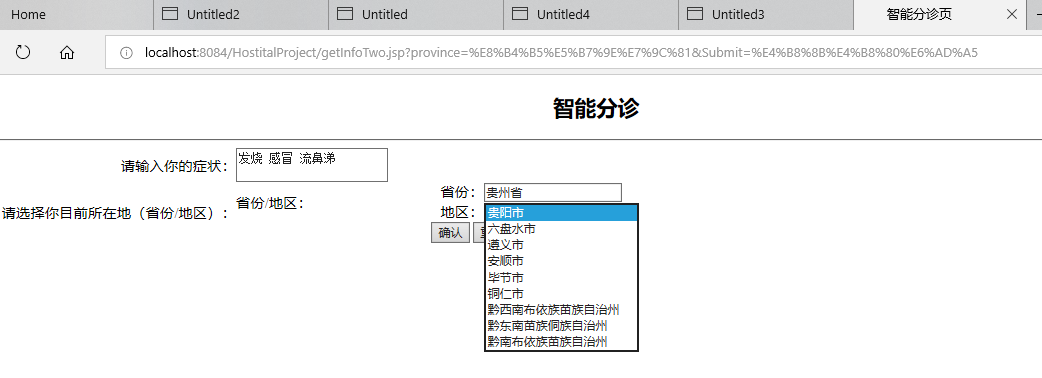
    <center><h2>智能分诊</h2></center>

    <hr>

    <body>

        <form action="fenzhen.jsp" method="post">

            <table width="874" cellspacing="0" cellpadding="0">

                <tr>

                    <td><div align="right">请输入你的症状:</div></td>

                    <td>      <textarea name="zhengzhuang" id="zhengzhuang"></textarea>    </td>

                </tr>

                <tr>

                    <td rowspan="2"><div align="right">请选择你目前所在地(省份/地区):</div></td>

                    <td>省份/地区:</td>

                    <td>

                        <%

                            String province = request.getParameter("province");

                            if (province != null) {

                                DBConnection conn = new DBConnection();

                                ActionDB action = new ActionDB(conn.getConnection());

                                List<String> administ = action.findAdminist(province);

                                Iterator<String> iter = administ.iterator();

                                int length = administ.size();

                                String[] str_administ = new String[length];

                                for (int i = 0; i < str_administ.length; i++) {

                                    str_administ[i] = iter.next();

                                }

                        %>

                        省份:<input type='text' name='province' value='<%=province%>'/><br>

                        地区:<select name="administ" size="1" id="administ">

                            <%for (int i = 0; i < str_administ.length; i++) {%>

                            <option value="<%=str_administ[i]%>"><%=str_administ[i]%></option>

                            <%}%>

                        </select>

                        <%

                            }

                        %>

                    </td>

                </tr>

                <tr>

                    <td colspan="2">    <div align="center">

                            <input type="submit" name="Submit" value="确认" />

                            <input name="reset" type="reset" id="reset" value="重置" />

                        </div></td>

                </tr>

            </table>

        </form>

    </body>

</html>
/*

 * To change this license header, choose License Headers in Project Properties.

 * To change this template file, choose Tools | Templates

 * and open the template in the editor.

 */

package db;

import java.sql.Connection;

import java.sql.DriverManager;

import java.sql.SQLException;

public class DBConnection {

    private static String DBDRIVER = "oracle.jdbc.OracleDriver";    //驱动标识符

    private static String DBURL = "jdbc:oracle:thin:@localhost:1521:tszr"; //链接字符串

    private static String DBUSER = "doctor";         //数据库的用户名

    private static String DBPASSWORD = "admin";     //数据库的密码

    private Connection conn = null;

    public DBConnection() throws Exception {

        Class.forName(DBDRIVER);

        this.conn = DriverManager.getConnection(DBURL, DBUSER, DBPASSWORD);

    }

    public Connection getConnection() {

        return this.conn;

    }

    public void close() throws Exception {

        if (this.conn != null) {

            try {

                this.conn.close();

            } catch (SQLException e) {

                throw e;

            }

        }

    }

}
/*

 * To change this license header, choose License Headers in Project Properties.

 * To change this template file, choose Tools | Templates

 * and open the template in the editor.

 */

package db;

import java.sql.Connection;

import java.sql.PreparedStatement;

import java.sql.ResultSet;

import java.util.ArrayList;

import java.util.List;

public class ActionDB {

    private Connection conn = null;

    private PreparedStatement pstmt = null;

    public ActionDB() {

    }

    public ActionDB(Connection conn) {

        this.conn = conn;

    }

    public List<String> findAdminist(String province) throws Exception {

        List<String> allList = new ArrayList<String>();

        String sql = "select administrative from hostitaladrrest where province=?";

        this.pstmt = this.conn.prepareStatement(sql);

        this.pstmt.setString(1, province);

        ResultSet rs = this.pstmt.executeQuery();

        while (rs.next()) {

            allList.add(rs.getString(1));

        }

        this.pstmt.close();

        return allList;

    }

}
<%--

    Document   : fenzhen

    Created on : 2018-10-8, 6:09:42

    Author     : acer

--%>

<%@page import="java.util.Iterator"%>

<%@page import="java.util.ArrayList"%>

<%@page import="java.util.List"%>

<%@page import="java.io.InputStreamReader"%>

<%@page import="java.io.BufferedReader"%>

<%@page contentType="text/html" pageEncoding="UTF-8"%>

<!DOCTYPE html>

<html>

    <head>

        <meta http-equiv="Content-Type" content="text/html; charset=UTF-8">

        <title>智能分诊显示页</title>

    </head>

    <%    request.setCharacterEncoding("UTF-8");    %>

    <body>

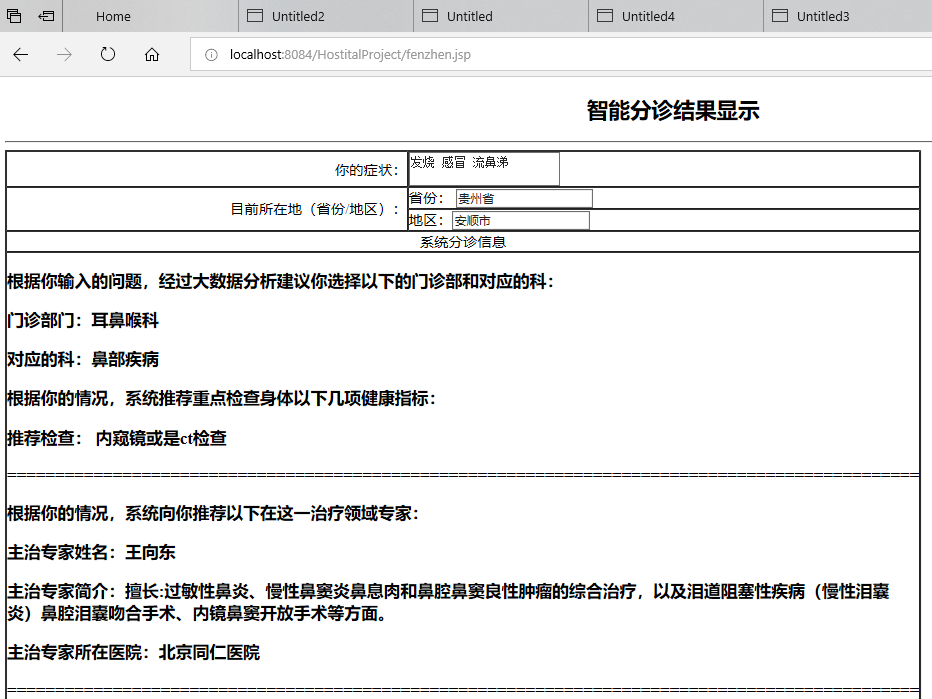
    <center><h2>智能分诊结果显示</h2></center>

    <hr>

    <%

        String zhengzhuang = request.getParameter("zhengzhuang");

        String province = request.getParameter("province");

        String administ = request.getParameter("administ");

        String[] userInfo = new String[]{"python", "F:\\HostitalProject\\src\\java\\pyFile\\getInfo.py", zhengzhuang, province, administ};

        Process pr = Runtime.getRuntime().exec(userInfo);

        BufferedReader in = new BufferedReader(new InputStreamReader(pr.getInputStream()));

        List<String> allList = new ArrayList<>();

        String line;

        while ((line = in.readLine()) != null) {

            allList.add(line);

        }

        Iterator<String> iter = allList.iterator();

        int length = allList.size();

        String[] str_back = new String[length];

        for (int i = 0; i < str_back.length; i++) {

            str_back[i] = iter.next();

        }

    %>

    <table width="874" cellspacing="0" cellpadding="0" border="1">

        <tr>

            <td width="383"><div align="right">你的症状:</div></td>

            <td width="489">      <textarea name="zhengzhuang" id="zhengzhuang" value="<%=zhengzhuang%>"><%=zhengzhuang%></textarea>    </td>

        </tr>

        <tr>

            <td rowspan="2"><div align="right">目前所在地(省份/地区):</div></td>

            <td>省份:

                <input name="province" type="text" id="province" value="<%=province%>"/>    </td>

        </tr>

        <tr>

            <td>地区:<input name="administ" type="text" id="province" value="<%=administ%>"/>      </td>

        </tr>

        <tr>

            <td colspan="2"><div align="center">系统分诊信息</div></td>

        </tr>

        <tr>

            <td colspan="2">

                <%

                    for (int i = 0; i < str_back.length; i++) {

                %>

                <h3><%=str_back[i]%></h3>

                <%

                    }

                %>

            </td>

        </tr>

    </table>

    <h2><a href="log.html">返回登录页</a></h2>

</body>

</html>
# coding:utf-8

import sys

import cx_Oracle

import numpy as np

import pandas as pd

import tensorflow as tf

conn = cx_Oracle.connect('doctor/admin@localhost:1521/tszr')

cursor = conn.cursor()

def getPAH(province, administrative):

    sql = "select hostitalname from hostitalAdrrest where province='%s' and administrative='%s'" % (

    province, administrative)

    cursor.execute(sql)

    rows = cursor.fetchall()

    hostitalName = []

    for row in rows:

        hostitalName.append(row[0])

    for i in range(len(hostitalName)):

        print(hostitalName[i])

def getSeeProject(subject):

    sql = "select CHACKPRO from chackProject where FAMILY='%s'" % (subject)

    cursor.execute(sql)

    rows = cursor.fetchall()

    seeproject = []

    for row in rows:

        seeproject.append(rows[0])

    return seeproject[0][0]

def getDoctors(sujects):

    sql = "select addraction,name,summary from doctors where family='%s'" % (sujects)

    cursor.execute(sql)

    rows = cursor.fetchall()

    doctorInfo = []

    for row in rows:

        doctorInfo.append(row[0])

        doctorInfo.append(row[1])

        doctorInfo.append(row[2])

    print("主治专家姓名:" + doctorInfo[1])

    print("主治专家简介:" + doctorInfo[2])

    print("主治专家所在医院:" + doctorInfo[0])

    return doctorInfo

def getInfo(argv, province, administ):

    sql = "select distinct surgery from menzhen"

    cursor.execute(sql)

    rows = cursor.fetchall()

    dipart = []

    for row in rows:

        dipart.append(row[0])

    ############################################

    sql = "select distinct surgery,surgerychest from menzhen"

    cursor.execute(sql)

    rows = cursor.fetchall()

    dipartmentSubj = []

    for row in rows:

        one = []

        one.append(row[0])

        one.append(row[1])

        dipartmentSubj.append(one)

    ###########################################################

    sql = "select illSubject,question from questb"

    cursor.execute(sql)

    rows = cursor.fetchall()

    subjectQues = []

    for row in rows:

        one = []

        one.append(row[0])

        one.append(row[1])

        subjectQues.append(one)

    #############################################################

    if (len(argv) == 1):

        print('很抱歉系统没有匹配到你症状所对应的门诊部门...')

    else:

        sym = ""

        for i in range(1, len(argv)):

            sym += argv[i]

        symptom = []

        symptom.extend(sym)

        subCount = []

        flat = False

        for j in range(len(subjectQues)):

            temp = []

            que = []

            que.extend(subjectQues[j][1])

            count = 0

            for i in range(len(symptom)):

                if (symptom[i] != "," or symptom[i] != " "):

                    for k in range(len(que)):

                        if (symptom[i] == que[k]):

                            count = count + 1

                            flat = True

            temp.append(subjectQues[j][0])

            temp.append(count)

            subCount.append(temp)

        ############################################################

        if (flat):

            for i in range(len(subCount)):

                for j in range(len(dipartmentSubj)):

                    if (subCount[i][0] == dipartmentSubj[j][1]):

                        subCount[i].append(dipartmentSubj[j][0])

            symMaxCount = sorted(subCount, key=(lambda x: x[1]), reverse=True)

            print("根据你输入的问题,经过大数据分析建议你选择以下的门诊部和对应的科:")

            print("门诊部门:" + symMaxCount[0][2])

            print("对应的科:" + symMaxCount[0][0])

            print("根据你的情况,系统推荐重点检查身体以下几项健康指标:")

            seeproject = getSeeProject(symMaxCount[0][0])

            print("推荐检查:", seeproject)

            print("===============================================================================================")

            print("根据你的情况,系统向你推荐以下在这一治疗领域专家:")

            doctorInfo = getDoctors(symMaxCount[0][0])

            print("===============================================================================================")

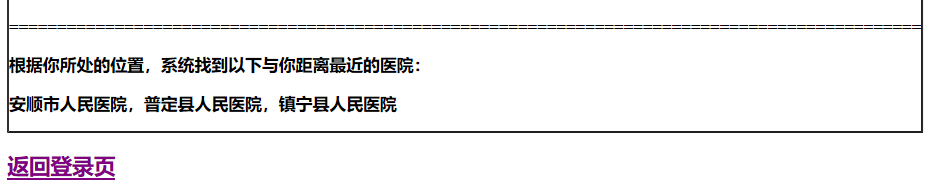
            print("根据你所处的位置,系统找到以下与你距离最近的医院:")

            getPAH(province, administ)

        else:

            print('很抱歉系统没有匹配到你症状所对应的门诊部门...')

# getInfo("发烧 感冒 流鼻涕","广东省","广州市")

import sys

def action(infon):

    getInfo(infon[0],infon[1],infon[2])

if __name__ == '__main__':

    infon = []

    for i in range(1,len(sys.argv)):

        infon.append(sys.argv[i])

    action(infon)
吴裕雄 人工智能 java、javascript、HTML5、python、oracle ——智能医疗系统WEB端智能分诊代码简洁版实现的更多相关文章
- 吴裕雄 python 人工智能——基于神经网络算法在智能医疗诊断中的应用探索代码简要展示
#K-NN分类 import os import sys import time import operator import cx_Oracle import numpy as np import ...
- 吴裕雄 PYTHON 人工智能——智能医疗系统后台智能分诊模块及系统健康养生公告简约版代码展示
#coding:utf-8 import sys import cx_Oracle import numpy as np import pandas as pd import tensorflow a ...
- 吴裕雄 python 人工智能——智能医疗系统后台用户复诊模块简约版代码展示
#复诊 import sys import os import time import operator import cx_Oracle import numpy as np import pand ...
- 吴裕雄 python 人工智能——智能医疗系统后台用户注册、登录和初诊简约版代码展示
#用户注册.登录模块 #数据库脚本 CREATE TABLE usertable( userid number(8) primary key not null , username varchar(5 ...
- 吴裕雄--天生自然 JAVASCRIPT开发学习:条件语句
<!DOCTYPE html> <html> <head> <meta charset="utf-8"> <title> ...
- 吴裕雄--天生自然 JAVASCRIPT开发学习:对象
<!DOCTYPE html> <html> <head> <meta charset="utf-8"> <title> ...
- 吴裕雄--天生自然 JAVASCRIPT开发学习
<!DOCTYPE html> <html> <head> <meta charset="utf-8"> <title> ...
- 吴裕雄--天生自然 JAVASCRIPT开发学习:函数定义
<!DOCTYPE html> <html> <head> <meta charset="utf-8"> <title> ...
- 吴裕雄--天生自然 JAVASCRIPT开发学习: this 关键字
<!DOCTYPE html> <html> <head> <meta charset="utf-8"> <title> ...
随机推荐
- this 的值到底是什么?一次说清楚
this 的值到底是什么?一次说清楚 方应杭 杭州饥人谷教育科技有限公司 CTO 1,071 人赞同了该文章 你可能遇到过这样的 JS 面试题: var obj = { foo: function ...
- nginx下载,安装,基础命令,和代理tomcat例子理解
nginx代理讲的很好理解:https://www.cnblogs.com/ysocean/p/9392908.html 一.nginx应用场景: 1.反向代理(用的非常多) 客户端发出请求,反向代理 ...
- 【Python】遍历循环
- ICPC2019 亚洲区域赛 南京站
蒟蒻终于打完了人生的第一场ICPC了. 终榜去星后rank36,AG,和AU差几十罚时了. 虽有遗憾但总体也是正常发挥了. 不愿再去对比赛做什么回顾,甚至很不愿去想.很多题已经在能力之外,即便是平常熟 ...
- Quality and CCPC
English foundation: the fractional part 小数部分 disclaimer 免责声明 fictitious 虚构的,编造的;假定的,虚设的;小说式的;假装的 No ...
- 在PDB级别中如何切换或重建UNDO表空间
Oracle 12.1版本中,UNDO表空间仅存在CDB级别(共享UNDO),来自于AskScuti博客园. Oracle 12.2版本开始,UNDO表空间同时可以存在每个PDB级别(本地UNDO). ...
- C++-HDU1000,1001,1002-格式是真的坑
#include <cstdio> int main(){ for(int a,b;~scanf("%d%d",&a,&b);printf(" ...
- 常见css属性
div { width: 100px; height: 100px; /* 表示行高 */ line-heigh ...
- HTML学习(2)编辑器
HTML编辑常用的编辑器:Notepad++.Sublime Text.VS Code 可以使用Emmet插件来提高编码速度. 注:emmet只支持32位的Notepad++. 注意这里要把这两个dl ...
- Java8 Time API与老Date之间的转换
前面我已经总结了Java8 Time API常用的一些方法.封装的工具类,可是最近需要对一个比较老的项目进行重构,大致看了一下使用的Jdk还是7而且里面的时间工具类还是使用的Date和Calendar ...