
iOS绘制线条的使用
1、相关简介
2、绘制曲线
2.1、方法详解
- (void)addQuadCurveToPoint:(CGPoint)endPoint controlPoint:(CGPoint)controlPoint;
追加一条二次贝塞尔曲线,结束点是endPoint,曲线偏向controlPoint控制点!
2.2、绘制曲线
//绘制曲线

- (void)drawView{

    UIBezierPath *path = [UIBezierPath bezierPath];

    DrawModel *firstModel = [self.dataArr firstObject];

    CGPoint firstPoint = firstModel.currPoint;

    [path moveToPoint:firstPoint];

    if (self.dataArr.count<) {

        return;

    }

    for (int i=; i<self.dataArr.count; i++) {

        DrawModel *seconModel = self.dataArr[i];

        CGPoint secondPoint = seconModel.currPoint;

        //中心点

        CGPoint midPoint = [self getMindPointWithFirstPoint:firstPoint secondPoint:secondPoint];

        //第一个点都是中心点,为了绘制两点之间有弧度

        [path addQuadCurveToPoint:midPoint controlPoint:[self getControlPointWithFirstPoint:midPoint SecondPoint:firstPoint]];

        [path addQuadCurveToPoint:secondPoint controlPoint:[self getControlPointWithFirstPoint:midPoint SecondPoint:secondPoint]];

        firstPoint = secondPoint;

    }

    CAShapeLayer  *layer = [CAShapeLayer layer];

    layer.lineWidth = ;

    layer.strokeColor = [UIColor redColor].CGColor;

    layer.fillColor = [UIColor clearColor].CGColor;

    layer.path = [path CGPath];

    [self.backScrollView.layer addSublayer:layer];

}

//获取两点之间控制点

- (CGPoint)getControlPointWithFirstPoint:(CGPoint)firstPoint

                             SecondPoint:(CGPoint)secondPoint{

    CGPoint controlPoint = [self getMindPointWithFirstPoint:firstPoint secondPoint:secondPoint];

    CGFloat diffY = fabs(secondPoint.y - controlPoint.y);

    if (firstPoint.y < secondPoint.y)

        controlPoint.y += diffY;

    else if (firstPoint.y > secondPoint.y)

        controlPoint.y -= diffY;

    return controlPoint;

}

//获取两点之间中心点

- (CGPoint)getMindPointWithFirstPoint:(CGPoint)firstPoint

                          secondPoint:(CGPoint)secondPoint{

    return CGPointMake((firstPoint.x + secondPoint.x)/, (firstPoint.y + secondPoint.y)/);

}
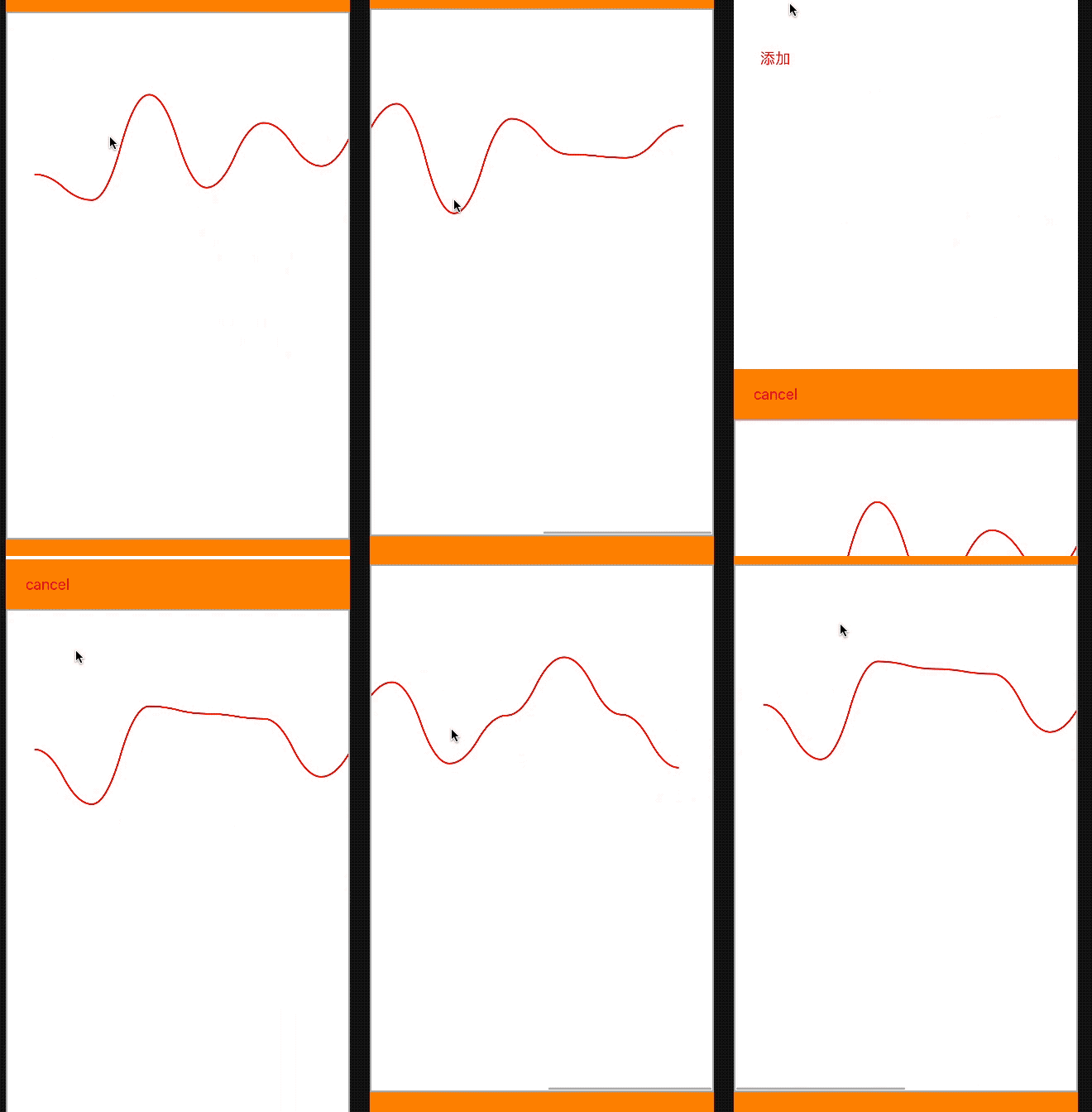
效果图
3、绘制折线
- (void)drawView{

    UIBezierPath *path = [UIBezierPath bezierPath];

    DrawModel *firstModel = [self.dataArr firstObject];

    CGPoint firstPoint = firstModel.currPoint;

    [path moveToPoint:firstPoint];

    if (self.dataArr.count<) {

        return;

    }

    for (int i=; i<self.dataArr.count; i++) {

        DrawModel *seconModel = self.dataArr[i];

        CGPoint secondPoint = seconModel.currPoint;

        [path addLineToPoint:secondPoint];

    }

    CAShapeLayer  *layer = [CAShapeLayer layer];

    layer.lineWidth = ;

    layer.strokeColor = [UIColor redColor].CGColor;

    layer.fillColor = [UIColor clearColor].CGColor;

    layer.path = [path CGPath];

    [self.backScrollView.layer addSublayer:layer];

}
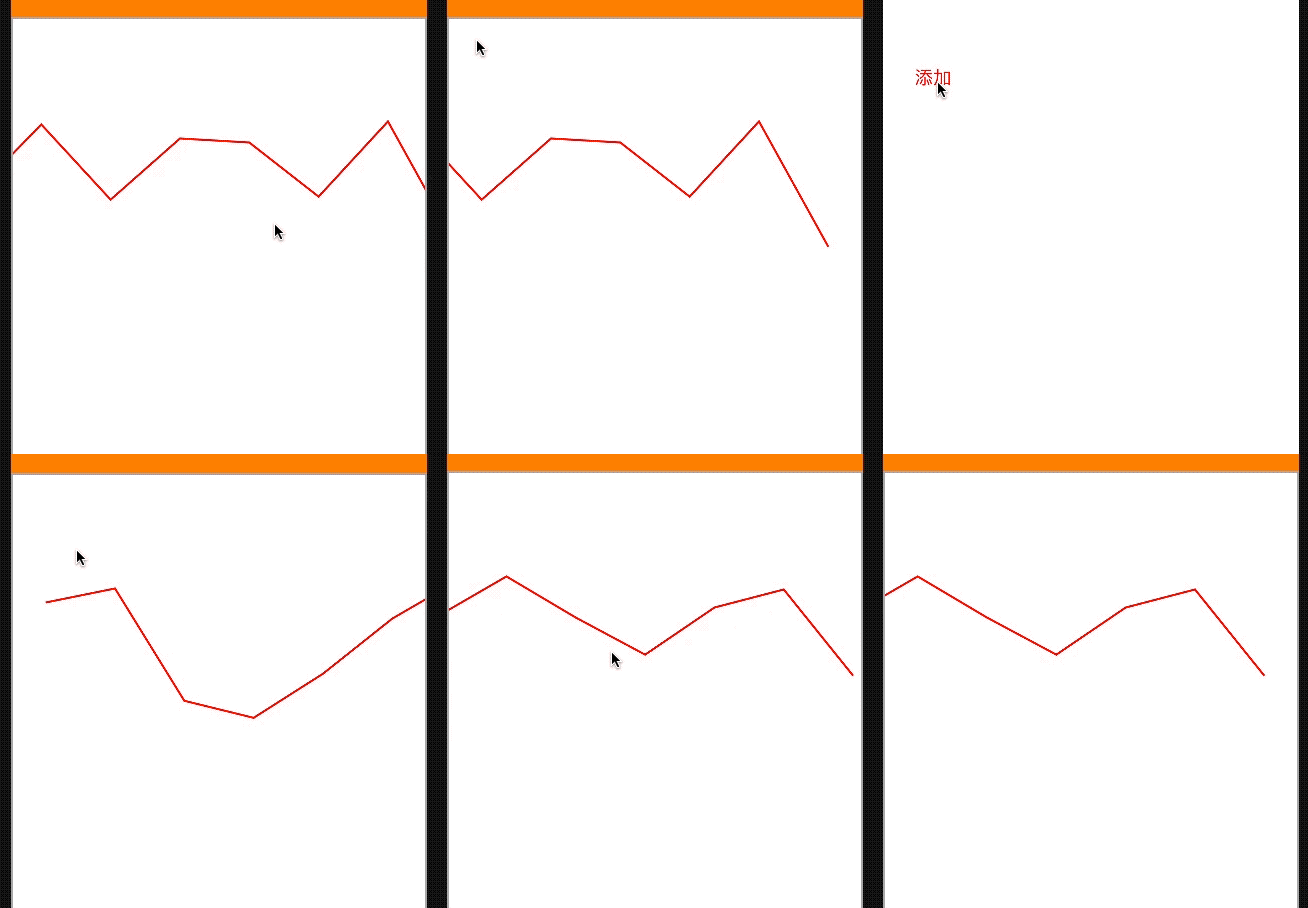
效果图
iOS绘制线条的使用的更多相关文章
- iOS 动画绘制线条颜色渐变的折线图
效果图 .................... 概述 现状 折线图的应用比较广泛,为了增强用户体验,很多应用中都嵌入了折线图.折线图可以更加直观的表示数据的变化.网络上有很多绘制折线图的demo,有 ...
- IOS绘制渐变背景色折线图的一种尝试
1.绘制折线图 上次在群里看到一个折线图划的很漂亮,自己想实现一个这样的 ,但是一直没什么头绪,不知道怎么做,就开始在网上查找划线,绘 制渐变色这一块的内容,用最笨的方式,自己尝试的写了一些,也没 有 ...
- 使用html5 Canvas绘制线条(直线、折线等)
使用html5 Canvas绘制直线所需的CanvasRenderingContext2D对象的主要属性和方法(有"()"者为方法)如下: 属性或方法 基本描述 strokeSty ...
- GDI基础(1):绘制线条和图形
1. 绘制一个像素点:SetPixel(). 绘制直线:MoveTo(),LineTo(). 绘制多个首尾相连的线:Polyline(). 绘制矩形:FrameRect(),Rectangle(),F ...
- html5的canvas绘制线条,moveTo和lineTo详解
今天在看html5,里面新增的属性有一个canvas,它相当于一个画布你可以用js在里面画你想要的效果!我在w3c的手册里面看到用moveTo和lineTo绘制线条讲的不是很清楚,尤其是moveTo和 ...
- canvas绘制线条详解
canvas详解----绘制线条 <!DOCTYPE html> <html> <head> <title>canvas详解</title> ...
- IOS开发 图形绘制,绘制线条,矩形,和垂直和居中绘制文字
概述 吐槽下IOS下 的图形绘图,代码冗长,不得不自己重新封装方法.整理形成本文. 绘制线 // 绘制直线 + (void)toDrawLineFromX:(CGFloat)x1 Y:(CGFloat ...
- iOS绘制坐标图,折线图-Swift
坐标图,经常会在各种各样的App中使用,最常用的一种坐标图就是折线图,根据给定的点绘制出对应的坐标图是最基本的需求.由于本人的项目需要使用折线图,第一反应就是搜索已经存在的解决方案,因为这种需求应该很 ...
- 转:iOS绘制一个UIView
绘制一个UIView 绘制一个UIVIew最灵活的方式就是由它自己完成绘制.实际上你不是绘制一个UIView,你只是子类化了UIView并赋予子类绘制自己的能力.当一个UIVIew需要执行绘图操作的时 ...
随机推荐
- c# 编写windows 服务,并制作安装包
对服务的认识有很多个阶段. 第一阶段:当时还在用c++,知道在一个进程里while(True){},然后里面做很多很多事情,这就叫做服务了,界面可能当时还用Console控制台程序. 第二阶段:知道了 ...
- kcptun搭建
wget --no-check-certificate https://github.com/kuoruan/shell-scripts/raw/master/kcptun/kcptun.sh sha ...
- js数组方法 slice()和splice()
说实在我之前都不怎么分的清这个两个函数,因为这两个函数名字那么像,经常我就弄混了,平常使用的时候都先查一下我需要使用的实际是哪个函数.这样不说很浪费时间,但是也是影响了开发效率,所以我决定今天就彻底区 ...
- PHP-SQL查询上升的温度
给定一个 Weather 表,编写一个 SQL 查询,来查找与之前(昨天的)日期相比温度更高的所有日期的 Id. +---------+------------------+------------- ...
- Java 异常基本结构
异常的定义:阻止当前方法或作用域继续执行的情况,即程序无法正常执行下去称之为异常. 异常的基本结构: 所有不正常的类都继承与Throwable类,包括Error类和Exception类 Error一般 ...
- Java 基础 - 基本类型和引用类型
ref: https://www.cnblogs.com/ysocean/p/8482979.html#_label2 ------------------ 这里再给大家普及一个概念,在 Java 中 ...
- 如何检测 Web 服务请求丢失问题
导读 『StabilityGuide』是阿里多位阿里技术工程师共同发起的稳定性领域的知识库开源项目,涵盖性能压测.故障演练.JVM.应用容器.服务框架.流量调度.监控.诊断等多个技术领域,以更结构化的 ...
- thinkphp 范围标签
范围判断标签包括in notin between notbetween四个标签,都用于判断变量是否中某个范围. 大理石平台价格 IN和NOTIN 用法: 假设我们中控制器中给id赋值为1: $id = ...
- 剑指Offer-14:输入一个链表,输出该链表中倒数第k个结点。
题目描述: 输入一个链表,输出该链表中倒数第k个结点.例如有一个链表有六个节点1,2,3,4,5,6.则它的倒数第二个节点为5 节点定义如下: public class ListNode { int ...
- WannaCry结束了? 安专家注册域名掐断病毒传播
腾讯科技讯,(韩依民) 5 月 13 日,席卷全球的勒索病毒 WannaCry(也被称作 WanaCrypt 或 WCry),在今日晚间被互联网安全人员找到阻止其传播的方法. 据北京云纵信息技术有限公 ...