
iOS之String动态书写
/**

 String动画书写出来

 @param string 要写的字

 @param view 父视图

 @param ui_font 字体大小

 @param color 字体颜色

 */

- (void)createAnimationLayerWithString:(NSString*)string andView:(UIView *)view andFont:(UIFont*)ui_font andStrokeColor:(UIColor*)color{

    CTFontRef font =CTFontCreateWithName((CFStringRef)ui_font.fontName,

                                         ui_font.pointSize,

                                         NULL);

    CGMutablePathRef letters = CGPathCreateMutable();

    //这里设置画线的字体和大小

    NSDictionary *attrs = [NSDictionary dictionaryWithObjectsAndKeys:

                           (__bridge id)font, kCTFontAttributeName,

                           nil];

    NSAttributedString *attrString = [[NSAttributedString alloc] initWithString:string

                                                                     attributes:attrs];

    CTLineRef line = CTLineCreateWithAttributedString((CFAttributedStringRef)attrString);

    CFArrayRef runArray = CTLineGetGlyphRuns(line);

    for (CFIndex runIndex = ; runIndex < CFArrayGetCount(runArray); runIndex++)

    {

        CTRunRef run = (CTRunRef)CFArrayGetValueAtIndex(runArray, runIndex);

        CTFontRef runFont = CFDictionaryGetValue(CTRunGetAttributes(run), kCTFontAttributeName);

        for (CFIndex runGlyphIndex = ; runGlyphIndex < CTRunGetGlyphCount(run); runGlyphIndex++)

        {

            CFRange thisGlyphRange = CFRangeMake(runGlyphIndex, );

            CGGlyph glyph;

            CGPoint position;

            CTRunGetGlyphs(run, thisGlyphRange, &glyph);

            CTRunGetPositions(run, thisGlyphRange, &position);

            CGPathRef letter = CTFontCreatePathForGlyph(runFont, glyph, NULL);

            CGAffineTransform t = CGAffineTransformMakeTranslation(position.x, position.y);

            CGPathAddPath(letters, &t, letter);

            CGPathRelease(letter);

        }

    }

    CAShapeLayer *pathLayer = [CAShapeLayer layer];

    pathLayer.frame = CGRectMake(, , view.frame.size.width, view.frame.size.height );

    pathLayer.bounds = CGPathGetBoundingBox(letters);

    pathLayer.geometryFlipped = YES;

    pathLayer.path = letters;

    pathLayer.strokeColor = [color CGColor];

    pathLayer.fillColor = nil;

    pathLayer.lineWidth = 1.0f;

    pathLayer.lineJoin = kCALineJoinBevel;

    [view.layer addSublayer:pathLayer];

    CABasicAnimation *pathAnimation = [CABasicAnimation animationWithKeyPath:@"strokeEnd"];

    pathAnimation.duration = 5.0;

    pathAnimation.fromValue = [NSNumber numberWithFloat:0.0f];

    pathAnimation.toValue = [NSNumber numberWithFloat:1.0f];

    [pathLayer addAnimation:pathAnimation forKey:@"strokeEnd"];

    CGPathRelease(letters);

    CFRelease(font);

    CFRelease(line);

}
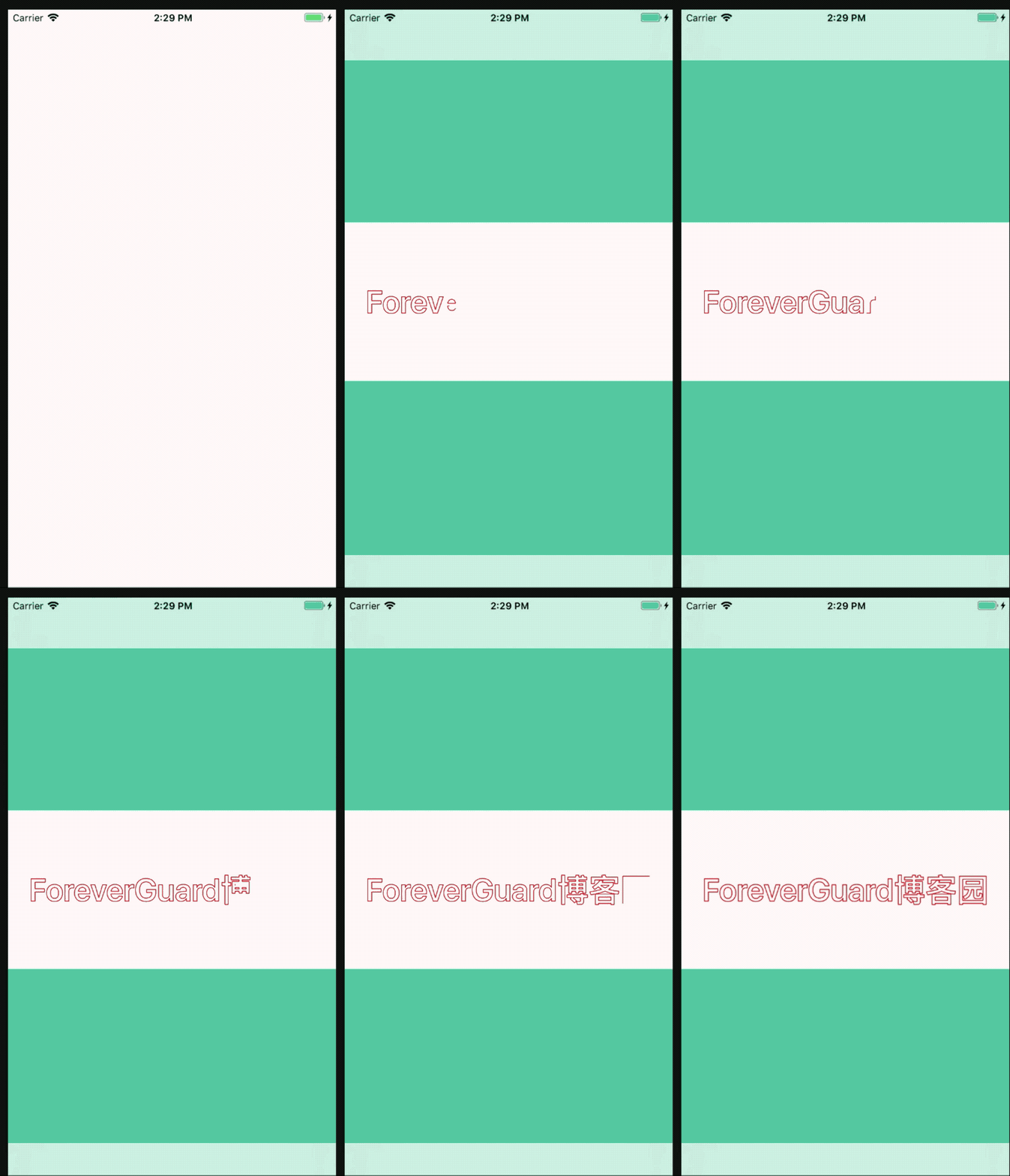
效果图
iOS之String动态书写的更多相关文章
- ios 开发中 动态库 与静态库的区别
使用静态库的好处 1,模块化,分工合作 2,避免少量改动经常导致大量的重复编译连接 3,也可以重用,注意不是共享使用 动态库使用有如下好处: 1使用动态库,可以将最终可执行文件体积缩小 2使用动态库, ...
- 通过List<String>动态传递参数给 sqlcommand.Parameters
通过List<String>动态传递参数 private void GetallChecked_TreeNote(TreeNodeCollection aNodes, ref int To ...
- 【转】提示框第三方库之MBProgressHUD iOS toast效果 动态提示框效果
原文网址:http://www.zhimengzhe.com/IOSkaifa/37910.html MBProgressHUD是一个开源项目,实现了很多种样式的提示框,使用上简单.方便,并且可以对显 ...
- iOS中关于动态Tableview中的cell数据传输的多线程问题解决之拙见
iOS中关于动态Tableview中的cell数据传输的多线程问题解决之拙见 (2015-12-05 12:48:20)[编辑][删除] 转载▼ 首先我们先明确一下问题: 1.因为UI是在主线 ...
- 李洪强iOS开发之动态获取UILabel的bounds
李洪强iOS开发之动态获取UILabel的bounds 在使用UILabel存放字符串时,经常需要获取label的长宽数据,本文列出了部分常用的计算方法. 1.获取宽度,获取字符串不折行单行显示时所需 ...
- ios Objective-C的动态特性
这是一篇译文,原文在此,上一篇文章就是受这篇文章启发,这次干脆都翻译过来. 过去的几年中涌现了大量的Objective-C开发者.有些是从动态语言转过来的,比如Ruby或Python,有些是从强类型语 ...
- ios ableviewcell的动态加载数据,模仿喜马拉雅动态数据加载
iphone(UITableViewCell)动态加载图片http://developer.apple.com/library/ios/#samplecode/LazyTableImages/Intr ...
- iOS: 学习笔记, 动态添加按钮
1. 新建iOS -> Single View Application. 2. 个性控制器文件YYViewController.m(此处修改为你相应的控制器文件名) // // YYViewCo ...
- iOS 开发新版 动态库framework
0. 参考 http://www.cocoachina.com/industry/20140613/8810.html framework+xib参考 : http://blog.csdn.net/x ...
随机推荐
- myeclipe 中配置maven
1.配置maven 2. 2
- PostgreSQL 主键自动增长
建立主键并设置自动增加的办法好好几种,这里记录我测试过的: drop table pro_process; CREATE TABLE "public"."pro_proc ...
- iOS开发系列-Lock
概述 我们在使用多线程的时候多个线程可能会访问同一块资源,这样就很容易引发数据错乱和数据安全等问题,这时候就需要我们保证每次只有一个线程访问这一块资源,锁 应运而生. iOS中锁之前的性能的图标排行: ...
- vue使用CDN全局安装百度地图
参考: https://www.zhangshengrong.com/p/O3aA7x5X4E/ 一.在public/index.html中引入cdn <script src="htt ...
- redis集群的学习(一)
redis配置文件详解 redis默认是不作为守护进程来运行的,你可以把这个设置为yes,让它作为守护进程来运行 注意,当作为守护进程的时候,redis 会把进程ID 写到/var/run/redis ...
- eclipse导出说明文档
选中项目--右键--Export--Java--Javadoc—Finish 1.为程序添加文档注释 2.选中项目--右键Export--Java--Javadoc--next, 3.next--在V ...
- response.text与content的区别
在某些情况下来说,response.text 与 response.content 都是来获取response中的数据信息,效果看起来差不多.那么response.text 和 response.co ...
- CSS3——动画
动画是CSS3中具有颠覆性的特征之一,可通过设置多个节点来精确控制一个或一组动画,常用来实现复杂的动画效果. 语法格式: animation:动画名称 动画时间 运动曲线 何时开始 播放次数 是否反 ...
- Perl 数据类型
Perl 数据类型 Perl 是一种弱类型语言,所以变量不需要指定类型,Perl 解释器会根据上下文自动选择匹配类型. Perl 有三个基本的数据类型:标量.数组.哈希.以下是这三种数据类型的说明: ...
- hdu多校第四场1001 (hdu6614) AND Minimum Spanning Tree 签到
题意: 一个完全图,某两点边权为这两点编号之按位与,求最小生成树,输出字典序最小的. 题解: 如果点数不为$2^n-1$,则每一点均可找到一点,两点之间边权为0,只需找到该点二进制下其最左边的0是第几 ...