
Nexus-配置VDC
1、配置资源模板
This example shows how to configure a VDC resource template:
vdc resource template TemplateA
limit-resource port-channel minimum 4 maximum 128
limit-resource span-ssn minimum 1 maximum equal-to-min
limit-resource vlan minimum 32 maximum 1024
limit-resource vrf minimum 32 maximum 1000
通过命令show vdc resource template TemplateA 查看,可以看到和如下类似结果: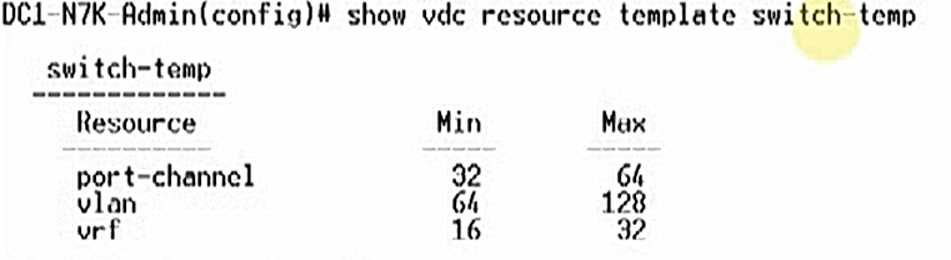
2、创建VDC
This example shows how to create and initialize a VDC:
switch# config t
switch(config)# vdc test
Note:Creating VDC,one moment please…
switch(config-vdc)# allocate interface ethernet 2/46
Moving ports will cause all config associated to them in source vdc to be removed. Are you sure you want to move the ports? [yes] yes
//通过show vdc N7K membership查看分配的接口
switch(config-vdc)# exit
switch(config)# switchto vdc test
---- System Admin Account Setup ----
Do you want to enforce secure password standard (yes/no) [y]: y
Enter the password for "admin":<password>
Confirm the password for "admin":<password>
---- Basic System Configuration Dialog ----
This setup utility will guide you through the basic configuration of
the system. Setup configures only enough connectivity for management
of the system.
Please register Cisco Nexus7000 Family devices promptly with your
supplier. Failure to register may affect response times for initial
service calls. Nexus7000 devices must be registered to receive
entitled support services.
Press Enter at anytime to skip a dialog. Use ctrl-c at anytime
to skip the remaining dialogs.
Would you like to enter the basic configuration dialog (yes/no): yes
Create another login account (yes/no) [n]: n
Configure read-only SNMP community string (yes/no) [n]: n
Configure read-write SNMP community string (yes/no) [n]: n
Enter the switch name : Test
Continue with Out-of-band (mgmt0) management configuration? (yes/no) [y]:
Mgmt0 IPv4 address : 10.10.5.5
Mgmt0 IPv4 netmask : 255.255.254.0
Configure the default gateway? (yes/no) [y]: y
IPv4 address of the default gateway : 10.10.5.1
Configure advanced IP options? (yes/no) [n]:
Enable the telnet service? (yes/no) [y]:
Enable the ssh service? (yes/no) [n]: y
Type of ssh key you would like to generate (dsa/rsa/rsa1) : rsa
Number of key bits <768-2048> : 768
Configure the ntp server? (yes/no) [n]:
Configure default switchport interface state (shut/noshut) [shut]:
Configure default switchport trunk mode (on/off/auto) [on]:
The following configuration will be applied:
switchname Test
interface mgmt0
ip address 10.10.5.5 255.255.254.0
no shutdown
exit
vrf context management
ip route 0.0.0.0/0 10.10.5.1
exit
telnet server enable
ssh key rsa 768 force
ssh server enable
system default switchport shutdown
system default switchport trunk mode on
Would you like to edit the configuration? (yes/no) [n]:
Use this configuration and save it? (yes/no) [y]:
[########################################] 100%
Cisco Data Center Operating System (NX-OS) Software
TAC support: http://www.cisco.com/tac
Copyright (c) 2002-2007, Cisco Systems, Inc. All rights reserved.
The copyrights to certain works contained herein are owned by
other third parties and are used and distributed under license.
Some parts of this software may be covered under the GNU Public
License or the GNU Lesser General Public License. A copy of
each such license is available at
http://www.gnu.org/licenses/gpl.html and
http://www.gnu.org/licenses/lgpl.html
switch-test# exit
switch
来自 <https://www.cisco.com/c/en/us/td/docs/switches/datacenter/sw/nx-os/virtual_device_context/configuration/guide/b-7k-Cisco-Nexus-7000-Series-NX-OS-Virtual-Device-Context-Configuration-Guide/creating-vdc.html>
查看VDC可能是如下情况:
3、限制VDC资源使用
DC2-N7K-1(config)#vdc DC2-N7K-3
DC2-N7K-1(config-vdc)#template TemplateA
可以通过show vdc DC2-N7K-1 resource查看
4、限制VDC关联模块
DC2-N7K-1(config)#vdc DC2-N7K-3
DC2-N7K-1(config-vdc)#limit-resource module-type m1xl f2e
This wil cause all ports of unallowed types to be removed from this vdc.Continue(y/n)[yes]yes
通过show vdc查看对应VDC关联的模块限制
5、配置启动顺序
默认的启动顺序为1,具有相同的启动顺序时,VDC ID越小的越优先启动,default VDC,admin VDC 总是第一个启动!
DC2-N7K-1(config)#vdc DC2-N7K-3
DC2-N7K-1(config-vdc)#boot-order 2 >>>>范围1-9
6、查看VDC高可用性的默认配置
双引擎:
Bringdown,让VDC进入failed状态
Restart,将重启启动进程,报错shut所有的接口,停止虚拟化服务进程,然后重新启动保存了的服务,配置,那些没有保存在startup config的配置会丢失
Switchover,初始化一个引擎模块切换
单引擎:
Bringdown,让VDC进入failed状态
Reload,重启引擎模块
Restart,将重启启动进程,报错shut所有的接口,停止虚拟化服务进程,然后重新启动保存了的服务,配置,那些没有保存在startup config的配置会丢失
DC2-N7K-1#show vdc DC2-N7K-33 detail
Swtichwide mode is m1 f1 m1xl f22 m2xl f2e f3
vdc id:3
vdc name:DC2-N7K-3
vdc state:active
vdc mac address:01:e1:a3:3c:45:a3
vdc ha policy:RESTART
vdc dual-sup ha policy:SWITCHOVER
vdc boot Order:2
CPU share:10
CPU share Percentage:22%
vdc create time:Thu Oct 23 21:13 55 2017
vdc reload count:0
vdc uptime:0 day(s),8 hour(s),5 minute(s),20 second(s)
vdc restart count:0
vdc type:Ethernet
vdc supported linecards:m1xl f2e
修改配置
DC2-N7K-1(config)#vdc DC2-N7K-3
DC2-N7K-1(config-vdc)#ha-policy singe-sup bringdown
DC2-N7K-1(config-vdc)#ha-policy dual-sup restart
DC2-N7K-1#show vdc DC2-N7K-33 detail
Swtichwide mode is m1 f1 m1xl f22 m2xl f2e f3
vdc id:3
vdc name:DC2-N7K-3
vdc state:active
vdc mac address:01:e1:a3:3c:45:a3
vdc ha policy:BRINGDOWN
vdc dual-sup ha policy:RESTART
vdc boot Order:2
CPU share:10
CPU share Percentage:22%
vdc create time:Thu Oct 23 21:13 55 2017
vdc reload count:0
vdc uptime:0 day(s),8 hour(s),5 minute(s),20 second(s)
vdc restart count:0
vdc type:Ethernet
vdc supported linecards:m1xl f2e
7、创建管理VDC、VDC之间的切换、绑定主机名
DC2-N7K-1(config)#system admin-vdc migrate DC2-N7K-5
default vdc切换为admin vdc,限制default vdc里面的网络配置迁移到DC2-N7K-5
DC2-N7K-1(config)# switchto vdc test
---- System Admin Account Setup ----
Do you want to enforce secure password standard (yes/no) [y]: no
Enter the password for "admin":
Confirm the password for "admin":
---- Basic System Configuration Dialog VDC:2 ----
Would you like to enter the basic configuration dialog(yes/no):no
DC2-N7K-1-test(config)#switchback
DC2-N7K-1(config)#no vdc combined-hostname
DC2-N7K-1(config)# switchto vdc test
test(config)#
Nexus-配置VDC的更多相关文章
- 为Nexus配置阿里云代理仓库【转】
Nexus默认远程仓库为https://repo1.maven.org/maven2/ 慢死,还常连不上. 可以添加阿里云代理仓库 URL:http://maven.aliyun.com/nexus/ ...
- 架构(二)Maven安装以及Nexus配置
一 Maven安装配置 1.1 下载 http://mirrors.tuna.tsinghua.edu.cn/apache/maven/maven-3/3.5.4/binaries/apache-ma ...
- 使用Nexus配置Maven私有仓库
使用Nexus配置Maven私有仓库 作者:尹正杰 版权声明:原创作品,谢绝转载!否则将追究法律责任. 一.安装配置Nexus 1>.下载nexus 下载地址:https://www.sonat ...
- 【Maven】Nexus配置和使用
Nexus安装 nexus安装,可以参照:[Maven]Nexus(Maven仓库私服)下载与安装 Nexus简单说明 用途:指定私服的中央地址.将自己的Maven项目指定到私服地址.从私服下载中央库 ...
- Nexus配置
1.可以为maven项目单独配置nexus路径 <project xmlns="http://maven.apache.org/POM/4.0.0" xmlns:xsi=&q ...
- Gradle nexus配置
1.下载Gradle; 2.添加脚本init.gradle到gradle的init.d目录中: ext { nexus = 'http://192.168.184.6:8081/nexus' user ...
- maven+nexus配置本地私有仓库
以下是settting.xml的配置 <?xml version="1.0" encoding="UTF-8"?> <settings> ...
- 架构实战项目心得(四):使用Nexus配置Maven私有仓库
一.安装配置Nexus 1. 下载nexus https://www.sonatype.com/download-oss-sonatype 2. 解压:tar -zxfnexus-3.5.2-01 ...
- maven仓库 - nexus配置
搭建环境: 腾讯云服务器 CentOS 6.8.jdk7.sonatype nexus.maven.Xshell 5 版本信息: jdk : jdk-7u80-linux-x64.tar.gz nex ...
- 为Nexus配置阿里云代理仓库
Nexus默认远程仓库为https://repo1.maven.org/maven2/ 慢死,还常连不上. 可以添加阿里云代理仓库 URL:http://maven.aliyun.com/nexus/ ...
随机推荐
- 第七章 类(class)7.1 笔记
最好不要把对象的定义和类的定义放在一起,这么做无异于把两种不同实体的定义混在了一条语句里,一会定义类,一会又定义变量,显然这是一种不被建议的行为. 类的定义最后要加上分号(:) 成员函数的声明必须放在 ...
- FTP服务:使用 vsftpd 服务传输文件
1.文件传输协议 今天的互联网是由几千万台个人计算机.工作站.服务器.小型机.大型 机.巨型机等具有不同型号.不同架构的物理设备共同组成的,而且即便是个人计算机,也 可能会装有 Windows.Lin ...
- python自动化用例框架搭建--目录结构规划
目录结构搭建 Test_framework |--config(配置文件) |--data(数据文件) |--drivers(驱动) |--log(日志) |--report(测试报告) |--tes ...
- 全网最全!小白搭建hexo+Github/Gitee/Coding
Hexo是一个快速.简洁且高效的博客框架.Hexo使用Markdown解析文章,在几秒内,即可利用靓丽的主题生成静态网页. 本站内容已全部转移到https://www.myyuns.ltd,具体请移步 ...
- 001.Django_Model.整理
Django001_Model.整理 Model表设计 数据定义数据存储,输出 a.定义表(信息 =字段) + 定义表关系 + (定义/限制)数据 b.通过orm等方法来,定义method来编辑原始数 ...
- 联网调试DE1
步骤:打开PUTTY,com3,串口,115200 重启开发板, 输入root, 输入 cd /mnt 输入 ifconfig 尝试一下自动分配网址:udhcpc 网络直连失败,原因占时不知 ...
- 虚拟函数是否应该被声明仅为private/protected?
问题导入 我想对于大家来说,虚拟函数并不能算是个陌生的概念吧.至于怎么样使用它,大部分人都会告诉我:通过在子类中重写(override)基类中的虚拟函数,就可以达到OO中的一个重要特性——多态(pol ...
- React的React.createRef()/forwardRef()源码解析(三)
1.refs三种使用用法 1.字符串 1.1 dom节点上使用 获取真实的dom节点 //使用步骤: 1. <input ref="stringRef" /> 2. t ...
- php 裁剪图片并处理png图片背景变黑
/*TODO 图片裁剪*/ function img_cutting($file_old,$file_new,$h,$w){ $image = $file_old; // 原图 $dir = 'xxx ...
- Go流程结构(for)
一.程序的流程结构 程序的流程控制结构一共有三种:顺序结构,选择结构,循环结构. 顺序结构:代码从上向下逐行的执行 选择结构:条件满足,某些代码才会被执行.0-1次 if语句,switch语句 循环结 ...