
【Maven】Nexus配置和使用
Nexus安装
nexus安装,可以参照:【Maven】Nexus(Maven仓库私服)下载与安装
Nexus简单说明
- 用途:指定私服的中央地址、将自己的Maven项目指定到私服地址、从私服下载中央库的项目索引、从私服仓库下载依赖组件、将第三方项目jar上传到私服供其他项目组使用
- 仓库:
hosted 类型的仓库,内部项目的发布仓库
releases 内部的模块中release模块的发布仓库
snapshots 发布内部的SNAPSHOT模块的仓库
3rd party 第三方依赖的仓库,这个数据通常是由内部人员自行下载之后发布上去
proxy 类型的仓库,从远程中央仓库中寻找数据的仓库
group 类型的仓库,组仓库用来方便我们开发人员进行设置的仓库

Nexus配置
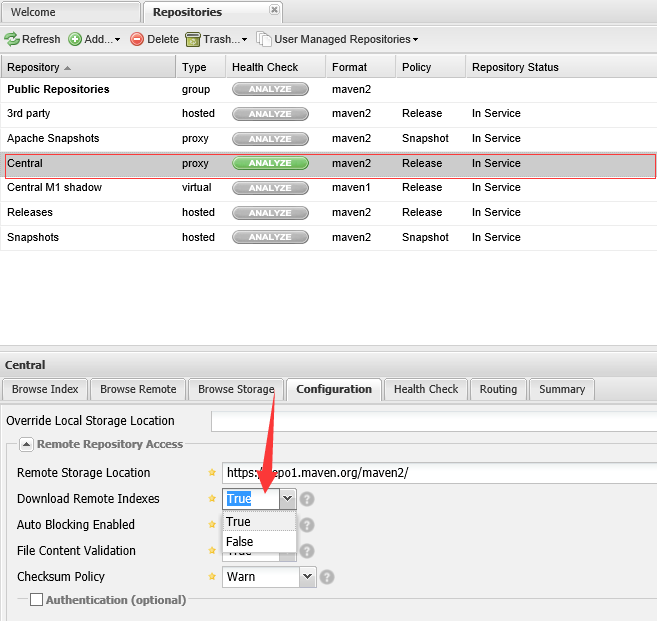
nexus配置大部分使用默认配置即可,主要是配置一个项目索引
选择Central仓库,设置Download Remote Indexes:True
Nexus使用
- 项目使用nexus私服的jar包,在项目的pom.xml文件中指定私服仓库
 <repositories>

     <repository>

         <id>nexus</id>

         <name>nexus</name>

         <url>http://192.168.1.103:8081/nexus/content/groups/public/</url>

         <releases>

             <enabled>true</enabled>

         </releases>

         <snapshots>

             <enabled>true</enabled>

         </snapshots>

     </repository>

</repositories> - 项目使用nexus私服的插件,在项目的pom.xml文件中指定插件仓库
 <pluginRepositories>

     <pluginRepository>

         <id>nexus</id>

         <name>nexus</name>

         <url>http://192.168.1.103:8081/nexus/content/groups/public/</url>

         <releases>

             <enabled>true</enabled>

         </releases>

         <snapshots>

             <enabled>true</enabled>

         </snapshots>

     </pluginRepository>

</pluginRepositories> - 如果想本机所有的maven项目都使用私服的组件,可以在maven的设置文件settings.xml中添加属性,并激活
 <profiles>

     <profile>

         <id>nexusProfile</id>

         <repositories>

             <repository>

                 <id>nexus</id>

                 <name>nexus</name>

                 <url>http://192.168.1.103:8081/nexus/content/groups/public/</url>

                 <releases>

                     <enabled>true</enabled>

                 </releases>

                 <snapshots>

                     <enabled>true</enabled>

                 </snapshots>

             </repository>

         </repositories>

     </profile>

 </profiles>

 <!-- 激活 -->

 <activeProfiles>

     <activeProfile>nexusProfile</activeProfile>

</activeProfiles> - 项目发布到私服,maven项目使用命令:mvn clean deploy;需要在pom文件中配置一下代码;
 <distributionManagement>

         <repository>

             <id>user-release</id>

             <name>User Project Release</name>

             <url>http://192.168.1.103:8081/nexus/content/repositories/releases/</url>

         </repository>

         <snapshotRepository>

             <id>user-snapshots</id>

             <name>User Project SNAPSHOTS</name>

             <url>http://192.168.1.103:8081/nexus/content/repositories/snapshots/</url>

         </snapshotRepository>

     </distributionManagement>
注意还需要配置mvn发布的权限,否则会报401错误,在settings.xml中配置权限,其中id要与pom文件中的id一致
 <server>

     <id>user-release</id>

     <username>admin</username>

     <password>admin123</password>

 </server>

 <server>

     <id>user-snapshots</id>

     <username>admin</username>

     <password>admin123</password>

 </server>
发布成功后,可以在nexus中看到

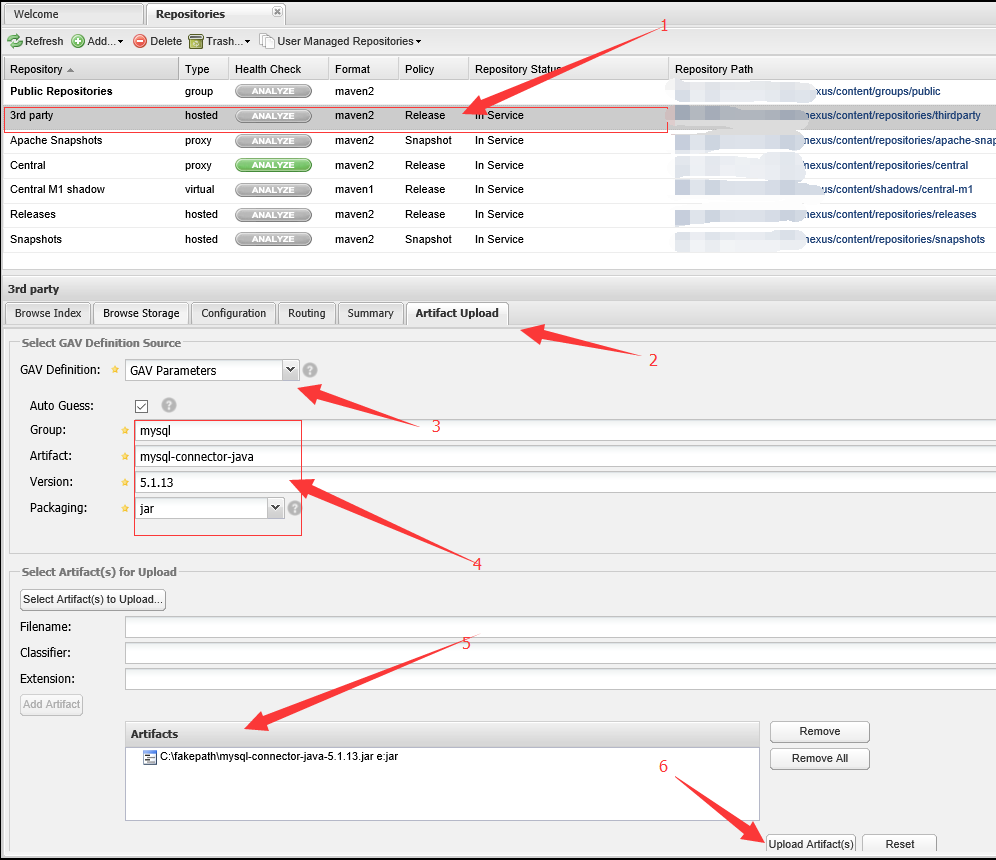
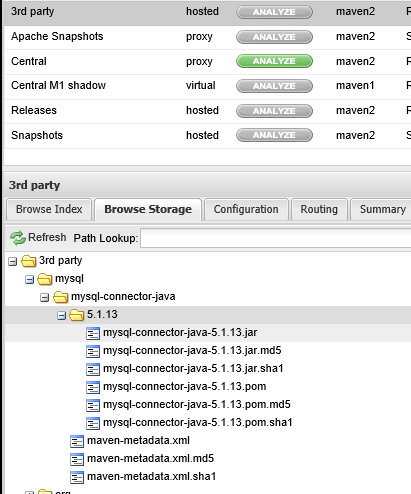
- 上传第三方的jar包,选择3rd party-->Artifact Upload--> 选择GAV方式-->填好构建参数-->增加jar包-->上传,在Browse Storeage查看
【Maven】Nexus配置和使用的更多相关文章
- maven+nexus配置本地私有仓库
以下是settting.xml的配置 <?xml version="1.0" encoding="UTF-8"?> <settings> ...
- Maven nexus安装、配置和使用
简介 Nexus 可以代理并缓存 Maven 构件,当 Maven 需要下载构件的时候,就不需要反复的请求中央仓库. 有些公司都不提供外网给项目组人员,因此就不能使用 Maven 访问 ...
- 架构(二)Maven安装以及Nexus配置
一 Maven安装配置 1.1 下载 http://mirrors.tuna.tsinghua.edu.cn/apache/maven/maven-3/3.5.4/binaries/apache-ma ...
- 使用Nexus配置Maven私有仓库
使用Nexus配置Maven私有仓库 作者:尹正杰 版权声明:原创作品,谢绝转载!否则将追究法律责任. 一.安装配置Nexus 1>.下载nexus 下载地址:https://www.sonat ...
- Nexus Repository3安装和maven,npm配置(Linux)
Nexus Repository下载 根据操作系统选择指定版本,本文针对Linux安装,其他的安装过程可能有所差异. https://help.sonatype.com/repomanager3/do ...
- 使用Maven+Nexus+Jenkins+Svn+Tomcat+Sonar搭建持续集成环境(二)
前言 上一篇随笔Maven+Nexus+Jenkins+Svn+Tomcat+Sonar搭建持续集成环境(一)介绍maven和nexus的环境搭建,以及如何使用maven和nexus统一管理库 ...
- 使用Maven+Nexus+Jenkins+Svn+Tomcat+Sonar搭建持续集成环境(一)
前言 但凡一个略有规模的项目都需要一个持续集成环境的支撑,为什么需要持续集成环境,我们来看一个例子.假如一个项目,由A.B两位程序员来协作开发,A负责前端模块,B负责后端模块,前端依赖后端.A ...
- 国内可用maven repository 配置
国内可用maven repository 配置 发表于2016/1/4 23:08:04 10235人阅读 分类: maven 鉴于一些原因,从maven中央仓库download依赖包时,被各种折磨 ...
- maven的安装,maven库配置和Eclipse插件的安装
maven的安装,maven库配置和Eclipse插件的安装 1.下载并解压maven 2.配置环境变量 3.配置maven配置文件 1.下载链接 Downloading Apache Maven 2 ...
随机推荐
- windows安装python运行环境使用pycharm
pycharm下载地址: https://www.jetbrains.com/zh/pycharm/download/download-thanks.html 安装教程: https://blog.c ...
- linux装机首先需要关闭的服务
关闭selinux和iptables:setenforce 0 iptables -Fiptables -t nat -Fsystemctl stop firewalldsystemctl disab ...
- linux获取日志指定行数范围内的内容
假如我要获取“浅浅岁月拂满爱人袖”到“落入凡尘伤情着我”之间的内容. 1.首先得到他们所在的行号: -n选项显示行号 但是有时候grep后显示的是“匹配到二进制文件(标准输入)”,说明搜索的字符串在某 ...
- Vue2.0中v-for迭代语法变化(key、index)
语法发生了变化:http://blog.csdn.net/sinat_35512245/article/details/53966788 新数组语法 value in arr (value, inde ...
- jq js 对象互转
. DOM 对象转成 jQuery 对象 对于已经是一个 DOM 对象,只需要用 $() 把DOM对象包装起来,就可以获得一个 jQuery 对象了,$(DOM 对象) 注: var是定义变量 如: ...
- Apache Hive 执行HQL语句报错 ( 10G )
# 故障描述: hive > , ) as uuid, count(distinct(request_body["uuid"])) as count from log_bft ...
- python 学习备忘
list列表排序 def listdir(path): #返回一个排序后的目录list files=os.listdir(path) files.sort(key=lambda x:str(x[:-4 ...
- 电脑连接树莓派Pi Zero W
作者:陈拓 chentuo@ms.xab.ac.cn 2018.05.16/2018.06.09 0. 概述 本位介绍两种电脑连接树莓派Pi Zero W的方法: 电脑通过USB以太网连接树莓派Ze ...
- MySQL 事务 是对数据进行操作,对结构没有影响,比如创建表、删除表,事务就不起作用
- MongoDB服务无法启动,发生服务特定错误:100
问题:MongoDB服务无法启动,发生服务特定错误:100 原因:没有正常关闭mongod服务,导致mongod被锁 解决方案:进入db文件夹,删除mongod.lock文件,然后重新启动服务即可