
【Hadoop学习之八】MapReduce开发
环境
虚拟机:VMware 10
Linux版本:CentOS-6.5-x86_64
客户端:Xshell4
FTP:Xftp4
jdk8
hadoop-3.1.1
伪分布式:HDFS和YARN 伪分布式搭建,事先启动HDFS和YARN
第一步:开发WordCount示例
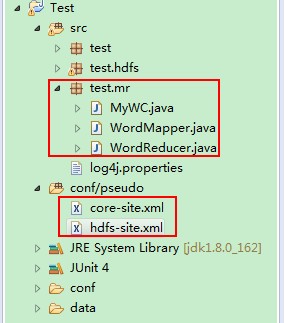
package test.mr;

import org.apache.hadoop.conf.Configuration;

import org.apache.hadoop.fs.Path;

import org.apache.hadoop.io.IntWritable;

import org.apache.hadoop.io.Text;

import org.apache.hadoop.mapreduce.Job;

import org.apache.hadoop.mapreduce.lib.input.FileInputFormat;

import org.apache.hadoop.mapreduce.lib.output.FileOutputFormat;

public class MyWC {

    public static void main(String[] args) {

        Configuration conf = new Configuration();

        try {

            Job job = Job.getInstance(conf,"word count");

            job.setJarByClass(MyWC.class);

            job.setMapperClass(WordMapper.class);

            job.setOutputKeyClass(Text.class);

            job.setOutputValueClass(IntWritable.class);

            job.setReducerClass(WordReducer.class);

            job.setNumReduceTasks(1);

//            FileInputFormat.addInputPath(job, new Path("hdfs://node1:9820/wjy/input/text.txt"));

//            Path output = new Path("hdfs://node1:9820/wjy/output/");

            //注意这里设置的目录是从 HDFS根目录开始的

            FileInputFormat.addInputPath(job, new Path("/wjy/input/text.txt"));

            Path output = new Path("/wjy/output/");

            if (output.getFileSystem(conf).exists(output))

            {

                output.getFileSystem(conf).delete(output,true);

            }

            FileOutputFormat.setOutputPath(job, output);

            System.exit(job.waitForCompletion(true) ? 0 : 1);

        } catch (Exception e) {

            e.printStackTrace();

        }

    }

}
package test.mr;

import java.io.IOException;

import java.util.StringTokenizer;

import org.apache.hadoop.io.IntWritable;

import org.apache.hadoop.io.LongWritable;

import org.apache.hadoop.io.Text;

import org.apache.hadoop.mapreduce.Mapper;

public class WordMapper extends Mapper<LongWritable, Text, Text, IntWritable> {

    // 写在外面 map循环创建会造成内存溢出

    private final static IntWritable one = new IntWritable(1);

    // map写出的数据放到buffer字节数组里 这样word可以继续使用 没有影响

    private Text word = new Text();

    @Override

    protected void map(LongWritable key, Text value, Mapper<LongWritable, Text, Text, IntWritable>.Context context)

            throws IOException, InterruptedException {

        //StringTokenizer 默认按照空格 制表符 回车等空白符作为分隔符来切分传入的数据

        StringTokenizer st = new StringTokenizer(value.toString());

        while (st.hasMoreTokens()) {

            word.set(st.nextToken());

            context.write(word, one);

        }

    }

}
package test.mr;

import java.io.IOException;

import org.apache.hadoop.io.IntWritable;

import org.apache.hadoop.io.Text;

import org.apache.hadoop.mapreduce.Reducer;

public class WordReducer extends Reducer<Text, IntWritable, Text, IntWritable> {

    private IntWritable result = new IntWritable();

    @Override

    protected void reduce(Text key, Iterable<IntWritable> values,

            Reducer<Text, IntWritable, Text, IntWritable>.Context context) throws IOException, InterruptedException {

        //key:hello

        //values:(1,1,1,1,1,1)

        int sum = 0;

        for (IntWritable val : values) {

            sum += val.get();

        }

        result.set(sum);

        context.write(key, result);

    }

}
第二步:程序打jar包:MyWC.jar,上传jar和测试文件
[root@node1 ~]# ls

MyWC.jar text.txt

[root@node1 ~]# hdfs dfs -mkdir /wjy/input

[root@node1 ~]# hdfs dfs -mkdir /wjy/output

[root@node1 ~]# hdfs dfs -put /root/text.txt /wjy/input
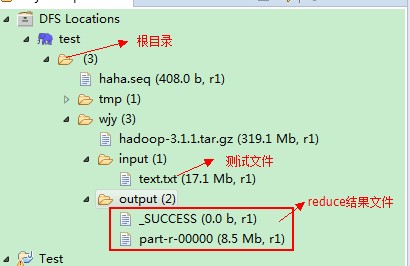
text.txt文件里面是测试数据:
hello sxt 1
hello sxt 2
hello sxt 3
...
hello sxt 1000000
第三步:运行jar:MyWC.jar
[root@node1 ~]# hadoop jar MyWC.jar test.mr.MyWC

-- ::, WARN util.NativeCodeLoader: Unable to load native-hadoop library for your platform... using builtin-java classes where applicable

-- ::, INFO client.RMProxy: Connecting to ResourceManager at /0.0.0.0:

-- ::, WARN mapreduce.JobResourceUploader: Hadoop command-line option parsing not performed. Implement the Tool interface and execute your application with ToolRunner to remedy this.

-- ::, INFO mapreduce.JobResourceUploader: Disabling Erasure Coding for path: /tmp/hadoop-yarn/staging/root/.staging/job_1547546637762_0003

-- ::, INFO input.FileInputFormat: Total input files to process :

-- ::, INFO mapreduce.JobSubmitter: number of splits:

-- ::, INFO Configuration.deprecation: yarn.resourcemanager.system-metrics-publisher.enabled is deprecated. Instead, use yarn.system-metrics-publisher.enabled

-- ::, INFO mapreduce.JobSubmitter: Submitting tokens for job: job_1547546637762_0003

-- ::, INFO mapreduce.JobSubmitter: Executing with tokens: []

-- ::, INFO conf.Configuration: resource-types.xml not found

-- ::, INFO resource.ResourceUtils: Unable to find 'resource-types.xml'.

-- ::, INFO impl.YarnClientImpl: Submitted application application_1547546637762_0003

-- ::, INFO mapreduce.Job: The url to track the job: http://node1:8088/proxy/application_1547546637762_0003/

-- ::, INFO mapreduce.Job: Running job: job_1547546637762_0003

-- ::, INFO mapreduce.Job: Job job_1547546637762_0003 running in uber mode : false

-- ::, INFO mapreduce.Job:  map % reduce %

-- ::, INFO mapreduce.Job:  map % reduce %

-- ::, INFO mapreduce.Job:  map % reduce %

-- ::, INFO mapreduce.Job:  map % reduce %

-- ::, INFO mapreduce.Job:  map % reduce %

-- ::, INFO mapreduce.Job: Job job_1547546637762_0003 completed successfully

-- ::, INFO mapreduce.Job: Counters:

    File System Counters

        FILE: Number of bytes read=

        FILE: Number of bytes written=

        FILE: Number of read operations=

        FILE: Number of large read operations=

        FILE: Number of write operations=

        HDFS: Number of bytes read=

        HDFS: Number of bytes written=

        HDFS: Number of read operations=

        HDFS: Number of large read operations=

        HDFS: Number of write operations=

    Job Counters

        Launched map tasks=

        Launched reduce tasks=

        Data-local map tasks=

        Total time spent by all maps in occupied slots (ms)=

        Total time spent by all reduces in occupied slots (ms)=

        Total time spent by all map tasks (ms)=

        Total time spent by all reduce tasks (ms)=

        Total vcore-milliseconds taken by all map tasks=

        Total vcore-milliseconds taken by all reduce tasks=

        Total megabyte-milliseconds taken by all map tasks=

        Total megabyte-milliseconds taken by all reduce tasks=

    Map-Reduce Framework

        Map input records=

        Map output records=

        Map output bytes=

        Map output materialized bytes=

        Input split bytes=

        Combine input records=

        Combine output records=

        Reduce input groups=

        Reduce shuffle bytes=

        Reduce input records=

        Reduce output records=

        Spilled Records=

        Shuffled Maps =

        Failed Shuffles=

        Merged Map outputs=

        GC time elapsed (ms)=

        CPU time spent (ms)=

        Physical memory (bytes) snapshot=

        Virtual memory (bytes) snapshot=

        Total committed heap usage (bytes)=

        Peak Map Physical memory (bytes)=

        Peak Map Virtual memory (bytes)=

        Peak Reduce Physical memory (bytes)=

        Peak Reduce Virtual memory (bytes)=

    Shuffle Errors

        BAD_ID=

        CONNECTION=

        IO_ERROR=

        WRONG_LENGTH=

        WRONG_MAP=

        WRONG_REDUCE=

    File Input Format Counters

        Bytes Read=

    File Output Format Counters

        Bytes Written=
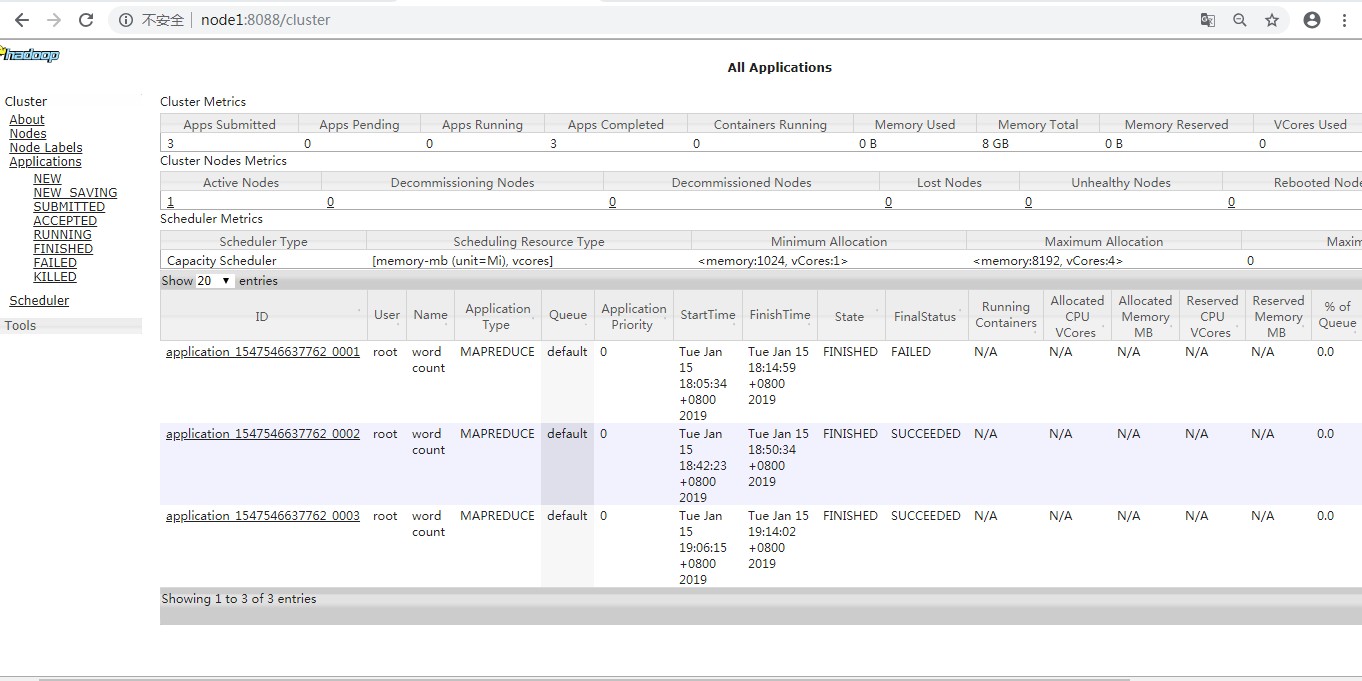
第四步:查看下载处理结果
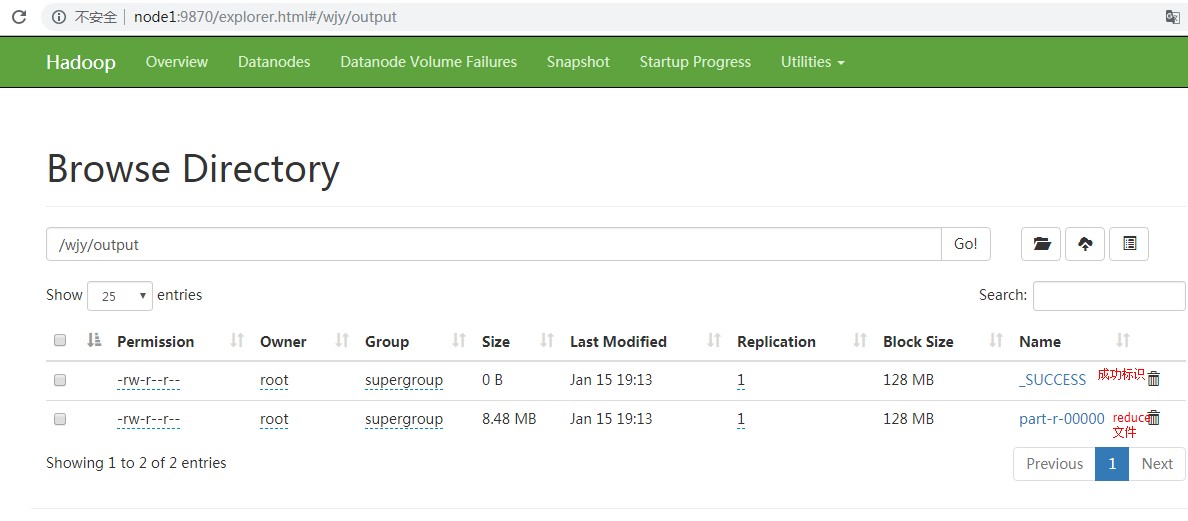
[root@node1 sbin]# hdfs dfs -ls /wjy/output

-- ::, WARN util.NativeCodeLoader: Unable to load native-hadoop library for your platform... using builtin-java classes where applicable

Found  items

-rw-r--r--   1 root supergroup          0 2019-01-15 19:13 /wjy/output/_SUCCESS

-rw-r--r--   1 root supergroup    8888922 2019-01-15 19:13 /wjy/output/part-r-00000

[root@node1 ~]# hdfs dfs -get /wjy/output/part-r-00000 ./

[root@node1 ~]# vi part-r-

hello

sxt
问题1:
[2019-01-15 17:08:05.159]Container killed on request. Exit code is 143
[2019-01-15 17:08:05.182]Container exited with a non-zero exit code 143.
2019-01-15 17:08:20,957 INFO mapreduce.Job: Task Id : attempt_1547542193692_0003_m_000000_2, Status : FAILED
[2019-01-15 17:08:18.963]Container [pid=4064,containerID=container_1547542193692_0003_01_000004] is running 210352640B beyond the 'VIRTUAL' memory limit. Current usage: 26.0 MB of 1 GB physical memory used; 2.3 GB of 2.1 GB virtual memory used. Killing container.
原因:申请内存过大而被终止
解决措施:取消内存检查
配置:yarn-site.xml
<property>

<name>yarn.nodemanager.vmem-check-enabled</name>

<value>false</value>

<description>Whether virtual memory limits will be enforced for containers</description>

</property>
问题2:
2019-01-15 18:51:11,229 INFO mapred.ClientServiceDelegate: Application state is completed. FinalApplicationStatus=SUCCEEDED. Redirecting to job history server
2019-01-15 18:51:12,237 INFO ipc.Client: Retrying connect to server: 0.0.0.0/0.0.0.0:10020. Already tried 0 time(s); retry policy is RetryUpToMaximumCountWithFixedSleep(maxRetries=10, sleepTime=1000 MILLISECONDS)
java.io.IOException: java.net.ConnectException: Your endpoint configuration is wrong; For more details see: http://wiki.apache.org/hadoop/UnsetHostnameOrPort
原因:由于没有启动historyserver引起的
解决办法:
在mapred-site.xml配置文件中添加
<property>

    <name>mapreduce.jobhistory.address</name>

    <value>node1:10020</value>

</property>
在namenode上执行命令:mr-jobhistory-daemon.sh start historyserver
这样在,namenode上会启动JobHistoryServer服务,可以在historyserver的日志中查看运行情况
问题3:
-- ::, WARN hdfs.DataStreamer: Caught exception

java.lang.InterruptedException

    at java.lang.Object.wait(Native Method)

    at java.lang.Thread.join(Thread.java:)

    at java.lang.Thread.join(Thread.java:)

    at org.apache.hadoop.hdfs.DataStreamer.closeResponder(DataStreamer.java:)

    at org.apache.hadoop.hdfs.DataStreamer.endBlock(DataStreamer.java:)

    at org.apache.hadoop.hdfs.DataStreamer.run(DataStreamer.java:)
这个网上有说是BUG,也有说是没有按照hadoop约定的规则创建HDFS目录,
对于上传块目录:
格式:hdfs dfs -mkdir -p /user/input
比如使用root用户登录,则创建目录应为:hdfs dfs -mkdir -p /root/input
【Hadoop学习之八】MapReduce开发的更多相关文章
- hadoop学习(七)----mapReduce原理以及操作过程
前面我们使用HDFS进行了相关的操作,也了解了HDFS的原理和机制,有了分布式文件系统我们如何去处理文件呢,这就的提到hadoop的第二个组成部分-MapReduce. MapReduce充分借鉴了分 ...
- Hadoop学习笔记—MapReduce的理解
我不喜欢照搬书上的东西,我觉得那样写个blog没多大意义,不如直接把那本书那一页告诉大家,来得省事.我喜欢将我自己的理解.所以我会说说我对于Hadoop对大量数据进行处理的理解.如果有理解不对欢迎批评 ...
- Hadoop学习之Mapreduce执行过程详解
一.MapReduce执行过程 MapReduce运行时,首先通过Map读取HDFS中的数据,然后经过拆分,将每个文件中的每行数据分拆成键值对,最后输出作为Reduce的输入,大体执行流程如下图所示: ...
- 【尚学堂·Hadoop学习】MapReduce案例2--好友推荐
案例描述 根据好友列表,推荐好友的好友 数据集 tom hello hadoop cat world hadoop hello hive cat tom hive mr hive hello hive ...
- 【尚学堂·Hadoop学习】MapReduce案例1--天气
案例描述 找出每个月气温最高的2天 数据集 -- :: 34c -- :: 38c -- :: 36c -- :: 32c -- :: 37c -- :: 23c -- :: 41c -- :: 27 ...
- hadoop学习day3 mapreduce笔记
1.对于要处理的文件集合会根据设定大小将文件分块,每个文件分成多块,不是把所有文件合并再根据大小分块,每个文件的最后一块都可能比设定的大小要小 块大小128m a.txt 120m 1个块 b.txt ...
- Hadoop学习(3)-mapreduce快速入门加yarn的安装
mapreduce是一个运算框架,让多台机器进行并行进行运算, 他把所有的计算都分为两个阶段,一个是map阶段,一个是reduce阶段 map阶段:读取hdfs中的文件,分给多个机器上的maptask ...
- Hadoop学习(4)-mapreduce的一些注意事项
关于mapreduce的一些注意细节 如果把mapreduce程序打包放到了liux下去运行, 命令java –cp xxx.jar 主类名 如果报错了,说明是缺少相关的依赖jar包 用命令had ...
- Hadoop 学习之MapReduce
MapReduce充分利用了分而治之,主要就是将一个数据量比较大的作业拆分为多个小作业的框架,而用户需要做的就是决定拆成多少份,以及定义作业本身,用户所要做的操作少了又少,真是Very Good! 一 ...
随机推荐
- 新兴的API(fileReader、geolocation、web计时、web worker)
requestAnimationFrame() 每次浏览器重绘之前会调用这个方法!!! 它接收一个参数,就是回调函数: 它可以保证在最佳的间隔时间调用传入的回调函数,以达到让屏幕产生最流畅的动画效果. ...
- PostgreSQL 自动输入密码
在 Shell 命令行中,使用 postgresql-client 连接 PostgreSQL 数据库时,每次都要输入密码.如果要写 Shell Script,做一些类似于备份的自动化管理工作,每次都 ...
- 文件批量scp分发脚本
#!/bin/bash SERVERS="172.17.xx.y 172.17.pp.mm" PASSWORD=机器登录密码 auto_ssh_copy_file() { expe ...
- 用uart实现printf函数
硬件:JZ2440 实现功能:用putchr()函数实现printf() start.s nand.c uart.c uart.h my_stdio.c my_stdio.h main.c start ...
- 数据库 - Navicat与pymysql模块
一.Nabicat 在生产环境中操作MySQL数据库还是推荐使用命令行工具mysql,但在我们自己开发测试时, 可以使用可视化工具Navicat,以图形界面的形式操作MySQL数据库 官网下载:htt ...
- c#4.0 Task.Factory.StartNew 用法
var t1 = Task.Factory.StartNew<string>(() => { return “1111111”; }); //t1.Wait(); t1.Contin ...
- sqlserver生成表结构文档的方法
只说原理了,具体 可以自己使用程序去生成htm或word文档. 1.首先获取所有的表 SELECT name, id From sysobjects WHERE xtype = 'u' ORDER B ...
- DS1-3
#include <stdio.h> #include <string.h> #define MAXSIZE 1024 double polynomial[MAXSIZE]; ...
- cloud-api-service和cloud-iopm-web提交merge方法
cloud-api-service应该push to '自己的分支',然后去gitserver请求合并 cloud-iopm-web(master分支)应该push to Upstream,然后去gi ...
- GlusterFS 配置及使用
GlusterFS集群创建 一.简介 GlusterFS概述 Glusterfs是一个开源的分布式文件系统,是Scale存储的核心,能够处理千数量级的客户端.在传统的解决 方案中Glusterfs能够 ...