
OC分割输入验证码的视觉效果
效果图:
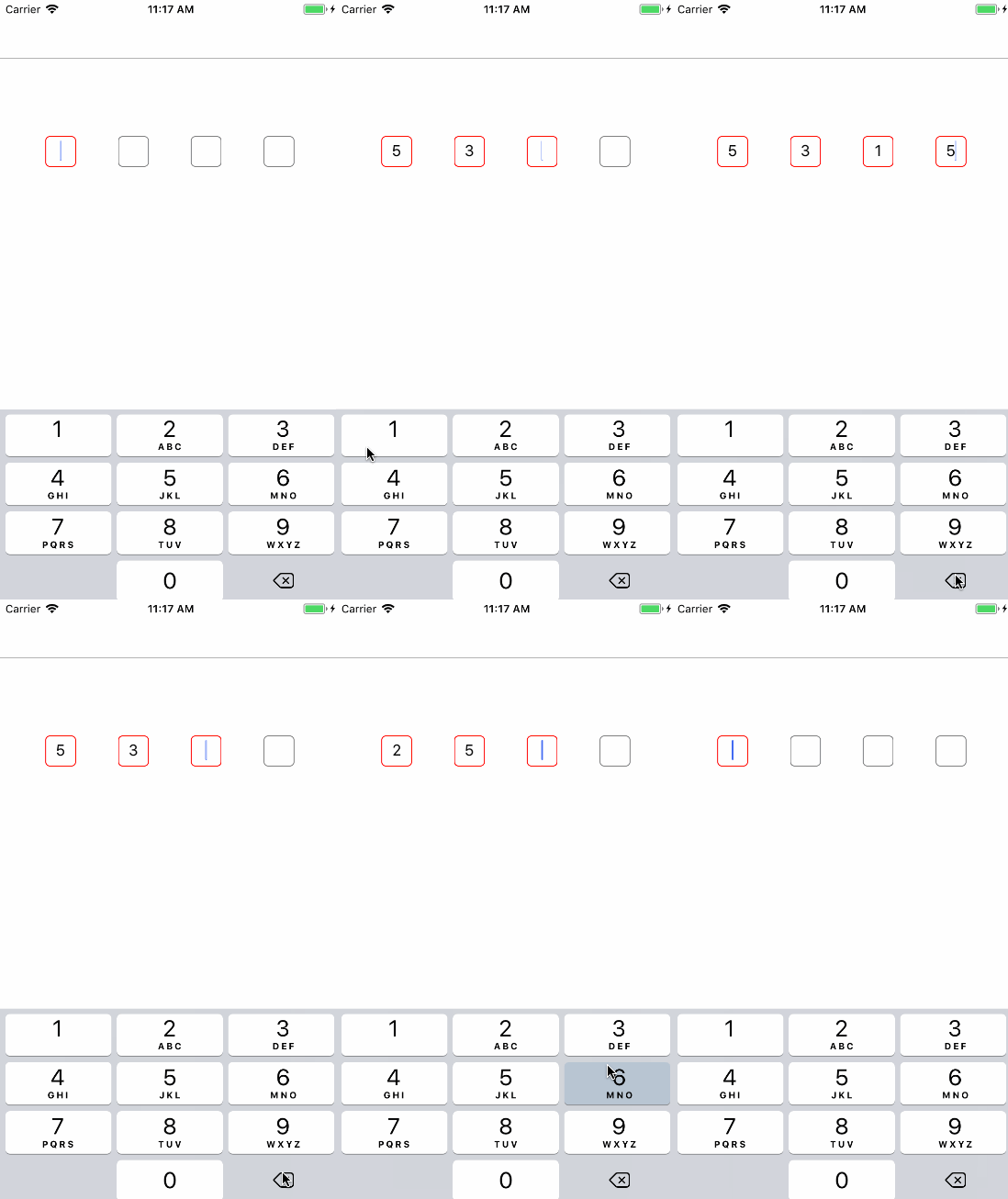
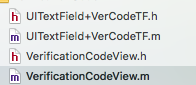
用到的类:
UITextField+VerCodeTF.h
#import <UIKit/UIKit.h>

@protocol VerCodeTFDelegate <UITextFieldDelegate>

@optional

- (void)textFieldDidDeleteBackward:(UITextField *)textField;

@end

NS_ASSUME_NONNULL_BEGIN

@interface UITextField (VerCodeTF)

@property (weak, nonatomic) id <VerCodeTFDelegate> delegate;

@end

NS_ASSUME_NONNULL_END
UITextField+VerCodeTF.m
#import "UITextField+VerCodeTF.h"

#import <objc/runtime.h>

@implementation UITextField (VerCodeTF)

+ (void)load {

    Method method1 = class_getInstanceMethod([self class], NSSelectorFromString(@"deleteBackward"));

    Method method2 = class_getInstanceMethod([self class], @selector(vc_deleteBackward));

    method_exchangeImplementations(method1, method2);

}

/**

 当删除按钮点击是触发的事件

 */

- (void)vc_deleteBackward {

    [self vc_deleteBackward];

    if ([self.delegate respondsToSelector:@selector(textFieldDidDeleteBackward:)])

    {

        id <VerCodeTFDelegate> delegate  = (id<VerCodeTFDelegate>)self.delegate;

        [delegate textFieldDidDeleteBackward:self];

    }

}

@end
VerificationCodeView.h
#import <UIKit/UIKit.h>

NS_ASSUME_NONNULL_BEGIN

@interface VerificationCodeView : UIView

@end

NS_ASSUME_NONNULL_END
VerificationCodeView.m
#import "VerificationCodeView.h"

#import "UITextField+VerCodeTF.h"

#define Count 4 //一共有多少个输入框

#define Secure NO //是否密文

#define Width 34 //输入框的宽度,这边我比较懒,都做成正方形了

//输入框输入时边框颜色

#define RedColor [UIColor redColor].CGColor

//输入框未输入时边框颜色

#define GrayColor [UIColor grayColor].CGColor

@interface VerificationCodeView ()<UITextFieldDelegate>

@property(nonatomic,strong)NSMutableArray *tfArr;

@property(nonatomic,copy)NSString *lastTFText;//最有一个TextField的内容

@end

@implementation VerificationCodeView

-(instancetype)initWithFrame:(CGRect)frame{

    frame.size.height = 34;

    self = [super initWithFrame:frame];

    if(self){

        self.lastTFText = @"";

        self.tfArr = [NSMutableArray array];

        float margin = ( frame.size.width - Width * Count)/3.0;

        for(int i=0;i<Count;i++){

            UITextField *tf = [[UITextField alloc]initWithFrame:CGRectMake((Width+margin)*i, 0, Width, Width)];

            tf.secureTextEntry = Secure;

            tf.tag = i+1;

            tf.layer.borderWidth = 1.0f;

            tf.layer.cornerRadius = 5.0f;

            tf.textAlignment = NSTextAlignmentCenter;

            tf.keyboardType = UIKeyboardTypeNumberPad;

            tf.delegate = self;

            [self addSubview:tf];

            [self.tfArr addObject:tf];

            if(i == 0){

                [tf becomeFirstResponder];

                tf.userInteractionEnabled = YES;

                tf.layer.borderColor = RedColor;

            }else{

                tf.userInteractionEnabled = NO;

                tf.layer.borderColor = GrayColor;

            }

            [tf addTarget:self action:@selector(tfChange:) forControlEvents:UIControlEventEditingChanged];

        }

    }

    return self;

}

- (BOOL)textField:(UITextField *)textField shouldChangeCharactersInRange:(NSRange)range replacementString:(NSString *)string{

    //>0说明我输入了一个字符

    if(textField.text.length > 0){

        textField.text = [textField.text substringToIndex:textField.text.length-1];

    }

    return YES;

}

-(void)tfChange:(UITextField *)textField{

    if(textField.tag == Count){

        self.lastTFText = textField.text;

    }

    if(textField.text.length > 0){

        if(textField.tag < self.tfArr.count){

            UITextField *tf = self.tfArr[textField.tag];

            tf.userInteractionEnabled = YES;

            [tf becomeFirstResponder];

            tf.layer.borderColor = RedColor;

            textField.userInteractionEnabled = NO;

        }else{

            //四个输入框输入完毕,

            //            [self endEditing:YES];

        }

    }

}

- (void)textFieldDidDeleteBackward:(UITextField *)textField{

    if(textField.tag == Count && self.lastTFText.length > 0){

        [textField becomeFirstResponder];

        self.lastTFText = @"";

    }else{

        //因为第一个UITextField的tag值为1

        if(textField.tag > 1){

            UITextField *tf = self.tfArr[textField.tag-2];

            tf.userInteractionEnabled = YES;

            tf.text = @"";

            [tf becomeFirstResponder];

            textField.userInteractionEnabled = NO;

            textField.layer.borderColor = GrayColor;

        }

    }

}

@end
使用:
VerificationCodeView *codeView = [[VerificationCodeView alloc]initWithFrame:CGRectMake(50, 150, self.view.bounds.size.width-100, 44)];

 [self.view addSubview:codeView];
OC分割输入验证码的视觉效果的更多相关文章
- js实现输入验证码
html部分: <div> <input type="text" id="input" /> <input type=" ...
- iOS学习——输入验证码界面封装
在很多App中都有输入验证码的功能需求,最近项目需要也有这个功能.做完之后简单整理了一下,将实现的基本思路做下记录.实现后的效果大致如下图所示,当四位签到码全部输入时,提交按钮是可以提交的,否则提交按 ...
- Lua 用指定字符或字符串分割输入字符串,返回包含分割结果的数组
// 用指定字符或字符串分割输入字符串,返回包含分割结果的数组 // @function [parent=#string] split // @param string input 输入字符串 // ...
- JS中同步显示并分割输入的数字字符串
题目比较晦涩,来张图来说明要表达的效果: 第一张图的效果就是,用户输入一个数字,上面就显示一个大层,然后显示输入的数字,并把数字用空格按照每四位分割出来.好像在建行的网上银行上面就有这种效果.第二个图 ...
- python语言验证码识别,以后不用老输入验证码了。
1.Python 3.6 安装包 1.要加环境变量 2.pip安装PIL库 3.pip安装pytesseract模块 2.tesseract-ocr-setup-4.00.00dev.exe -- ...
- 使用request实现手工输入验证码登录
我们的目标网站是这个http://awehome.com.cn,登录页面是这个http://awehome.com.cn/tenant/login import requests import jso ...
- Python输错4次用户名密码需要输入验证码
time = 0 login_success = False USER_NAME = "alex" PWD = "alex123" CHECK_CODE = & ...
- PHP中判断输入验证码是否一致
首先用session将随机生成的验证码的值传到页面,然后获取当前文本框中输入的值 进行对比:代码如下: 生成的随机数,把它传到session里面 <? session_start(); 必 ...
- shiro 和spring集合 实现登录时输入验证码并校验(七)
编写实现验证码的主体实现类:CaptchaCode import java.util.UUID; import javax.servlet.http.HttpServletRequest; impor ...
随机推荐
- 针对phpStudy网站服务器的入侵
今天客户服务器上出现报警,查找了下原因,发现根目录下有wk.php E:\phpStudy\MySQL\bin\mysqld.exe, Version: (MySQL Community Server ...
- Hadoop -- ES -- CURD
1.获取ES连接 package com.ciic.history.common; import org.elasticsearch.client.transport.TransportClient; ...
- JS 如何将“在线图片资源”转换成“base64”
在实现html2canvas截图的功能时,会报下面的错误: Uncaught DOMException: Failed to execute 'toDataURL' on 'HTMLCanvasEle ...
- Solve error LNK2001 about pcl::io::vtkPolyDataToPointCloud
When use function 'pcl::io::vtkPolyDataToPointCloud' in PCL 1.6.0, one may have error as follows: &g ...
- MSDN2001 快捷方式丢失的处理方法
1. C:\Windows\hh.exe,右键 - 发送快捷方式到桌面 2. 给快捷方式改名为:MSDN2001 3. 右键快捷方式 - 属性- 快捷方式选项卡中的目标填写: C:\Windows\ ...
- 三剑客之grep
简介 grep (global search regular expression(RE) and print out the line,全面搜索正则表达式并把行打印出来)是一种强大的文本搜索工具,它 ...
- IBatisNet不常用到的配置(Dao.config ConnectionTimeout),居然不起作用(前辈留给我们的坑)
IBattis 默认超时时间好像是30s,可多于这个时间总就会报错:DaoProxy : unable to intercept method name 'ExcuteQuery', cause : ...
- JS BOM DOM对象 select联动 计时器 时间 css操作 节点(标签 ) 查找标签 {前端基础之BOM和DOM}
前端基础之BOM和DOM 前戏 到目前为止,我们已经学过了JavaScript的一些简单的语法.但是这些简单的语法,并没有和浏览器有任何交互. 也就是我们还不能制作一些我们经常看到的网页的一些交互,我 ...
- POJ 1854 - Evil Straw Warts Live
Description A palindrome is a string of symbols that is equal to itself when reversed. Given an inpu ...
- [No0000153]详解C# 迭代器【转】
迭代器模式是设计模式中行为模式(behavioral pattern)的一个例子,他是一种简化对象间通讯的模式,也是一种非常容易理解和使用的模式.简单来说,迭代器模式使得你能够获取到序列中的所有元素而 ...