
WCF服务寄宿应用程序
1.先创建一个WCF服务库
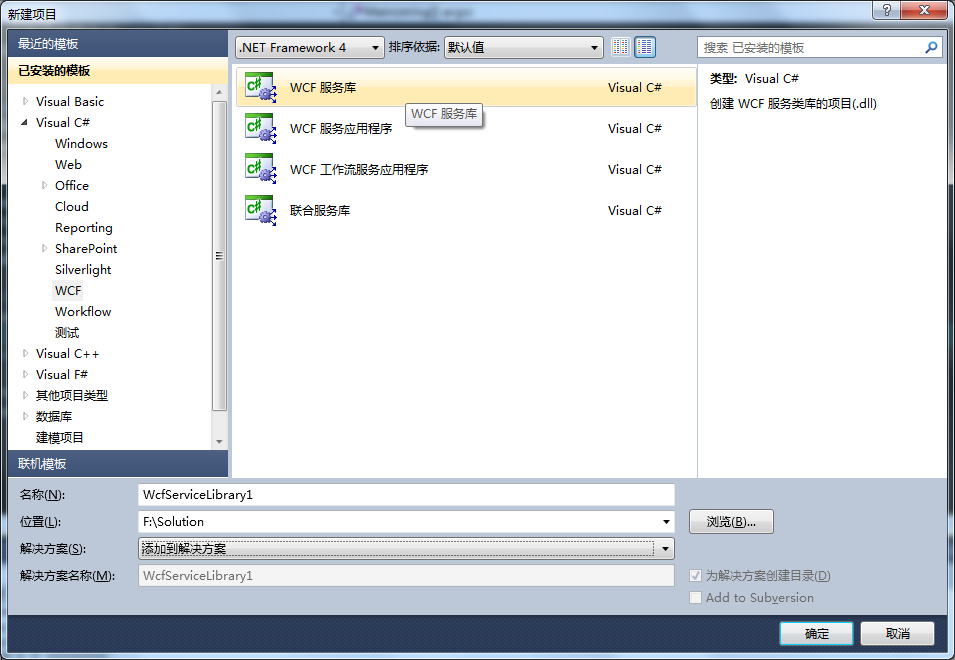
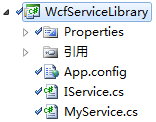
2.创建一个Console控制台,服务将寄宿在该应用程序上,该程序一旦关闭,服务将停止。
控制台代码:
 using System;

 using System.Collections.Generic;

 using System.Linq;

 using System.Text;

 using WcfServiceLibrary;

 using System.ServiceModel;

 using System.ServiceModel.Description;

 namespace wcfConsole

 {

     class Program

     {

         static void Main(string[] args)

         {

             //这是将来要引用的服务地址,由你自己定义

             Uri address = new Uri("http://localhost:8123/ServiceDemo/Service");

             //MyService是你WCF服务库里面服务的名称

             ServiceHost selfHost = new ServiceHost(typeof(MyService), address);

             try

             {

                 //IService是你服务库里面接口的名称

                 selfHost.AddServiceEndpoint(typeof(IService), new WSHttpBinding(), "MyService");

                 //设置服务行为

                 ServiceMetadataBehavior smb = new ServiceMetadataBehavior();

                 smb.HttpGetEnabled = true;

                 selfHost.Description.Behaviors.Add(smb);

                 //打开 ServiceHost

                 selfHost.Open();

                 Console.WriteLine("success");

                 Console.WriteLine();

                 Console.ReadLine();

                 // 关闭 ServiceHost

                 selfHost.Close();

             }

             catch (CommunicationException ce)

             {

                 Console.WriteLine("Error : {0}", ce.Message);

                 selfHost.Abort();

             }

         }

     }

 }
也可以用 app.config 配置服务信息,代码要略作修改。
app.config内容:
 <?xml version="1.0" encoding="utf-8" ?>

 <configuration>

     <system.serviceModel>

         <services>

             <service name="WcfServiceLibrary.MyService" behaviorConfiguration="MyBehavior">

                 <host>

                     <baseAddresses>

                         <add baseAddress="http://localhost:8123/ServiceDemo/Service" />

                     </baseAddresses>

                 </host>

                 <endpoint address="MyService" binding="basicHttpBinding"

                  contract="WcfServiceLibrary.IService"  />

             </service>

         </services>

         <behaviors>

             <serviceBehaviors>

                 <behavior name="MyBehavior">

                     <serviceMetadata httpGetEnabled="true" />

                 </behavior>

             </serviceBehaviors>

         </behaviors>

     </system.serviceModel>

 </configuration>
service.name 是你WCF服务库里服务类的完全限定名
service.behaviorConfiguration 要与 behavior.name 相同
endpoint.contract 是你WCF服务库里接口的完全限定名
改动后的控制台代码:
 using System;

 using System.Collections.Generic;

 using System.Linq;

 using System.Text;

 using WcfServiceLibrary;

 using System.ServiceModel;

 using System.ServiceModel.Description;

 namespace wcfConsole

 {

     class Program

     {

         static void Main(string[] args)

         {

             //这是将来要引用的服务地址,由你自己定义

             //Uri address = new Uri("http://localhost:8123/ServiceDemo/Service");

             //MyService是你WCF服务库里面服务的名称

             ServiceHost selfHost = new ServiceHost(typeof(MyService));

             try

             {

                 ////IService是你服务库里面接口的名称

                 //selfHost.AddServiceEndpoint(typeof(IService), new WSHttpBinding(), "MyService");

                 ////设置服务行为

                 //ServiceMetadataBehavior smb = new ServiceMetadataBehavior();

                 //smb.HttpGetEnabled = true;

                 //selfHost.Description.Behaviors.Add(smb);

                 //打开 ServiceHost

                 selfHost.Open();

                 Console.WriteLine("success");

                 Console.WriteLine();

                 Console.ReadLine();

                 // 关闭 ServiceHost

                 selfHost.Close();

             }

             catch (CommunicationException ce)

             {

                 Console.WriteLine("Error : {0}", ce.Message);

                 selfHost.Abort();

             }

         }

     }

 }
测试:
先运行控制台,然后新建项目添加服务引用:http://localhost:8123/ServiceDemo/Service
直接调用WCF服务库默认提供的方法:GetData()
 using System;

 using System.Collections.Generic;

 using System.Linq;

 using System.Web;

 using System.Web.UI;

 using System.Web.UI.WebControls;

 namespace InvokeWcfServiceTest

 {

     public partial class _default : System.Web.UI.Page

     {

         protected void Page_Load(object sender, EventArgs e)

         {

             ServiceReference.ServiceClient client = new ServiceReference.ServiceClient();

             Response.Write(client.GetData());

             Response.End();

         }

     }

 }

结果是可喜的。
WCF服务寄宿应用程序的更多相关文章
- 创建WCF服务寄宿到IIS
一.WCF简介: Windows Communication Foundation(WCF)是由微软开发的一系列支持数据通信的应用程序框架,可以翻译为Windows 通讯开发平台. 整合了原有的win ...
- WCF技术剖析之四:基于IIS的WCF服务寄宿(Hosting)实现揭秘
原文:WCF技术剖析之四:基于IIS的WCF服务寄宿(Hosting)实现揭秘 通过<再谈IIS与ASP.NET管道>的介绍,相信读者已经对IIS和ASP.NET的请求处理管道有了一个大致 ...
- WCF服务寄宿到IIS
一.WCF简介: Windows Communication Foundation(WCF)是由微软开发的一系列支持数据通信的应用程序框架,可以翻译为Windows 通讯开发平台.整合了原有的wind ...
- WCF服务寄宿IIS与Windows服务 - C#/.NET
WCF是Windows平台下程序间通讯的应用程序框架.整合和 .net Remoting,WebService,Socket的机制,是用来开发windows平台上分布式开发的最佳选择.wcf程序的运行 ...
- 关于WCF引用方式之WCF服务寄宿控制台
1.创建解决方案WCFService 依次添加四个项目,如上图,Client和Hosting为控制台应用程序,Service和Service.Interface均为类库. 2.引用关系 Service ...
- WCF服务寄宿IIS与Windows服务
WCF是Windows平台下程序间通讯的应用程序框架.整合和 .net Remoting,WebService,Socket的机制,是用来开发windows平台上分布式开发的最佳选择.wcf程序的 ...
- WCF服务寄宿Windows
windows服务的介绍 Windows服务应用程序是一种需要长期运行的应用程序,它对于服务器环境特别适合.它没有用户界面,并且也不会产生任何可视输出.任何用户消息都会被写进Windows事件日志.计 ...
- 使用C#创建WCF服务控制台应用程序
本文属于原创,转载请注明出处,谢谢! 一.开发环境 操作系统:Windows 10 开发环境:VS2015 编程语言:C# IIS版本:10.0.0.0 二.添加WCF服务.Internet Info ...
- 将使用netTcp绑定的WCF服务寄宿到IIS7上全记录 (这文章也不错)
原文地址:http://www.cnblogs.com/wengyuli/archive/2010/11/22/wcf-tcp-host-to-iis.html 摘要 在项目开发中,我们可能会适时的选 ...
随机推荐
- 利用闪回查看Oracle表历史时刻数据
利用闪回查看Oracle表历史时刻数据 1.查看表历史时刻数据 select * from tab_test AS OF TIMESTAMP to_timestamp('20140917 10:00: ...
- vm10.0key
5F4EV-4Z0DP-XZHN9-0L95H-02V17
- XPath 教程
http://www.w3school.com.cn/xpath/xpath_syntax.asp
- Windows下给鼠标右键菜单添加获得完全控制权限的菜单项
这段时间计算机C分区里多了很多无用的文件,而且不在同一个目录下,搜索出来删除的时候提示没有管理员权限,需要在右键属性里面修改,非常麻烦,于是查询了一下发现可以在文件右键菜单添加一个获取权限的菜单项,这 ...
- centos搭建SVN三部曲
搭建SVN服务,有效的管理代码,以下三步可以快速搞定. 1.安装 #yum install subversion 判断是否安装成功 #subversion -v svnserve, version 1 ...
- java基础学习04(数组与方法)
数组与方法 一.完成的目标 1. 掌握数组的定义.使用方法.引用传递 2. 掌握方法及其方法的重载 3. 使用方法接收和返回一个数组 4. java新特性对数组的操作支持 二.数组的定义和使用 数组是 ...
- 【leetcode】Evaluate Reverse Polish Notation(middle)
Evaluate the value of an arithmetic expression in Reverse Polish Notation. Valid operators are +, -, ...
- 在HTML网页中设置弹出窗口的办法
[1.最基本的弹出窗口代码] 其实代码非常简单: <SCRIPT LANGUAGE="javascript"> <!-- window.open ('page.h ...
- mongoDB 3.0以前版本 - 入门指南、示例
一.准备工作 1. 下载mongoDB 下载地址:http://www.mongodb.org/downloads 选择合适你的版本 相关文档:http://www.mongodb.org/displ ...
- Codeforces Round #324 (Div. 2) C (二分)
题目链接:http://codeforces.com/contest/734/problem/C 题意: 玩一个游戏,一开始升一级需要t秒时间,现在有a, b两种魔法,两种魔法分别有m1, m2种效果 ...