
java:提示Could not initialize class sun.awt.X11GraphicsEnvironment
前几天发现tomcat提示 Could not initialize class sun.awt.X11GraphicsEnvironment 问题。以为不验证,就没太关注,今天发现,有同事提示了个bug,验证码刷不出来,查看日志,报了很多这个个错误。才意识到问题的严重。
网上找了找资料:共两种解决方案
1:http://love-love-l.blog.163.com/blog/static/21078304200908595214/
2:http://tcrct.iteye.com/blog/507953
文章摘抄
方案一
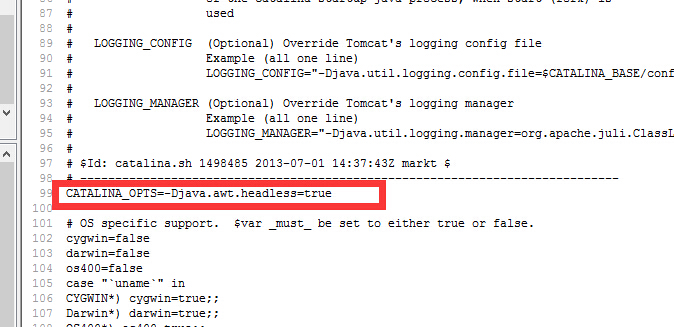
修改${TOMCAT_HOME}/bin/catalina.sh (windows修改catalina.bat) 里加上一句 “CATALINA_OPTS=-Djava.awt.headless=true
如图
方案二
修改${TOMCAT_HOME}/bin/catalina.sh (windows修改catalina.bat)

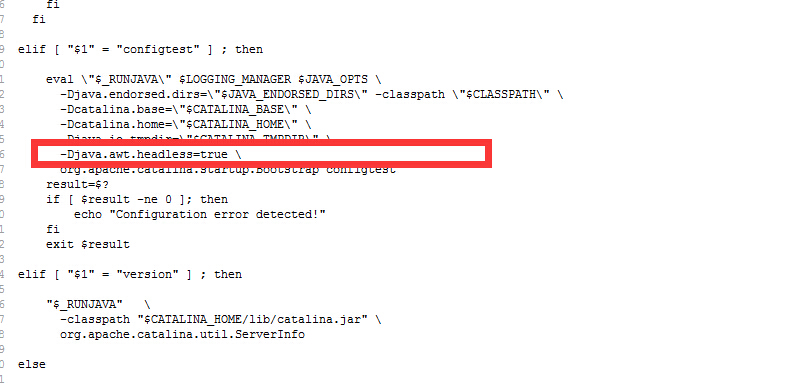
查到-Djava.io.tmpdir="$CATALINA_TMPDIR"这行,并在这一行下加入:

-Djava.awt.headless=true \

共有八处的。
修改好保存再重启即可,此时,如果是用远程登录来修改的话,有可能需要修改catalina.sh这个文件的权限,用在tomcat\bin目录下输入chmod 777 catalina.sh修改即可!
需改过后的 全部内容
#!/bin/sh

# Licensed to the Apache Software Foundation (ASF) under one or more

# contributor license agreements.  See the NOTICE file distributed with

# this work for additional information regarding copyright ownership.

# The ASF licenses this file to You under the Apache License, Version 2.0

# (the "License"); you may not use this file except in compliance with

# the License.  You may obtain a copy of the License at

#

#     http://www.apache.org/licenses/LICENSE-2.0

#

# Unless required by applicable law or agreed to in writing, software

# distributed under the License is distributed on an "AS IS" BASIS,

# WITHOUT WARRANTIES OR CONDITIONS OF ANY KIND, either express or implied.

# See the License for the specific language governing permissions and

# limitations under the License.

# -----------------------------------------------------------------------------

# Control Script for the CATALINA Server

#

# Environment Variable Prerequisites

#

#   Do not set the variables in this script. Instead put them into a script

#   setenv.sh in CATALINA_BASE/bin to keep your customizations separate.

#

#   CATALINA_HOME   May point at your Catalina "build" directory.

#

#   CATALINA_BASE   (Optional) Base directory for resolving dynamic portions

#                   of a Catalina installation.  If not present, resolves to

#                   the same directory that CATALINA_HOME points to.

#

#   CATALINA_OUT    (Optional) Full path to a file where stdout and stderr

#                   will be redirected.

#                   Default is $CATALINA_BASE/logs/catalina.out

#

#   CATALINA_OPTS   (Optional) Java runtime options used when the "start",

#                   "run" or "debug" command is executed.

#                   Include here and not in JAVA_OPTS all options, that should

#                   only be used by Tomcat itself, not by the stop process,

#                   the version command etc.

#                   Examples are heap size, GC logging, JMX ports etc.

#

#   CATALINA_TMPDIR (Optional) Directory path location of temporary directory

#                   the JVM should use (java.io.tmpdir).  Defaults to

#                   $CATALINA_BASE/temp.

#

#   JAVA_HOME       Must point at your Java Development Kit installation.

#                   Required to run the with the "debug" argument.

#

#   JRE_HOME        Must point at your Java Runtime installation.

#                   Defaults to JAVA_HOME if empty. If JRE_HOME and JAVA_HOME

#                   are both set, JRE_HOME is used.

#

#   JAVA_OPTS       (Optional) Java runtime options used when any command

#                   is executed.

#                   Include here and not in CATALINA_OPTS all options, that

#                   should be used by Tomcat and also by the stop process,

#                   the version command etc.

#                   Most options should go into CATALINA_OPTS.

#

#   JAVA_ENDORSED_DIRS (Optional) Lists of of colon separated directories

#                   containing some jars in order to allow replacement of APIs

#                   created outside of the JCP (i.e. DOM and SAX from W3C).

#                   It can also be used to update the XML parser implementation.

#                   Defaults to $CATALINA_HOME/endorsed.

#

#   JPDA_TRANSPORT  (Optional) JPDA transport used when the "jpda start"

#                   command is executed. The default is "dt_socket".

#

#   JPDA_ADDRESS    (Optional) Java runtime options used when the "jpda start"

#                   command is executed. The default is 8000.

#

#   JPDA_SUSPEND    (Optional) Java runtime options used when the "jpda start"

#                   command is executed. Specifies whether JVM should suspend

#                   execution immediately after startup. Default is "n".

#

#   JPDA_OPTS       (Optional) Java runtime options used when the "jpda start"

#                   command is executed. If used, JPDA_TRANSPORT, JPDA_ADDRESS,

#                   and JPDA_SUSPEND are ignored. Thus, all required jpda

#                   options MUST be specified. The default is:

#

#                   -agentlib:jdwp=transport=$JPDA_TRANSPORT,

#                       address=$JPDA_ADDRESS,server=y,suspend=$JPDA_SUSPEND

#

#   CATALINA_PID    (Optional) Path of the file which should contains the pid

#                   of the catalina startup java process, when start (fork) is

#                   used

#

#   LOGGING_CONFIG  (Optional) Override Tomcat's logging config file

#                   Example (all one line)

#                   LOGGING_CONFIG="-Djava.util.logging.config.file=$CATALINA_BASE/conf/logging.properties"

#

#   LOGGING_MANAGER (Optional) Override Tomcat's logging manager

#                   Example (all one line)

#                   LOGGING_MANAGER="-Djava.util.logging.manager=org.apache.juli.ClassLoaderLogManager"

#

# $Id: catalina.sh 1498485 2013-07-01 14:37:43Z markt $

# -----------------------------------------------------------------------------

# OS specific support.  $var _must_ be set to either true or false.

cygwin=false

darwin=false

os400=false

case "`uname`" in

CYGWIN*) cygwin=true;;

Darwin*) darwin=true;;

OS400*) os400=true;;

esac

# resolve links - $0 may be a softlink

PRG="$0"

while [ -h "$PRG" ]; do

  ls=`ls -ld "$PRG"`

  link=`expr "$ls" : '.*-> \(.*\)$'`

  if expr "$link" : '/.*' > /dev/null; then

    PRG="$link"

  else

    PRG=`dirname "$PRG"`/"$link"

  fi

done

# Get standard environment variables

PRGDIR=`dirname "$PRG"`

# Only set CATALINA_HOME if not already set

[ -z "$CATALINA_HOME" ] && CATALINA_HOME=`cd "$PRGDIR/.." >/dev/null; pwd`

# Copy CATALINA_BASE from CATALINA_HOME if not already set

[ -z "$CATALINA_BASE" ] && CATALINA_BASE="$CATALINA_HOME"

# Ensure that any user defined CLASSPATH variables are not used on startup,

# but allow them to be specified in setenv.sh, in rare case when it is needed.

CLASSPATH=

if [ -r "$CATALINA_BASE/bin/setenv.sh" ]; then

  . "$CATALINA_BASE/bin/setenv.sh"

elif [ -r "$CATALINA_HOME/bin/setenv.sh" ]; then

  . "$CATALINA_HOME/bin/setenv.sh"

fi

# For Cygwin, ensure paths are in UNIX format before anything is touched

if $cygwin; then

  [ -n "$JAVA_HOME" ] && JAVA_HOME=`cygpath --unix "$JAVA_HOME"`

  [ -n "$JRE_HOME" ] && JRE_HOME=`cygpath --unix "$JRE_HOME"`

  [ -n "$CATALINA_HOME" ] && CATALINA_HOME=`cygpath --unix "$CATALINA_HOME"`

  [ -n "$CATALINA_BASE" ] && CATALINA_BASE=`cygpath --unix "$CATALINA_BASE"`

  [ -n "$CLASSPATH" ] && CLASSPATH=`cygpath --path --unix "$CLASSPATH"`

fi

# For OS400

if $os400; then

  # Set job priority to standard for interactive (interactive - 6) by using

  # the interactive priority - 6, the helper threads that respond to requests

  # will be running at the same priority as interactive jobs.

  COMMAND='chgjob job('$JOBNAME') runpty(6)'

  system $COMMAND

  # Enable multi threading

  export QIBM_MULTI_THREADED=Y

fi

# Get standard Java environment variables

if $os400; then

  # -r will Only work on the os400 if the files are:

  # 1. owned by the user

  # 2. owned by the PRIMARY group of the user

  # this will not work if the user belongs in secondary groups

  . "$CATALINA_HOME"/bin/setclasspath.sh

else

  if [ -r "$CATALINA_HOME"/bin/setclasspath.sh ]; then

    . "$CATALINA_HOME"/bin/setclasspath.sh

  else

    echo "Cannot find $CATALINA_HOME/bin/setclasspath.sh"

    echo "This file is needed to run this program"

    exit 1

  fi

fi

# Add on extra jar files to CLASSPATH

if [ ! -z "$CLASSPATH" ] ; then

  CLASSPATH="$CLASSPATH":

fi

CLASSPATH="$CLASSPATH""$CATALINA_HOME"/bin/bootstrap.jar

if [ -z "$CATALINA_OUT" ] ; then

  CATALINA_OUT="$CATALINA_BASE"/logs/catalina.out

fi

if [ -z "$CATALINA_TMPDIR" ] ; then

  # Define the java.io.tmpdir to use for Catalina

  CATALINA_TMPDIR="$CATALINA_BASE"/temp

fi

# Add tomcat-juli.jar to classpath

# tomcat-juli.jar can be over-ridden per instance

if [ -r "$CATALINA_BASE/bin/tomcat-juli.jar" ] ; then

  CLASSPATH=$CLASSPATH:$CATALINA_BASE/bin/tomcat-juli.jar

else

  CLASSPATH=$CLASSPATH:$CATALINA_HOME/bin/tomcat-juli.jar

fi

# Bugzilla 37848: When no TTY is available, don't output to console

have_tty=0

if [ "`tty`" != "not a tty" ]; then

    have_tty=1

fi

# For Cygwin, switch paths to Windows format before running java

if $cygwin; then

  JAVA_HOME=`cygpath --absolute --windows "$JAVA_HOME"`

  JRE_HOME=`cygpath --absolute --windows "$JRE_HOME"`

  CATALINA_HOME=`cygpath --absolute --windows "$CATALINA_HOME"`

  CATALINA_BASE=`cygpath --absolute --windows "$CATALINA_BASE"`

  CATALINA_TMPDIR=`cygpath --absolute --windows "$CATALINA_TMPDIR"`

  CLASSPATH=`cygpath --path --windows "$CLASSPATH"`

  JAVA_ENDORSED_DIRS=`cygpath --path --windows "$JAVA_ENDORSED_DIRS"`

fi

# Set juli LogManager config file if it is present and an override has not been issued

if [ -z "$LOGGING_CONFIG" ]; then

  if [ -r "$CATALINA_BASE"/conf/logging.properties ]; then

    LOGGING_CONFIG="-Djava.util.logging.config.file=$CATALINA_BASE/conf/logging.properties"

  else

    # Bugzilla 45585

    LOGGING_CONFIG="-Dnop"

  fi

fi

if [ -z "$LOGGING_MANAGER" ]; then

  LOGGING_MANAGER="-Djava.util.logging.manager=org.apache.juli.ClassLoaderLogManager"

fi

# Uncomment the following line to make the umask available when using the

# org.apache.catalina.security.SecurityListener

#JAVA_OPTS="$JAVA_OPTS -Dorg.apache.catalina.security.SecurityListener.UMASK=`umask`"

# ----- Execute The Requested Command -----------------------------------------

# Bugzilla 37848: only output this if we have a TTY

if [ $have_tty -eq 1 ]; then

  echo "Using CATALINA_BASE:   $CATALINA_BASE"

  echo "Using CATALINA_HOME:   $CATALINA_HOME"

  echo "Using CATALINA_TMPDIR: $CATALINA_TMPDIR"

  if [ "$1" = "debug" ] ; then

    echo "Using JAVA_HOME:       $JAVA_HOME"

  else

    echo "Using JRE_HOME:        $JRE_HOME"

  fi

  echo "Using CLASSPATH:       $CLASSPATH"

  if [ ! -z "$CATALINA_PID" ]; then

    echo "Using CATALINA_PID:    $CATALINA_PID"

  fi

fi

if [ "$1" = "jpda" ] ; then

  if [ -z "$JPDA_TRANSPORT" ]; then

    JPDA_TRANSPORT="dt_socket"

  fi

  if [ -z "$JPDA_ADDRESS" ]; then

    JPDA_ADDRESS="8000"

  fi

  if [ -z "$JPDA_SUSPEND" ]; then

    JPDA_SUSPEND="n"

  fi

  if [ -z "$JPDA_OPTS" ]; then

    JPDA_OPTS="-agentlib:jdwp=transport=$JPDA_TRANSPORT,address=$JPDA_ADDRESS,server=y,suspend=$JPDA_SUSPEND"

  fi

  CATALINA_OPTS="$CATALINA_OPTS $JPDA_OPTS"

  shift

fi

if [ "$1" = "debug" ] ; then

  if $os400; then

    echo "Debug command not available on OS400"

    exit 1

  else

    shift

    if [ "$1" = "-security" ] ; then

      if [ $have_tty -eq 1 ]; then

        echo "Using Security Manager"

      fi

      shift

      exec "$_RUNJDB" "$LOGGING_CONFIG" $LOGGING_MANAGER $JAVA_OPTS $CATALINA_OPTS \

        -Djava.endorsed.dirs="$JAVA_ENDORSED_DIRS" -classpath "$CLASSPATH" \

        -sourcepath "$CATALINA_HOME"/../../java \

        -Djava.security.manager \

        -Djava.security.policy=="$CATALINA_BASE"/conf/catalina.policy \

        -Dcatalina.base="$CATALINA_BASE" \

        -Dcatalina.home="$CATALINA_HOME" \

        -Djava.io.tmpdir="$CATALINA_TMPDIR" \

	-Djava.awt.headless=true \

        org.apache.catalina.startup.Bootstrap "$@" start

    else

      exec "$_RUNJDB" "$LOGGING_CONFIG" $LOGGING_MANAGER $JAVA_OPTS $CATALINA_OPTS \

        -Djava.endorsed.dirs="$JAVA_ENDORSED_DIRS" -classpath "$CLASSPATH" \

        -sourcepath "$CATALINA_HOME"/../../java \

        -Dcatalina.base="$CATALINA_BASE" \

        -Dcatalina.home="$CATALINA_HOME" \

        -Djava.io.tmpdir="$CATALINA_TMPDIR" \

	-Djava.awt.headless=true \

        org.apache.catalina.startup.Bootstrap "$@" start

    fi

  fi

elif [ "$1" = "run" ]; then

  shift

  if [ "$1" = "-security" ] ; then

    if [ $have_tty -eq 1 ]; then

      echo "Using Security Manager"

    fi

    shift

    eval exec \"$_RUNJAVA\" \"$LOGGING_CONFIG\" $LOGGING_MANAGER $JAVA_OPTS $CATALINA_OPTS \

      -Djava.endorsed.dirs=\"$JAVA_ENDORSED_DIRS\" -classpath \"$CLASSPATH\" \

      -Djava.security.manager \

      -Djava.security.policy==\"$CATALINA_BASE/conf/catalina.policy\" \

      -Dcatalina.base=\"$CATALINA_BASE\" \

      -Dcatalina.home=\"$CATALINA_HOME\" \

      -Djava.io.tmpdir=\"$CATALINA_TMPDIR\" \

      -Djava.awt.headless=true \

      org.apache.catalina.startup.Bootstrap "$@" start

  else

    eval exec \"$_RUNJAVA\" \"$LOGGING_CONFIG\" $LOGGING_MANAGER $JAVA_OPTS $CATALINA_OPTS \

      -Djava.endorsed.dirs=\"$JAVA_ENDORSED_DIRS\" -classpath \"$CLASSPATH\" \

      -Dcatalina.base=\"$CATALINA_BASE\" \

      -Dcatalina.home=\"$CATALINA_HOME\" \

      -Djava.io.tmpdir=\"$CATALINA_TMPDIR\" \

      -Djava.awt.headless=true \

      org.apache.catalina.startup.Bootstrap "$@" start

  fi

elif [ "$1" = "start" ] ; then

  if [ ! -z "$CATALINA_PID" ]; then

    if [ -f "$CATALINA_PID" ]; then

      if [ -s "$CATALINA_PID" ]; then

        echo "Existing PID file found during start."

        if [ -r "$CATALINA_PID" ]; then

          PID=`cat "$CATALINA_PID"`

          ps -p $PID >/dev/null 2>&1

          if [ $? -eq 0 ] ; then

            echo "Tomcat appears to still be running with PID $PID. Start aborted."

            exit 1

          else

            echo "Removing/clearing stale PID file."

            rm -f "$CATALINA_PID" >/dev/null 2>&1

            if [ $? != 0 ]; then

              if [ -w "$CATALINA_PID" ]; then

                cat /dev/null > "$CATALINA_PID"

              else

                echo "Unable to remove or clear stale PID file. Start aborted."

                exit 1

              fi

            fi

          fi

        else

          echo "Unable to read PID file. Start aborted."

          exit 1

        fi

      else

        rm -f "$CATALINA_PID" >/dev/null 2>&1

        if [ $? != 0 ]; then

          if [ ! -w "$CATALINA_PID" ]; then

            echo "Unable to remove or write to empty PID file. Start aborted."

            exit 1

          fi

        fi

      fi

    fi

  fi

  shift

  touch "$CATALINA_OUT"

  if [ "$1" = "-security" ] ; then

    if [ $have_tty -eq 1 ]; then

      echo "Using Security Manager"

    fi

    shift

    eval \"$_RUNJAVA\" \"$LOGGING_CONFIG\" $LOGGING_MANAGER $JAVA_OPTS $CATALINA_OPTS \

      -Djava.endorsed.dirs=\"$JAVA_ENDORSED_DIRS\" -classpath \"$CLASSPATH\" \

      -Djava.security.manager \

      -Djava.security.policy==\"$CATALINA_BASE/conf/catalina.policy\" \

      -Dcatalina.base=\"$CATALINA_BASE\" \

      -Dcatalina.home=\"$CATALINA_HOME\" \

      -Djava.io.tmpdir=\"$CATALINA_TMPDIR\" \

      -Djava.awt.headless=true \

      org.apache.catalina.startup.Bootstrap "$@" start \

      >> "$CATALINA_OUT" 2>&1 "&"

  else

    eval \"$_RUNJAVA\" \"$LOGGING_CONFIG\" $LOGGING_MANAGER $JAVA_OPTS $CATALINA_OPTS \

      -Djava.endorsed.dirs=\"$JAVA_ENDORSED_DIRS\" -classpath \"$CLASSPATH\" \

      -Dcatalina.base=\"$CATALINA_BASE\" \

      -Dcatalina.home=\"$CATALINA_HOME\" \

      -Djava.io.tmpdir=\"$CATALINA_TMPDIR\" \

      -Djava.awt.headless=true \

      org.apache.catalina.startup.Bootstrap "$@" start \

      >> "$CATALINA_OUT" 2>&1 "&"

  fi

  if [ ! -z "$CATALINA_PID" ]; then

    echo $! > "$CATALINA_PID"

  fi

elif [ "$1" = "stop" ] ; then

  shift

  SLEEP=5

  if [ ! -z "$1" ]; then

    echo $1 | grep "[^0-9]" >/dev/null 2>&1

    if [ $? -gt 0 ]; then

      SLEEP=$1

      shift

    fi

  fi

  FORCE=0

  if [ "$1" = "-force" ]; then

    shift

    FORCE=1

  fi

  if [ ! -z "$CATALINA_PID" ]; then

    if [ -f "$CATALINA_PID" ]; then

      if [ -s "$CATALINA_PID" ]; then

        kill -0 `cat "$CATALINA_PID"` >/dev/null 2>&1

        if [ $? -gt 0 ]; then

          echo "PID file found but no matching process was found. Stop aborted."

          exit 1

        fi

      else

        echo "PID file is empty and has been ignored."

      fi

    else

      echo "\$CATALINA_PID was set but the specified file does not exist. Is Tomcat running? Stop aborted."

      exit 1

    fi

  fi

  eval \"$_RUNJAVA\" $LOGGING_MANAGER $JAVA_OPTS \

    -Djava.endorsed.dirs=\"$JAVA_ENDORSED_DIRS\" -classpath \"$CLASSPATH\" \

    -Dcatalina.base=\"$CATALINA_BASE\" \

    -Dcatalina.home=\"$CATALINA_HOME\" \

    -Djava.io.tmpdir=\"$CATALINA_TMPDIR\" \

    -Djava.awt.headless=true \

    org.apache.catalina.startup.Bootstrap "$@" stop

  if [ ! -z "$CATALINA_PID" ]; then

    if [ -f "$CATALINA_PID" ]; then

      while [ $SLEEP -ge 0 ]; do

        kill -0 `cat "$CATALINA_PID"` >/dev/null 2>&1

        if [ $? -gt 0 ]; then

          rm -f "$CATALINA_PID" >/dev/null 2>&1

          if [ $? != 0 ]; then

            if [ -w "$CATALINA_PID" ]; then

              cat /dev/null > "$CATALINA_PID"

            else

              echo "Tomcat stopped but the PID file could not be removed or cleared."

            fi

          fi

          break

        fi

        if [ $SLEEP -gt 0 ]; then

          sleep 1

        fi

        if [ $SLEEP -eq 0 ]; then

          if [ $FORCE -eq 0 ]; then

            echo "Tomcat did not stop in time. PID file was not removed."

          fi

        fi

        SLEEP=`expr $SLEEP - 1 `

      done

    fi

  fi

  KILL_SLEEP_INTERVAL=5

  if [ $FORCE -eq 1 ]; then

    if [ -z "$CATALINA_PID" ]; then

      echo "Kill failed: \$CATALINA_PID not set"

    else

      if [ -f "$CATALINA_PID" ]; then

        PID=`cat "$CATALINA_PID"`

        echo "Killing Tomcat with the PID: $PID"

        kill -9 $PID

        while [ $KILL_SLEEP_INTERVAL -ge 0 ]; do

            kill -0 `cat "$CATALINA_PID"` >/dev/null 2>&1

            if [ $? -gt 0 ]; then

                rm -f "$CATALINA_PID" >/dev/null 2>&1

                if [ $? != 0 ]; then

                    echo "Tomcat was killed but the PID file could not be removed."

                fi

                break

            fi

            if [ $KILL_SLEEP_INTERVAL -gt 0 ]; then

                sleep 1

            fi

            KILL_SLEEP_INTERVAL=`expr $KILL_SLEEP_INTERVAL - 1 `

        done

        if [ $KILL_SLEEP_INTERVAL -gt 0 ]; then

            echo "Tomcat has not been killed completely yet. The process might be waiting on some system call or might be UNINTERRUPTIBLE."

        fi

      fi

    fi

  fi

elif [ "$1" = "configtest" ] ; then

    eval \"$_RUNJAVA\" $LOGGING_MANAGER $JAVA_OPTS \

      -Djava.endorsed.dirs=\"$JAVA_ENDORSED_DIRS\" -classpath \"$CLASSPATH\" \

      -Dcatalina.base=\"$CATALINA_BASE\" \

      -Dcatalina.home=\"$CATALINA_HOME\" \

      -Djava.io.tmpdir=\"$CATALINA_TMPDIR\" \

      -Djava.awt.headless=true \

      org.apache.catalina.startup.Bootstrap configtest

    result=$?

    if [ $result -ne 0 ]; then

        echo "Configuration error detected!"

    fi

    exit $result

elif [ "$1" = "version" ] ; then

    "$_RUNJAVA"   \

      -classpath "$CATALINA_HOME/lib/catalina.jar" \

      org.apache.catalina.util.ServerInfo

else

  echo "Usage: catalina.sh ( commands ... )"

  echo "commands:"

  if $os400; then

    echo "  debug             Start Catalina in a debugger (not available on OS400)"

    echo "  debug -security   Debug Catalina with a security manager (not available on OS400)"

  else

    echo "  debug             Start Catalina in a debugger"

    echo "  debug -security   Debug Catalina with a security manager"

  fi

  echo "  jpda start        Start Catalina under JPDA debugger"

  echo "  run               Start Catalina in the current window"

  echo "  run -security     Start in the current window with security manager"

  echo "  start             Start Catalina in a separate window"

  echo "  start -security   Start in a separate window with security manager"

  echo "  stop              Stop Catalina, waiting up to 5 seconds for the process to end"

  echo "  stop n            Stop Catalina, waiting up to n seconds for the process to end"

  echo "  stop -force       Stop Catalina, wait up to 5 seconds and then use kill -KILL if still running"

  echo "  stop n -force     Stop Catalina, wait up to n seconds and then use kill -KILL if still running"

  echo "  configtest        Run a basic syntax check on server.xml - check exit code for result"

  echo "  version           What version of tomcat are you running?"

  echo "Note: Waiting for the process to end and use of the -force option require that \$CATALINA_PID is defined"

  exit 1

fi
java:提示Could not initialize class sun.awt.X11GraphicsEnvironment的更多相关文章
- 验证码无法正常显示,提示Could not initialize class sun.awt.X11GraphicsEnvironment
在Web开发中使用验证码时可能遇到的问题:java.lang.NoClassDefFoundError: Could not initialize class sun.awt.X11GraphicsE ...
- exception java.lang.NoClassDefFoundError: Could not initialize class sun.awt.X11GraphicsEnvironment
exception java.lang.NoClassDefFoundError: Could not initialize class sun.awt.X11GraphicsEnvironmen ...
- java.lang.NoClassDefFoundError: Could not initialize class sun.awt.X11GraphicsEnvironment问题解决
2018-09-29 17:45:16.905 ERROR [pool-1-thread-1]o.s.scheduling.support.TaskUtils$LoggingErrorHandler. ...
- java.lang.NoClassDefFoundError: Could not initialize class sun.awt.X11GraphicsEnvironment
请求验证码时后台报错:java.lang.NoClassDefFoundError: Could not initialize class sun.awt.X11GraphicsEnvironment ...
- 验证码无法显示,服务器端出现异常:Could not initialize class sun.awt.X11GraphicsEnvironment
异常信息: Caused by: java.lang.NoClassDefFoundError: Could not initialize class sun.awt.X11GraphicsEnvir ...
- 关于使用Xshell远程连接启动tomcat导致图片不显示,报错Could not initialize class sun.awt.X11GraphicsEnvironment解决方案
如果您是使用xshell远程启动tomcat,导致二维码.验证码,头像等各种图片不显示,并且打开图片链接报错Could not initialize class sun.awt.X11Graphics ...
- 验证码无法显示:Could not initialize class sun.awt.X11GraphicsEnvironment 解决方案
一.原因现象:图下图 二.原因导致: 经过Google发现很多人也出现同样的问题.从了解了X11GraphicEnvironment这个类的功能入手,一个Java服务器来处理图片的API基本上是需要运 ...
- Could not initialize class sun.awt.X11GraphicsEnvironment异常处理
原因导致: 经过Google发现很多人也出现同样的问题.从了解了X11GraphicEnvironment这个类的功能入手, 一个Java服务器来处理图片的API基本上是需要运行一个X-server以 ...
- HTTP Status 500 - Handler processing failed; nested exception is java.lang.NoClassDefFoundError: Could not initialize class sun.awt.X11GraphicsEnvironment
解决方案:修改catalina.sh 文件加上-Djava.awt.headless=true JAVA_OPTS="$JAVA_OPTS $JSSE_OPTS -Djava.awt.hea ...
随机推荐
- codevs 1082 线段树练习3
1082 线段树练习 3 时间限制: 3 s 空间限制: 128000 KB 题目等级 : 大师 Master 题解 题目描述 Description 给你N个数,有两种操作: 1: ...
- [No000016]为什么假期计划总是做不到?
- Oracle死锁查询及处理
一.数据库死锁的现象程序在执行的过程中,点击确定或保存按钮,程序没有响应,也没有出现报错.二.死锁的原理当对于数据库某个表的某一列做更新或删除等操作,执行完毕后该条语句不提交,另一条对于这一列数据做更 ...
- 如何为logo配色
原网链接:http://design.jobbole.com/125287/ 色彩是带有情绪的.我们能感知到的色彩能带来各种各样的情绪,也能传达一种思想或一种文化. 企业logo的色彩就是利用上面的原 ...
- mysql密码遗忘和登陆报错问题
mysql登录密码忘记,其实解决办法很简单,只需要在mysql的主配置文件my.cnf里添加一行"跳过授权表"的参数选择即可! 在my.cnf中添加下面一行:[root@test- ...
- python学习之用正则处理log(持续更新,ftace)
1. ftrace的输出如下图所示: [003] 48375.494595: clear_buddies <-pick_next_entity m=re.match("^\[([0-9 ...
- BZOJ 1036: [ZJOI2008]树的统计Count
1036: [ZJOI2008]树的统计Count Time Limit: 10 Sec Memory Limit: 162 MB Submit: 14354 Solved: 5802 [Subm ...
- CodeSmith操作Access时字段的排序问题
最近在用CodeSmith操作写ACCESS数据库的代码模版,发现CodeSmith默认的字段顺序与ACCESS中表的字段顺序不一致. 首先在ACCESS数据库中建一个测试表Test,并添加ID.Na ...
- 前端科普文—为什么<!DOCTYPE> 不可或缺
When question comes 你一定在 HTML 页面最前面看到过这样一行代码(比如 百度): <!DOCTYPE html> 或者说类似这样的(比如 博客园-韩子迟 PS:博客 ...
- 理解AngularJS生命周期:利用ng-repeat动态解析自定义directive
ng-repeat是AngularJS中一个非常重要和有意思的directive,常见的用法之一是将某种自定义directive和ng-repeat一起使用,循环地来渲染开发者所需要的组件.比如现在有 ...