
【Java MyBatis Generator】使用generator自动生成Dao,Mapping和实体文件
具体请参照:
http://blog.csdn.net/fengshizty/article/details/43086833
按照上面博客地址,下载Generator的依赖包:
如下是我的配置文件:
 <?xml version="1.0" encoding="UTF-8"?>

 <!DOCTYPE generatorConfiguration PUBLIC "-//mybatis.org//DTD MyBatis Generator Configuration 1.0//EN" "http://mybatis.org/dtd/mybatis-generator-config_1_0.dtd">

 <generatorConfiguration>

     <!-- 数据库驱动包位置 -->

     <classPathEntry location="C:\Generate\generator\generator\mysql-connector-java-5.1.34.jar" />

     <!-- <classPathEntry location="C:\oracle\product\10.2.0\db_1\jdbc\lib\ojdbc14.jar" />-->

     <context id="DB2Tables" targetRuntime="MyBatis3">

         <commentGenerator>

             <property name="suppressAllComments" value="true" />

         </commentGenerator>

         <!-- 数据库链接URL、用户名、密码 -->

          <jdbcConnection driverClass="com.mysql.jdbc.Driver" connectionURL="jdbc:mysql://localhost:3306/testmybatis" userId="root" password="XXXXX">

         <!--<jdbcConnection driverClass="oracle.jdbc.driver.OracleDriver" connectionURL="jdbc:oracle:thin:@localhost:1521:orcl" userId="msa" password="msa">-->

         </jdbcConnection>

         <javaTypeResolver>

             <property name="forceBigDecimals" value="false" />

         </javaTypeResolver>

         <!-- 生成模型的包名和位置 -->

         <javaModelGenerator targetPackage="com.zlg.model" targetProject="C:\Generate\generator\generator\src">

             <property name="enableSubPackages" value="true" />

             <property name="trimStrings" value="true" />

         </javaModelGenerator>

         <!-- 生成的映射文件包名和位置 -->

         <sqlMapGenerator targetPackage="com.zlg.mapping" targetProject="C:\Generate\generator\generator\src">

             <property name="enableSubPackages" value="true" />

         </sqlMapGenerator>

         <!-- 生成DAO的包名和位置 -->

         <javaClientGenerator type="XMLMAPPER" targetPackage="com.zlg.dao" targetProject="C:\Generate\generator\generator\src">

             <property name="enableSubPackages" value="true" />

         </javaClientGenerator>

         <!-- 要生成那些表(更改tableName和domainObjectName就可以) -->

         <table tableName="user" domainObjectName="UserInfo" enableCountByExample="false" enableUpdateByExample="false" enableDeleteByExample="false" enableSelectByExample="false" selectByExampleQueryId="false" />

         <table tableName="dept" domainObjectName="DeptInfo" enableCountByExample="false" enableUpdateByExample="false" enableDeleteByExample="false" enableSelectByExample="false" selectByExampleQueryId="false" />

         <table tableName="emp" domainObjectName="EmpInfo" enableCountByExample="false" enableUpdateByExample="false" enableDeleteByExample="false" enableSelectByExample="false" selectByExampleQueryId="false" />

         <table tableName="cost" domainObjectName="CostInfo" enableCountByExample="false" enableUpdateByExample="false" enableDeleteByExample="false" enableSelectByExample="false" selectByExampleQueryId="false" />

     </context>

 </generatorConfiguration>
根据以上配置文件中的标记位置,修改成你需要的位置,然后运行如下指令(记住用tab键补全命令,这个用过CMD或者Linux都知道)。

运行成功后,就生成了如下文件:
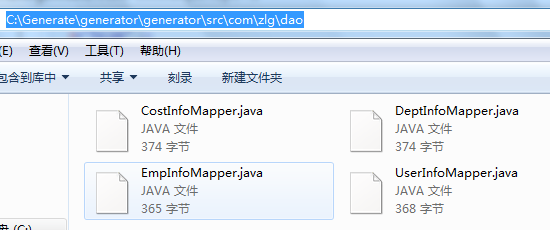
当然,如果你比较懒,可以直接把生成路径设置成你项目的相应位置。
此时,你就可以把这些对应的文件拷贝到项目的相关位置了。非常简单,而且以上链接的作者已经写得很详细了。
感谢分享~
【Java MyBatis Generator】使用generator自动生成Dao,Mapping和实体文件的更多相关文章
- idea集成 MyBatis Generator 插件,自动生成dao,model,sql map文件
1.集成到开发环境中 以maven管理的功能来举例,只需要将插件添加到pom.xml文件中即可.(注意此处是以plugin的方式,放在<plugins></plugins>中间 ...
- 使用mybatis generator插件,自动生成dao、dto、mapper等文件
mybatis generator 介绍 mybatis generator中文文档http://mbg.cndocs.tk/ MyBatis Generator (MBG) 是一个Mybatis的代 ...
- mybatis-generator自动生成dao,mapping,model
mybatis-generator下载地址:https://github.com/mybatis/generator/releases/tag/mybatis-generator-1.3.2 下载好后 ...
- java web(七): mybatis的动态sql和mybatis generator自动生成pojo类和映射文件
前言: MyBatis 的强大特性之一便是它的动态 SQL.如果你有使用 JDBC 或其它类似框架的经验,你就能体会到根据 不同条件拼接 SQL 语句的痛苦.例如拼接时要确保不能忘记添加必要的空格,还 ...
- mybatis generator cmd 终端命令 生成dao model mapper
mybatis generator cmd 终端命令 生成dao model mapper 文件包下载 mybatis-generator-core-1.3.2.jar 下载地址:https://gi ...
- Mybatis-Generator 自动生成Dao、Model、Mapping相关文档
最近在学习mybatis,结果在写Mapping的映射文件时insert语句一直报错,于是想看看标准的映射文件是什么样.百度到Mybatis-Generator 自动生成Dao.Model.Mappi ...
- Mybatis-Generator插件自动生成Dao、Model、Mapping相关文件
最近做项目,mapping 有点多而且容易写错,于是试着用了Mybatis-Generator 插件自动生成 dao, domain mapping 文件.感觉还挺好用.把相关配置分享,一边以后做项 ...
- Mybatis最入门---代码自动生成(generatorConfig.xml配置)
[一步是咫尺,一步即天涯] 经过前文的叙述,各位看官是不是已经被Mybatis的强大功能给折服了呢?本文我们将介绍一个能够极大提升我们开发效率的插件:即代码自动生成.这里的代码自动生成包括,与数据库一 ...
- IDEA利用mybatis-generator自动生成dao和mapper
pom.xml配置 <properties> <java.version>1.8</java.version> <mybatis-generator-core ...
- Mybatis-Generator自动生成Dao、Model、Mapping等相关映射文件(懒人版)
今天在学习mybatis生成相关的映射文件的时候,发现了往期的生成Dao.Model.Mapping等文章多数都是一样的,我也在学着重复造轮子,不过是懒人造的.本文旨在解决开发过程,简化配置文件的“手 ...
随机推荐
- Docker 修改默认存储位置
首先使用 docker info 查看 docker 的基本信息 sudo docker info Containers: 0 Images: 5 Storage Driver: devicemapp ...
- webform中使用webapi,并且使用autofac
private void AutofacIoCRegister() { HttpConfiguration config = GlobalConfiguration.Configuration; if ...
- OC-内存管理-基本原理与引用计数器
基本原理 1. 什么是内存管理 移动设备的内存极其有限,每个app所能占用的内存是有限制的 当app所占用的内存较多时,系统会发出内存警告,这时得回收一些不需要再使用的内存空间.比如回收一些不需要使用 ...
- 用Redis实现分布式锁 与 实现任务队列(转)
这一次总结和分享用Redis实现分布式锁 与 实现任务队列 这两大强大的功能.先扯点个人观点,之前我看了一篇博文说博客园的文章大部分都是分享代码,博文里强调说分享思路比分享代码更重要(貌似大概是这个意 ...
- Yii2-Redis使用小记 - Cache(转)
前些天简单学习了下 Redis,现在准备在项目上使用它了.我们目前用的是 Yii2 框架,在官网搜索了下 Redis,就发现了yii2-redis这扩展. 安装后使用超简单,打开 common/con ...
- yaf扩展
- smarty string_format用法 取小数点后2位
<{if $d.ul_pv}> <{$d.sum/$d.ul_pv|string_format:'%.2f'}> <{else}> 0.00 <{/if}&g ...
- jQuery.Callbacks 源码解读二
一.参数标记 /* * once: 确保回调列表仅只fire一次 * unique: 在执行add操作中,确保回调列表中不存在重复的回调 * stopOnFalse: 当执行回调返回值为false,则 ...
- [转载]JavaScript内存分析
https://github.com/CN-Chrome-DevTools/CN-Chrome-DevTools/blob/master/md/Performance-Profiling/javasc ...
- 第二章平稳时间序列模型——AR(p),MA(q),ARMA(p,q)模型及其平稳性
1白噪声过程: 零均值,同方差,无自相关(协方差为0) 以后我们遇到的efshow如果不特殊说明,就是白噪声过程. 对于正态分布而言,不相关即可推出独立,所以如果该白噪声如果服从正态分布,则其还将 ...