
函数sigsuspend
sigqueue函数原型:
函数作用:新的发送信号系统调用,主要是针对实时信号提出的支持信号带有参数,与函数sigaction()配合使用
int sigqueue(pid_t pid, int signo, const union sigval value);
分析:
- 第一个参数: 指定接收信号的进程id
- 第二个参数:确定即将发送的信号
- 第三个参数:是一个联合结构体union sigval,指定了信号传递的参数,即通常所说的4字节值
程序清单
1. 测试代码:
- 发送端
 #include <stdlib.h>

 #include <stdio.h>

 #include <string.h>

 #include <signal.h>

 #include <unistd.h>

 int main(int argc, char *argv[])

 {

     if(argc != )

     {

         fprintf(stderr, "Usage %s pid\n", argv[]);

         exit();

     }

     pid_t pid = atoi(argv[]);

     union sigval v;

     v.sival_int = ;

     sigqueue(pid, SIGINT, v);

     sleep();

     return ;

 }
- 接收端
 #include <string.h>

 #include <signal.h>

 #include <unistd.h>

 #include <stdlib.h>

 #include <stdio.h>

 void handler(int sig, siginfo_t *info, void *ctx)

 {

     printf("recv a sig = %d data = %d data = %d\n", sig, info->si_value.sival_int, info->si_int);

 }

 int main(int argc, char *argv[])

 {

     printf("I'm %d\n", getpid());

     struct sigaction act;

     act.sa_sigaction = handler;

     sigemptyset(&act.sa_mask);

     act.sa_flags = SA_SIGINFO;

     if(sigaction(SIGINT, &act, NULL) < )

     {

         perror("sigaction error");

         exit();

     }

     for(; ;)

       pause();

     return ;

 }
输出结果:
- 发送端

- 接收端

2. 测试代码
- 发送端
 #include <stdlib.h>

 #include <stdio.h>

 #include <string.h>

 #include <signal.h>

 #include <unistd.h>

 int main(int argc, char *argv[])

 {

     if(argc != )

     {

         fprintf(stderr, "Usage %s pid\n", argv[]);

         exit();

     }

     pid_t pid = atoi(argv[]);

     union sigval v;

     v.sival_int = ;

     sigqueue(pid, SIGINT, v);

     sigqueue(pid, SIGINT, v);

     sigqueue(pid, SIGINT, v);

     sigqueue(pid, SIGRTMIN, v);

     sigqueue(pid, SIGRTMIN, v);

     sigqueue(pid, SIGRTMIN, v);

     sleep();

     kill(pid, SIGUSR1);

     return ;

 }
- 接收端
 #include <string.h>

 #include <signal.h>

 #include <unistd.h>

 #include <stdlib.h>

 #include <stdio.h>

 void handler(int sig)

 {

     if(sig == SIGINT || sig == SIGRTMIN)

     printf("recv a sig = %d\n", sig);

     else if(sig == SIGUSR1)

     {

         sigset_t s;

         sigemptyset(&s);

         sigaddset(&s, SIGINT);

         sigaddset(&s, SIGRTMIN);

         sigprocmask(SIG_UNBLOCK, &s, NULL);

     }

 }

 int main(int argc, char *argv[])

 {

     printf("I'm %d\n", getpid());

     struct sigaction act;

     act.sa_sigaction = handler;

     sigemptyset(&act.sa_mask);

     act.sa_flags = ;

     sigset_t s;

     sigemptyset(&s);

     sigaddset(&s, SIGINT);

     sigaddset(&s, SIGRTMIN);

     sigprocmask(SIG_BLOCK, &s, NULL);

     if(sigaction(SIGINT, &act, NULL) < )

     {

         perror("sigaction error");

         exit();

     }

     if(sigaction(SIGRTMIN, &act, NULL) < )

     {

         perror("sigaction error");

         exit();

     }

     if(sigaction(SIGUSR1, &act, NULL) < )

     {

         perror("sigaction error");

         exit();

     }

     for(; ;)

       pause();

     return ;

 }
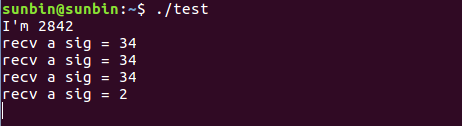
输出结果
- 发送端

- 接收端
函数sigsuspend的更多相关文章
- sigsuspend sigprocmask函数的用法
一个进程的信号屏蔽字规定了当前堵塞而不能递送给该进程的信号集.调用函数sigprocmask能够检測或更改其信号屏蔽字,或者在一个步骤中同一时候运行这两个操作. #include <signal ...
- Linux进程间通信(二):信号集函数 sigemptyset()、sigprocmask()、sigpending()、sigsuspend()
我们已经知道,我们可以通过信号来终止进程,也可以通过信号来在进程间进行通信,程序也可以通过指定信号的关联处理函数来改变信号的默认处理方式,也可以屏蔽某些信号,使其不能传递给进程.那么我们应该如何设定我 ...
- UNIX环境高级编程--10. 信号
第十章 信号 信号是软中断,提供了一种处理异步事件的方法.例如,终端用户键入终端键,会通过信号机制停止一个进程,或及早终止管道中的下一个程序. 每个信号都有一个名字,SIG开 ...
- IPC——信号
Linux进程间通信——使用信号 一.什么是信号 用过Windows的我们都知道,当我们无法正常结束一个程序时,可以用任务管理器强制结束这个进程,但这其实是怎么实现的呢?同样的功能在Linux上是通过 ...
- linux进程通信之信号
本节主要学习信号和与信号相关的处理函数,兴许还会更新. http://blog.csdn.net/xiaoliangsky/article/details/40264151 一 信号 信号是UNIX和 ...
- 《UNIX级别编程环境》注意读出信号(2)
1.功能sigaction sigaction动与指定信号相关联的处理动作.其函数原型例如以下: #inlcude <signal.h> int sigaction(int signo,c ...
- 《UNIX环境高级编程(第3版)》
<UNIX环境高级编程(第3版)> 基本信息 原书名:Advanced Programming in the UNIX Environment (3rd Edition) (Addison ...
- Linux-进程间的通信-信号集函数【转】
我们已经知道,我们可以通过信号来终止进程,也可以通过信号来在进程间进行通信,程序也可以通过指定信号的关联处理函数来改变信号的默认处理方式,也可以屏蔽某些信号,使其不能传递给进程.那么我们应该如何设定我 ...
- Linux c 屏蔽信号、切换信号
信号导致的问题 不是任何信号我们都需要的,如果遇到我们不想处理的信号,我们怎么避免这个信号? 1. 信号屏蔽 intsigprocmask(int how,//操作方式 SIG_BLOCK屏 ...
随机推荐
- golang goroutine 介绍
Goroutine 是用户态自己实现的线程,调度方式遇到IO/阻塞点方式就会让出cpu时间(其实也看编译器的实现,如果TA在代码里面插入一些yield,也是可以的. 反正现在不是抢占式的.) 不能设置 ...
- addEventListener() 方法,事件监听
知识点1:addEventListener() 方法,事件监听,可以使用 removeEventListener() 方法来移除事件的监听. 语法 element.addEventListener(e ...
- 在本地SharePoint 2013 搭建App开发环境
1.环境描述: SharePoint服务器: Windows Server 2012 R2+SharePoint 2013 IP:192.168.1.180,域控:ser.com 开发环境: Wind ...
- git下载指定的版本
1.查看提交历史 sudo git log 打印如下内容: commit 2e3c19d412ab6a99bb51f338f71537a720a9c706 Author: huangbaog ...
- ubuntu 远程登录错误
利用 ubuntu 16.04 自带功能远程登录到同事的电脑时,提示如下错误: This file server type is not recognized 百度一下,得知,缺少必要的文件,安装后 ...
- Fiddler模拟低速网络
1. 打开 Rules -> Customize Rules,ctrl + F 找 300 2.修改上传.下载速度,保存 ctrl + s 3.启动模拟网络限速 4.想要取消模拟网络限速,取消勾 ...
- $Django 虚拟环境,2.0、1.0路由层区别,Httprequest对象,视图层(fbv,cbv),文件上传
1 虚拟环境:解决问题同一台机器上可以运行不同版本的django, 1 用pychanrm创建--->files-->newproject--->选择虚拟环境 2 setting ...
- 1-HTML Attributes
下表列举了常用的Html属性 Attribute Description alt Specifies an alternative text for an image, when the image ...
- python学习第天14天。
模块 什么是模块 常见的场景:一个模块就是一个包含了python定义和声明的文件,文件名就是模块名字加上.py的后缀. 但其实import加载的模块分为四个通用类别: 1 使用python编写的代码( ...
- ElasticSearch搜索数据到底有几种方式?
Elasticsearch允许三种方式执行搜索请求: GET请求正文: curl -XGET "http://localhost:9200/app/users/_search" - ...