
【vue】vue +element 搭建及开发中项目中,遇到的错误提示
1.
import Layout from '@/views/layout/Layout';

export default [

    {

        // 配置路由,当路径为'/activePublic',使用组件activePublic

        path: '/activeManage', component: resolve => require(['@/views/activeManage/index.vue'], resolve),

    },

    {

        // 配置路由,当路径为'/activePublic',使用组件activePublic

        path: '/activePublic', component: resolve => require(['@/views/activePublic/index.vue'], resolve),//路由懒加载写法

        children : [

            { path: '', component: resolve => require(['@/views/activePublic/step1.vue'], resolve)  },

            { path: 'step1', component: resolve => require(['@/views/activePublic/step1.vue'], resolve)},

            { path: 'step2', component: resolve => require(['@/views/activePublic/step2.vue'], resolve)},

            { path: 'step3', component: resolve => require(['@/views/activePublic/step3.vue'], resolve)},

            { path: 'step4', component: resolve => require(['@/views/activePublic/step4.vue'], resolve)},

        ]

    },

    {

        path: '/', component: resolve => require(['@/views/activePublic/index.vue'], resolve),

    },//设置默认路径

]
错误:Module not found: Error: Can't resolve 'sass-loader' in 'D:\vue_test_project\vuedemo\src'
解决方案:需要安装安装sass-loader以及node-sass插件才能正常运行
cnpm install sass-loader -D

cnpm install node-sass -D
2.
操作:
错误:

解决方案:
import Siderbar from "@/views/layout/Siderbar";

import AppMain from "@/views/layout/AppMain";
3.操作:

import Siderbar from "@/views/layout/components";

import AppMain from "@/views/layout/components";
错误:
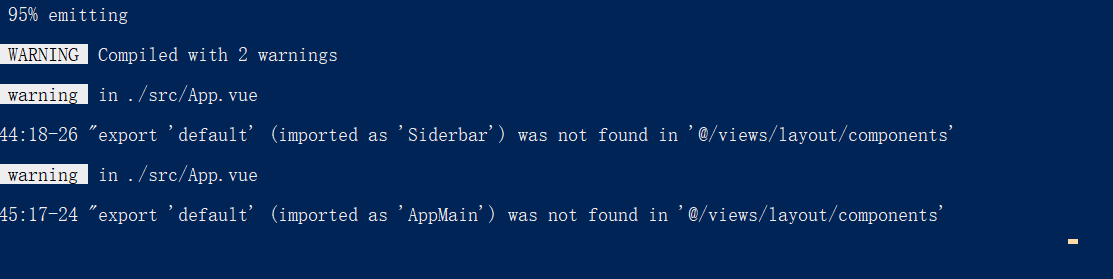
解决方案:
cnpm install --save babel-runtime。
4.操作
App.vue

created(){

    require('./styles/common.scss');

}
错误:
Module build failed: Error: `sass-loader` requires `node-sass` >=4. Please install a compatible version.
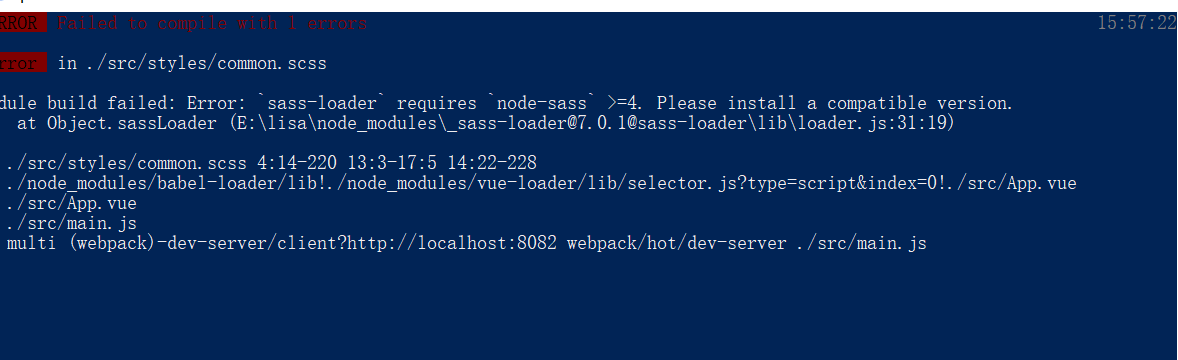
解决方案:
cnpm install node-sass
5.使用Vue.js加sass时遇到 Invalid CSS after ".xxx{": expected "}", was "{" 错误的解决方法
解决方案:
这个问题涉及到 sass 和 scss 的区别。sass 的语法规则是一种缩进语法。而 scss 语法与 css 语法相近,使用大括号。上面那个例子中,home.vue 文件中的 style 标签,lang 属性设置成了 sass,代码如下:

<style lang="sass" rel="stylesheet/scss" scoped>

然而 style 标签里面的内容是scss,这导致了编译器报错。所以为了解决这个问题,需要把上面的代码改成如下形式:

<style lang="scss" rel="stylesheet/scss" scoped>

lang 属性变成 scss,所有关于语法的地方都设置成 scss,这样问题就解决了。
相关链接:https://blog.csdn.net/zhangchao19890805/article/details/64122182
6.es6模式匹配


原因:let不允许在相同作用域内,重复声明同一个变量。set那一行的x y z被重复定义
7.表单验证提示语为英文提示语
必填字段required写在哪儿的问题,要写在js中,否则在测试环境中会出现验证提示语为英文的问题
错误写法:

正确写法:

8.在同一个页面使用多个ElementUI中 Popover 弹出框(el-popover),需要指定不同的ref值,否则显示异常
   <div>

            qq:11

            <el-popover

                ref="popover"

                placement="bottom"

                width="400"

                trigger="hover"

                content=" 管理员上传课程附件(MP3、MP4、PDF、PPT、doc)所占用的储存空间。"

                >

            </el-popover>

            <i v-popover:popover  class="el-icon-question accountSetting-help"  ></i>

        </div>

        <div>

            wx:222

            <el-popover

                ref="popover"

                placement="bottom"

                width="400"

                trigger="hover"

                content="用户观看课程(MP3、MP4、PDF、PPT、doc)所产生的数据流量。"

                >

            </el-popover>

            <i v-popover:popover  class="el-icon-question accountSetting-help"  ></i>

        </div>
效果:

9.{{form.lang.name}} 造成的
Vue.js报错—TypeError: Cannot read property 'Name' of undefined
解决方案:
form:{

    lang:{}

}
10.form表单验证提示语问题
不显示提示语问题

解决方案:

相关链接:https://blog.csdn.net/u010865136/article/details/79374789
11.npm install 安装依赖一直失败
错误截图:

解决方案:
安装淘宝镜像,使用cnpm install
相关链接:https://blog.csdn.net/qq_38225558/article/details/86485843
12.报错比如,[Vue warn]: Do not use built-in or reserved HTML elements as component id: table

解决方案:给组件命名"table"造成的,不能使用html元素命名,改个名字就好了

13.报错[Vue warn]: Error in v-on handler: "TypeError: record is undefined",是因为路由跳转时写的不对

14.在使用Element中的Dialog弹框时,弹出框被遮盖层遮盖的问题
错误效果图:

原因:父级元素加了层级
解决方案:给dialog加一个 append-to-body 属性
15.在引入组件时,组件名在服务器端比较严格,有大小写问题
16.报错:TypeError: Cannot read property 'updateFieldButton' of null
比如:openPlatform: null
17.重置表单验证规则时遇到的错误提示

使用场景:点击按钮后弹出含有form表单的弹窗 并重置表单验证规则
直接使用
this.$refs['ruleForm'].resetFields() 会报上图错误
解决方案:
this.$nextTick(function () {

    this.$refs['ruleForm'].resetFields()

})
在组件中标签没有闭合,报错:
Errors while compiling. Reload prevented.
./node_modules/_vue-loader@13.4.0@vue-loader/lib/template-compiler?{"id":"data-v-00822b28","hasScoped":false,"buble":{"transforms":{}}}!./node_modules/_vue-loader@13.4.0@vue-loader/lib/selector.js?type=template&index=0&bustCache!./src/components/BaseProject.vue
(Emitted value instead of an instance of Error)
解决办法:检查html代码
在配置路由并引入组件后,报错:
Unknown custom element: <router-link> - did you register the component correctly? For recursive components, make sure to provide the "name" option.
错误原因:vue-router没有注册
解决办法:
【vue】vue +element 搭建及开发中项目中,遇到的错误提示的更多相关文章
- Vue + TypeScript + Element 搭建简洁时尚的博客网站及踩坑记
前言 本文讲解如何在 Vue 项目中使用 TypeScript 来搭建并开发项目,并在此过程中踩过的坑 . TypeScript 具有类型系统,且是 JavaScript 的超集,TypeScript ...
- eclipse中jquery.js文件有错误提示…
eclipse中jquery.js文件有错误提示的解决办法 2013-04-06 19:18 浏览次数:382 由于jquery.js文件进行了压缩,压缩之后的语法eclipse无法完全识别,所以有错 ...
- vue.js + element 搭建后台管理系统 笔记(一)
此文仅记录本人在搭建后台系统过程中遇到的难点及注意点,如果能帮到各位自然是极好的~~~ 项目主要架构:vueJS.elementUI.scss 一.项目初始化 首先需要安装nodejs,安装方法就不在 ...
- 【vue】如何在 Vue-cli 创建的项目中引入 iView
根据vue项目的搭建教程,以下记录如何在Vue-cli创建的项目中引入iView. 1)iView的安装,在项目下使用 npm 安装iView cnpm install iview --save ...
- 【vue】如何在 Vue-cli 创建的项目中引入iView
根据vue项目的搭建教程,一下记录下如何在Vue-cli创建的项目中引入iView. 1)安装iView,在项目下 cnpm install iview --save 2 ) 在 webpack ...
- vue+webpack+npm搭建的纯前端项目
转载来源:https://www.cnblogs.com/shenyf/p/8341641.html 搭建node环境 下载 1.进入node.js官方网站下载页,点击下图中框出位置,进行下载即可,当 ...
- iOS HmacSHA1加密 和 MD5 Base64加密 --iOS开发系列---项目中成长的知识五
项目中开发中需要对一些数据进行加密后和服务器验证是否是我们客户端发出的请求! 方案是服务器定的,使用HmacSHA1加密和MD5 Base64加密 加密过程比较复杂 1.获取格林威治时间 2.用bas ...
- iOS 控制section不悬停 --- iOS开发系列 ---项目中成长的知识八
一般情况下,tableview中的section是会默认不随着tableview的滚动而滚动的,而是会等到属于这个section的cell滑完过后,然后往上顶(不知道大家能不能听懂=_=!) 有些时候 ...
- iOS UIView中的坐标转换convertPoint --- iOS开发系列 ---项目中成长的知识六
如果你的UITableViewCell里面有一个Button需要响应事件,你会怎么做? 在Controller中使用 button父类的父类? 例如:UITableViewCell *parent ...
随机推荐
- 内省(Introspector)
/** * 内省:通过反射来操作javabean * 内省类 --> Bean信息 --> 属性描述符 --> 属性的get/set对应的Method --> 进行反射 * c ...
- C#DataTable添加列、C#指定位置添加列
DataSet ds = SQlHelper.GetDataTable(Con, sb.ToString()); ds.Tables[].Columns.Add("Check", ...
- 自定义mvc或mtv框架:基于wsgiref的web框架
把mvc或mtv框架的model数据库,view:html,control逻辑处理,url判别,wsgiref集中在一个文件 代码如下 #!/usr/bin/env python #-*- codin ...
- webpack+vue+vueRouter模块化构建完整项目实例详细步骤-入门篇
新建项目 开始(确认已经安装node环境和npm包管理工具) 1.新建项目文件名为start_vuedemo 2.npm init -y 初始化项目,我的win7系统,工程在d盘的vue_test_p ...
- CSS3效果:animate实现点点点loading动画效果(一)
实现如图所示的点点点loading效果: 一:CSS3 animation实现代码 html代码: 提交订单中<span class="ani_dot">...< ...
- springboot 开发 Tars
1,创建 springboot 项目,并在启动类添加 @EnableTarsServer 注解 @SpringBootApplication @EnableTarsServer public clas ...
- 取消IE、Office、Wmp首次开启提示
一.取消IE首次开启提示 1.运行框输入gpedit.msc.打开组策略配置 2.本地计算机策略-计算机配置-管理模板-windows组件-Internet Explorer,查找右边“阻止执行首次运 ...
- Android string.xml 添加特殊字符
解决项目中在string.xml 中显示特殊符号的问题,如@号冒号等.只能考虑使用ASCII码进行显示: @号 @ :号 : 空格 以下为常见的ASCII十进制交换编码: --> <- ...
- Git基本操作和GtHub 特殊技巧
<GitHub 入门与实践> 笔记 了解GitHub Git 和 GitHub 的区别 在Git中,开发者将源代码存入名为"Git仓库"的资料库中,并加以使用.而Git ...
- (转载)彻底的理解:WebService到底是什么?
最近老是有人跟我提web service接口,怎么,怎么滴,我觉得很扎耳朵,web service是一种将服务器的服务封装起来的技术,表现为对外提供接口,所以,web service不是一种接口 !! ...