
运维监控-Open-Falcon安装Agent实战篇
运维监控-Open-Falcon安装Agent实战篇
作者:尹正杰
版权声明:原创作品,谢绝转载!否则将追究法律责任。
本文参考链接来自:http://book.open-falcon.org/zh/install_from_src/agent.html。
一.介绍
agent用于采集机器负载监控指标,比如cpu.idle、load.1min、disk.io.util等等,每隔60秒push给Transfer。agent与Transfer建立了长连接,数据发送速度比较快,agent提供了一个http接口/v1/push用于接收用户手工push的一些数据,然后通过长连接迅速转发给Transfer。
二.部署
agent需要部署到所有要被监控的机器上,比如公司有10万台机器,那就要部署10万个agent。agent本身资源消耗很少,不用担心。
1>.部署环境

2>.拷贝agent工具包到需要安装的服务器上
[root@node101 ~]# cd /yinzhengjie/open-falcon/workspace/open-falcon

[root@node101 open-falcon]#

[root@node101 open-falcon]# ll

total

drwxrwxr-x.            Aug    agent

drwxrwxr-x.            Aug    aggregator

drwxrwxr-x.            Aug    alarm

drwxrwxr-x.            Aug    api

drwxr-xr-x.  root root       Dec  : data

drwxrwxr-x.            Aug    gateway

drwxrwxr-x.            Aug    graph

drwxrwxr-x.            Aug    hbs

drwxrwxr-x.            Aug    judge

drwxrwxr-x.            Aug    nodata

-rwxrwxr-x.       Aug    open-falcon

lrwxrwxrwx.            Aug    plugins -> ./agent/plugins/

lrwxrwxrwx.            Aug    public -> ./agent/public/

drwxrwxr-x.            Aug    transfer

[root@node101 open-falcon]#
[root@node101 ~]# cd /yinzhengjie/open-falcon/workspace/open-falcon #进入到“node101.yinzhengjie.org.cn”的open-Falcon安装目录
[root@node101 open-falcon]# scp -r agent/ root@node102.yinzhengjie.org.cn:~

The authenticity of host 'node102.yinzhengjie.org.cn (172.30.1.102)' can't be established.

ECDSA key fingerprint is SHA256:aGk7Wv77uRVAElcihCH0Zu0sAPp6qEs2sSA1Zsj3o7g.

ECDSA key fingerprint is MD5:2b::b8:ad:f8::::::f1::e7:::fb.

Are you sure you want to continue connecting (yes/no)? yes

Warning: Permanently added 'node102.yinzhengjie.org.cn,172.30.1.102' (ECDSA) to the list of known hosts.

root@node102.yinzhengjie.org.cn's password:

agent.log                                                                                                                                           %   41KB .6KB/s   :

scheduler.go                                                                                                                                        %    .5KB/s   :

reader.go                                                                                                                                           %    .4KB/s   :

plugins.go                                                                                                                                          %      .9KB/s   :

odometer.js                                                                                                                                         %    .3KB/s   :

jquery.dataTables.min.js                                                                                                                            %   69KB   .9MB/s   :

jquery.js                                                                                                                                           %   93KB   .3MB/s   :

jquery-ui.min.js                                                                                                                                    %  223KB  .5MB/s   :

dashboard.js                                                                                                                                        %      .4MB/s   :

bootstrap.js                                                                                                                                        %   47KB   .2MB/s   :

base.js                                                                                                                                             %    .5KB/s   :

code.png                                                                                                                                            %      .9KB/s   :

favicon.ico                                                                                                                                         %   97KB  .5MB/s   :

font-awesome.min.css                                                                                                                                %   22KB   .0MB/s   :

font-awesome-ie7.min.css                                                                                                                            %   37KB  .5MB/s   :

font-awesome-ie7.css                                                                                                                                %   40KB   .7MB/s   :

font-awesome.css                                                                                                                                    %   27KB  .8MB/s   :

fontawesome-webfont.eot                                                                                                                             %   37KB .0KB/s   :

FontAwesome.otf                                                                                                                                     %   60KB  .9MB/s   :

fontawesome-webfont.woff                                                                                                                            %   43KB  .5MB/s   :

fontawesome-webfont.svg                                                                                                                             %  193KB  .5MB/s   :

fontawesome-webfont.ttf                                                                                                                             %   77KB   .9MB/s   :

odometer.css                                                                                                                                        %      .8MB/s   :

dashboard.css                                                                                                                                       %    .1KB/s   :

bootstrap-responsive.min.css                                                                                                                        %    .0KB/s   :

OpenSans-Regular-webfont.woff                                                                                                                       %   83KB   .1MB/s   :

OpenSans-Regular-webfont.eot                                                                                                                        %   71KB   .4MB/s   :

OpenSans-Regular-webfont.svg                                                                                                                        %  266KB   .5MB/s   :

OpenSans-Regular-webfont.ttf                                                                                                                        %  160KB   .9MB/s   :

style.css                                                                                                                                           %   23KB   .8MB/s   :

bootstrap.min.css                                                                                                                                   %   88KB  .3MB/s   :

g.css                                                                                                                                               %    .5KB/s   :

index.html                                                                                                                                          %   15KB  .1MB/s   :

falcon-agent                                                                                                                                        % 9849KB  .1MB/s   :

cfg.json                                                                                                                                            %     .8KB/s   :

[root@node101 open-falcon]#
[root@node101 open-falcon]# scp -r agent/ root@node102.yinzhengjie.org.cn:~ #拷贝agent目录到需要监控的"node102.yinzhengjie.org.cn"服务器上
[root@node101 open-falcon]# scp -r agent/ root@node103.yinzhengjie.org.cn:~

The authenticity of host 'node103.yinzhengjie.org.cn (172.30.1.103)' can't be established.

ECDSA key fingerprint is SHA256:aGk7Wv77uRVAElcihCH0Zu0sAPp6qEs2sSA1Zsj3o7g.

ECDSA key fingerprint is MD5:2b::b8:ad:f8::::::f1::e7:::fb.

Are you sure you want to continue connecting (yes/no)? yes

Warning: Permanently added 'node103.yinzhengjie.org.cn,172.30.1.103' (ECDSA) to the list of known hosts.

root@node103.yinzhengjie.org.cn's password:

agent.log                                                                                                                                           %   47KB   .1MB/s   :

scheduler.go                                                                                                                                        %      .1MB/s   :

reader.go                                                                                                                                           %      .7MB/s   :

plugins.go                                                                                                                                          %       .5MB/s   :

odometer.js                                                                                                                                         %    .0KB/s   :

jquery.dataTables.min.js                                                                                                                            %   69KB   .0MB/s   :

jquery.js                                                                                                                                           %   93KB  .0MB/s   :

jquery-ui.min.js                                                                                                                                    %  223KB  .4MB/s   :

dashboard.js                                                                                                                                        %      .9MB/s   :

bootstrap.js                                                                                                                                        %   47KB  .1MB/s   :

base.js                                                                                                                                             %      .2MB/s   :

code.png                                                                                                                                            %     .0KB/s   :

favicon.ico                                                                                                                                         %   97KB  .9MB/s   :

font-awesome.min.css                                                                                                                                %   22KB  .8MB/s   :

font-awesome-ie7.min.css                                                                                                                            %   37KB  .2MB/s   :

font-awesome-ie7.css                                                                                                                                %   40KB  .6MB/s   :

font-awesome.css                                                                                                                                    %   27KB   .6MB/s   :

fontawesome-webfont.eot                                                                                                                             %   37KB   .7MB/s   :

FontAwesome.otf                                                                                                                                     %   60KB  .6MB/s   :

fontawesome-webfont.woff                                                                                                                            %   43KB  .8MB/s   :

fontawesome-webfont.svg                                                                                                                             %  193KB  .1MB/s   :

fontawesome-webfont.ttf                                                                                                                             %   77KB   .4MB/s   :

odometer.css                                                                                                                                        %      .1MB/s   :

dashboard.css                                                                                                                                       %      .3MB/s   :

bootstrap-responsive.min.css                                                                                                                        %      .9MB/s   :

OpenSans-Regular-webfont.woff                                                                                                                       %   83KB  .9MB/s   :

OpenSans-Regular-webfont.eot                                                                                                                        %   71KB  .4MB/s   :

OpenSans-Regular-webfont.svg                                                                                                                        %  266KB  .4MB/s   :

OpenSans-Regular-webfont.ttf                                                                                                                        %  160KB   .1MB/s   :

style.css                                                                                                                                           %   23KB   .9MB/s   :

bootstrap.min.css                                                                                                                                   %   88KB  .3MB/s   :

g.css                                                                                                                                               %      .0MB/s   :

index.html                                                                                                                                          %   15KB  .0MB/s   :

falcon-agent                                                                                                                                        % 9849KB  .5MB/s   :

cfg.json                                                                                                                                            %    .1KB/s   :

[root@node101 open-falcon]#
[root@node101 open-falcon]# scp -r agent/ root@node103.yinzhengjie.org.cn:~ #拷贝agent目录到需要监控的"node103.yinzhengjie.org.cn"服务器上
[root@node101 open-falcon]# scp open-falcon root@node102.yinzhengjie.org.cn:~

root@node102.yinzhengjie.org.cn's password:

open-falcon                                                                                                                                         % 3894KB  .9MB/s   :

[root@node101 open-falcon]#
[root@node101 open-falcon]# scp open-falcon root@node102.yinzhengjie.org.cn:~ #拷贝open-falcon脚本到需要监控的服务器上面
[root@node101 open-falcon]# scp open-falcon root@node103.yinzhengjie.org.cn:~

root@node103.yinzhengjie.org.cn's password:

open-falcon                                                                                                                                         % 3894KB  .7MB/s   :

[root@node101 open-falcon]#
[root@node101 open-falcon]# scp open-falcon root@node103.yinzhengjie.org.cn:~ #拷贝open-falcon脚本到需要监控的服务器上面
3>.修改node102.yinzhengjie.org.cn的cfg.json配置文件并启动agent
[root@node102 ~]# ll

total

drwxrwxr-x.  root root       Dec  : agent

-rwxr-xr-x.  root root  Dec  : open-falcon

[root@node102 ~]#

[root@node102 ~]# cat agent/config/cfg.json

{

    "debug": true,

    "hostname": "node102.yinzhengjie.org.cn",

    "ip": "",

    "plugin": {

        "enabled": false,

        "dir": "./plugin",

        "git": "https://github.com/open-falcon/plugin.git",

        "logs": "./logs"

    },

    "heartbeat": {

        "enabled": true,

        "addr": "node101.yinzhengjie.org.cn:6030",

        "interval": ,

        "timeout":

    },

    "transfer": {

        "enabled": true,

        "addrs": [

            "node101.yinzhengjie.org.cn:8433"

        ],

        "interval": ,

        "timeout":

    },

    "http": {

        "enabled": true,

        "listen": ":1988",

        "backdoor": false

    },

    "collector": {

        "ifacePrefix": ["eth", "em"],

        "mountPoint": []

    },

    "default_tags": {

    },

    "ignore": {

        "cpu.busy": true,

        "df.bytes.free": true,

        "df.bytes.total": true,

        "df.bytes.used": true,

        "df.bytes.used.percent": true,

        "df.inodes.total": true,

        "df.inodes.free": true,

        "df.inodes.used": true,

        "df.inodes.used.percent": true,

        "mem.memtotal": true,

        "mem.memused": true,

        "mem.memused.percent": true,

        "mem.memfree": true,

        "mem.swaptotal": true,

        "mem.swapused": true,

        "mem.swapfree": true

    }

}

[root@node102 ~]#
{

    "debug": true, # 控制一些debug信息的输出,生产环境通常设置为false

    "hostname": "", # agent采集了数据发给transfer,endpoint就设置为了hostname,默认通过`hostname`获取,如果配置中配置了hostname,就用配置中的

    "ip": "", # agent与hbs心跳的时候会把自己的ip地址发给hbs,agent会自动探测本机ip,如果不想让agent自动探测,可以手工修改该配置

    "plugin": {

        "enabled": false, # 默认不开启插件机制

        "dir": "./plugin", # 把放置插件脚本的git repo clone到这个目录

        "git": "https://github.com/open-falcon/plugin.git", # 放置插件脚本的git repo地址

        "logs": "./logs" # 插件执行的log,如果插件执行有问题,可以去这个目录看log

    },

    "heartbeat": {

        "enabled": true, # 此处enabled要设置为true

        "addr": "127.0.0.1:6030", # hbs的地址,端口是hbs的rpc端口

        "interval": , # 心跳周期,单位是秒

        "timeout":  # 连接hbs的超时时间,单位是毫秒

    },

    "transfer": {

        "enabled": true, # 此处enabled要设置为true

        "addrs": [

            "127.0.0.1:8433",

            "127.0.0.1:8433"

        ], # transfer的地址,端口是transfer的rpc端口, 可以支持写多个transfer的地址,agent会保证HA

        "interval": , # 采集周期,单位是秒,即agent一分钟采集一次数据发给transfer

        "timeout":  # 连接transfer的超时时间,单位是毫秒

    },

    "http": {

        "enabled": true, # 是否要监听http端口

        "listen": ":1988" # 如果监听的话,监听的地址

    },

    "collector": {

        "ifacePrefix": ["eth", "em"] # 默认配置只会采集网卡名称前缀是eth、em的网卡流量,配置为空就会采集所有的,lo的也会采集。可以从/proc/net/dev看到各个网卡的流量信息

    },

    "ignore": { # 默认采集了200多个metric,可以通过ignore设置为不采集

        "cpu.busy": true,

        "mem.swapfree": true

    }

}
配置文件必须叫cfg.json,可以基于cfg.example.json修改(想要了解上述配置参数说明戳我)
./open-falcon start agent  启动进程

./open-falcon stop agent  停止进程

./open-falcon monitor agent  查看日志

看var目录下的log是否正常,或者浏览器访问其1988端口。另外agent提供了一个--check参数,可以检查agent是否可以正常跑在当前机器上

./falcon-agent --check
4>.修改node103.yinzhengjie.org.cn的cfg.json配置文件并启动agent
[root@node103 ~]# ll

total

drwxrwxr-x.  root root       Dec  : agent

-rwxr-xr-x.  root root  Dec  : open-falcon

[root@node103 ~]#

[root@node103 ~]# cat agent/config/cfg.json

{

    "debug": true,

    "hostname": "node103.yinzhengjie.org.cn",

    "ip": "",

    "plugin": {

        "enabled": false,

        "dir": "./plugin",

        "git": "https://github.com/open-falcon/plugin.git",

        "logs": "./logs"

    },

    "heartbeat": {

        "enabled": true,

        "addr": "node101.yinzhengjie.org.cn:6030",

        "interval": ,

        "timeout":

    },

    "transfer": {

        "enabled": true,

        "addrs": [

            "node101.yinzhengjie.org.cn:8433"

        ],

        "interval": ,

        "timeout":

    },

    "http": {

        "enabled": true,

        "listen": ":1988",

        "backdoor": false

    },

    "collector": {

        "ifacePrefix": ["eth", "em"],

        "mountPoint": []

    },

    "default_tags": {

    },

    "ignore": {

        "cpu.busy": true,

        "df.bytes.free": true,

        "df.bytes.total": true,

        "df.bytes.used": true,

        "df.bytes.used.percent": true,

        "df.inodes.total": true,

        "df.inodes.free": true,

        "df.inodes.used": true,

        "df.inodes.used.percent": true,

        "mem.memtotal": true,

        "mem.memused": true,

        "mem.memused.percent": true,

        "mem.memfree": true,

        "mem.swaptotal": true,

        "mem.swapused": true,

        "mem.swapfree": true

    }

}

[root@node103 ~]#
[root@node103 ~]# ./open-falcon start agent

[falcon-agent]

[root@node103 ~]# .
[root@node103 ~]# ./open-falcon start agent #在node103.yinzhengjie.org.cn节点上启动agent
[root@node103 ~]# ./open-falcon monitor agent

// :: var.go:: <= <Total=, Invalid:, Latency=0ms, Message:ok>

// :: var.go:: => <Total=> <Endpoint:node101.yinzhengjie.org.cn, Metric:ss.estab, Type:GAUGE, Tags:, Step:, Time:, Value:>

// :: var.go:: <= <Total=, Invalid:, Latency=0ms, Message:ok>

// :: var.go:: <= <Total=, Invalid:, Latency=0ms, Message:ok>

// :: var.go:: => <Total=> <Endpoint:node101.yinzhengjie.org.cn, Metric:rate, Type:GAUGE, Tags:name=pfc.push.cnt, Step:, Time:, Value:0.016666781240232065>

// :: var.go:: => <Total=> <Endpoint:node101.yinzhengjie.org.cn, Metric:rate, Type:GAUGE, Tags:name=pfc.push.cnt, Step:, Time:, Value:0.01666669039142266>

// :: var.go:: <= <Total=, Invalid:, Latency=0ms, Message:ok>

// :: var.go:: <= <Total=, Invalid:, Latency=0ms, Message:ok>

// :: cfg.go:: read config file: /root/agent/config/cfg.json successfully

// :: http.go:: listening :

// :: var.go:: => <Total=> <Endpoint:node101.yinzhengjie.org.cn, Metric:df.bytes.free.percent, Type:GAUGE, Tags:mount=/,fstype=xfs, Step:, Time:, Value:97.8937870429458>

// :: var.go:: => <Total=> <Endpoint:node101.yinzhengjie.org.cn, Metric:agent.alive, Type:GAUGE, Tags:, Step:, Time:, Value:>

// :: var.go:: <= <Total=, Invalid:, Latency=0ms, Message:ok>

// :: var.go:: <= <Total=, Invalid:, Latency=0ms, Message:ok>

// :: var.go:: => <Total=> <Endpoint:node101.yinzhengjie.org.cn, Metric:ss.estab, Type:GAUGE, Tags:, Step:, Time:, Value:>

// :: var.go:: <= <Total=, Invalid:, Latency=0ms, Message:ok>
[root@node103 ~]# ./open-falcon monitor agent #查看agent端的日志信息
三.在open-falcon中的前端界面查看是否有对应的主机列表
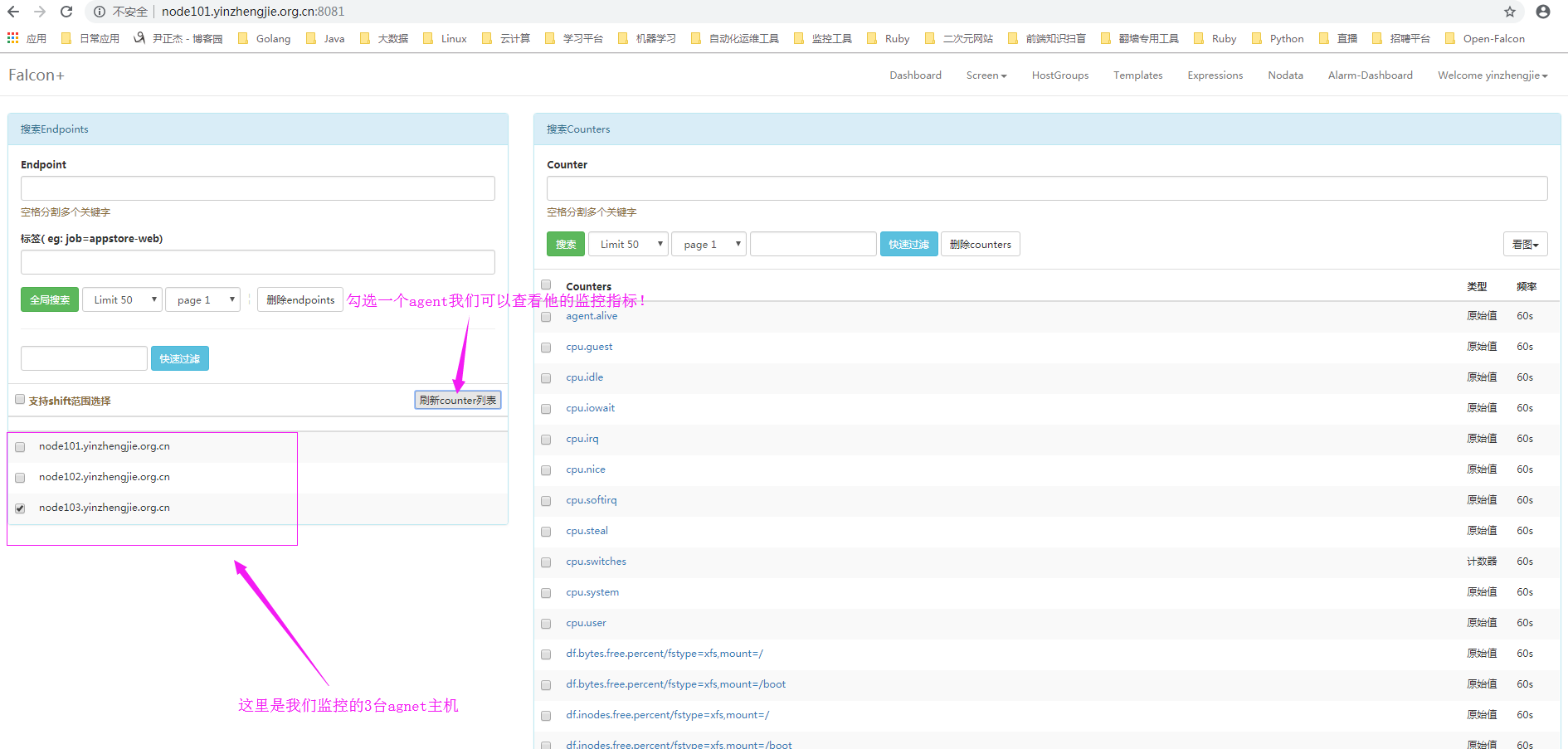
1>.刷新前端页面,会看到2台监控的主机信息,如下图所示:
2>.以Endpoint视角查看agent采集的监控项目
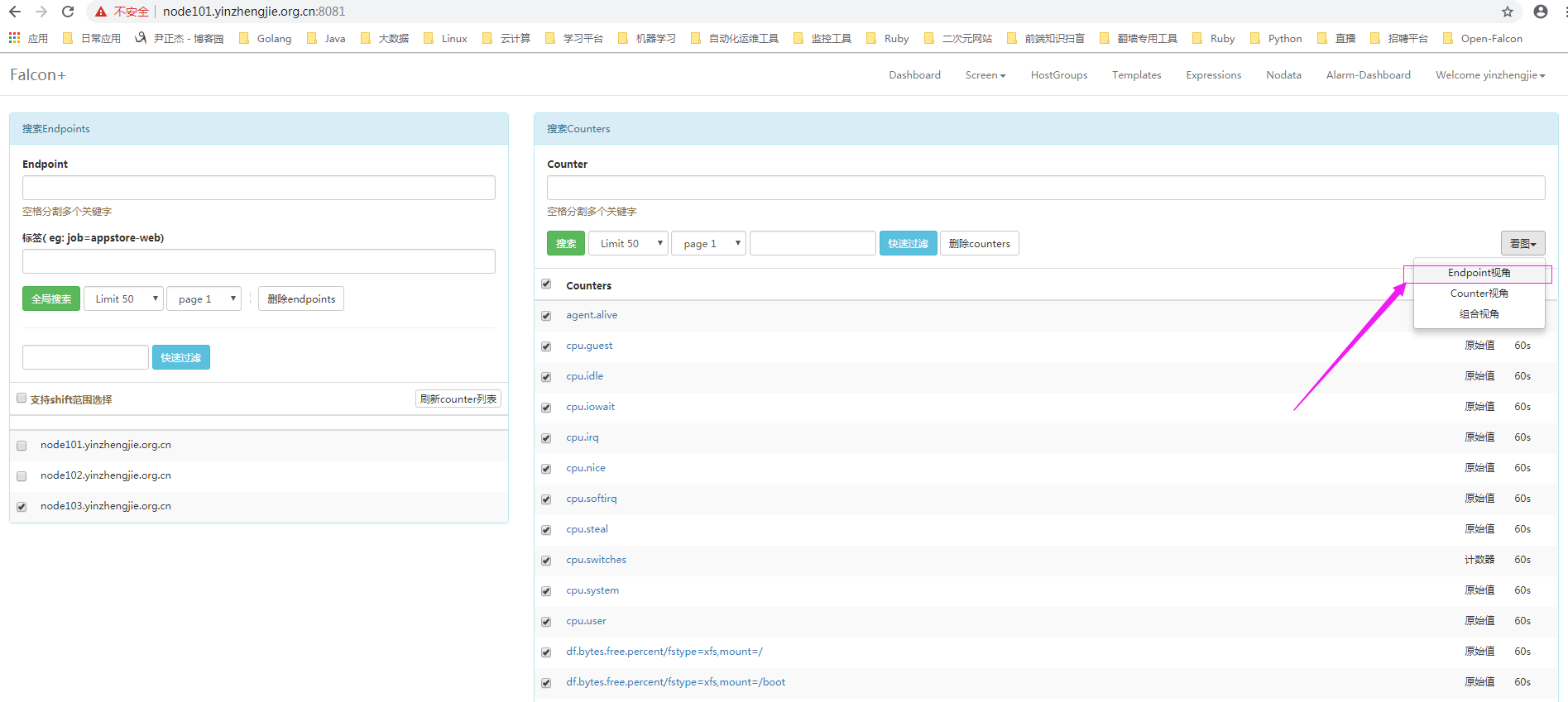
3>.点击后可查看到的视图信息如下:

运维监控-Open-Falcon安装Agent实战篇的更多相关文章
- 优化Linux内核参数/etc/sysctl.conf sysctl 《高性能Linux服务器构建实战:运维监控、性能调优与集群应用》
优化Linux内核参数/etc/sysctl.conf sysctl <高性能Linux服务器构建实战:运维监控.性能调优与集群应用> http://book.51cto.com/ar ...
- 运维监控-基于yum的方式部署 Zabbix Agent 4.0 版本
运维监控-基于yum的方式部署 Zabbix Agent 4.0 版本 作者:尹正杰 版权声明:原创作品,谢绝转载!否则将追究法律责任. 上一篇博客我们分享了如何基于yum的方式部署zabbix 4. ...
- 优化系统资源ulimit《高性能Linux服务器构建实战:运维监控、性能调优与集群应用》
优化系统资源ulimit<高性能Linux服务器构建实战:运维监控.性能调优与集群应用> 假设有这样一种情况,一台Linux 主机上同时登录了10个用户,在没有限制系统资源的情况下,这10 ...
- 运维监控-Open-Falcon介绍
运维监控-Open-Falcon介绍 作者:尹正杰 版权声明:原创作品,谢绝转载!否则将追究法律责任. 一.Open-Falcon 介绍 监控系统是整个运维环节,乃至整个产品生命周期中最重要的一环,事 ...
- CentOS服务器运维监控Nagios(一)
CentOS下搭建Nagios 王尚 2014.11.09 操作系统:CentOS-6.5-i386-bin-DVD1.iso 安装在VM中进行测试的. 本章需要的软件链接: php-5.3.2.ta ...
- 运维监控-使用Zabbix Server 添加自定义 item
运维监控-使用Zabbix Server 监控自定义 item 作者:尹正杰 版权声明:原创作品,谢绝转载!否则将追究法律责任. 本篇博客就直接开门见山如何使用Zabbix Server 监控自定义 ...
- 运维监控-基于yum的方式部署Zabbix Server 4.0 版本
运维监控-基于yum的方式部署Zabbix Server 4.0 版本 作者:尹正杰 版权声明:原创作品,谢绝转载!否则将追究法律责任. 一.如何选择zabbix版本 1>.打开zabbix官方 ...
- 建设DevOps统一运维监控平台,全面的系统监控 Zabbix VS Nagios VS Open-Falcon OR Prometheus
前言 随着Devops.云计算.微服务.容器等理念的逐步落地和大力发展,机器越来越多,应用越来越多,服务越来越微,应用运行基础环境越来多样化,容器.虚拟机.物理机不一而足.面对动辄几百上千个虚拟机.容 ...
- Lnmp搭建zabbix运维监控系统
使用目的? 在公司项目中需要做一个日志监控,最开始选择的是efk,但是efk的资料相对较少并且之前对这几个产品都没接触过,使用起来难度.于是选择了zabbix作为项目的运维监控系统. zabbix能做 ...
随机推荐
- HTML5-MathML-基础篇
MathML是数学标记语言,是一种基于XML(标准通用标记语言的子集)的标准.用来在互联网上书写数学符号和公式的置标语言. 注意:大部分浏览器都支持MathML标签,如果你的浏览器不支持该标签,可以使 ...
- BZOJ2434 [NOI2011] 阿狸的打字机 【树链剖分】【线段树】【fail树】【AC自动机】
题目分析: 画一下fail树,就会发现就是x的子树中属于y路径的,把y剖分一下,用线段树处理 $O(n*log^2 n)$. 代码: #include<bits/stdc++.h> usi ...
- 一个模拟——抢票部分功能的 简单版(主要实例化一下 Lock 的使用)
""" 抢票! 多个用户在同时读写同一个数据 """ from multiprocessing import Process,Lock im ...
- Quartus prime 16.0 in_system memory content editor 使用
前言 quartus提供了片内存储器的实时查看与修改,而不用编译工程,很棒.你可以方便的查看到存储器中到底存储了什么东西. 流程 1.打开: 2.主界面: 3.设置jtag项之后,查看即可. sign ...
- 【XSY2534】【BZOJ4817】树点涂色 LCT 倍增 线段树 dfs序
题目大意 Bob有一棵\(n\)个点的有根树,其中\(1\)号点是根节点.Bob在每个点上涂了颜色,并且每个点上的颜色不同.定义一条路径的权值是:这条路径上的点(包括起点和终点)共有多少种不同的颜 ...
- 安卓Q | 诸多本地文件找不到?应用文件存储空间沙箱化适配指导
上期我们针对Android Q 版本中对设备存储空间进行的限制.新特性变更引发的兼容性问题及原因分析推出了<安卓 Q | 8大场景全面解析应用存储沙箱化>文章,本期文章我们将手把手指导各位 ...
- 【BZOJ5300】[CQOI2018]九连环 (高精度,FFT)
[BZOJ5300][CQOI2018]九连环 (高精度,FFT) 题面 BZOJ 洛谷 题解 去这里看吧,多么好 #include<iostream> #include<cstdi ...
- 使用rt-thread中BSP-stm32 ENV构建工具报错
@2019-01-23 [小记] --路径问题 参照rtt官方<STM32 系列 BSP 制作教程> 构建项目时出现如下错误 error1:打开 menuconfig 出错 解决方法: 根 ...
- Billiard CFR484 div2 (数论)
就是一个点从开始的点在一个矩形内往某个方向一直运动,如果碰到了矩形的边,那么就反弹,我们可以把这个矩形拓展开,那么就是问题变成了我有没有一个点,这个点的坐标(Tx, Ty)满足n|Tx,m|Ty 那么 ...
- Lambda 表达式有何用处?如何使用?
强烈推荐!!! 作者:Sevenvidia链接:https://www.zhihu.com/question/20125256/answer/324121308来源:知乎著作权归作者所有.商业转载 ...