
运维监控-基于yum的方式部署 Zabbix Agent 4.0 版本
运维监控-基于yum的方式部署 Zabbix Agent 4.0 版本
作者:尹正杰
版权声明:原创作品,谢绝转载!否则将追究法律责任。
上一篇博客我们分享了如何基于yum的方式部署zabbix 4.0.0版本。接下来,我们就监控其他主机的item项吧。
一.在需要监控的主机上部署zabbix-agent服务
1>.安装zabbix-agent
[root@node102 ~]# rpm -Uvh https://repo.zabbix.com/zabbix/4.0/rhel/7/x86_64/zabbix-release-4.0-1.el7.noarch.rpm

Retrieving https://repo.zabbix.com/zabbix/4.0/rhel/7/x86_64/zabbix-release-4.0-1.el7.noarch.rpm

warning: /var/tmp/rpm-tmp.pYEOk0: Header V4 RSA/SHA512 Signature, key ID a14fe591: NOKEY

Preparing...                          ################################# [%]

Updating / installing...

   :zabbix-release-4.0-.el7         ################################# [%]

[root@node102 ~]#

[root@node102 ~]#
[root@node102 ~]# rpm -Uvh https://repo.zabbix.com/zabbix/4.0/rhel/7/x86_64/zabbix-release-4.0-1.el7.noarch.rpm
[root@node102 ~]# cat /etc/yum.repos.d/zabbix.repo

[zabbix]

name=Zabbix Official Repository - $basearch

baseurl=https://mirrors.aliyun.com/zabbix/zabbix/4.0/rhel/7/$basearch/

enabled=

gpgcheck=

gpgkey=file:///etc/pki/rpm-gpg/RPM-GPG-KEY-ZABBIX-A14FE591

[zabbix-non-supported]

name=Zabbix Official Repository non-supported - $basearch

baseurl=https://mirrors.aliyun.com/zabbix/non-supported/rhel/7/$basearch/

enabled=

gpgkey=file:///etc/pki/rpm-gpg/RPM-GPG-KEY-ZABBIX

gpgcheck=

[root@node102 ~]#
[root@node102 ~]# cat /etc/yum.repos.d/zabbix.repo #修改zabbix的源为阿里云
[root@node102 ~]# yum -y install zabbix-agent

Loaded plugins: fastestmirror

zabbix                                                                                                          | 2.9 kB  ::

zabbix-non-supported                                                                                            |   B  ::

Loading mirror speeds from cached hostfile

 * base: mirrors.aliyun.com

 * extras: mirrors.aliyun.com

 * updates: mirrors..com

Resolving Dependencies

--> Running transaction check

---> Package zabbix-agent.x86_64 :4.0.-.el7 will be installed

--> Finished Dependency Resolution

Dependencies Resolved

=======================================================================================================================================

 Package                            Arch                         Version                            Repository                    Size

=======================================================================================================================================

Installing:

 zabbix-agent                       x86_64                       4.0.-.el7                        zabbix                        k

Transaction Summary

=======================================================================================================================================

Install   Package

Total size:  k

Installed size: 1.5 M

Downloading packages:

warning: /var/cache/yum/x86_64//zabbix/packages/zabbix-agent-4.0.-.el7.x86_64.rpm: Header V4 RSA/SHA512 Signature, key ID a14fe591: NOKEY

Retrieving key from file:///etc/pki/rpm-gpg/RPM-GPG-KEY-ZABBIX-A14FE591

Importing GPG key 0xA14FE591:

 Userid     : "Zabbix LLC <packager@zabbix.com>"

 Fingerprint: a184 8f53 52d0 22b9 471d 83d0 082a b56b a14f e591

 Package    : zabbix-release-4.0-.el7.noarch (installed)

 From       : /etc/pki/rpm-gpg/RPM-GPG-KEY-ZABBIX-A14FE591

Running transaction check

Running transaction test

Transaction test succeeded

Running transaction

Warning: RPMDB altered outside of yum.

  Installing : zabbix-agent-4.0.-.el7.x86_64                                                                                     /

  Verifying  : zabbix-agent-4.0.-.el7.x86_64                                                                                     /

Installed:

  zabbix-agent.x86_64 :4.0.-.el7

Complete!

[root@node102 ~]#
[root@node102 ~]# yum -y install zabbix-agent #安装zabbix的代理服务
2>.配置zabbix-agent
[root@node102 ~]# cat /etc/hosts | grep yinzhengjie

172.30.1.101 node101.yinzhengjie.org.cn

172.30.1.102 node102.yinzhengjie.org.cn

172.30.1.103 node103.yinzhengjie.org.cn

[root@node102 ~]#

[root@node102 ~]# hostname

node102.yinzhengjie.org.cn

[root@node102 ~]#

[root@node102 ~]# hostname -i

172.30.1.102

[root@node102 ~]#

[root@node102 ~]# cat /etc/hosts | grep yinzhengjie

172.30.1.101 node101.yinzhengjie.org.cn

172.30.1.102 node102.yinzhengjie.org.cn

172.30.1.103 node103.yinzhengjie.org.cn

[root@node102 ~]#

[root@node102 ~]#

[root@node102 ~]# grep Server /etc/zabbix/zabbix_agentd.conf  | grep -v ^#

Server=127.0.0.1

ServerActive=127.0.0.1

[root@node102 ~]#

[root@node102 ~]#

[root@node102 ~]# sed -i 's#Server=127.0.0.1#Server=node101.yinzhengjie.org.cn#' /etc/zabbix/zabbix_agentd.conf

[root@node102 ~]#

[root@node102 ~]# sed -i 's#ServerActive=127.0.0.1#ServerActive=node101.yinzhengjie.org.cn#' /etc/zabbix/zabbix_agentd.conf

[root@node102 ~]#

[root@node102 ~]#

[root@node102 ~]# grep Server /etc/zabbix/zabbix_agentd.conf  | grep -v ^#

Server=node101.yinzhengjie.org.cn

ServerActive=node101.yinzhengjie.org.cn

[root@node102 ~]#
3>.启动zabbix-agent
[root@node102 ~]# systemctl enable zabbix-agent

Created symlink from /etc/systemd/system/multi-user.target.wants/zabbix-agent.service to /usr/lib/systemd/system/zabbix-agent.service.

[root@node102 ~]#

[root@node102 ~]# systemctl start zabbix-agent

[root@node102 ~]#

[root@node102 ~]# systemctl status zabbix-agent

● zabbix-agent.service - Zabbix Agent

   Loaded: loaded (/usr/lib/systemd/system/zabbix-agent.service; enabled; vendor preset: disabled)

   Active: active (running) since Fri -- :: PST; 3s ago

  Process:  ExecStart=/usr/sbin/zabbix_agentd -c $CONFFILE (code=exited, status=/SUCCESS)

 Main PID:  (zabbix_agentd)

   CGroup: /system.slice/zabbix-agent.service

           ├─ /usr/sbin/zabbix_agentd -c /etc/zabbix/zabbix_agentd.conf

           ├─ /usr/sbin/zabbix_agentd: collector [idle  sec]

           ├─ /usr/sbin/zabbix_agentd: listener # [waiting for connection]

           ├─ /usr/sbin/zabbix_agentd: listener # [waiting for connection]

           ├─ /usr/sbin/zabbix_agentd: listener # [waiting for connection]

           └─ /usr/sbin/zabbix_agentd: active checks # [idle  sec]

Feb  :: node102.yinzhengjie.org.cn systemd[]: Starting Zabbix Agent...

Feb  :: node102.yinzhengjie.org.cn systemd[]: Started Zabbix Agent.

[root@node102 ~]#

[root@node102 ~]#

[root@node102 ~]# ss -ntl | grep 10050          #很显然服务已经启动成功了,端口是存在的,别忘记关闭防火墙和selinux哟,为了就是试验方便!

LISTEN                     *:                    *:*

LISTEN                    :::                   :::*

[root@node102 ~]#

[root@node102 ~]#
[root@node102 ~]# sed -i 's#SELINUX=enforcing#SELINUX=disabled#' /etc/selinux/config

[root@node102 ~]#

[root@node102 ~]# setenforce

[root@node102 ~]#

[root@node102 ~]# getenforce

Permissive

[root@node102 ~]#
[root@node102 ~]# sed -i 's#SELINUX=enforcing#SELINUX=disabled#' /etc/selinux/config #禁用selinux
[root@node102 ~]#

[root@node102 ~]# systemctl disable firewalld

Removed symlink /etc/systemd/system/dbus-org.fedoraproject.FirewallD1.service.

Removed symlink /etc/systemd/system/basic.target.wants/firewalld.service.

[root@node102 ~]#

[root@node102 ~]# systemctl stop firewalld

[root@node102 ~]#

[root@node102 ~]# systemctl status firewalld

● firewalld.service - firewalld - dynamic firewall daemon

   Loaded: loaded (/usr/lib/systemd/system/firewalld.service; disabled; vendor preset: enabled)

   Active: inactive (dead)

Feb  :: node102.yinzhengjie.org.cn systemd[]: Starting firewalld - dynamic firewall daemon...

Feb  :: node102.yinzhengjie.org.cn systemd[]: Started firewalld - dynamic firewall daemon.

Feb  :: node102.yinzhengjie.org.cn systemd[]: Stopping firewalld - dynamic firewall daemon...

Feb  :: node102.yinzhengjie.org.cn systemd[]: Stopped firewalld - dynamic firewall daemon.

[root@node102 ~]#

[root@node102 ~]#
[root@node102 ~]# systemctl stop firewalld #关闭防火墙
4>.测试zabbix-agent服务是否正常
[root@node101 ~]# hostname

node101.yinzhengjie.org.cn

[root@node101 ~]#

[root@node101 ~]#

[root@node101 ~]# hostname -i

172.30.1.101

[root@node101 ~]#

[root@node101 ~]# yum -y install telnet

Loaded plugins: fastestmirror

base                                                                                                            | 3.6 kB  ::

extras                                                                                                          | 3.4 kB  ::

mysql-connectors-community                                                                                      | 2.5 kB  ::

mysql-tools-community                                                                                           | 2.5 kB  ::

mysql56-community                                                                                               | 2.5 kB  ::

updates                                                                                                         | 3.4 kB  ::

zabbix                                                                                                          | 2.9 kB  ::

zabbix-non-supported                                                                                            |   B  ::

Loading mirror speeds from cached hostfile

 * base: mirrors.aliyun.com

 * extras: ftp.sjtu.edu.cn

 * updates: mirrors.nwsuaf.edu.cn

Resolving Dependencies

--> Running transaction check

---> Package telnet.x86_64 :0.17-.el7 will be installed

--> Finished Dependency Resolution

Dependencies Resolved

=======================================================================================================================================

 Package                       Arch                          Version                                 Repository                   Size

=======================================================================================================================================

Installing:

 telnet                        x86_64                        :0.17-.el7                           base                          k

Transaction Summary

=======================================================================================================================================

Install   Package

Total download size:  k

Installed size:  k

Downloading packages:

telnet-0.17-.el7.x86_64.rpm                                                                                   |   kB  ::

Running transaction check

Running transaction test

Transaction test succeeded

Running transaction

  Installing : :telnet-0.17-.el7.x86_64                                                                                         /

  Verifying  : :telnet-0.17-.el7.x86_64                                                                                         /

Installed:

  telnet.x86_64 :0.17-.el7

Complete!

[root@node101 ~]#
[root@node101 ~]# yum -y install telnet #安装telnet测试工具
[root@node101 ~]# telnet node102.yinzhengjie.org.cn

Trying 172.30.1.102...

Connected to node102.yinzhengjie.org.cn.

Escape character is '^]'.                #很显然,服务时正常的

Connection closed by foreign host.

[root@node101 ~]#
二.在zabbix Server添加对node102.yinzhengjie.org.cn节点的监控
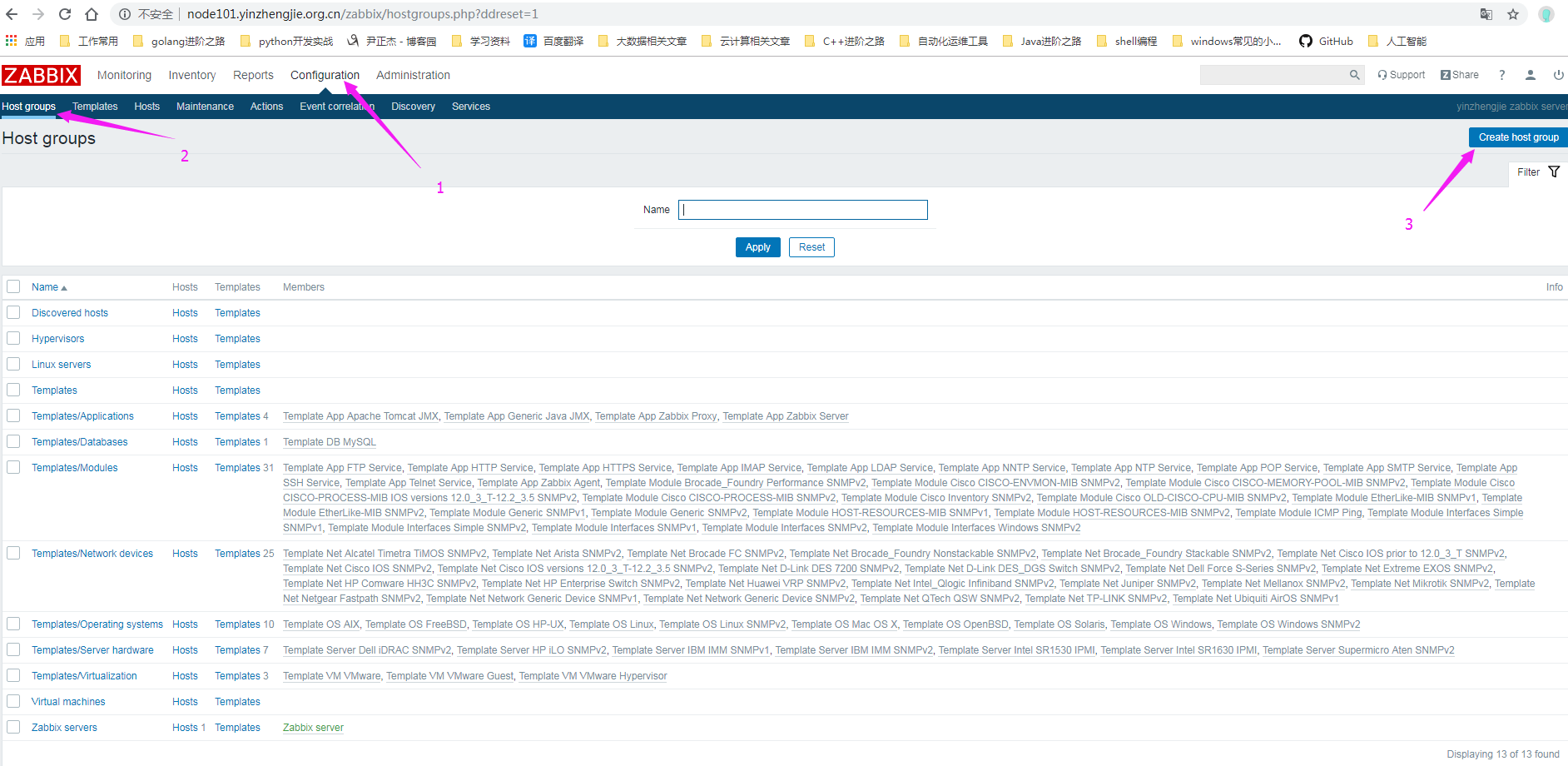
1>.如下图所示,点击创建一个主机组
2>.输入要创建的组名,名称你可以自定义
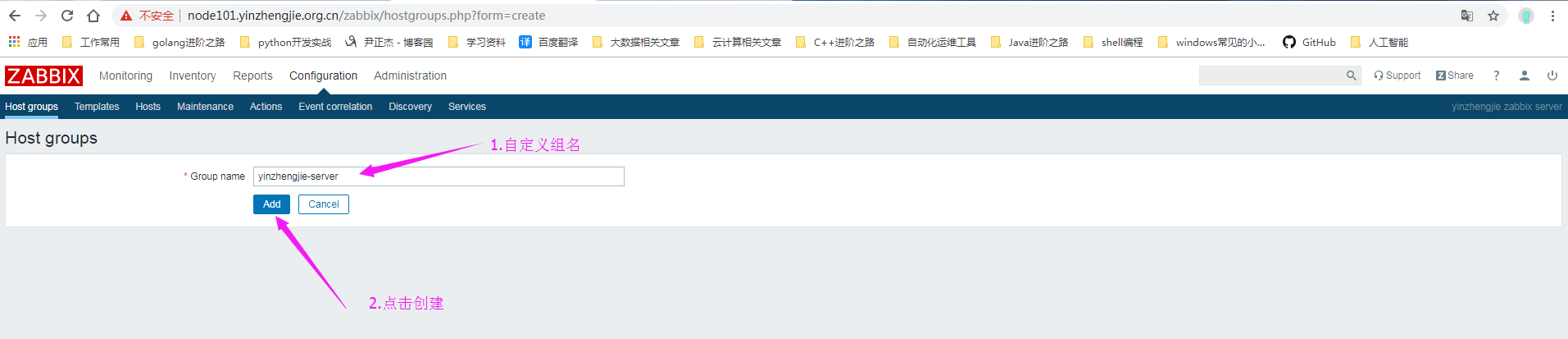
3>.组名添加完成

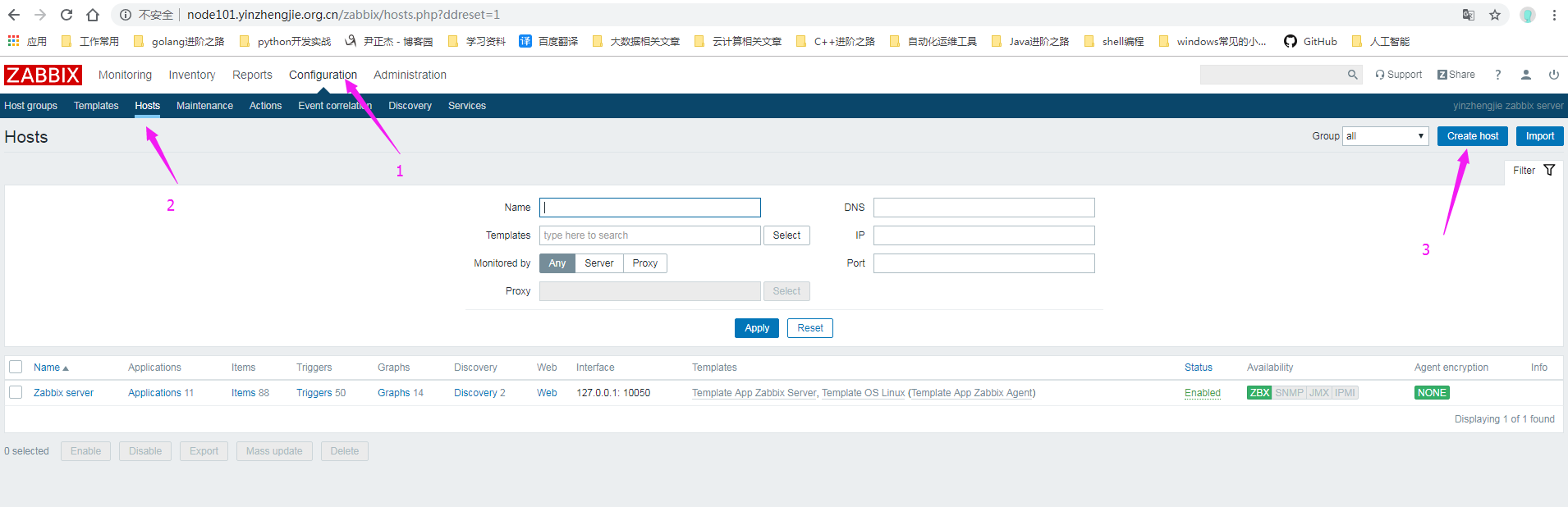
4>.如下图所示,点击创建主机
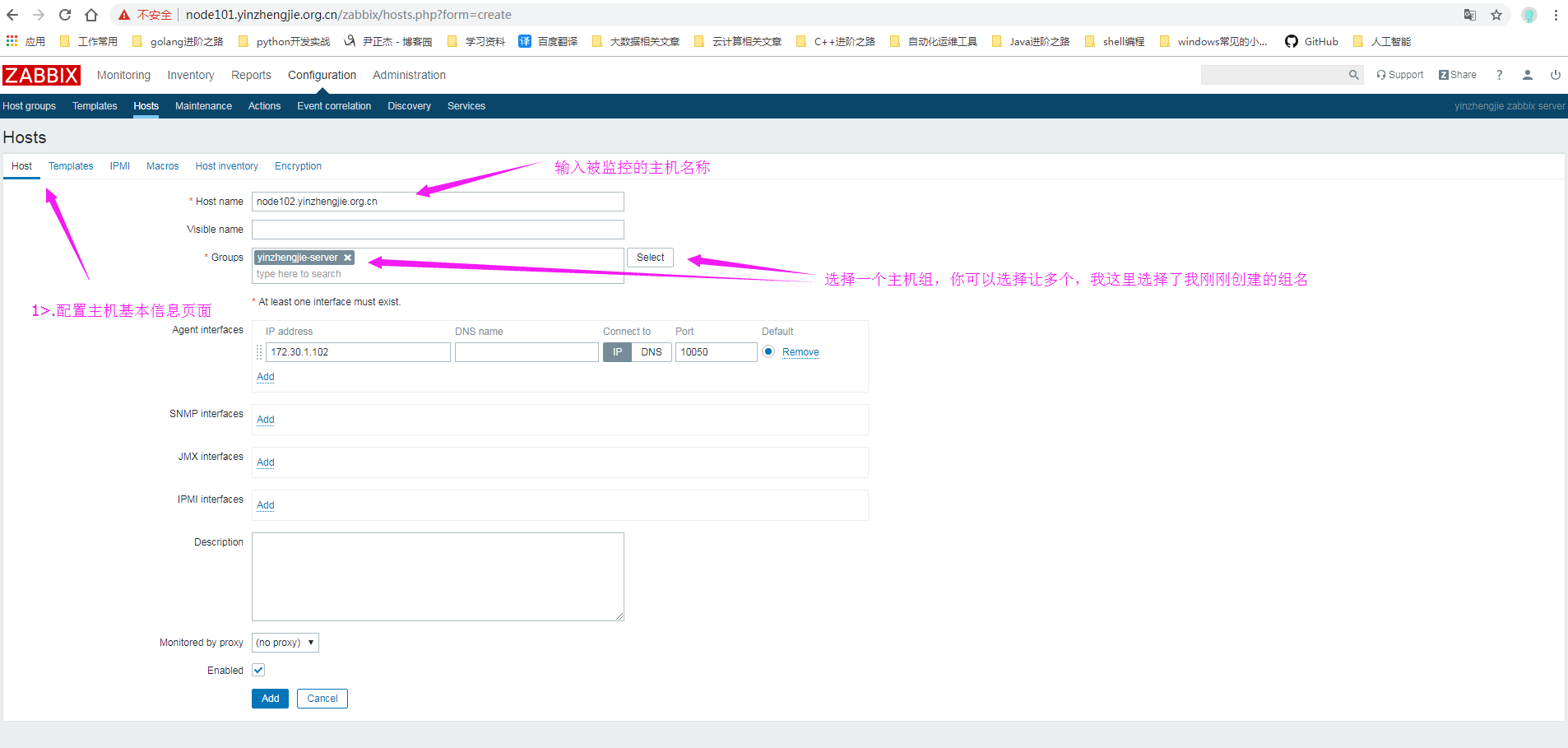
5>.配置被监控主机的基本信息(注意,带有*是必须要填写的!必须至少存在一个接口。)
6>.连接模板
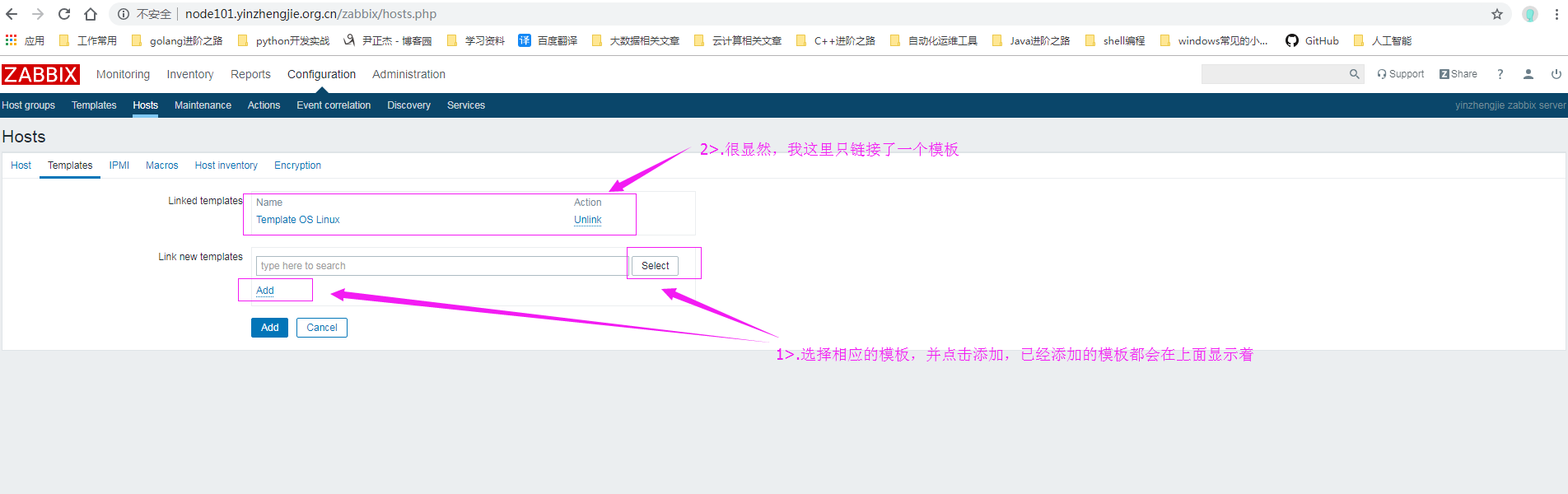
7>.点击添加按钮
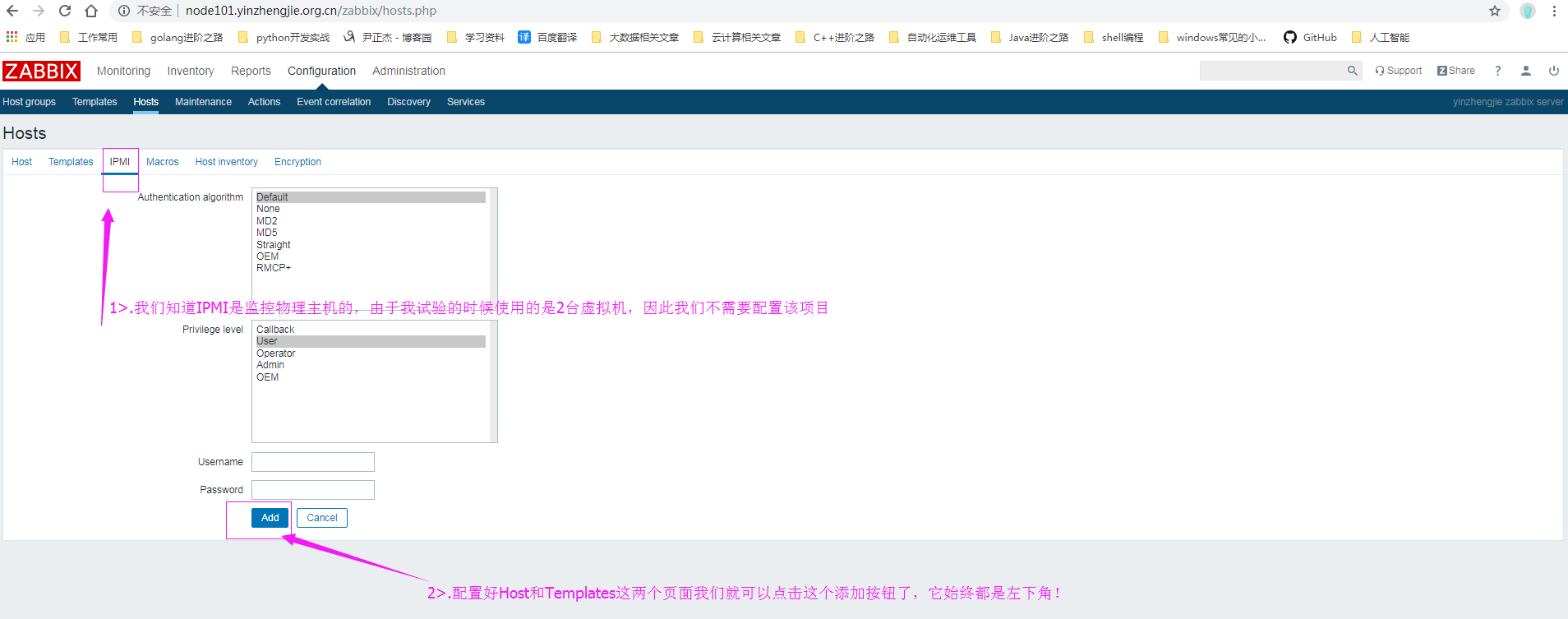
8>.添加完成

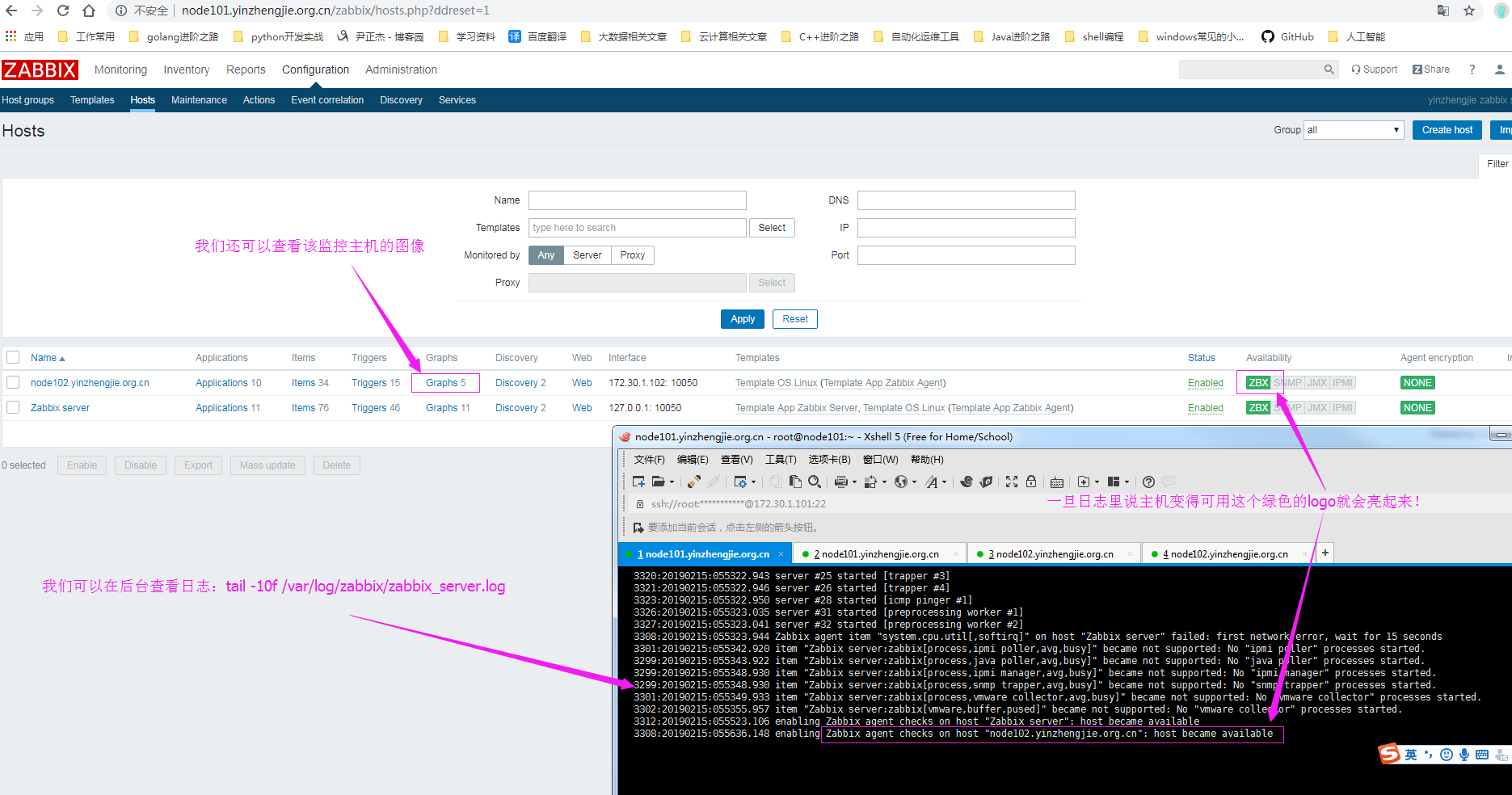
9>.等待30s左右,Zabbix Server就会监控到Zabbix agent的item了,监控成功,我们会看到一个绿灯
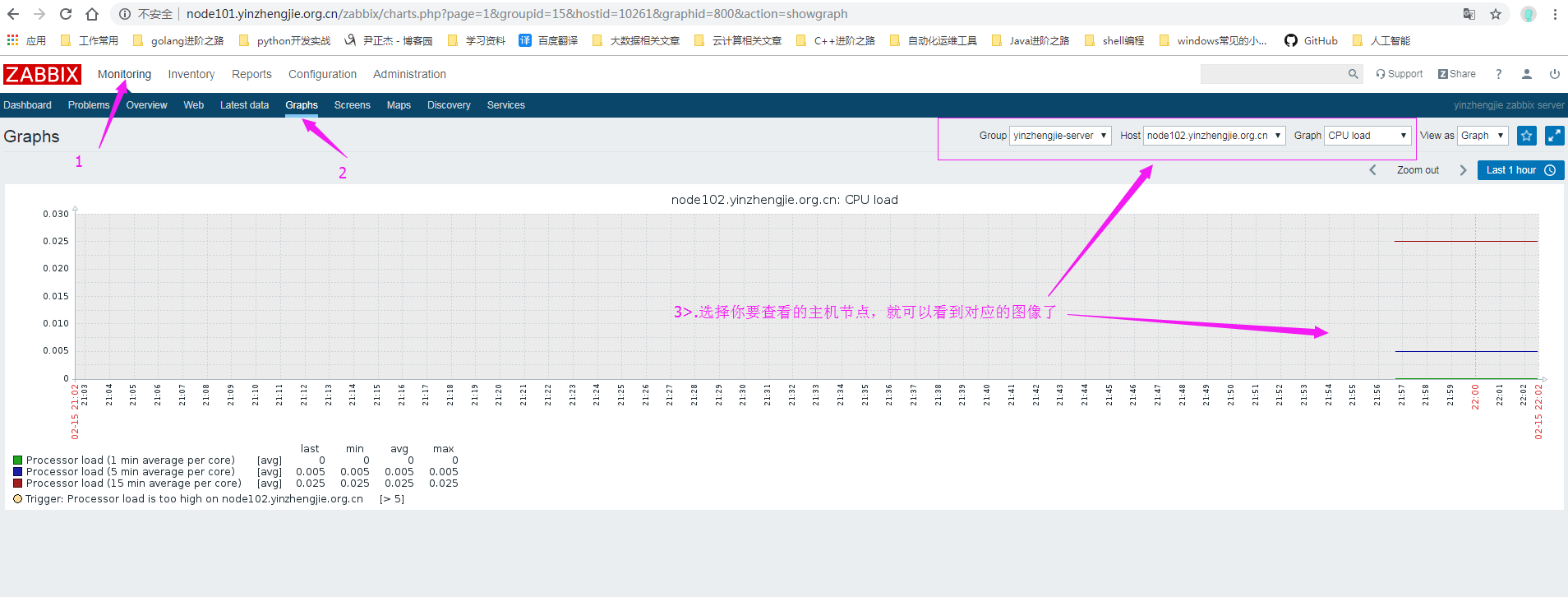
10>.查看监控的图像
运维监控-基于yum的方式部署 Zabbix Agent 4.0 版本的更多相关文章
- 运维监控-基于yum的方式部署Zabbix Server 4.0 版本
运维监控-基于yum的方式部署Zabbix Server 4.0 版本 作者:尹正杰 版权声明:原创作品,谢绝转载!否则将追究法律责任. 一.如何选择zabbix版本 1>.打开zabbix官方 ...
- OpenStack与ZStack深度对比:架构、部署、计算、运维监控等
摘要 OpenStack从2010年开源至今,已经走过9个年头,其正在进入主流企业市场,但该项目依然面临较难部署和管理的老问题.有一点是毫无疑问的,那就是OpenStack保持着高速增长的态势,超过5 ...
- Telegraf+Influxdb+Grafana自动化运维监控
概述:Telegraf收集信息,influxdb时序数据库存储数据,grafana平台展示数据,并进行监控告警,组成一个自动化运维监控平台. 一.influxdb InfluxDB是一个由Infl ...
- 建设DevOps统一运维监控平台,全面的系统监控 Zabbix VS Nagios VS Open-Falcon OR Prometheus
前言 随着Devops.云计算.微服务.容器等理念的逐步落地和大力发展,机器越来越多,应用越来越多,服务越来越微,应用运行基础环境越来多样化,容器.虚拟机.物理机不一而足.面对动辄几百上千个虚拟机.容 ...
- 运维监控-使用Zabbix Server 添加自定义 item
运维监控-使用Zabbix Server 监控自定义 item 作者:尹正杰 版权声明:原创作品,谢绝转载!否则将追究法律责任. 本篇博客就直接开门见山如何使用Zabbix Server 监控自定义 ...
- 运维监控-Open-Falcon安装Agent实战篇
运维监控-Open-Falcon安装Agent实战篇 作者:尹正杰 版权声明:原创作品,谢绝转载!否则将追究法律责任. 本文参考链接来自:http://book.open-falcon.org/zh/ ...
- 运维监控-Open-Falcon介绍
运维监控-Open-Falcon介绍 作者:尹正杰 版权声明:原创作品,谢绝转载!否则将追究法律责任. 一.Open-Falcon 介绍 监控系统是整个运维环节,乃至整个产品生命周期中最重要的一环,事 ...
- Lnmp搭建zabbix运维监控系统
使用目的? 在公司项目中需要做一个日志监控,最开始选择的是efk,但是efk的资料相对较少并且之前对这几个产品都没接触过,使用起来难度.于是选择了zabbix作为项目的运维监控系统. zabbix能做 ...
- Prometheus 运维监控
Prometheus 运维监控 1.Prometheus 介绍详解 2.Prometheus 安装部署 3.Prometheus 配置文件详解 4.Prometheus PromSQL 常用资源 5. ...
随机推荐
- Civil 3D 二次开发 创建AutoCAD对象—— 00 ——
不积跬步无以至千里,不积小流无以成江海.虽然创建一条直线.添加一个图层这样的小程序没有什么实际意义(内部命令很简单就可以完成),但对于初学二次开发的您来说,这可是一大步,这一步跨出去,您就跨进了二次开 ...
- LOJ6433 [PKUSC2018] 最大前缀和 【状压DP】
题目分析: 容易想到若集合$S$为前缀时,$S$外的所有元素的排列的前缀是小于$0$的,DP可以做到,令排列前缀个数小于0的是g[S]. 令f[S]表示$S$是前缀,转移可以通过在前面插入元素完成. ...
- VIM 光标移动常用命令
h或^h 向左移一个字符 k或^p 向上移一行 j或^j或^n 向下移一行 l或空格 向右移一个字符 G 移到文件的最后一行 nG 移到文件的第n行 w 移到下一个字的开头 W 移到下一个字 ...
- 【cf842D】Vitya and Strange Lesson(01字典树)
D. Vitya and Strange Lesson 题意 数列里有n个数,m次操作,每次给x,让n个数都异或上x.并输出数列的mex值. 题解 01字典树保存每个节点下面有几个数,然后当前总异或的 ...
- open-falcon详解
先扔出一张官方的架构图, agent是用于采集机器的监控指标,然后每60秒就会push给transfer,agent与transfer是建立了长连接的,传输速度会比较快: transfer接受到数据后 ...
- 在浏览器中浏览git上项目目录结构
效果如下,参考:https://gitee.com/oschina/GitCodeTree
- Crash 的文明世界
题目描述 给一棵树,求以每个点为根时下列式子的值. 题解 当k=1时这就是一个经典的换根dp问题. 所以这道题还是要用换根dp解决. 部分分做法: 考虑转移时是这样的一个形式(图是抄的). 用二项式定 ...
- VMware配置centos虚拟机静态ip
1. 安装centos,这个自己安装就好了 2. 配置配置虚拟机静态ip桥接器 配置ip地址 2. 配置网络共享中心 这里面的默认网关填写之前我们配置的网络网关ip默认为192.168.6.2 3. ...
- Http协议常见状态码
206 - 断点下载时用到,客户端请求了一部分内容,服务器成功把这部分内容返回给它,这时候就是用这个状态. 301 - 永久跳转,原地址不存在了,url被指向到另一个地址.这个主要是搜索引擎相关,影响 ...
- js常用的正则表达式
一.校验数字的表达式 数字:^[0-9]*$ n位的数字:^\d{n}$ 至少n位的数字:^\d{n,}$ m-n位的数字:^\d{m,n}$ 零和非零开头的数字:^(0|[1-9][0-9]*)$ ...