
ASP.NET Core中代码使用X509证书,部署到IIS上后报错:System cannot find the specified file 的解决办法(转载)
问:
I am trying to embrace the mysteries of SSL communication and have found a great tutorial on this site. I was trying to test my own certificate. Using Visual Studio 2012, I simply added an existing file (my certificate in .pfx format) and then changed the "certificate" and "password" settings in app.config. However, when trying to run it, I got an error:
CryptographicException was unhandled: System cannot find the specified file
Then, I tried the same in my Web Service. There I got some more details about the error:
System.Security.Cryptography.CryptographicException: System cannot find specified file.

   at System.Security.Cryptography.CryptographicException.ThrowCryptogaphicException(Int32 hr)

   at System.Security.Cryptography.X509Certificates.X509Utils._QueryCertFileType(String fileName)

   at System.Security.Cryptography.X509Certificates.X509Certificate.LoadCertificateFromFile(String fileName, Object password, X509KeyStorageFlags keyStorageFlags)

   v System.Security.Cryptography.X509Certificates.X509Certificate2..ctor(String fileName, String password)

   v TestServer.DataService.LoadSoap() v c:\Users\Administrator\Documents\Visual Studio 2012\Projects\TestServer\TestServer\DataService.asmx.cs:line 48
I have written this question to the author of the article, but since his last reply was in March 2012, I am not sure, whether he will reply. If somebody could help me with this problem, I would be very grateful.
P.S.: When exporting the certificate from .cer to .pfx, I have changed the title of the file exported. Although I doubt its effect on the problem, I'd rather mention it.
答:
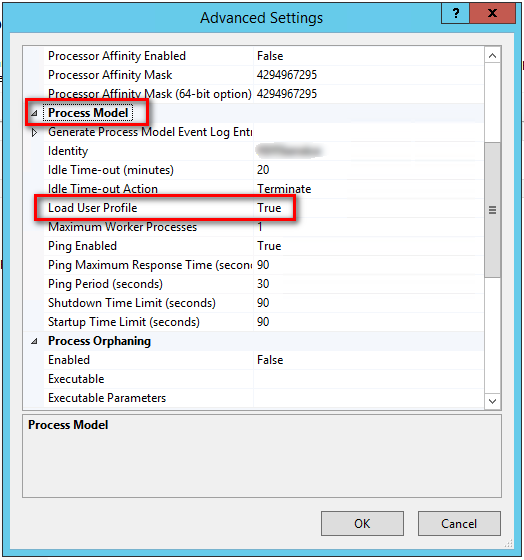
Did you set the following on the application pool in IIS?
- Go to IIS Manager
- Go to the application pool instance
- Click advanced settings
- Under Process model, set Load User Profile to true
See this stack question for further reading: What exactly happens when I set LoadUserProfile of IIS pool?
ASP.NET Core中代码使用X509证书,部署到IIS上后报错:System cannot find the specified file 的解决办法(转载)的更多相关文章
- ASP.NET Core Web 应用程序开发期间部署到IIS自定义主机域名并附加到进程调试
想必大家之前在进行ASP.NET Web 应用程序开发期间都有用到过将我们的网站部署到IIS自定义主机域名并附加到进程进行调试. 那我们的ASP.NET Core Web 应用程序又是如何部署到我们的 ...
- K8S+GitLab-自动化分布式部署ASP.NET Core(三) 更新镜像版本并部署到K8S上
一.介绍 前一篇,介绍了ASP.NET Core部署到K8S上,下面介绍我们在发布新一版本中怎么通过Gitlab CI自动给镜像打版本并部署到K8S上. 二.我们通过GitLab CI/CD 变量 不 ...
- iOS中出现"Check dependenciesWarning: The Copy Bundle Resources build phase contains this target's Info.plist file..."的解决办法A
出现场景 项目中移除info.plist ,后来又重新拖拽回来,同时勾选了Copy items if needed 解决办法 1.删除(删除时选择Remove Reference) 2.重新添加i ...
- asp.net core 错误定位 & vs2017 远程调试部署在centos上的asp.net core程序
前言 程序运行中会出现各种BUG. 排除BUG有三种方式. 一.访问页面直接报错误信息 出于安全,服务器是关闭这个功能的.在centos上可以用 命令设置环境变量来解决: export A ...
- asp.net core 系列 9 三种运行环境和IIS发布
一.在asp.net core中使用多个环境 ASP.NET Core 配置是基于运行时环境, 使用环境变量.ASP.NET Core 在应用启动时读取环境变量ASPNETCORE_ENVIRONME ...
- 在ASP.NET Core中使用百度在线编辑器UEditor
在ASP.NET Core中使用百度在线编辑器UEditor 0x00 起因 最近需要一个在线编辑器,之前听人说过百度的UEditor不错,去官网下了一个.不过服务端只有ASP.NET版的,如果是为了 ...
- [转]在ASP.NET Core中使用百度在线编辑器UEditor
原文地址:https://www.cnblogs.com/durow/p/6116393.html 0x00 起因 最近需要一个在线编辑器,之前听人说过百度的UEditor不错,去官网下了一个.不过服 ...
- Asp.Net Core 中的“虚拟目录”
写在前面 现在部署Asp.Net Core应用已经不再限制于Windows的IIS上,更多的是Docker容器.各种反向代理来部署.也有少部分用IIS部署的,IIS部署确实是又快又简单,图形化操作三下 ...
- asp.net core 中配合响应 html5 的音视频播放流,以及文件下载
一.asp.net core 中配合响应 html5 的音视频播放流,以及文件下载 问题描述: 目前测试了在 Windows(谷歌浏览器).Android(系统浏览器.QQ.微信).iOS 三个系统不 ...
随机推荐
- Hibernate概念初探
概述 Hibernate是一个开源代码的对象关系映射(ORM)框架,是基于Java的持久化中间件,它对JDBC进行轻量级的对象封装. 它不仅提供了从Java类到数据表之间的映射,也提供了查询和事务机制 ...
- redis中各种数据类型的常用操作方法汇总
在spring中使用jedisTemplate操作,详见https://www.cnblogs.com/EasonJim/p/7803067.html 一.Redis的五大数据类型 1.String( ...
- Windows 批处理获取某路径下最新创建的文件的名称
批处理获取某路径下最新创建的文件的名称 by:授客 QQ:1033553122 echo off setlocal enabledelayedexpansion rem 设置文件所在目录 set sr ...
- 不能用notepad++编辑器编写python
不能用notepad++编辑器编写python,因为notepad对空格支持不是很良好,会出现莫名其妙的错误!建议用vim或emacs. 有人这样解释:不要混合使用制表符和空格来缩进,因为这在跨越不同 ...
- 微软语音引擎 TTS 最基本使用
TTS(TextToSpeak) 需求:需要借助程序实现 文字合成语音/语音识别. TTS 介绍就不说了,这里介绍非常详细 >>> TTS详细介绍 + SAPI(微软的TTS语音 ...
- Markdown介绍及工具推荐
什么是Markdown? Markdown是一种可以使用普通文本编辑器编写的标记语言,通过简单的标记语法,它可以使普通文本内容具有一定的格式.百度百科markdown 还没听说过Markdown?那赶 ...
- (网页)jQuery判断checkbox是否选中的方法
if($('#checkbox-id').is(':checked')) { // do something} if ($('#checkbox-id').attr('checked')) { ...
- 关于正餐智能POS6.0.1.1改版后,点击反结账进入点菜界面后无法进行加菜的FAQ
适用版本:智能POS正餐V6.0.1.1+适用情况:点击反结账进入点菜界面后无法进行加菜.原因:为让报表统计的数据更准确解决方案:1.点击反结账,输入用户密码,进入点菜界面. 2.点击结算,进入收银台 ...
- HTMLTestRunner修改成Python3版本
修改前:HTMLTestRunner下载地址:http://tungwaiyip.info/software/HTMLTestRunner.html BSTestRunner 下载地址:htt ...
- [20190213]测试服务端打开那些端口.txt
[20190213]测试服务端打开那些端口.txt --//前几天测试使用发送信息到/dev/tcp/ip_address/port,测试端口是否打开.写简单写一个脚本验证看看. $ seq 1 65 ...