
Java实现爬取京东手机数据
Java实现爬取京东手机数据
最近看了某马的Java爬虫视频,看完后自己上手操作了下,基本达到了爬数据的要求,HTML页面源码也刚好复习了下,之前发布两篇关于简单爬虫的文章,也刚好用得上。项目没什么太难的地方,就是考验你对HTML源码的解析,层层解析,同标签选择器seletor进行元素筛选,再结合HttpCLient技术,成功把手机数据爬取下来。
一、项目Maven环境配置
1、配置SpringBoot
<parent>

    <groupId>org.springframework.boot</groupId>

    <artifactId>spring-boot-starter-parent</artifactId>

    <version>2.0.2.RELEASE</version>

</parent>
2、pom文件配置相关Jar包
 <dependencies>

    <!--SpringMVC-->

    <dependency>

        <groupId>org.springframework.boot</groupId>

        <artifactId>spring-boot-starter-web</artifactId>

    </dependency>

    <!--SpringData Jpa-->

    <dependency>

        <groupId>org.springframework.boot</groupId>

        <artifactId>spring-boot-starter-data-jpa</artifactId>

    </dependency>

    <!--MySQL连接包-->

    <dependency>

        <groupId>mysql</groupId>

        <artifactId>mysql-connector-java</artifactId>

    </dependency>

    <!-- HttpClient -->

    <dependency>

        <groupId>org.apache.httpcomponents</groupId>

        <artifactId>httpclient</artifactId>

    </dependency>

    <!--Jsoup-->

    <dependency>

        <groupId>org.jsoup</groupId>

        <artifactId>jsoup</artifactId>

        <version>1.10.3</version>

    </dependency>

    <!--工具包-->

    <dependency>

        <groupId>org.apache.commons</groupId>

        <artifactId>commons-lang3</artifactId>

    </dependency>

</dependencies>
3、添加配置文件(放在resource文件夹)
#DB Configuration:

spring.datasource.driverClassName=com.mysql.jdbc.Driver

spring.datasource.url=jdbc:mysql://127.0.0.1:3306/crawler

spring.datasource.username=root

spring.datasource.password=root

#JPA Configuration:

spring.jpa.database=MySQL

spring.jpa.show-sql=true
二、相关类
POJO类
@Entity

@Table(name = "jd_item")

public class Item {

    //主键

    @Id

    @GeneratedValue(strategy = GenerationType.IDENTITY)

    private Long id;

    //标准产品单位(商品集合)

    private Long spu;

    //库存量单位(最小品类单元)

    private Long sku;

    //商品标题

    private String title;

    //商品价格

    private Double price;

    //商品图片

    private String pic;

    //商品详情地址

    private String url;

    //创建时间

    private Date created;

    //更新时间

    private Date updated;

	...	... 	//  省略getter/setter、toString() 方法

}
Dao接口
public interface ItemDao extends JpaRepository<Item,Long> {}
业务层
public interface ItemService {

//根据条件查询数据

public List<Item> findAll(Item item);

//保存数据

public void save(Item item);

}
@Service

public class ItemServiceImpl implements ItemService {

@Autowired

private ItemDao itemDao;

@Override

public List<Item> findAll(Item item) {

    Example example = Example.of(item);

    List list = this.itemDao.findAll(example);

    return list;

}

    @Override

    @Transactional

    public void save(Item item) {

        this.itemDao.save(item);

    }

}
HttpClientUtils工具类(用来建立和销毁HttpClient连接的连接池)
@Component

public class HttpUtils {

   private PoolingHttpClientConnectionManager cm;

    public HttpUtils() {

        this.cm = new PoolingHttpClientConnectionManager();

        //    设置最大连接数

        cm.setMaxTotal(100);

        //    设置每个主机的并发数

        cm.setDefaultMaxPerRoute(10);

    }

    /**

     * 根据请求地址下载页面数据

     * @param url

     * @return 页面数据

     */

    public String doGetHtml(String url) {

        // 获取HttpClient对象

        CloseableHttpClient httpClient = HttpClients.custom().setConnectionManager(cm).build();

        // 声明httpGet请求对象

        HttpGet httpGet = new HttpGet(url);

        // 设置请求参数RequestConfig

        httpGet.setConfig(this.getConfig());

        // 浏览器表示

        httpGet.addHeader("User-Agent", "Mozilla/5.0 (iPhone; CPU iPhone OS 11_0 like Mac OS X) AppleWebKit/604.1.38 (KHTML, like Gecko) Version/11.0 Mobile/15A372 Safari/604.1");

        // 传输的类型

        httpGet.addHeader("Cookie","Cookie地址");  //Cookie地址是你搜索过后,开发者工具里面的request Header地址,这里太长了省略不写

		//	上述两行关于浏览的代码,是表示声明你是正常的方式访问该网页(可以理解为登录后正常访问)

		CloseableHttpResponse response = null;

        try {

            //  使用HttpClient发起请求,获取响应

            response = httpClient.execute(httpGet);

            //  解析响应,返回结果

            if (response.getStatusLine().getStatusCode()==200){

                //  判断响应Entity是否不为空,如果不为空就可以使用EntityUtils

                if (response.getEntity() !=null){

                    String content = EntityUtils.toString(response.getEntity(), "utf8");

                    return content;

                }

            }

        } catch (IOException e) {

            e.printStackTrace();

        } finally {

            try {

                if (response != null) {

                    // 关闭连接

                    response.close();

                }

            } catch (Exception e) {

                e.printStackTrace();

            }

        }

        return null;

    }

    /**

     * 下载图片

     * @param url

     * @return  图片名称

     */

    public String doGetImage(String url){

        //  获取HttpClient对象

        CloseableHttpClient httpClient = HttpClients.custom().setConnectionManager(this.cm).build();

        //  设置hTTPGet请求对象,设置url地址

        HttpGet httpGet = new HttpGet(url);

        //  设置请求信息

        httpGet.setConfig(this.getConfig());

        CloseableHttpResponse response = null;

        try {

            //  使用HttpClient发起请求,获取响应

            response = httpClient.execute(httpGet);

            //  解析响应,返回结果

            if (response.getStatusLine().getStatusCode()==200){

                //  判断响应Entity是否不为空,如果不为空就可以使用EntityUtils

                if (response.getEntity()!=null){

                    //  下载图片

                    //  获取图片的后缀

                    String extName = url.substring(url.lastIndexOf("."));

                    //  创建图片名,并重命名图片

                    String picName = UUID.randomUUID().toString() + extName;

                    //  下载图片

                    //  声明 OutPutStream

                    OutputStream out = new FileOutputStream(new File("C:\\Users\\Desktop\\images\\"+picName));

                    response.getEntity().writeTo(out);

                    //  返回图片名称

                    return picName;

                }

            }

        } catch (IOException e) {

            e.printStackTrace();

        }finally {

            //  关闭response

            if(response != null){

                try{

                    response.close();

                }catch (IOException e){

                    e.printStackTrace();

                }

            }

        }

        //  如果下载失败,返回空字符串

        return "";

    }

    //获取请求参数对象

    private RequestConfig getConfig() {

        RequestConfig config = RequestConfig.custom()

        		.setConnectTimeout(1000)// 设置创建连接的超时时间

                .setConnectionRequestTimeout(500) // 设置获取连接的超时时间

                .setSocketTimeout(10000) // 设置连接的超时时间

                .build();

        return config;

    }

}
ItemTask 任务类
@Component

public class ItemTask {

@Autowired

private HttpUtils httpUtils;

@Autowired

private ItemService itemService;

private static final ObjectMapper MAPPER = new ObjectMapper();

    //  当下载任务完成后,间隔多长时间进行下一次的任务

    @Scheduled(fixedDelay =1000*1000 )

    public void itemTask() throws Exception{

       	//  声明需要解析的初始地址

        String url = "https://search.jd.com/Search?keyword=%E6%89%8B%E6%9C%BA&enc=utf-8" +

                    "&qrst=1&rt=1&stop=1&vt=2&wq=%E6%89%8B%E6%9C%BA&s=1&click=0&page=";

        //  遍历页面对手机的搜索进行遍历结果

        for (int i = 1; i < 10; i=i+2) {

            String html = this.httpUtils.doGetHtml(url+i);

            //  解析页面,获取商品数据并存储

            this.parse(html);

        }

        System.out.println("手机数据抓取完成!!!");

    }

    /**

     * 解析页面,获取商品数据并存储

     * @param html

     */

    private void parse(String html) throws Exception {

        //  解析HTML获取Document

        Document doc = Jsoup.parse(html);

        //  获取spu

        Elements spuEles = doc.select("div#J_goodsList > ul > li");

        //  遍历获取spu数据

        for (Element spuEle : spuEles) {

            //  获取spu

            long spu = Long.parseLong(spuEle.attr("data-spu"));

            //  获取sku信息

            Elements skuEles = spuEles.select("li.ps-item");

            for (Element skuEle : skuEles) {

                //  获取sku

                long sku = Long.parseLong(skuEle.select("[data-sku]").attr("data-sku"));

                //  根据sku查询商品数据

                Item item = new Item();

                item.setSku(sku);

                List<Item> list = this.itemService.findAll(item);

                if (list.size()>0){

                    //如果商品存在,就进行下一个循环,该商品不保存,因为已存在

                    continue;

                }

                //  设置商品的spu

                item.setSpu(spu);

                //  获取商品的详情信息

                String itemUrl = "https://item.jd.com/"+sku+".html";

                item.setUrl(itemUrl);

                //  商品图片

                String picUrl = skuEle.select("img[data-sku]").first().attr("data-lazy-img");

                //	图片路径可能会为空的情况

                if(!StringUtils.isNotBlank(picUrl)){

                    picUrl =skuEle.select("img[data-sku]").first().attr("data-lazy-img-slave");

                }

                picUrl ="https:"+picUrl.replace("/n9/","/n1/");	//	替换图片格式

                String picName = this.httpUtils.doGetImage(picUrl);

                item.setPic(picName);

                //  商品价格

                String priceJson = this.httpUtils.doGetHtml("https://p.3.cn/prices/mgets?skuIds=J_" + sku);

                double price = MAPPER.readTree(priceJson).get(0).get("p").asDouble();

                item.setPrice(price);

                //  商品标题

                String itemInfo = this.httpUtils.doGetHtml(item.getUrl());

                String title = Jsoup.parse(itemInfo).select("#itemName").text();

                item.setTitle(title);

                //  商品创建时间

                item.setCreated(new Date());

                //  商品修改时间

                item.setUpdated(item.getCreated());

                //  保存商品数据到数据库中

                this.itemService.save(item);

            }

        }

    }

}
ItemTask 引导类
@SpringBootApplication

//设置开启定时任务

@EnableScheduling

public class Application {

    public static void main(String[] args) {

        SpringApplication.run(Application.class, args);

    }

}
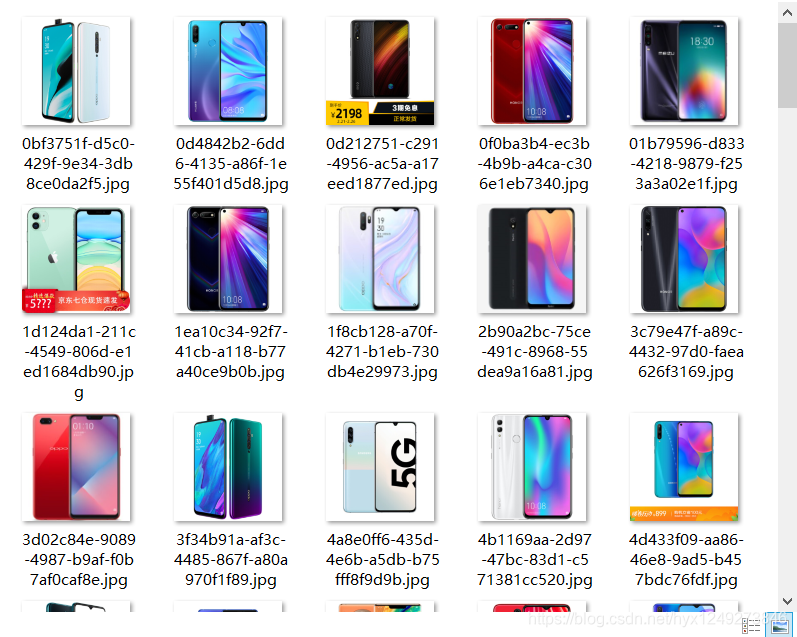
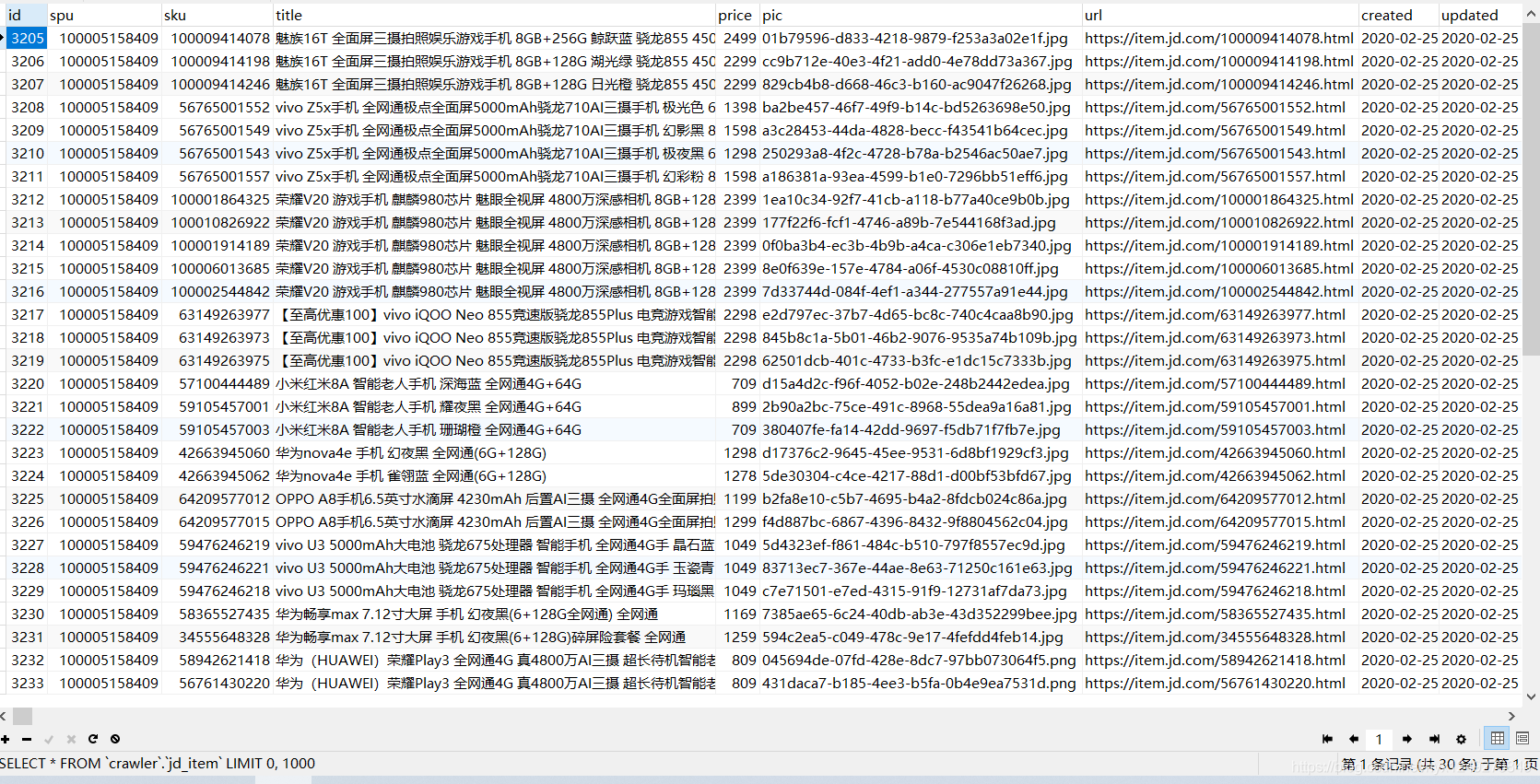
结果展示:
Java实现爬取京东手机数据的更多相关文章
- C#爬取京东手机数据+PowerBI数据可视化展示
此系列博文链接 C#爬虫基本知识 Html Agility Pack解析html TODO: EF6中基本认识. EF6操作mysql MySQL乱码问题 C#爬虫 在开头贴一下github仓库地址, ...
- webMagic+RabbitMQ+ES爬取京东建材数据
本次爬虫所要爬取的数据为京东建材数据,在爬取京东的过程中,发现京东并没有做反爬虫动作,所以爬取的过程还是比较顺利的. 为什么要用WebMagic: WebMagic作为一款轻量级的Java爬虫框架,可 ...
- 用scrapy爬取京东的数据
本文目的是使用scrapy爬取京东上所有的手机数据,并将数据保存到MongoDB中. 一.项目介绍 主要目标 1.使用scrapy爬取京东上所有的手机数据 2.将爬取的数据存储到MongoDB 环境 ...
- 爬虫(十七):Scrapy框架(四) 对接selenium爬取京东商品数据
1. Scrapy对接Selenium Scrapy抓取页面的方式和requests库类似,都是直接模拟HTTP请求,而Scrapy也不能抓取JavaScript动态谊染的页面.在前面的博客中抓取Ja ...
- python 爬取京东手机图
初学urllib,高手勿喷... import re import urllib.request #函数:每一页抓取的30张图片 def craw(url,page): imagelist = []# ...
- Python 爬虫-爬取京东手机页面的图片
具体代码如下: __author__ = 'Fred Zhao' import requests from bs4 import BeautifulSoup import os from urllib ...
- python3[爬虫实战] 使用selenium,xpath爬取京东手机
使用selenium ,可能感觉用的并不是很深刻吧,可能是用scrapy用多了的缘故吧.不过selenium确实强大,很多反爬虫的都可以用selenium来解决掉吧. 思路: 入口: 关键字搜索入口 ...
- Java爬虫爬取京东商品信息
以下内容转载于<https://www.cnblogs.com/zhuangbiing/p/9194994.html>,在此仅供学习借鉴只用. Maven地址 <dependency ...
- Python爬虫实战(2):爬取京东商品列表
1,引言 在上一篇<Python爬虫实战:爬取Drupal论坛帖子列表>,爬取了一个用Drupal做的论坛,是静态页面,抓取比较容易,即使直接解析html源文件都可以抓取到需要的内容.相反 ...
随机推荐
- 【ArcEngine】AE连接SDE_For_SQLServer参数设置
SDE for sqlserver直连的ArcEngine访问 Ae中的数据的连接实质还是采用服务连接的方式.连接代码如下: 1 public IWorkspace Getworkspace() 2 ...
- Struts中整合的强大Ognl学习(一)
测试使用了一个JavaBean的User,User中的Address单独封装再形成了一个JavaBean: 为了测试静态方法和静态变量调用,写了一个Util方法: 因为测试Ognl功能过多所以直接使用 ...
- opencv入门系列教学(四)处理鼠标事件
一.鼠标事件的简单演示 opencv中的鼠标事件,值得是任何与鼠标相关的任何事物,例如左键按下,左键按下,左键双击等.我们先来看看鼠标事件有哪些,在python中执行下面代码: import cv2 ...
- promise错误处理的三种方法
promise碰到then,也就是resolve或者reject的时候是异步的,所以try...catch对它是没有用的 1.then(resolve,reject); then方法中第二个回调,是 ...
- 🏆【JVM技术专区】「难点-核心-遗漏」TLAB内存分配+锁的碰撞(技术串烧)!
JVM内存分配及申请过程 当使用new关键字或者其他任何方式进行创建一个类的对象时,JVM虚拟机需要为该对象分配内存空间,而对象的大小在类加载完成后已经确定了,所以分配内存只需要在Java堆中划分出一 ...
- 笔记本+ubuntu18.04 关闭触摸板touchpad
方法1: Settings -> Devices -> Mouse&Touchpad -> Touchpad OFF 方法2: 终端运行如下命令 touchpad off: ...
- 详细分析MySQL事务日志(undo log)
2.undo log 2.1 基本概念 undo log有两个作用:提供回滚和多个行版本控制(MVCC). 在数据修改的时候,不仅记录了redo,还记录了相对应的undo,如果因为某些原因导致事务失败 ...
- Git使用教程七——Git实用技能
Git实用技能 1.图形管理工具 Github for Desktop Source tree 老牌的GitGUl管理工具了,也号称是最好用的Git GUI工具.功能丰富,基本操作和高 级操作都非常流 ...
- golang map实现原理
这篇文章主要讲 map 的赋值.删除.查询.扩容的具体执行过程,仍然是从底层的角度展开.结合源码,看完本文一定会彻底明白 map 底层原理. 我要说明的是,这里对 map 的基本用法涉及比较少,我相信 ...
- blender Text on Curve Text on Sphere
Text on Curve Shift + A 添加一个 BezierCurve Shift + A 添加一个 Text,Tab 编辑,再次 Tab 退回 Object Mode 选中 Text,Ad ...