
filebeat收集日志到elsticsearch中并使用ingest node的pipeline处理
filebeat收集日志到elsticsearch中
一、需求
使用 filebeat 收集系统中的日志到 elasticsearch 中。
- 读取系统中的日志文件,排除不需要的数据。
- 多行日志的处理。
- filebeat.yml中敏感的信息(比如:密码)需要放置到
filebeat keystore中。 - 使用自定义的索引模板。
- 收集到的日志去重。
- 使用es的 ingest node 的pipeline 来处理数据(增加字段、删除字段、修改数据类型等等)
二、实现
1、filebeat.yml 配置文件的编写
filebeat.inputs:

- type: log

  # 是否启动

  enabled: true

  encoding: "utf-8"

  # 从那个路径收集日志,如果存在多个 input ,则这个 paths 中的收集的日志最好不要重复,否则会出现问题

  # 日志路径可以写通配符

  paths:

    - "/Users/huan/soft/elastic-stack/filebeat/filebeat/springboot-admin.log"

  # 如果日志中出现了 DEBUG 的字样,则排除这个日志

  exclude_lines:

    - "DEBUG"

  # 添加自定义字段

  fields:

    "application-servic-name": "admin"

  # fields 中的字段不放在根级别 ,true表示放在根级别

  fields_under_root: false

  # 添加一个自定义标签

  tags:

    - "application-admin"

  # 多行日志的处理,比如java中的异常堆栈

  multiline:

    # 正则表达式

    pattern: "^\\[+"

    # 是否开启正则匹配,true:开启,false:不开启

    negate: true

    # 不匹配正则的行是放到匹配到正则的行的after(后面)还是before(前面)

    match: after

    # 多行日志结束的时间,多长时间没接收到日志,如果上一个是多行日志,则认为上一个结束了

    timeout: 2s

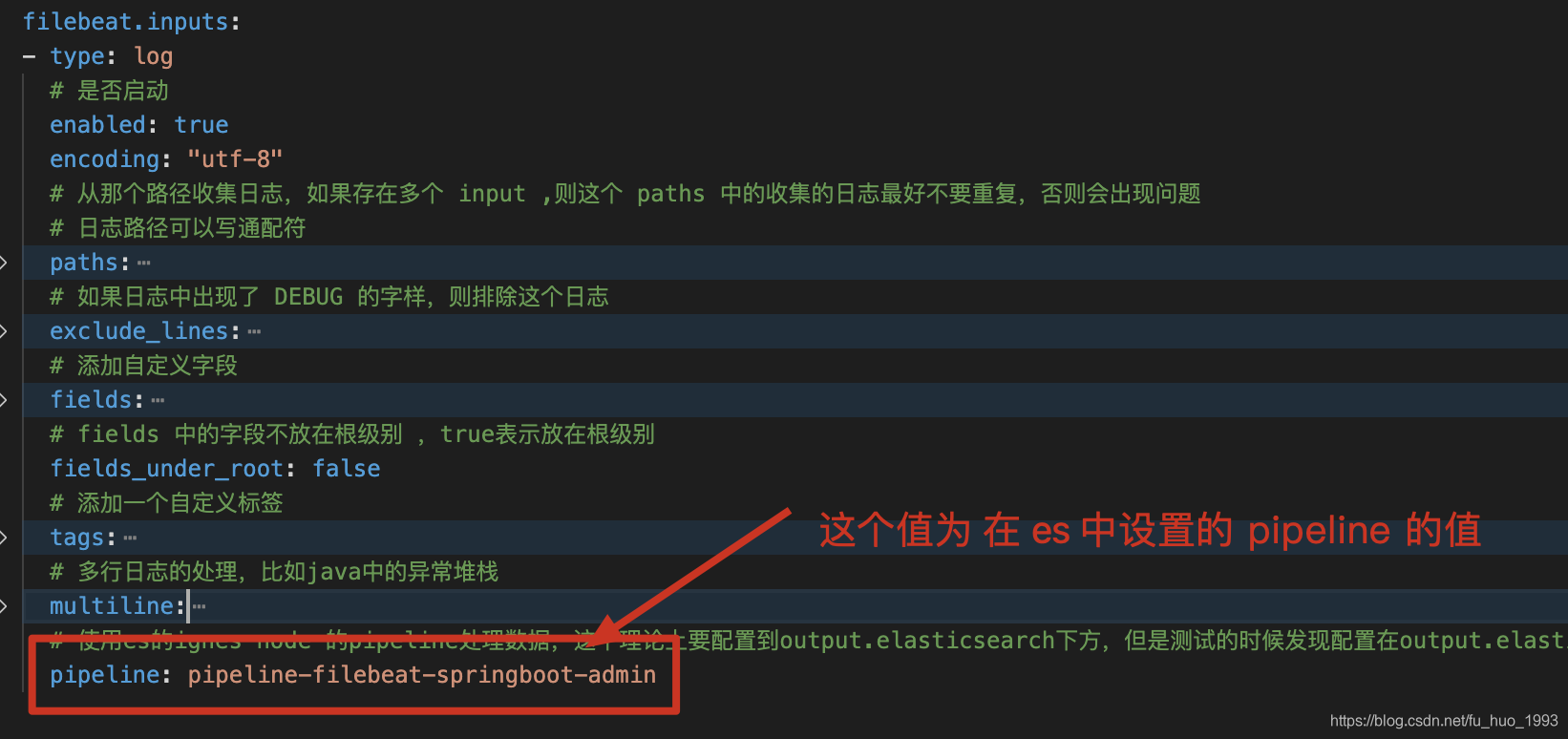
  # 使用es的ignes node 的pipeline处理数据,这个理论上要配置到output.elasticsearch下方,但是测试的时候发现配置在output.elasticsearch下方不生效。

  pipeline: pipeline-filebeat-springboot-admin

# 配置索引模板的名字和索引模式的格式

setup.template.enabled: false

setup.template.name: "template-springboot-admin"

setup.template.pattern: "springboot-admin-*"

# 索引的生命周期,需要禁用,否则可能无法使用自定义的索引名字

setup.ilm.enabled: false

# 数据处理,如果我们的数据不存在唯一主键,则使用fingerprint否则可以使用add_id来实现

processors:

  # 指纹,防止同一条数据在output的es中存在多次。(此处为了演示使用message字段做指纹,实际情况应该根据不用的业务来选择不同的字段)

  - fingerprint:

      fields: ["message"]

      ignore_missing: false

      target_field: "@metadata._id"

      method: "sha256"

# 输出到es中

output.elasticsearch:

  # es 的地址

  hosts:

    - "http://localhost:9200"

    - "http://localhost:9201"

    - "http://localhost:9202"

  username: "elastic"

  password: "123456"

  # 输出到那个索引,因为我们这个地方自定义了索引的名字,所以需要下方的 setup.template.[name|pattern]的配置

  index: "springboot-admin-%{[agent.version]}-%{+yyyy.MM.dd}"

  # 是否启动

  enabled: true
注意️:
1、索引的生命周期,需要禁用,否则可能无法使用自定义的索引名字。
2、估计是filebeat(7.12.0)版本的一个bug,pipeline需要写在input阶段,写在output阶段不生效。
2、创建自定义的索引模板
PUT /_template/template-springboot-admin

{

  # 任何符合 springboot-admin- 开头的索引都会被匹配到,在索引创建的时候生效。

  "index_patterns": ["springboot-admin-*"],

  # 一个索引可能匹配到多个索引模板,使用 order 来控制顺序

  "order": 0,

  "mappings": {

    "properties": {

      "createTime":{

        "type": "date",

        "format": ["yyyy-MM-dd HH:mm:ss.SSS"]

      }

    }

  }

}
此处需要根据索引情况自定义创建,此处为了简单演示,将createTime的字段类型设置为date。
3、加密连接到es用户的密码
由下方的配置可知
output.elasticsearch:

  username: "elastic"

  password: "123456"
用户名是明文的,这个不安全,我们使用 filebeat keystore 来存储密码。
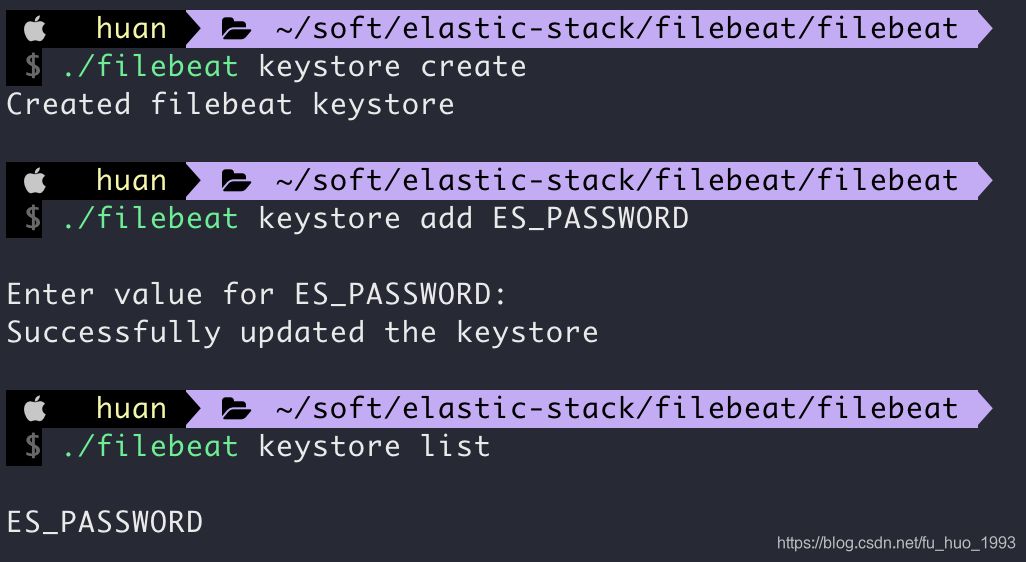
1、创建keystore
./filebeat keystore create
2、添加一个ES_PASSWORD这个key
./filebeat keystore add ES_PASSWORD
在接下来的提示中,输入密码。ES_PASSWORD是自定义的,待会在修改filebeat.yml配置文件中的 es output 中需要用到。
3、列出keystore中已经有了多少个key
./filebeat keystore list
4、删除keystore中的某个key
./filebeat keystore remove KEY(比如:ES_PASSWORD)
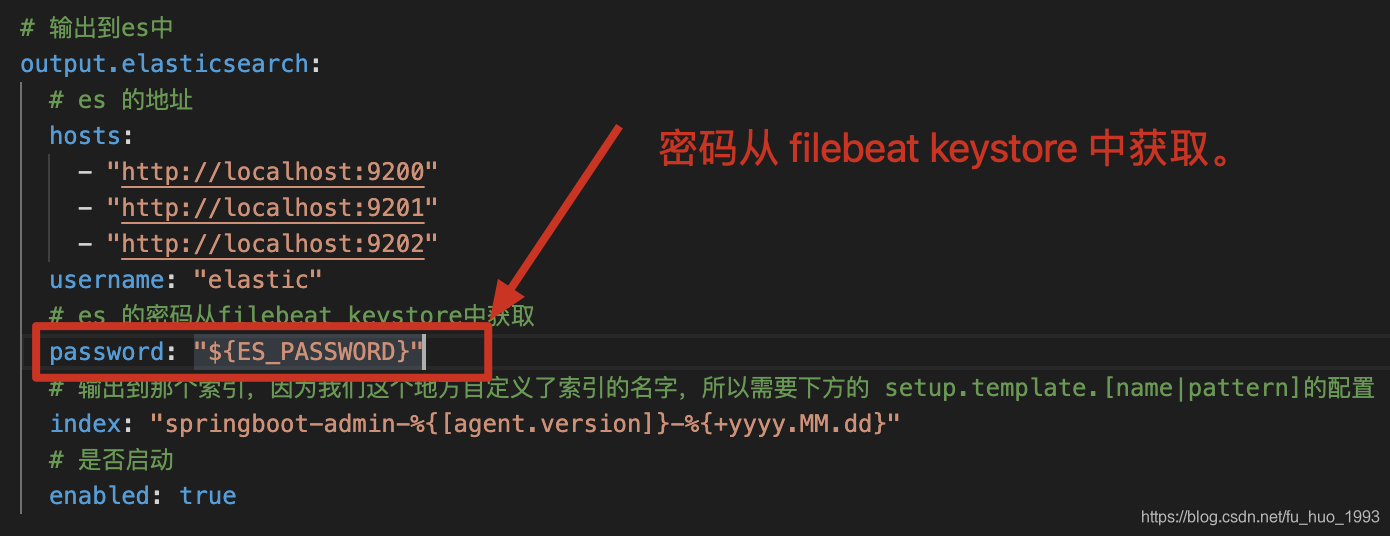
5、修改filebeat.yml中es的密码
4、使用es的ingest node 的pipeline来处理数据
ingest pipeline 使我们在索引数据之前,提供了对数据执行通用转换等操作。**比如:**可以转换数据的类型、删除字段、增加字段等操作。
PUT _ingest/pipeline/pipeline-filebeat-springboot-admin

{

  "description": "对springboot-admin项目日志的pipeline处理",

  "processors": [

    {

      "grok": {

        "field": "message",

        "patterns": [

          """(?m)^\[%{INT:pid}\]%{SPACE}%{TIMESTAMP_ISO8601:createTime}%{SPACE}\[%{DATA:threadName}\]%{SPACE}%{LOGLEVEL:level}%{SPACE}%{JAVACLASS:javaClass}#(?<methodName>[a-zA-Z_]+):%{INT:linenumber}%{SPACE}-%{GREEDYDATA:message}"""

        ],

        "pattern_definitions": {

          "METHODNAME": "[a-zA-Z_]+"

        },

        "on_failure": [

          {

            "set": {

              "field": "grok_fail_message",

              "value": "{{_ingest.on_failure_message }}"

            }

          }

        ]

      },

      "set": {

        "field": "pipelineTime",

        "value": "{{_ingest.timestamp}}"

      },

      "remove": {

        "field": "ecs",

        "ignore_failure": true

      },

      "convert": {

        "field": "pid",

        "type": "integer",

        "ignore_failure": true

      }

    },

    {

      "convert": {

        "field": "linenumber",

        "type": "integer",

        "ignore_failure": true

      }

    },

    {

      "date": {

        "field": "createTime",

        "formats": [

          "yyyy-MM-dd HH:mm:ss.SSS"

        ],

        "timezone": "+8",

        "target_field": "@timestamp",

        "ignore_failure": true

      }

    }

  ]

}
5、准备测试数据
[9708] 2021-05-13 11:14:51.873 [http-nio-8080-exec-1] INFO  org.springframework.web.servlet.DispatcherServlet#initServletBean:547 -Completed initialization in 1 ms

[9708] 2021-05-13 11:14:51.910 [http-nio-8080-exec-1] ERROR com.huan.study.LogController#showLog:32 -请求:[/showLog]发生了异常

java.lang.ArithmeticException: / by zero

	at com.huan.study.LogController.showLog(LogController.java:30)

	at sun.reflect.NativeMethodAccessorImpl.invoke0(Native Method)

	at sun.reflect.NativeMethodAccessorImpl.invoke(NativeMethodAccessorImpl.java:62)

	at sun.reflect.DelegatingMethodAccessorImpl.invoke(DelegatingMethodAccessorImpl.java:43)
6、运行filebeat
./filebeat -e -c (filebeat配置文件的路径)
解释:
-e将日志输出到stderr,默认输出到sysloglogs/filebeat文件。-c指定filebeat.yml配置文件的路径
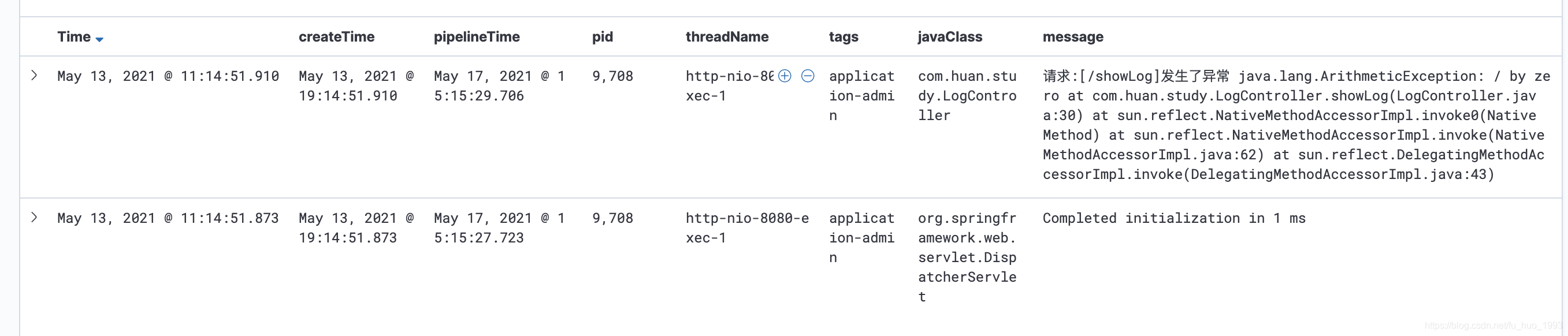
7、查看结果
在kibana上创建索引模式,然后查看日志。
三、如何读取同一个文件多次
删除 data/registry 文件夹的内容。不同的filebeat安装方式,data目录的位置不同,参考如下文档 https://www.elastic.co/guide/en/beats/filebeat/current/directory-layout.html
四、数据去重
我们知道在es中,每个文档数据都有一个文档id,默认情况下这个文档id是es自动生成的,因此重复的文档数据可能产生多个文档。
解决思路如下:
# 数据处理,如果我们的数据不存在唯一主键,则使用fingerprint否则可以使用add_id来实现

processors:

  # 指纹,防止同一条数据在output的es中存在多次。(此处为了演示使用message字段做指纹,实际情况应该根据不用的业务来选择不同的字段)

  - fingerprint:

      fields: ["message"]

      ignore_missing: false

      target_field: "@metadata._id"

      method: "sha256"
五、filebeat使用es ingest node pipeline遇到的一个坑
在使用 filebeat的过程中,我们从官网中可知,pipeline这个是写在output中的。
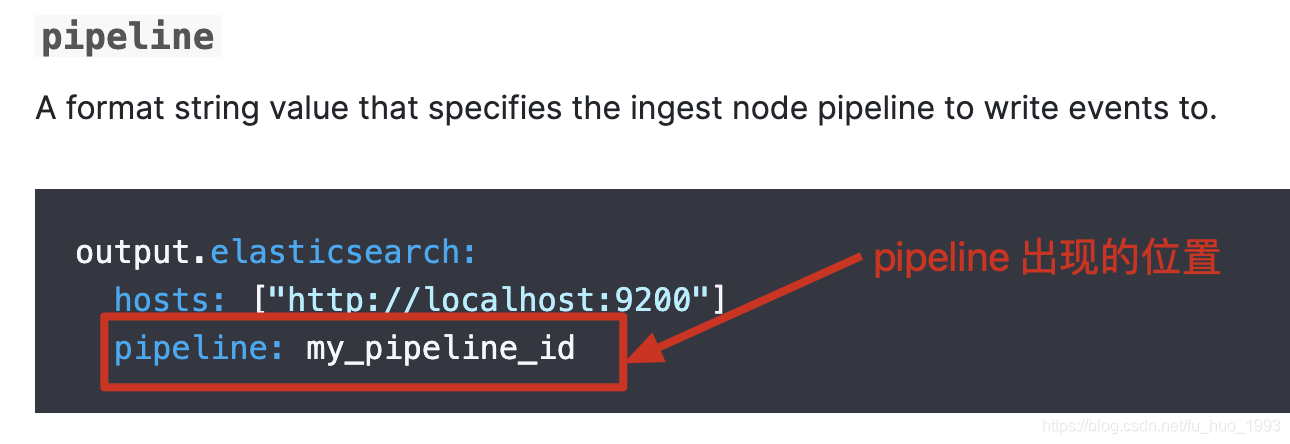
但是在测试的过程中发现,写在output这个里面是不生效的,需要写在input这个地方,见配置文件。
网上对这个问题的讨论: https://github.com/elastic/beats/issues/20342
六、参考文档
1、https://www.elastic.co/guide/en/beats/filebeat/current/directory-layout.html
2、https://www.elastic.co/guide/en/beats/filebeat/current/multiline-examples.html
3、https://www.elastic.co/guide/en/beats/filebeat/current/keystore.html
4、https://www.elastic.co/guide/en/beats/filebeat/current/fingerprint.html
5、https://www.elastic.co/guide/en/beats/filebeat/current/elasticsearch-output.html
6、github 上对 filebeat 在output到es时,pipeline不生效的讨论
7、https://www.elastic.co/guide/en/elasticsearch/reference/7.12/ingest.html
8、https://www.elastic.co/guide/en/elasticsearch/reference/7.12/index-templates.html
filebeat收集日志到elsticsearch中并使用ingest node的pipeline处理的更多相关文章
- 第十一章·Filebeat-使用Filebeat收集日志
Filebeat介绍及部署 Filebeat介绍 Filebeat附带预构建的模块,这些模块包含收集.解析.充实和可视化各种日志文件格式数据所需的配置,每个Filebeat模块由一个或多个文件集组成, ...
- 使用filebeat收集日志传输到redis的各种效果展示
0 环境 Linux主机,cengtos7系统 安装有openresty软件,用来访问生成日志信息 1.15.8版本 安装有filebeat软件,用来收集openresty的日志 7.3版本 安装有r ...
- ELK日志方案--使用Filebeat收集日志并输出到Kafka
1,Filebeat简介 Filebeat是一个使用Go语言实现的轻量型日志采集器.在微服务体系中他与微服务部署在一起收集微服务产生的日志并推送到ELK. 在我们的架构设计中Kafka负责微服务和EL ...
- elk-日志方案--使用Filebeat收集日志并输出到Kafka
1,Filebeat简介 Filebeat是一个使用Go语言实现的轻量型日志采集器.在微服务体系中他与微服务部署在一起收集微服务产生的日志并推送到ELK. 在我们的架构设计中Kafka负责微服务和 ...
- filebeat收集日志传输到Redis集群,logstash从Redis集群中拉取数据
前提:已配置好Redis集群,并设置的有统一的访问密码 架构是filebeat-->redis集群-->logstash->elasticsearch,需要修改filebeat的输出 ...
- .Nginx安装filebeat收集日志:
1.安装filebeat: [root@nginx ~]# vim /usr/local/filebeat/filebeat.yml [root@nginx ~]# tar xf filebeat-6 ...
- ELK之在windows安装filebeat收集日志
登录官方网站下载filebeat的windows客户端 https://www.elastic.co/downloads/beats 下载压缩包,无需解压 修改配置文件filebeat.yml 其余设 ...
- ELK学习实验016:filebeat收集tomcat日志
filebeat收集tomcat日志 1 安装tomcat [root@node4 ~]# yum -y install tomcat tomcat-webapps tomcat-admin-weba ...
- Filebeat和logstash 使用过程中遇到的一些小问题记录
一.filebeat 收集软链文件日志 1.1.场景 由于我们新部署的Nginx 日志都是采用的软链的形式. lrwxrwxrwx 1 root root 72 Apr 6 00:00 jy.baid ...
随机推荐
- java 多线程Thread和Runnable的区别
如果一个类继承Thread,则不适合资源共享.但是如果实现了Runable接口的话,则很容易的实现资源共享 实现Runnable接口比继承Thread类所具有的优势:1. 适合多个相同的程序代码的线程 ...
- vim的配置文件
网上一个比较常见的配置文件设置如下,这个配置还是很棒的,尤其创建脚本或者c文件时 " All system-wide defaults are set in $VIMRUNTIME/debi ...
- systemctl添加自定义系统服务
[Service] Type=forking ExecStart=绝对路径 ExecStop=绝对路径 ExecReload=绝对路径 以上最精简版,文件/usr/lib/systemd/system ...
- selenium-ide-2.3.0 组件在foxfire45.0无法安装的问题
楼主在安装selenium-ide组件时,尝试了下面两种方式都无法安装: 1.在forfire浏览器进行拖拽安装,页面无任何跳转.拖拽后回车安装,也没任何效果 2.附件组件-从文件安装添加组件,添加了 ...
- 1004. 最大连续1的个数 III
1004. 最大连续1的个数 III 给定一个由若干 0 和 1 组成的数组 A,我们最多可以将 K 个值从 0 变成 1 . 返回仅包含 1 的最长(连续)子数组的长度. 示例 1: 输入:A = ...
- 消息队列之 kafka 集群搭建
我们先弄清楚kafka集群环境首先需要些什么 JDK 10+ Zookeeper Kafka 2.x 首先准备三台虚拟机 centos7 ,更改IP地址为静态地址分别为,29.30.31 cd /et ...
- PHP的CLI命令行运行模式浅析
在做开发的时候,我们不仅仅只是做各种网站或者接口,也经常需要写一些命令行脚本用来处理一些后端的事务.比如对数据进行处理统计等.当然也是为了效率着想,当一个事务有可能会有较长的耗时时,往往会交由服务器的 ...
- Centos 7 设置 SFTP
近期要给服务器设置一个SFTP用户,可以上传删除修改的SFTP,但是禁止该用户SSH登录.这里记录下来 先升级 来源: https://blog.csdn.net/fenglailea/article ...
- python风格对象
对象表示形式 python提供了两种获取对象字符串表示形式的标准方式 repr() //便于开发者理解的方式返回对象的字符串表示形式(一般来说满足obj==eval(repr(obj) ...
- Git:分布式版本控制系统
参考廖雪峰的 Git 教程:https://www.liaoxuefeng.com/wiki/896043488029600 讲解很详细,这里只做一些个人笔记: 各系统安装 Git :https:/ ...