
iTextSharp生成pdf的一个简单例子
效果图: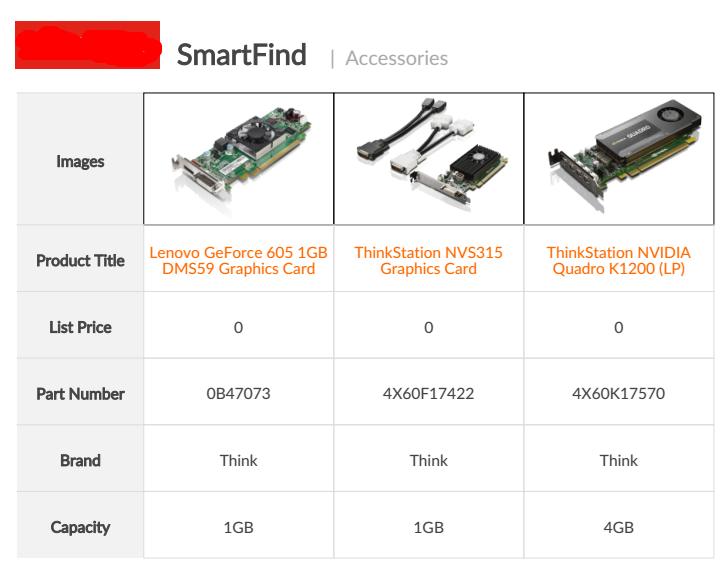
参考:http://www.cnblogs.com/CareySon/archive/2011/11/09/2243496.html
http://www.cnblogs.com/julyluo/p/3839788.html
itextsharp版本:4.1.6.0
代码:
  /// <summary>

        /// Compare页面生成pdf功能。

        /// </summary>

        /// <param name="country">国家</param>

        /// <param name="pns">pn</param>

        /// <param name="language">语言</param>

        /// <returns>响应对象</returns>

        public string ComparePdf(string country, string[] pns, string language)

        {

            var result = "";

            //生成pdf

            Document document = new Document();

            //这样写:是生成一个文件到某目录中

            //var directory = HttpContext.Current.Server.MapPath("~/pdf");

            //string host = HttpContext.Current.Request.Url.Host;

            //int port = HttpContext.Current.Request.Url.Port;

            //if (!Directory.Exists(directory))

            //{

            //    Directory.CreateDirectory(directory);

            //}

            //var fileName = "";

            //foreach (var item in pns)

            //{

            //    fileName += "_" + item + "_";

            //}

            //fileName = "Compare" + fileName + DateTime.Now.ToString("yyyyMMddHHmmss") + ".pdf";

            //var pdfPath = directory + "\\" + fileName;

            //var fileStream = new FileStream(pdfPath, FileMode.Create);

            //PdfWriter pw = PdfWriter.GetInstance(document, fileStream);

         //这样写:是生成文件到内存中去

            var memoryStream = new MemoryStream();

            PdfWriter pw = PdfWriter.GetInstance(document, memoryStream);//生成到内存中

            //数据

            var list = Compare(country, pns, language);

            document.Open();//打开文件

            //写入数据

            //注册字体

            string fontpath = HttpContext.Current.Server.MapPath("~/App_Data");

            BaseFont customfont = BaseFont.CreateFont(fontpath + "\\Lato-Regular.ttf", BaseFont.CP1252, BaseFont.EMBEDDED);

            var baseFont = new Font(customfont, 14 * 0.667f, Font.NORMAL, new Color(68, 68, 68));

            var leftFont = new Font(customfont, 14 * 0.667f, Font.BOLD, new Color(68, 68, 68));

            #region 头部

            PdfPTable tableLogo = new PdfPTable(3);

            tableLogo.DefaultCell.Border = Rectangle.NO_BORDER;

            tableLogo.DefaultCell.MinimumHeight = 40f;

            float[] headWidths = new float[] { 60f, 60f, 150f };

            tableLogo.SetWidths(headWidths);

            //logo

            var logo = iTextSharp.text.Image.GetInstance("http://d1fyvoqprbjuee.cloudfront.net/smartfindimages/logo.png");

            logo.ScaleToFit(130 * 0.667f, 43 * 0.667f);

            var logoCell = new PdfPCell();

            logoCell.PaddingLeft = -1f;

            logoCell.MinimumHeight = 45f;

            logoCell.HorizontalAlignment = Element.ALIGN_LEFT;

            logoCell.Border = 0;

            logoCell.AddElement(logo);

            tableLogo.AddCell(logoCell);

             var headFont = new Font(customfont, 26 * 0.667f, Font.BOLD, new Color(68, 68, 68));

            var sCell = new PdfPCell(new Paragraph("SmartFind", headFont));

            sCell.Border = 0;

            sCell.PaddingLeft = 3f;

            sCell.PaddingBottom = 17f;

            sCell.MinimumHeight = 45f;

            sCell.HorizontalAlignment = Element.ALIGN_LEFT;

            sCell.VerticalAlignment = Element.ALIGN_BOTTOM;

            tableLogo.AddCell(sCell);

            var aCell = new PdfPCell();

            aCell.Border = 0;

            aCell.MinimumHeight = 45f;

            aCell.PaddingBottom = 17f;

            aCell.HorizontalAlignment = Element.ALIGN_LEFT;

            aCell.VerticalAlignment = Element.ALIGN_BOTTOM;

            var accFont = new Font(customfont, 18 * 0.667f, Font.NORMAL, new Color(170, 170, 170));

            var acc = new Paragraph("|  Accessories", accFont);

            aCell.AddElement(acc);

            tableLogo.AddCell(aCell);

            document.Add(tableLogo);

            #endregion

            document.Add(new Paragraph(""));

            #region 中间的表格

            PdfPTable table = new PdfPTable(list.Count + 1);//n列的表格

            table.DefaultCell.Border = 0;

            table.DefaultCell.HorizontalAlignment = Element.ALIGN_CENTER;

            table.DefaultCell.VerticalAlignment = Element.ALIGN_MIDDLE;

            //根据图片数量确定列数及列宽

            if (pns.Count() == 1)

            {

                float[] widths = new float[] { 2f, 3f };

                table.SetWidths(widths);

            }

            else if (pns.Count() == 2)

            {

                float[] widths = new float[] { 2f, 3f, 3f };

                table.SetWidths(widths);

            }

            else if (pns.Count() == 3)

            {

                float[] widths = new float[] { 2f, 3f, 3f, 3f };

                table.SetWidths(widths);

            }

            else if (pns.Count() == 4)

            {

                float[] widths = new float[] { 2f, 3f, 3f, 3f, 3f };

                table.SetWidths(widths);

            }

            //左单元格

            var leftCell = new PdfPCell(new Paragraph("Images", leftFont));

            leftCell.MinimumHeight = 40f;

           leftCell.BackgroundColor = new Color(242, 242, 242);

            leftCell.HorizontalAlignment = Element.ALIGN_CENTER;

            leftCell.VerticalAlignment = Element.ALIGN_MIDDLE;

            table.AddCell(leftCell);

            //右单元格

            var rightCell = new PdfPCell();

            rightCell.HorizontalAlignment = Element.ALIGN_CENTER;

            rightCell.VerticalAlignment = Element.ALIGN_MIDDLE;

            rightCell.MinimumHeight = 40f;

            foreach (var item in list)

            {

                var imageCell = new PdfPCell();

                imageCell.Padding = 1f;

                //根据图片数量确定左边距,确保图片在中间显示。这个地方写的不好,暂时这样

                if (list.Count == 2)

                {

                    imageCell.PaddingLeft = 30f;

                }

                if (list.Count == 1)

                {

                    imageCell.PaddingLeft = 80f;

                }

                if (list.Count == 3)

                {

                    imageCell.PaddingLeft = 10f;

                }

                //确保网络图片存在

                if (!string.IsNullOrEmpty(item.Url) && Helper.IsExists(item.Url + "-218.png"))

                {

                    var image = iTextSharp.text.Image.GetInstance(item.Url + "-218.png");

                    if (list.Count == 4)

                    {

                        image.ScaleToFit(80f, 80f);

                    }

                    else

                    {

                        image.ScaleToFit(100f, 100f);

                    }

                    imageCell.AddElement(image);

                }

                table.AddCell(imageCell);

            }

            //Product Title

            leftCell.Phrase = new Paragraph("Product Title", leftFont);

            var titleFont = new Font(customfont, 14 * 0.667f, Font.NORMAL, new Color(255, 105, 0));

            table.AddCell(leftCell);

            foreach (var item in list)

            {

                rightCell.Phrase = new Paragraph(item.Title, titleFont);

                table.AddCell(rightCell);

            }

            //List Price

            leftCell.Phrase = new Paragraph("List Price", leftFont);

            table.AddCell(leftCell);

            foreach (var item in list)

            {

                rightCell.Phrase = new Paragraph(item.Currency + item.Price, baseFont);

                table.AddCell(rightCell);

            }

            //Part Number

            leftCell.Phrase = new Paragraph("Part Number", leftFont);

            table.AddCell(leftCell);

            foreach (var item in list)

            {

                rightCell.Phrase = new Paragraph(item.PN, baseFont);

                table.AddCell(rightCell);

            }

            //facet

            var first = list.FirstOrDefault();

            foreach (var item in first.Facets)

            {

                leftCell.Phrase = new Paragraph(item.Key, leftFont);

                table.AddCell(leftCell);

                rightCell.Phrase = new Paragraph(item.Value, baseFont);

                table.AddCell(rightCell);

                //其余的

                list.Remove(first);

                var other = list;

                foreach (var one in other)

                {

                    rightCell.Phrase = new Paragraph(one.Facets.FirstOrDefault(o => o.Key == item.Key).Value, baseFont);

                    table.AddCell(rightCell);

                }

            }

            document.Add(table);

            #endregion

            //页脚

            PDFFooter footer = new PDFFooter();

            footer.OnEndPage(pw, document);

            document.Close();

            var bytes = memoryStream.ToArray();

            result = Convert.ToBase64String(bytes);

            return result;

        }

/// <summary>

    /// 页脚类

    /// </summary>

    public class PDFFooter : PdfPageEventHelper

    {

        // write on top of document

        public override void OnOpenDocument(PdfWriter writer, Document document)

        {

            base.OnOpenDocument(writer, document);

            PdfPTable tabFot = new PdfPTable(new float[] { 1F });

            tabFot.SpacingAfter = 10F;

            PdfPCell cell;

            tabFot.TotalWidth = 300F;

            cell = new PdfPCell(new Phrase("Header"));

            tabFot.AddCell(cell);

            tabFot.WriteSelectedRows(0, -1, 150, document.Top, writer.DirectContent);

        }

        // write on start of each page

        public override void OnStartPage(PdfWriter writer, Document document)

        {

            base.OnStartPage(writer, document);

        }

        // write on end of each page

        public override void OnEndPage(PdfWriter writer, Document document)

        {

            base.OnEndPage(writer, document);

            PdfPTable tabFot = new PdfPTable(new float[] { 1F });

            tabFot.TotalWidth = 700f;

            tabFot.DefaultCell.Border = 0;

          //  var footFont = FontFactory.GetFont("Lato", 12 * 0.667f, new Color(60, 60, 60));

            string fontpath = HttpContext.Current.Server.MapPath("~/App_Data");

            BaseFont customfont = BaseFont.CreateFont(fontpath + "\\Lato-Regular.ttf", BaseFont.CP1252, BaseFont.EMBEDDED);

            var footFont = new Font(customfont, 12 * 0.667f, Font.NORMAL, new Color(170, 170, 170));

            PdfPCell cell;

            cell = new PdfPCell(new Phrase("@ 2016 . All Rights Reserved", footFont));

            cell.VerticalAlignment = Element.ALIGN_CENTER;

            cell.Border = 0;

            cell.PaddingLeft = 100f;

            tabFot.AddCell(cell);

            tabFot.WriteSelectedRows(0, -1, 150, document.Bottom, writer.DirectContent);

        }

        //write on close of document

        public override void OnCloseDocument(PdfWriter writer, Document document)

        {

            base.OnCloseDocument(writer, document);

        }

    }
 /// <summary>

        /// 判断网络文件是否存在

        /// </summary>

        /// <param name="url"></param>

        /// <returns></returns>

        public static bool IsExists(string url)

        {

            try

            {

                using (new WebClient().OpenRead(url)) { }

                return true;

            }

            catch (WebException)

            {

                return false;

            }

        }
其他注意点:
1、当字体不支持中文、日文、繁体中文
 public string[] ChineseFont = new string[] { "Traditional Chinese [zh-tw]", "Japanese [ja]" };

 BaseFont customfont = BaseFont.CreateFont(fontpath + "\\Lato-Regular.ttf", BaseFont.CP1252, BaseFont.EMBEDDED);

            if (ChineseFont.Contains(data.Language))

            {

                customfont = BaseFont.CreateFont(fontpath + "\\msyh.ttf", BaseFont.IDENTITY_H, BaseFont.EMBEDDED);

            }
要写BaseFont.IDENTITY_H
2、表格的边框
设置 table.DefaultCell.Border = 0;是不能约束单元格的边框的,必须每个单元格单独设置边框pnCell.Border=0或设置其他宽度及四面是否显示。
3、表格位置
一个表格默认是在页面中居中对齐,要设置 左对齐: pnTable.HorizontalAlignment = Element.ALIGN_LEFT;
4、表格中嵌套表格
嵌套的表格不会占满此行,设置了此表格左对齐,右边留白很多。要完全设置表格的宽度,并且锁定才行。
pnTable.TotalWidth = 404 * 0.667f;
pnTable.LockedWidth = true;
5、链接。
链接要用块来实现。
var linkCell = new PdfPCell();

            linkCell.BorderWidthTop = ;

            linkCell.Padding = 5f;

            linkCell.PaddingLeft = 10f;

            linkCell.PaddingBottom = 20f;

            var chunk = new Chunk("More Information", link14);

            chunk.SetAnchor("http://accsmartfind.lenovo.com/products/" + model.PN);

            linkCell.AddElement(chunk);

            table.AddCell(linkCell);
6、样式。
样式不行表格来凑,如果样式还不出来,再加一个表格。
代码:https://pan.baidu.com/s/1bwjMZcfCwndFeSfmG9zd6w ,里面的对象数据要自己添加些调试。vs2013.
iTextSharp生成pdf的一个简单例子的更多相关文章
- ITextSharp用来生成 PDF 的一个组件
iTextSharp 是用来生成 PDF 的一个组件,在 1998 年夏天的时候,Bruno Lowagie ,iText 的创作者,参与了学校的一个项目,当时使用 HTML 来生成报告,但是,使用 ...
- itextsharp生成pdf后的直接打印问题
原文 itextsharp生成pdf后的直接打印问题 小弟这两天用itextsharp生成pdf文档,生成的pdf可以直接保存在指定路径的文件夹下,可是user不想保存,想要点一下button,就可以 ...
- iTextSharp生成PDF文件
这是一篇简单的教程,所以只涉及一些iTextSharp生成pdf的简单应用,详细教程请搜索iTextSharp进入官网看官方文档(英文版). iTextSharp官方文档:https://itextp ...
- 一个简单例子:贫血模型or领域模型
转:一个简单例子:贫血模型or领域模型 贫血模型 我们首先用贫血模型来实现.所谓贫血模型就是模型对象之间存在完整的关联(可能存在多余的关联),但是对象除了get和set方外外几乎就没有其它的方法,整个 ...
- (转)Java中使用正则表达式的一个简单例子及常用正则分享
转自:http://www.jb51.net/article/67724.htm 这篇文章主要介绍了Java中使用正则表达式的一个简单例子及常用正则分享,本文用一个验证Email的例子讲解JAVA中如 ...
- C语言多线程的一个简单例子
多线程的一个简单例子: #include <stdio.h> #include <stdlib.h> #include <string.h> #include &l ...
- quartz---的一个简单例子
quartz---的一个简单例子 首先建立一个maven项目.jar工程即可.(提示:我前面有如何建立一个maven工程的总结以及maven环境的配置.) 1.建立好后点击到app中运行,--> ...
- 用socket.io实现websocket的一个简单例子
socket.io 是基于 webSocket 构建的跨浏览器的实时应用. 逛博客发现几个比较好的 一.用socket.io实现websocket的一个简单例子 http://biyeah.iteye ...
- 词法分析程序 LEX和VC6整合使用的一个简单例子
词法分析的理论知识不少,包括了正规式.正规文法.它们之间的转换以及确定的有穷自动机和不确定的有穷自动机等等... 要自己写一个词法分析器也不会很难,只要给出了最简的有穷自动机,就能很方便实现了,用if ...
随机推荐
- 更新整理本人所有博文中提供的代码与工具(Java,2013.11)
为了更方便地管理博文中涉及的各种代码与工具资源,现在把这些资源迁移到 Google Code 中,有兴趣者可前往下载. Java 1.<高效 Java Web 应用开发框架 JessMA v3. ...
- 鼠标悬停显示CSS3动画边框
效果体验:http://keleyi.com/keleyi/phtml/css3/14.htm 以下是代码: <!DOCTYPE html> <html xmlns="ht ...
- jquery右下角自动弹出关闭层
效果体验:http://keleyi.com/keleyi/phtml/jqtexiao/36.htm 右下角弹出层后,会在一定时间后自动隐藏.第一版本:http://www.cnblogs.com/ ...
- 关于jquery中用函数来设置css样式
关于jquery中用函数来设置css样式 2016-12-21 23:27:55 1.jquery语法 $(selector).css(name,function(index,value)) name ...
- C语言中把数字转换为字符串 【转】
在将各种类型的数据构造成字符串时,sprintf 的强大功能很少会让你失望.由于sprintf 跟printf 在用法上几乎一样,只是打印的目的地不同而已,前者打印到字符串中,后者则直接在命令行上输出 ...
- 轻松掌握:JavaScript单例模式
单例模式 定义:保证一个对象(类)仅有一个实例,并提供一个访问它的全局访问点: 实现原理:利用闭包来保持对一个局部变量的引用,这个变量保存着首次创建的唯一的实例; 主要用于:全局缓存.登录浮窗等只需要 ...
- SharePoint 2013 图文开发系列之应用程序页
在SharePoint中,有两种页面类型,一种是保存在数据库中的页面,我们可以在网站的页面库中看到:还有一种叫做应用程序页,部署在服务器上,Layouts下面的页面,是应用程序页,主要是完成特定功能的 ...
- sharepoint 提升权限报错
现象: sharepoint中提升权限是为了模拟管理员操作,但是对于普通用户对item的更新和删除照成错误 解决办法: 去掉权限升级 说明: 升级权限能不用尽量不用,同时也不好排查权限问题.
- View and Data API tips: 缓存Access Token
对于云API服务,常见的方式就是按照API调用次数收费,某些API调用也就有某些限制,比如在特定时间内只允许调用指定的次数以免造成滥用.虽然Autodesk的view and Data API目前还没 ...
- 最详细的hadoop2.2.0集群的HA高可靠的最简单配置
简介 [from http://www.open-open.com/lib/view/open1390717631132.html] hadoop中的NameNode好比是人的心脏,非常重要,绝对不可 ...