
SpringCloud整合Hystrix
1、Hystrix简介
Hystrix是由Nefflix开源的一个延迟和容错库,用于隔离访问远程系统、服务或第三方库,防止级联失败,从而提升系统的可用性、容错性与局部应用的弹性,是一个实现了超时机制和熔断器模式的工具类库。
2、Hystrix设计原则
- 防止任何单独的依赖耗尽资源(线程),过载立即切断并快速失败,防止排队。
- 尽可能提供回退以保护用户免受故障。
- 使用隔离技术(例如隔板、泳道和断路器模式)来限制任何一个依赖的影响。
- 通过近实时的指标,监控和告警,确保故障被及时发现。
- 通过动态修改配置属性,确保故障及时恢复。
- 防止整个依赖客户端执行失败,而不仅仅是网络通信。
3、Hystrix工作原理
- 使用命令模式将所有对外部服务(或依赖关系)的调用包装再HystrixCommand或HystrixObservableCommand对象中,并将该对象放在单独的线程中执行。
- 每个依赖都维护一个线程池(或信号量),线程池被耗尽则拒绝请求(而不是让请求排队)。
- 记录请求成功,失败,超时和线程拒绝。
- 服务错误百分比超过阀值,熔断器开关自动打开,一段时间内停止对该服务的所有请求。
- 请求失败,被拒绝,超时或熔断时执行降级逻辑。
- 近实时地讲课指标和配置的修改。
当使用Hystrix封装每个基础依赖项时,每个依赖项彼此隔离,受到延迟时发生饱和的资源的限制,并包含回退逻辑,该逻辑决定了在依赖项中发生任何类型的故障时做出什么响应。
4、Hystrix整合
1)实现eureka-server
pom.xml文件配置
<?xml version="1.0" encoding="UTF-8"?>

<project xmlns="http://maven.apache.org/POM/4.0.0"

         xmlns:xsi="http://www.w3.org/2001/XMLSchema-instance"

         xsi:schemaLocation="http://maven.apache.org/POM/4.0.0 http://maven.apache.org/xsd/maven-4.0.0.xsd">

    <parent>

        <groupId>org.springframework.boot</groupId>

        <artifactId>spring-boot-starter-parent</artifactId>

        <version>2.2.2.RELEASE</version>

        <relativePath/>

    </parent>

    <modelVersion>4.0.0</modelVersion>

    <artifactId>eureka-server</artifactId>

    <version>1.0</version>

    <properties>

        <project.build.sourceEncoding>UTF-8</project.build.sourceEncoding>

        <project.reporting.outputEncoding>UTF-8</project.reporting.outputEncoding>

        <java.version>1.8</java.version>

        <spring-cloud.version>Hoxton.RELEASE</spring-cloud.version>

    </properties>

    <dependencies>

        <dependency>

            <groupId>org.springframework.cloud</groupId>

            <artifactId>spring-cloud-starter-netflix-eureka-server</artifactId>

        </dependency>

        <dependency>

            <groupId>org.springframework.boot</groupId>

            <artifactId>spring-boot-starter-web</artifactId>

        </dependency>

    </dependencies>

    <dependencyManagement>

        <dependencies>

            <dependency>

                <groupId>org.springframework.cloud</groupId>

                <artifactId>spring-cloud-dependencies</artifactId>

                <version>${spring-cloud.version}</version>

                <type>pom</type>

                <scope>import</scope>

            </dependency>

        </dependencies>

    </dependencyManagement>

    <build>

        <plugins>

            <plugin>

                <groupId>org.apache.maven.plugins</groupId>

                <artifactId>maven-jar-plugin</artifactId>

        <version>2.6</version>

                <configuration>

                    <excludes>

                        <exclude>*.**</exclude>

                        <exclude>*/*.xml</exclude>

                    </excludes>

                    <archive>

                        <manifest>

                            <addClasspath>true</addClasspath>

                            <classpathPrefix>lib/</classpathPrefix>

                            <useUniqueVersions>false</useUniqueVersions>

                            <mainClass>cn.kenlab.org.EurekaServerApplication</mainClass>

                        </manifest>

                        <manifestEntries>

                            <Class-Path>./resources/</Class-Path>

                        </manifestEntries>

                    </archive>

                    <outputDirectory>${project.build.directory}</outputDirectory>

                </configuration>

            </plugin>

            <plugin>

                <groupId>org.apache.maven.plugins</groupId>

                <artifactId>maven-dependency-plugin</artifactId>

                <version>3.0.1</version>

                <executions>

                    <execution>

                        <id>copy-dependencies</id>

                        <phase>package</phase>

                        <goals>

                            <goal>copy-dependencies</goal>

                        </goals>

                        <configuration>

                            <outputDirectory>${project.build.directory}/lib/</outputDirectory>

                        </configuration>

                    </execution>

                </executions>

            </plugin>

            <plugin>

            <groupId>org.apache.maven.plugins</groupId>

                <artifactId>maven-resources-plugin</artifactId>

                <version>3.2.0</version>

                <executions>

                    <execution>

                        <id>copy-resources</id>

                        <phase>package</phase>

                        <goals>

                            <goal>copy-resources</goal>

                        </goals>

                        <configuration>

                            <resources>

                                <resource>

                                    <directory>src/main/resources</directory>

                                </resource>

                            </resources>

                            <outputDirectory>${project.build.directory}/resources</outputDirectory>

                        </configuration>

                    </execution>

                </executions>

            </plugin>

        </plugins>

    </build>

</project>
编写启动类,添加@EnableEurekaServer和@SpringBootApplication注解:
@EnableEurekaServer

@SpringBootApplication

public class EurekaServerApplication {

    public static void main(String[] args) {

        SpringApplication.run(EurekaServerApplication.class,args);

    }

}
配置文件application.properties内容:
server.port=8761

eureka.client.register-with-eureka=false

eureka.client.fetch-registry=false
2)创建服务提供者
pob文件添加依赖
<dependency>

       <groupId>org.springframework.cloud</groupId>

       <artifactId>spring-cloud-starter-netflix-eureka-client</artifactId>

</dependency>

 <dependency>

    <groupId>org.springframework.boot</groupId>

    <artifactId>spring-boot-starter-web</artifactId>

</dependency>
实现启动类,添加@EnableEurekaClient和@SpringBootApplication注解。
@SpringBootApplication

@EnableEurekaClient

public class UserServicerApplication {

    public static void main(String[] args) {

        SpringApplication.run(UserServicerApplication.class,args);

    }

}
实现UserController接口:
@RestController

@RequestMapping("/User")

public class UserController {

    static Map<Integer, User> userMap = new HashMap<>();

    static {

        //模拟数据库

        User user1 = new User(1, "张三", "123456");

        userMap.put(1, user1);

        User user2 = new User(2, "李四", "123123");

        userMap.put(2, user2);

    }

    @RequestMapping(value = "/getUser",method = RequestMethod.GET)

    public User getUser(int id)

    {

        User user = userMap.get(id);

        return user;

    }

}
配置文件application.properties内容:
eureka.client.service-url.defaultZone=http://127.0.0.1:8761/eureka/

eureka.client.register-with-eureka=true

eureka.client.fetch-registry=true

server.port=8082

spring.application.name=service
3)在Ribbon中使用熔断器
pom中添加依赖,熔断器在spring-cloud-starter-netflix-hystrix包中。
<dependency>

    <groupId>org.springframework.cloud</groupId>

    <artifactId>spring-cloud-starter-netflix-eureka-client</artifactId>

</dependency>

<dependency>

   <groupId>org.springframework.boot</groupId>

    <artifactId>spring-boot-starter-web</artifactId>

</dependency>

<dependency>

   <groupId>org.springframework.cloud</groupId>

   <artifactId>spring-cloud-starter-netflix-hystrix</artifactId>

</dependency>
启动类中加上@EnableHystrix注解,开启熔断器功能。
@EnableHystrix //在启动类上添加@EnableHystrix注解开启Hystrix的熔断器功能。

@SpringBootApplication

@EnableEurekaClient

public class ConsumerRibbonApplication {

    //当添加@LoadBalanced注解,就代表启动Ribbon,进行负载均衡

    @LoadBalanced

    @Bean

    public RestTemplate restTemplate() {

        return new RestTemplate();

    }

    public static void main(String[] args) {

        SpringApplication.run(ConsumerRibbonApplication.class,args);

    }

}
实现HystrixRibbonController类,在需要有熔断机制的方法上添加@HystrixCommand,属性fallbackMethod是熔断时返回的方法。
@RestController

@RequestMapping("/Hystrix/User")

public class HystrixRibbonController {

    @Autowired

    private RestTemplate restTemplate;

    /**

     * 调用 user微服务

     */

    @HystrixCommand(fallbackMethod = "getDefaultUser")

    @RequestMapping(value = "getUser",method = RequestMethod.GET)

    public String getUser(Integer id) {

        String url = "http://service/User/getUser?id=" + id;

        return restTemplate.getForObject(url, String.class);

    }

    public String getDefaultUser(Integer id) {

        System.out.println("熔断,默认回调函数");

        return "{\"id\":-1,\"name\":\"熔断用户\",\"password\":\"123456\"}";

    }

}
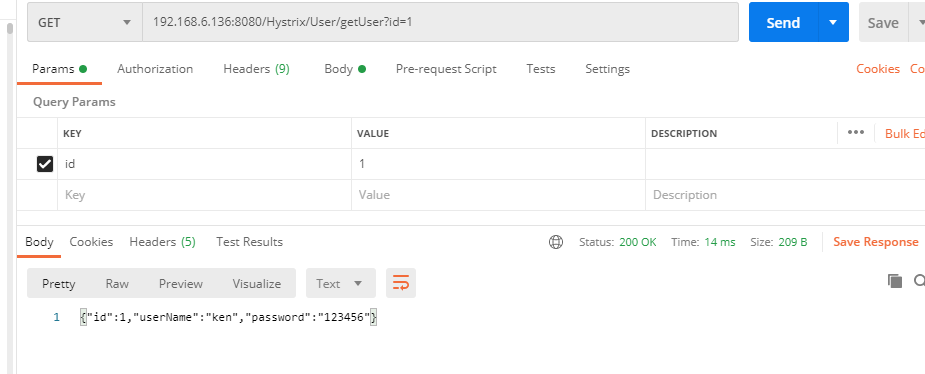
测试。正常情况下,在postman中访问192.168.1.136:8080/Hystrix/User/getUser?id=1,服务正常。如下图所示:
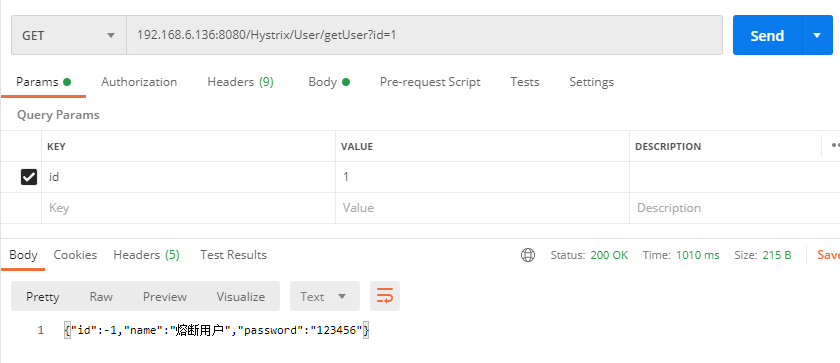
然后停掉service服务,再次访问192.168.1.136:8080/Hystrix/User/getUser?id=1,此时会触发熔断。运行结果如下所示:
4)在Feign中使用熔断器
pom文件中添加依赖。由于Feign依赖中已经加入了Hystrix依赖,因此,项目中添加Feign依赖后,无需添加Hstrix的其它依赖。只需要在application.properties文件中添加feign.hystrix.enabled=true,开启熔断机制即可,默认为false。
<dependency>

     <groupId>org.springframework.cloud</groupId>

     <artifactId>spring-cloud-starter-netflix-eureka-client</artifactId>

</dependency>

<dependency>

     <groupId>org.springframework.boot</groupId>

     <artifactId>spring-boot-starter-web</artifactId>

</dependency>

<dependency>

     <groupId>org.springframework.cloud</groupId>

     <artifactId>spring-cloud-starter-openfeign</artifactId>

</dependency>
启动类与普通feign启动类实现方式相同。即加上@EnableFeignClients。
@SpringBootApplication

@EnableEurekaClient

@EnableFeignClients

public class ConsumerFeignApplication {

    public static void main(String[] args) {

        SpringApplication.run(ConsumerFeignApplication.class,args);

    }

}
配置文件application.properties中加入feign.hystrix.enabled=true,开启熔断机制。
eureka.client.service-url.defaultZone=http://127.0.0.1:8761/eureka/

eureka.client.register-with-eureka=true

eureka.client.fetch-registry=true

server.port=8081

spring.application.name=Feign

feign.hystrix.enabled=true
实现feign客户端,调用服务提供者service模块的getUser接口,并配置fallback快速失败处理类UserFeignBackImpl。
//表示"service"的服务,指定fallback

@FeignClient(value = "service",fallback = UserFeignBackImpl.class)

public interface UserInterface {

    @RequestMapping(value = "/User/getUser",method = RequestMethod.GET)

    public String getUser(@RequestParam("id") int id);

}
实现UserFeignBackImpl类。
@Component

public class UserFeignBackImpl implements UserInterface {

    @Override

    public String getUser(int id) {

        return "{\"id\":-1,\"name\":\"熔断用户\",\"msg\":\"请求异常,返回熔断用户!\"}";

    }

}
实现外部访问接口。
@RestController

@RequestMapping("/HystrixFeign/User")

public class FeignHystrixController {

    @Autowired

    private UserInterface userInterface;

    @RequestMapping(value = "getUser",method = RequestMethod.GET)

    public String getUser(int id) {

        return  userInterface.getUser(id);

    }

}
测试方法同上。
SpringCloud整合Hystrix的更多相关文章
- Springcloud 整合Hystrix 断路器,支持Feign客户端调用
1,在这篇博文中,已经大致说过了Springcloud服务保护框架 Hystrix在服务隔离,服务降级,以及服务熔断中的使用 https://www.cnblogs.com/pickKnow/p/11 ...
- SpringCloud系列-整合Hystrix的两种方式
Hystrix [hɪst'rɪks],中文含义是豪猪,因其背上长满棘刺,从而拥有了自我保护的能力.本文所说的Hystrix是Netflix开源的一款容错框架,同样具有自我保护能力. 本文目录 一.H ...
- SpringCloud的Hystrix(一) 一个消费者内的两个服务监控
一.概念与定义 1.服务雪崩 在微服务架构中,整个系统按业务拆分出一个个服务,这些服务之间可以相互调用(RPC),为了保证服务的高可用,单个服务通常会集群部署. 但是由于网络原因或自身原因,服务并不能 ...
- springcloud使用Hystrix实现微服务的容错处理
使用Hystrix实现微服务的容错处理 容错机制 如果服务提供者相应非常缓慢,那么消费者对提供者的请求就会被强制等待,知道提供者相应超时.在高负载场景下,如果不作任何处理,此类问题可能会导致服务消费者 ...
- springcloud(八) Hystrix监控
一.Feign项目Hystrix自带的监控 在feign项目pom.xml 添加: <!-- 1,使用 Hystrix的模块 hystrix-metrics-event-stream,就可将这些 ...
- SpringCloud之Hystrix断路器(六)
整合Hystrix order-service pom.xml <dependency> <groupId>org.springframework.cloud& ...
- SpringCloud之Hystrix集群及集群监控turbine
目的: Hystrix集群及监控turbine Feign.Hystrix整合之服务熔断服务降级彻底解耦 集群后超时设置 Hystrix集群及监控turbine 新建一个springboot工程mic ...
- 19.SpringCloud实战项目-SpringCloud整合Alibaba-Nacos配置中心
SpringCloud实战项目全套学习教程连载中 PassJava 学习教程 简介 PassJava-Learning项目是PassJava(佳必过)项目的学习教程.对架构.业务.技术要点进行讲解. ...
- SpringCloud实战 | 第五篇:SpringCloud整合OpenFeign实现微服务之间的调用
一. 前言 微服务实战系列是基于开源微服务项目 有来商城youlai-mall 版本升级为背景来开展的,本篇则是讲述SpringCloud整合OpenFeign实现微服务之间的相互调用,有兴趣的朋友可 ...
随机推荐
- 教学日志:javaSE-面向对象1
对象,类,属性,方法的理解 package com.tengxun.class6.oop1; /** * @Auther: Yu Panpan * @Date: 2021/12/7 - 12 - 07 ...
- react hooks 如何自定义组件(react函数组件的封装)
前言 这里写一下如何封装可复用组件.首先技术栈 react hooks + props-type + jsx封装纯函数组件.类组件和typeScript在这不做讨论,大家别白跑一趟. 接下来会说一下封 ...
- 牛客练习赛39 B:选点(二叉树遍历+LIS)
链接: https://ac.nowcoder.com/acm/contest/368/B 来源:牛客网 时间限制:C/C++ 1秒,其他语言2秒 空间限制:C/C++ 131072K,其他语言262 ...
- 「算法笔记」期望 DP 入门
一.数学期望 1. 由来 在 \(17\) 世纪,有一个赌徒向法国著名数学家帕斯卡挑战,给他出了一道题目:甲乙两个人赌博,他们两人获胜的机率相等,比赛规则是先胜三局者为赢家,一共进行五局,赢家可以获得 ...
- html2canvas 返回的toDataURL()数据为 data:,的解决方法
1.使用的场景是把html转换成PDF保存下来,代码: /* eslint-disable */ import html2canvas from 'html2canvas'; import JsPDF ...
- Linux_Cornd任务调度
Crond任务调度 进行定时任务的设置 概述 任务调度:是指系统在某个时间执行特定的命令或程序 作用:避免重复工作 基本语法 crontab [选项] 选项 功能 -e 编辑crontab定时任务 - ...
- 编写Java程序,在子类老虎中重写父类动物的吃食方法
返回本章节 返回作业目录 需求说明: 在子类老虎中重写父类动物的吃食方法 实现思路: 在子类老虎中重写父类动物的吃食方法的实现思路如下: 创建各种动物的父类Animal类,在该类中定义eat()方法. ...
- 编写Java程序,演练静态内部类应用
返回本章节 返回作业目录 需求说明: 创建一个Person类,在该类中定义一个Home静态内部类,并在这个Home类中定义一个显示Home相关信息的方法. 在Person类中设置一个Home类型属性对 ...
- Kafka版本介绍Version2.4.0
1.说明 Kafka的版本从0.11.0.X到1.0.X, 再到2.0.X大版本, 其实没有经过几个版本, 只是版本号变化较大. 2.最新发布版本 截止本文章2020年2月22号发布时, Kafka ...
- Docker 安装mysql主从
安装docker 1.yum -y install docker 2.查看是否安装成功 docker -v 3.接着将docker后台启动 systemctl start docker.service ...