
SpringCloud之Hystrix集群及集群监控turbine
目的:
Hystrix集群及监控turbine
Feign、Hystrix整合之服务熔断服务降级彻底解耦
集群后超时设置
Hystrix集群及监控turbine
新建一个springboot工程microservice-student-provider-hystrix-1005把它作为集群
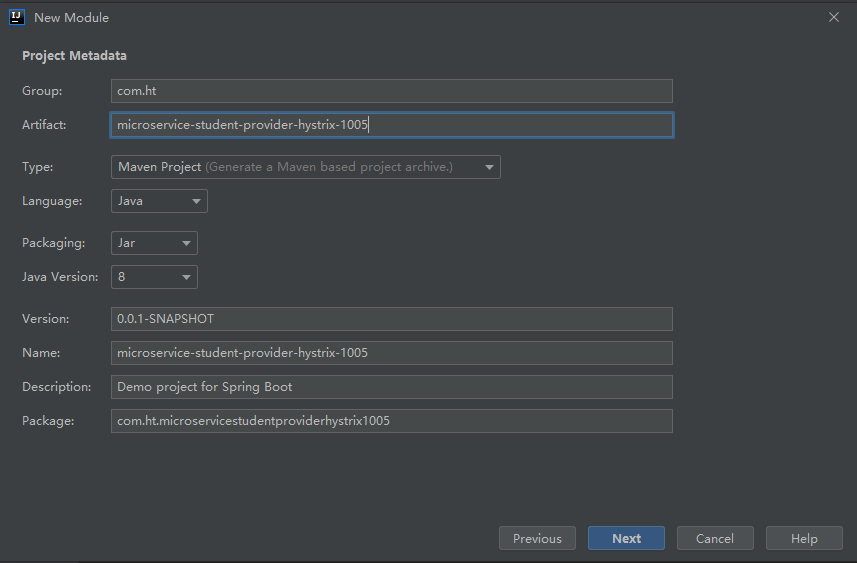
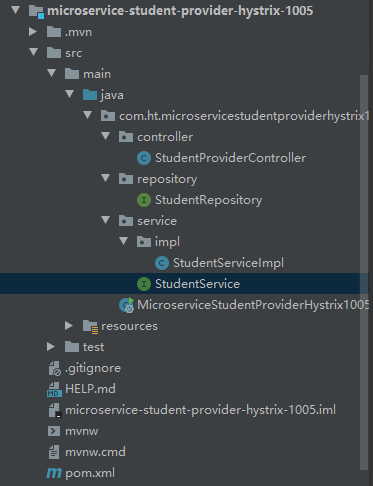
工程中测试详细代码见https://www.cnblogs.com/huangting/p/11902121.html
导入pom依赖
<?xml version="1.0" encoding="UTF-8"?>

<project xmlns="http://maven.apache.org/POM/4.0.0" xmlns:xsi="http://www.w3.org/2001/XMLSchema-instance"

         xsi:schemaLocation="http://maven.apache.org/POM/4.0.0 https://maven.apache.org/xsd/maven-4.0.0.xsd">

    <modelVersion>4.0.0</modelVersion>

    <parent>

        <groupId>com.ht</groupId>

        <artifactId>htSpringCloud</artifactId>

        <version>1.0-SNAPSHOT</version>

    </parent>

    <artifactId>microservice-student-provider-hystrix-1005</artifactId>

    <properties>

        <java.version>1.8</java.version>

    </properties>

    <dependencies>

        <!--添加注册中心Eureka相关配置-->

        <dependency>

            <groupId>org.springframework.cloud</groupId>

            <artifactId>spring-cloud-starter-eureka</artifactId>

        </dependency>

        <dependency>

            <groupId>org.springframework.cloud</groupId>

            <artifactId>spring-cloud-starter-config</artifactId>

        </dependency>

        <!-- actuator监控引入 -->

        <dependency>

            <groupId>org.springframework.boot</groupId>

            <artifactId>spring-boot-starter-actuator</artifactId>

        </dependency>

        <dependency>

            <groupId>org.springframework.boot</groupId>

            <artifactId>spring-boot-starter-web</artifactId>

        </dependency>

        <dependency>

            <groupId>org.springframework.boot</groupId>

            <artifactId>spring-boot-starter-test</artifactId>

            <scope>test</scope>

        </dependency>

        <dependency>

            <groupId>org.springframework.boot</groupId>

            <artifactId>spring-boot-starter-data-jpa</artifactId>

        </dependency>

        <dependency>

            <groupId>mysql</groupId>

            <artifactId>mysql-connector-java</artifactId>

        </dependency>

        <dependency>

            <groupId>org.springframework.boot</groupId>

            <artifactId>spring-boot-starter-tomcat</artifactId>

        </dependency>

        <dependency>

            <groupId>com.alibaba</groupId>

            <artifactId>druid-spring-boot-starter</artifactId>

        </dependency>

        <!--  修改后立即生效,热部署  -->

        <dependency>

            <groupId>org.springframework</groupId>

            <artifactId>springloaded</artifactId>

        </dependency>

        <dependency>

            <groupId>org.springframework.boot</groupId>

            <artifactId>spring-boot-devtools</artifactId>

        </dependency>

        <dependency>

            <groupId>com.ht</groupId>

            <artifactId>microservice-common</artifactId>

            <version>1.0-SNAPSHOT</version>

            <scope>compile</scope>

        </dependency>

        <!--Hystrix相关依赖-->

        <dependency>

            <groupId>org.springframework.cloud</groupId>

            <artifactId>spring-cloud-starter-hystrix</artifactId>

        </dependency>

    </dependencies>

    <build>

        <plugins>

            <plugin>

                <groupId>org.springframework.boot</groupId>

                <artifactId>spring-boot-maven-plugin</artifactId>

            </plugin>

        </plugins>

    </build>

</project>
修改yml配置:
---

server:

  port: 1004

  context-path: /

spring:

  datasource:

    type: com.alibaba.druid.pool.DruidDataSource

    driver-class-name: com.mysql.jdbc.Driver

    url: jdbc:mysql://localhost:3306/test?useUnicode=true&characterEncoding=utf8

    username: root

    password: root

  jpa:

    hibernate:

      ddl-auto: update

    show-sql: true

  application:

    name: microservice-student

  profiles: provider-hystrix-1004

eureka:

  instance:

    hostname: localhost

    appname: microservice-student

    instance-id: microservice-student:1004

    prefer-ip-address: true

  client:

    service-url:

      defaultZone: http://eureka2001.ht.com:2001/eureka/,http://eureka2002.ht.com:2002/eureka/,http://eureka2003.ht.com:2003/eureka/

info:

  groupId: com.ht.testSpringcloud

  artifactId: microservice-student-provider-hystrix-1004

  version: 1.0-SNAPSHOT

  userName: http://ht.com

  phone: 123456

hystrix:

  command:

    default:

      execution:

        isolation:

          thread:

            timeoutInMilliseconds: 1500

---

server:

  port: 1005

  context-path: /

spring:

  datasource:

    type: com.alibaba.druid.pool.DruidDataSource

    driver-class-name: com.mysql.jdbc.Driver

    url: jdbc:mysql://localhost:3306/test?useUnicode=true&characterEncoding=utf8

    username: root

    password: root

  jpa:

    hibernate:

      ddl-auto: update

    show-sql: true

  application:

    name: microservice-student

  profiles: provider-hystrix-1005

eureka:

  instance:

    hostname: localhost

    appname: microservice-student

    instance-id: microservice-student:1005

    prefer-ip-address: true

  client:

    service-url:

      defaultZone: http://eureka2001.ht.com:2001/eureka/,http://eureka2002.ht.com:2002/eureka/,http://eureka2003.ht.com:2003/eureka/

info:

  groupId: com.ht.htSpringCloud

  artifactId: microservice-student-provider-hystrix-1005

  version: 1.0-SNAPSHOT

  userName: http://ht.com

  phone: 123456

hystrix:

  command:

    default:

      execution:

        isolation:

          thread:

            timeoutInMilliseconds: 1500

---

server:

  port: 1006

  context-path: /

spring:

  datasource:

    type: com.alibaba.druid.pool.DruidDataSource

    driver-class-name: com.mysql.jdbc.Driver

    url: jdbc:mysql://localhost:3306/test?useUnicode=true&characterEncoding=utf8

    username: root

    password: root

  jpa:

    hibernate:

      ddl-auto: update

    show-sql: true

  application:

    name: microservice-student

  profiles: provider-hystrix-1006

eureka:

  instance:

    hostname: localhost

    appname: microservice-student

    instance-id: microservice-student:1006

    prefer-ip-address: true

  client:

    service-url:

      defaultZone: http://eureka2001.ht.com:2001/eureka/,http://eureka2002.ht.com:2002/eureka/,http://eureka2003.ht.com:2003/eureka/

info:

  groupId: com.ht.htSpringCloud

  artifactId: microservice-student-provider-hystrix-1006

  version: 1.0-SNAPSHOT

  userName: http://ht.com

  phone: 123456

hystrix:

  command:

    default:

      execution:

        isolation:

          thread:

            timeoutInMilliseconds: 1500
启动类MicroserviceStudentProviderHystrix1005Application 中添加注释
package com.ht.microservicestudentproviderhystrix1005;

import org.springframework.boot.SpringApplication;

import org.springframework.boot.autoconfigure.SpringBootApplication;

import org.springframework.boot.autoconfigure.domain.EntityScan;

import org.springframework.cloud.client.circuitbreaker.EnableCircuitBreaker;

import org.springframework.cloud.netflix.eureka.EnableEurekaClient;

@EnableCircuitBreaker

@EntityScan("com.ht.*.*")

@EnableEurekaClient

@SpringBootApplication

public class MicroserviceStudentProviderHystrix1005Application {

    public static void main(String[] args) {

        SpringApplication.run(MicroserviceStudentProviderHystrix1005Application.class, args);

    }

}
然后配置启动项的时候多搞几个启动项,这里搞了三个
provider-hystrix-1004
provider-hystrix-1005
provider-hystrix-1006
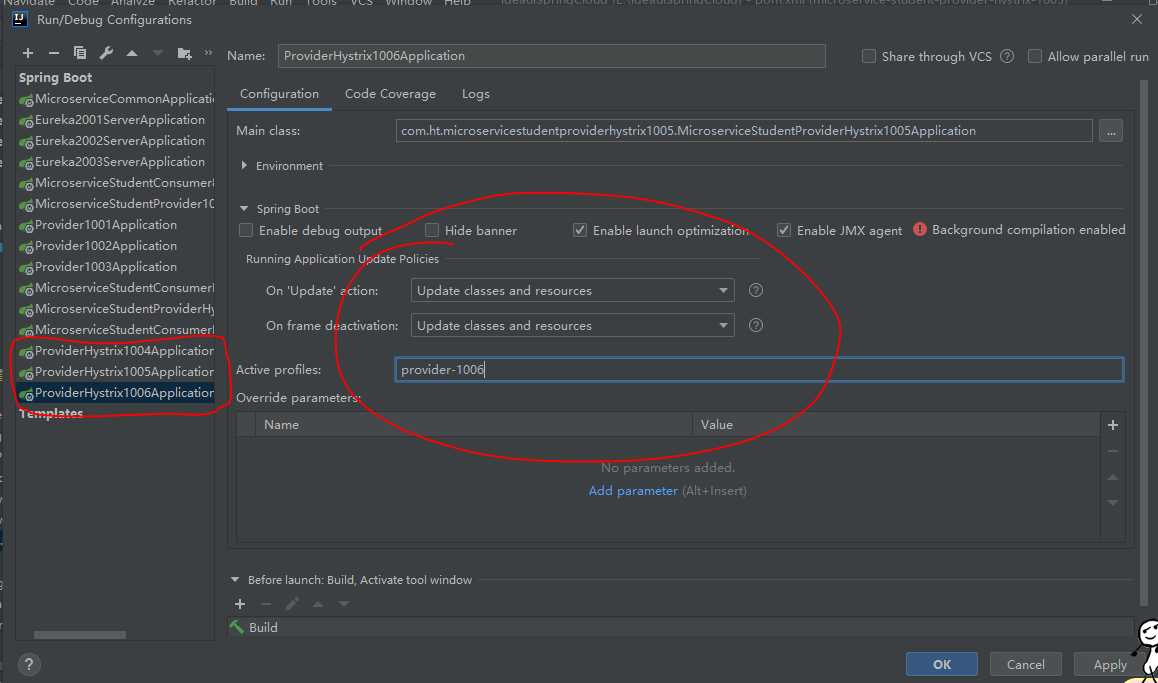
好了一个hystrix集群服务就搭好了。
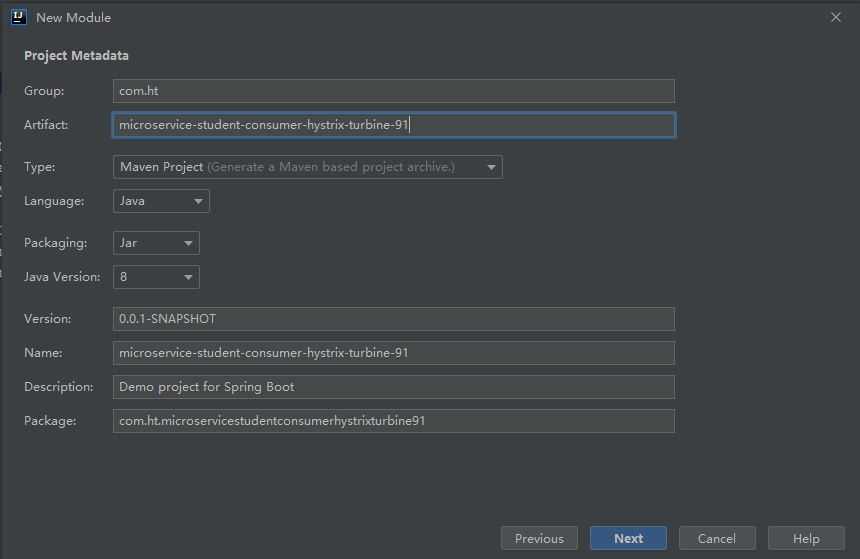
修改pom依赖:
<?xml version="1.0" encoding="UTF-8"?>

<project xmlns="http://maven.apache.org/POM/4.0.0" xmlns:xsi="http://www.w3.org/2001/XMLSchema-instance"

         xsi:schemaLocation="http://maven.apache.org/POM/4.0.0 https://maven.apache.org/xsd/maven-4.0.0.xsd">

    <modelVersion>4.0.0</modelVersion>

    <parent>

        <groupId>com.ht</groupId>

        <artifactId>htSpringCloud</artifactId>

        <version>1.0-SNAPSHOT</version>

    </parent>

    <artifactId>microservice-student-consumer-hystrix-turbine-91</artifactId>

    <properties>

        <java.version>1.8</java.version>

    </properties>

    <dependencies>

        <dependency>

            <groupId>org.springframework.boot</groupId>

            <artifactId>spring-boot-starter</artifactId>

        </dependency>

        <dependency>

            <groupId>org.springframework.boot</groupId>

            <artifactId>spring-boot-starter-test</artifactId>

            <scope>test</scope>

            <exclusions>

                <exclusion>

                    <groupId>org.junit.vintage</groupId>

                    <artifactId>junit-vintage-engine</artifactId>

                </exclusion>

            </exclusions>

        </dependency>

        <dependency>

            <groupId>org.springframework.boot</groupId>

            <artifactId>spring-boot-starter-actuator</artifactId>

        </dependency>

        <dependency>

            <groupId>org.springframework.cloud</groupId>

            <artifactId>spring-cloud-starter-turbine</artifactId>

        </dependency>

    </dependencies>

    <build>

        <plugins>

            <plugin>

                <groupId>org.springframework.boot</groupId>

                <artifactId>spring-boot-maven-plugin</artifactId>

            </plugin>

        </plugins>

    </build>

</project>
配置yml文件
server:

  port: 91

  context-path: /

eureka:

  client:

    service-url:

      defaultZone: http://eureka2001.ht.com:2001/eureka/,http://eureka2002.ht.com:2002/eureka/,http://eureka2003.ht.com:2003/eureka/

turbine:

  app-config: microservice-student   # 指定要监控的应用名称

  clusterNameExpression: "'default'" #表示集群的名字为default

spring:

  application:

    name: turbine
给启动类MicroserviceStudentConsumerHystrixTurbine91Application 加注解:@EnableTurbine
package com.ht.microservicestudentconsumerhystrixdashboard90;

import org.springframework.boot.SpringApplication;

import org.springframework.boot.autoconfigure.SpringBootApplication;

import org.springframework.boot.autoconfigure.jdbc.DataSourceAutoConfiguration;

import org.springframework.boot.autoconfigure.orm.jpa.HibernateJpaAutoConfiguration;

import org.springframework.cloud.netflix.turbine.EnableTurbine;

@SpringBootApplication(exclude={DataSourceAutoConfiguration.class, HibernateJpaAutoConfiguration.class})

@EnableTurbine

public class MicroserviceStudentConsumerHystrixDashboard90Application {

    public static void main(String[] args) {

        SpringApplication.run(MicroserviceStudentConsumerHystrixDashboard90Application.class, args);

    }

}
测试:
先启动三个eureka,然后把1004 1005 带hystrix的服务都启动;
microservice-student-consumer-80这个也启动,方便测试;
dashboard,turbine启动;
这样的话 http://localhost/student/hystrix 就能调用服务集群;
http://localhost:91/turbine.stream 可以监控数据,实时ping 返回data

输入http://localhost:90/hystrix进入仪表盘,输入地址,进行实时监控测试

Feign、Hystrix整合之服务熔断服务降级彻底解耦
前面的代码,用@HystrixCommand fallbackMethod是很不好的,因为和业务代码耦合度太高,不利于维护,所以需要解耦,这我们讲下Feign Hystrix整合。
microservice-student-provider-hystrix项目修改
我们不用原先那套。按照正常的逻辑来写;
StudentService加新的接口方法:
/**

 * 测试Hystrix服务降级

 * @return

 */

public Map<String,Object> hystrix();
StudentServiceImpl实现:
@Override

public Map<String, Object> hystrix() {

    Map<String,Object> map=new HashMap<String,Object>();

    map.put("code", 200);

    map.put("info","工号【"+port+"】正在为您服务");

    return map;

}
StudentProviderController正常调用service方法:
/**

     * 测试Hystrix服务降级

     * @return

     * @throws InterruptedException

     */

    @ResponseBody

    @GetMapping(value="/hystrix")

    @HystrixCommand(fallbackMethod="hystrixFallback")

    public Map<String,Object> hystrix() throws InterruptedException{

        Thread.sleep(2000);

//        Map<String,Object> map=new HashMap<String,Object>();

//        map.put("code", 200);

//        map.put("info","工号【"+port+"】正在为您服务");

        return studentService.hystrix();

    }
microservice-common项目新建FallbackFactory类,解耦服务熔断服务降级
StudentClientService接口,新增getInfo方法;
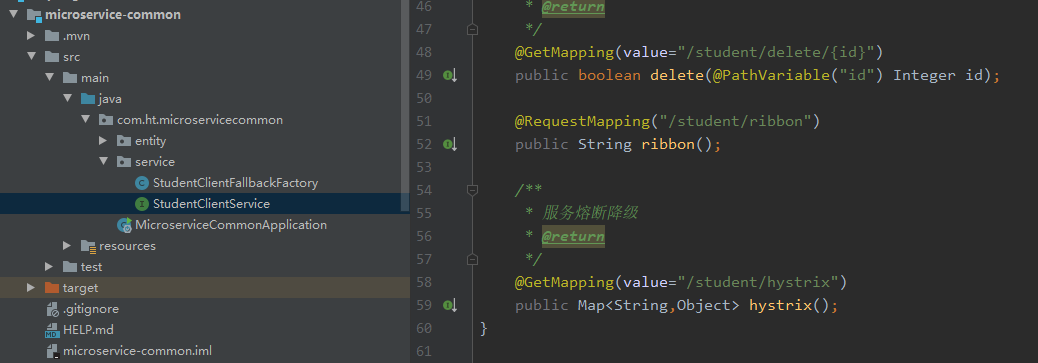
/**

 * 服务熔断降级

 * @return

 */

@GetMapping(value="/student/hystrix")

public Map<String,Object> hystrix();
microservice-common的application.yml加上hystrix支持
hystrix支持
feign:

  hystrix:

    enabled: true
新建 StudentClientFallbackFactory 类,实现FallbackFactory接口;
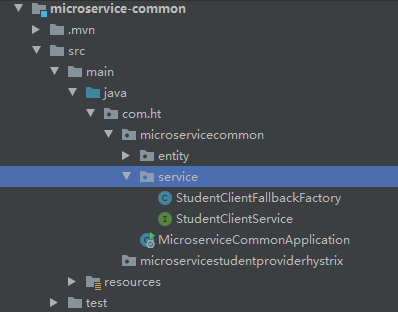
package com.ht.microservicestudentproviderhystrix.service;

import com.ht.microservicecommon.StudentClientService;

import com.ht.microservicecommon.entity.Student;

import feign.hystrix.FallbackFactory;

import java.util.HashMap;

import java.util.List;

import java.util.Map;

public class StudentClientFallbackFactory implements FallbackFactory<StudentClientService> {

    @Override

    public StudentClientService create(Throwable cause) {

        return new StudentClientService() {

            @Override

            public boolean save(Student student) {

                return false;

            }

            @Override

            public List<Student> list() {

                return null;

            }

            @Override

            public Map<String, Object> hystrix() {

                Map<String,Object> map=new HashMap<String,Object>();

                map.put("code", 500);

                map.put("info", "系统繁忙,稍后重试");

                return map;

            }

            @Override

            public Student get(Integer id) {

                return null;

            }

            @Override

            public boolean delete(Integer id) {

                return false;

            }

            @Override

            public String ribbon() {

                return null;

            }

        };

    }

}
StudentClientService接口的@FeignClient注解加下 fallbackFactory属性
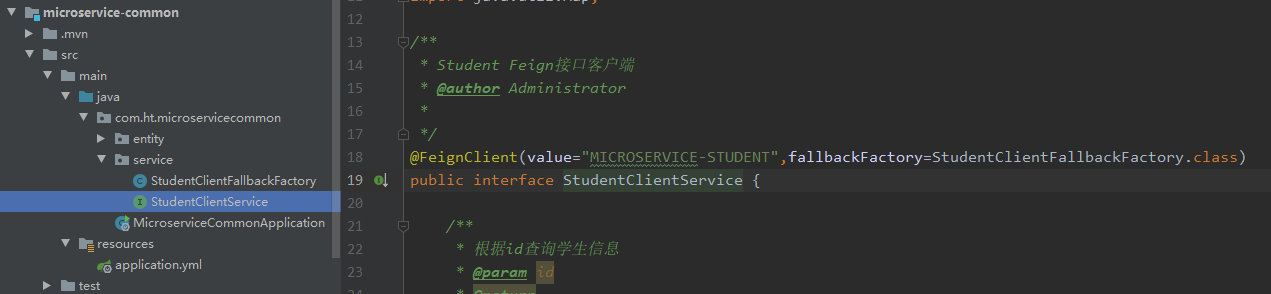
@FeignClient(value="MICROSERVICE-STUDENT",fallbackFactory=StudentClientFallbackFactory.class)
microservice-student-consumer-feign-80修改 支持Hystrix
StudentConsumerFeignController新增方法调用
/**

 * Feign整合Hystrix服务熔断降级

 * @return

 * @throws InterruptedException

 */

@GetMapping(value="/hystrix")

public Map<String,Object> hystrix() throws InterruptedException{

    return studentClientService.hystrix();

}
microservice-student-consumer-feign-80启动类中添加注释
package com.ht.microservicestudentconsumerfeign80;

import org.springframework.boot.SpringApplication;

import org.springframework.boot.autoconfigure.SpringBootApplication;

import org.springframework.boot.autoconfigure.jdbc.DataSourceAutoConfiguration;

import org.springframework.boot.autoconfigure.orm.jpa.HibernateJpaAutoConfiguration;

import org.springframework.cloud.netflix.eureka.EnableEurekaClient;

import org.springframework.cloud.netflix.feign.EnableFeignClients;

import org.springframework.context.annotation.ComponentScan;

@EnableEurekaClient

@EnableFeignClients(value = "com.ht.*.*")

@ComponentScan(basePackages = {"com.ht.microservicecommon.service", "com.ht.microservicestudentconsumerfeign80"})

@SpringBootApplication(exclude={DataSourceAutoConfiguration.class, HibernateJpaAutoConfiguration.class})

public class MicroserviceStudentConsumerFeign80Application {

    public static void main(String[] args) {

        SpringApplication.run(MicroserviceStudentConsumerFeign80Application.class, args);

    }

}
集群后超时设置
microservice-common的application.yml加上hystrix支持
这里因为还有一个 feign 也有一个超时时间的设置,当然feign底层是 ribbon的封装,所以 直接配置ribbon,ribbon默认超时也是1秒。
所以这里都是强制要求,ribbon的超时时间要大于hystrix的超时时间,否则 hystrix自定义的超时时间毫无意义。
所以还得microservice-student-consumer-feign-80上加个 ribbon超时时间设置
hystrix:

  command:

    default:

      execution:

        isolation:

          thread:

            timeoutInMilliseconds: 1500
这里因为还有一个 feign 也有一个超时时间的设置,当然feign底层是 ribbon的封装,所以 直接配置ribbon,ribbon默认超时也是1秒。
所以这里都是强制要求,ribbon的超时时间要大于hystrix的超时时间,否则 hystrix自定义的超时时间毫无意义。
所以还得microservice-student-consumer-feign-80上加个 ribbon超时时间设置
ribbon:

  ReadTimeout: 10000

  ConnectTimeout: 9000
谢谢观看!
SpringCloud之Hystrix集群及集群监控turbine的更多相关文章
- java框架之SpringCloud(5)-Hystrix服务熔断、降级与监控
前言 分布式系统面临的问题 复杂分布式体系结构中的应用程序有数十个依赖关系,每个依赖关系在某些时候将不可避免地失败.不做任何处理的情况下,很容易导致服务雪崩. 服务雪崩:多个微服务之间调用的时候,假设 ...
- Hystrix集群及监控turbine
Hystrix集群及监控turbine 前面Dashboard演示的仅仅是单机服务监控,实际项目基本都是集群,所以这里集群监控用的是turbine. turbine是基于Dashboard的. 先搞个 ...
- Spring Cloud第八篇 | Hystrix集群监控Turbine
本文是Spring Cloud专栏的第八篇文章,了解前七篇文章内容有助于更好的理解本文: Spring Cloud第一篇 | Spring Cloud前言及其常用组件介绍概览 Spring Clo ...
- Hystrix集群及集群监控turbine
Hystrix集群及监控turbine 前面Dashboard演示的仅仅是单机服务监控,实际项目基本都是集群,所以这里集群监控用的是turbine. turbine是基于Dashboard的. 先搞个 ...
- Spring Cloud :断路器集群监控(Turbine)
一. 简介 上一篇文章我们已经实现了对单个服务实例的监控,当然在实际应用中,单个实例的监控数据没有多大的价值,我们更需要的是一个集群系统的监控信息,这时我们就需要引入Turbine.Turb ...
- 【MongoDB】windows平台搭建Mongo数据库复制集(类似集群)(转)
原文链接:[MongoDB]windows平台搭建Mongo数据库复制集(类似集群)(一) Replica Sets(复制集)是在mongodDB1.6版本开始新增的功能,它可以实现故障自动切换和自 ...
- docker 快速部署ES集群 spark集群
1) 拉下来 ES集群 spark集群 两套快速部署环境, 并只用docker跑起来,并保存到私库. 2)弄清楚怎么样打包 linux镜像(或者说制作). 3)试着改一下,让它们跑在集群里面. 4) ...
- Mongodb副本集+分片集群环境部署记录
前面详细介绍了mongodb的副本集和分片的原理,这里就不赘述了.下面记录Mongodb副本集+分片集群环境部署过程: MongoDB Sharding Cluster,需要三种角色: Shard S ...
- Hadoop集群-HDFS集群中大数据运维常用的命令总结
Hadoop集群-HDFS集群中大数据运维常用的命令总结 作者:尹正杰 版权声明:原创作品,谢绝转载!否则将追究法律责任. 本篇博客会简单涉及到滚动编辑,融合镜像文件,目录的空间配额等运维操作简介.话 ...
随机推荐
- chsh
修改shell进程
- javascript根据两点和底角,计算等腰三角形的顶点坐标
参考图: 代码如下: var x1 = 0; var y1 = 100; var x2 = -100; var y2 = 0; var angle = 30; var PI = Math.PI; // ...
- 【POJ2632】Crashing Robots
题目传送门 本题知识点:模拟 模拟机器人的运作过程,分别有三种功能,L 则是左转90°,R 则是右转90°,L 则是前进1格.让我们去模拟并判断它们的状态. 输入: 第一行是测试样例 第二行分别是矩形 ...
- Git命令相关
特别说明 关于命令行中参数前面的-和--的区别 - 通常后面接参数的缩写 -- 通常后面接参数的全拼 eg: git status --short 等价于 git status -s 常用命令 创建版 ...
- OpenFOAM计算结果转换到CFD-Post当中处理
我们编写如下的Python代码 源代码:
- 梯形法求解常微分方程(c++)
#include<iostream> #include<iomanip> using namespace std; int main() { double x,y,yn,h,t ...
- Predictive Analysis in Network Function Virtualization
摘要 网络功能虚拟化(NFV)体系结构的最新部署获得了极大的关注.虚拟化虽然带来了诸如降低成本和简化网络功能部署之类的好处,但它增加了附加层,从而降低了较低层故障的透明度.为了改善虚拟网络功能(VNF ...
- 剑指offer:构建乘积数组
题目描述: 给定一个数组A[0,1,...,n-1],请构建一个数组B[0,1,...,n-1],其中B中的元素B[i]=A[0]*A[1]*...*A[i-1]*A[i+1]*...*A[n-1]. ...
- Phpoffice 已经弃用
Package phpoffice/phpexcel is abandoned, you should avoid using it. Use phpoffice/phpspreadsheet i ...
- PHP正则匹配中文汉字会得到�
preg_match('/^[a-zA-Z\x{4e00}-\x{9fa5}]+$/u', $str)