
GIMP 一键均匀添加多条参考线 一键均匀切分图片
添加参考线
#!/usr/bin/env python2

# -*- coding: utf-8 -*-

from gimpfu import *

# orientation: ORIENTATION_HORIZONTAL(0), ORIENTATION_VERTICAL(1)

# diff: 参考线之间的间隔

def add_multi_guides(img, drawable, orientation, diff):

    # img = gimp.image_list()[0]

    # uri = img.uri

    w, h = img.width, img.height

    endposition = None

    add_guide = None

    if orientation == ORIENTATION_HORIZONTAL:

        assert diff < h, 'diff too big'

        endposition = h

        add_guide = pdb.gimp_image_add_hguide

    elif orientation == ORIENTATION_VERTICAL:

        assert diff < w, 'diff too big'

        endposition = w

        add_guide = pdb.gimp_image_add_vguide

    else:

        raise ValueError(('orientation not valid: {0}').format(orientation))

    # 清空原来的参考线

    guide = pdb.gimp_image_find_next_guide(img, 0)

    while guide != 0:

        if orientation == pdb.gimp_image_get_guide_orientation(img, guide):

            pdb.gimp_image_delete_guide(img, guide)

            guide = 0

        guide = pdb.gimp_image_find_next_guide(img, guide)

    position = diff

    while position < endposition:

        add_guide(img, position)

        position = position + diff

register(

    "add_multi_guides",

    # table snippet means a small piece of HTML code here

    "Add fucking guides",

    "long description",

    "hangj",

    "hangj",

    "2020",

    "Add Multi Guides...",

    "*",

    [

        (PF_IMAGE, "img", "Input image", None),

        (PF_DRAWABLE, "drawable", "Input drawable", None),

        (PF_OPTION, "orientation", "orientation", 0, ("HORIZONTAL", "VERTICAL")),

        (PF_INT, "diff", "pixcels between guides", 1000)

    ],

    [],

    add_multi_guides,

    menu="<Image>/Image/Guides"

    )

main()
一键切分图片
一键切分的代码是把我上面添加参考线的代码与 GIMP 内 py-slice.py 合并在一起的。
其实更优的做法是直接复制一份 py-slice.py 换个文件名,然后修改 get_guides 函数(通过用户给的参数直接生成参考线坐标,而不需要真的添加参考线然后再读取参考线的坐标)
#!/usr/bin/env python2

# -*- coding: utf-8 -*-

import os

from gimpfu import *

import os.path

gettext.install("gimp20-python", gimp.locale_directory, unicode=True)

# orientation: ORIENTATION_HORIZONTAL(0), ORIENTATION_VERTICAL(1)

# diff: 参考线之间的间隔

def add_multi_guides(img, orientation, diff):

    w, h = img.width, img.height

    endposition = None

    add_guide = None

    if orientation == ORIENTATION_HORIZONTAL:

        assert diff < h, 'diff too big'

        endposition = h

        add_guide = pdb.gimp_image_add_hguide

    elif orientation == ORIENTATION_VERTICAL:

        assert diff < w, 'diff too big'

        endposition = w

        add_guide = pdb.gimp_image_add_vguide

    else:

        raise ValueError(('orientation not valid: {0}').format(orientation))

    # 清空原来的参考线

    guide = pdb.gimp_image_find_next_guide(img, 0)

    while guide != 0:

        if orientation == pdb.gimp_image_get_guide_orientation(img, guide):

            pdb.gimp_image_delete_guide(img, guide)

            guide = 0

        guide = pdb.gimp_image_find_next_guide(img, guide)

    position = diff

    while position < endposition:

        add_guide(img, position)

        position = position + diff

def pyslice(image, drawable, orientation, diff, save_path,

            image_basename, image_extension,

            image_path):

    add_multi_guides(image, orientation, diff)

    vert, horz = get_guides(image)

    if len(vert) == 0 and len(horz) == 0:

        return

    gimp.progress_init(_("Equally Slice"))

    progress_increment = 1 / ((len(horz) + 1) * (len(vert) + 1))

    progress = 0.0

    def check_path(path):

        path = os.path.abspath(path)

        if not os.path.exists(path):

            os.mkdir(path)

        return path

    save_path = check_path(save_path)

    if not os.path.isdir(save_path):

        save_path = os.path.dirname(save_path)

    image_relative_path = ''

    image_path = save_path

    top = 0

    for i in range(0, len(horz) + 1):

        if i == len(horz):

            bottom = image.height

        else:

            bottom = image.get_guide_position(horz[i])

        left = 0

        for j in range(0, len(vert) + 1):

            if j == len(vert):

                right = image.width

            else:

                right = image.get_guide_position(vert[j])

            if (

                   (len(horz) >= 2 and (i == 0 or i == len(horz) )) or

                   (len(vert) >= 2 and (j == 0 or j == len(vert) ))

               ):

                skip_stub = True

            else:

                skip_stub = False

            slice (image, None, image_path,

                  image_basename, image_extension,

                  left, right, top, bottom, i, j, "")

            left = right

            progress += progress_increment

            gimp.progress_update(progress)

        top = bottom

def slice(image, drawable, image_path, image_basename, image_extension,

          left, right, top, bottom, i, j, postfix):

    if postfix:

        postfix = "_" + postfix

    src = "%s_%d_%d%s.%s" % (image_basename, i, j, postfix, image_extension)

    filename = os.path.join(image_path, src)

    if not drawable:

        temp_image = image.duplicate()

        temp_drawable = temp_image.active_layer

    else:

        if image.base_type == INDEXED:

            #gimp_layer_new_from_drawable doesn't work for indexed images.

            #(no colormap on new images)

            original_active = image.active_layer

            image.active_layer = drawable

            temp_image = image.duplicate()

            temp_drawable = temp_image.active_layer

            image.active_layer = original_active

            temp_image.disable_undo()

            #remove all layers but the intended one

            while len (temp_image.layers) > 1:

                if temp_image.layers[0] != temp_drawable:

                    pdb.gimp_image_remove_layer (temp_image, temp_image.layers[0])

                else:

                    pdb.gimp_image_remove_layer (temp_image, temp_image.layers[1])

        else:

            temp_image = pdb.gimp_image_new (drawable.width, drawable.height,

                                         image.base_type)

            temp_drawable = pdb.gimp_layer_new_from_drawable (drawable, temp_image)

            temp_image.insert_layer (temp_drawable)

    temp_image.disable_undo()

    temp_image.crop(right - left, bottom - top, left, top)

    if image_extension == "gif" and image.base_type == RGB:

        pdb.gimp_image_convert_indexed (temp_image, CONVERT_DITHER_NONE,

                                        CONVERT_PALETTE_GENERATE, 255,

                                        True, False, False)

    if image_extension == "jpg" and image.base_type == INDEXED:

        pdb.gimp_image_convert_rgb (temp_image)

    pdb.gimp_file_save(temp_image, temp_drawable, filename, filename)

    gimp.delete(temp_image)

    return src

class GuideIter:

    def __init__(self, image):

        self.image = image

        self.guide = 0

    def __iter__(self):

        return iter(self.next_guide, 0)

    def next_guide(self):

        self.guide = self.image.find_next_guide(self.guide)

        return self.guide

def get_guides(image):

    vguides = []

    hguides = []

    for guide in GuideIter(image):

        orientation = image.get_guide_orientation(guide)

        guide_position = image.get_guide_position(guide)

        if guide_position > 0:

            if orientation == ORIENTATION_VERTICAL:

                if guide_position < image.width:

                    vguides.append((guide_position, guide))

            elif orientation == ORIENTATION_HORIZONTAL:

                if guide_position < image.height:

                    hguides.append((guide_position, guide))

    def position_sort(x, y):

        return cmp(x[0], y[0])

    vguides.sort(position_sort)

    hguides.sort(position_sort)

    vguides = [g[1] for g in vguides]

    hguides = [g[1] for g in hguides]

    return vguides, hguides

register(

    "equally-slice",

    N_("Cuts an image equally, creates images"),

    """Cuts an image equally, creates images""",

    "hangj",

    "hangj",

    "2020",

    _("_Equally Slice..."),

    "*",

    [

        (PF_IMAGE, "image", "Input image", None),

        (PF_DRAWABLE, "drawable", "Input drawable", None),

        (PF_OPTION, "orientation", "orientation", 0, ("HORIZONTAL", "VERTICAL")),

        (PF_INT, "diff", "pixcels every piece", 1000),

        (PF_DIRNAME, "save-path",     _("Path for images"), os.getcwd()),

        (PF_STRING, "image-basename", _("Image name prefix"),    "equallyslice"),

        (PF_RADIO, "image-extension", _("Image format"),         "jpg", (("gif", "gif"), ("jpg", "jpg"), ("png", "png"))),

        (PF_STRING, "relative-image-path", _("Folder for image export"), "images"),

    ],

    [],

    pyslice,

    menu="<Image>/Filters/Web",

    domain=("gimp20-python", gimp.locale_directory)

    )

main()
把脚本保存,放到 plug-ins 目录下,然后chmod +x filename,重启 GIMP,设置快捷键
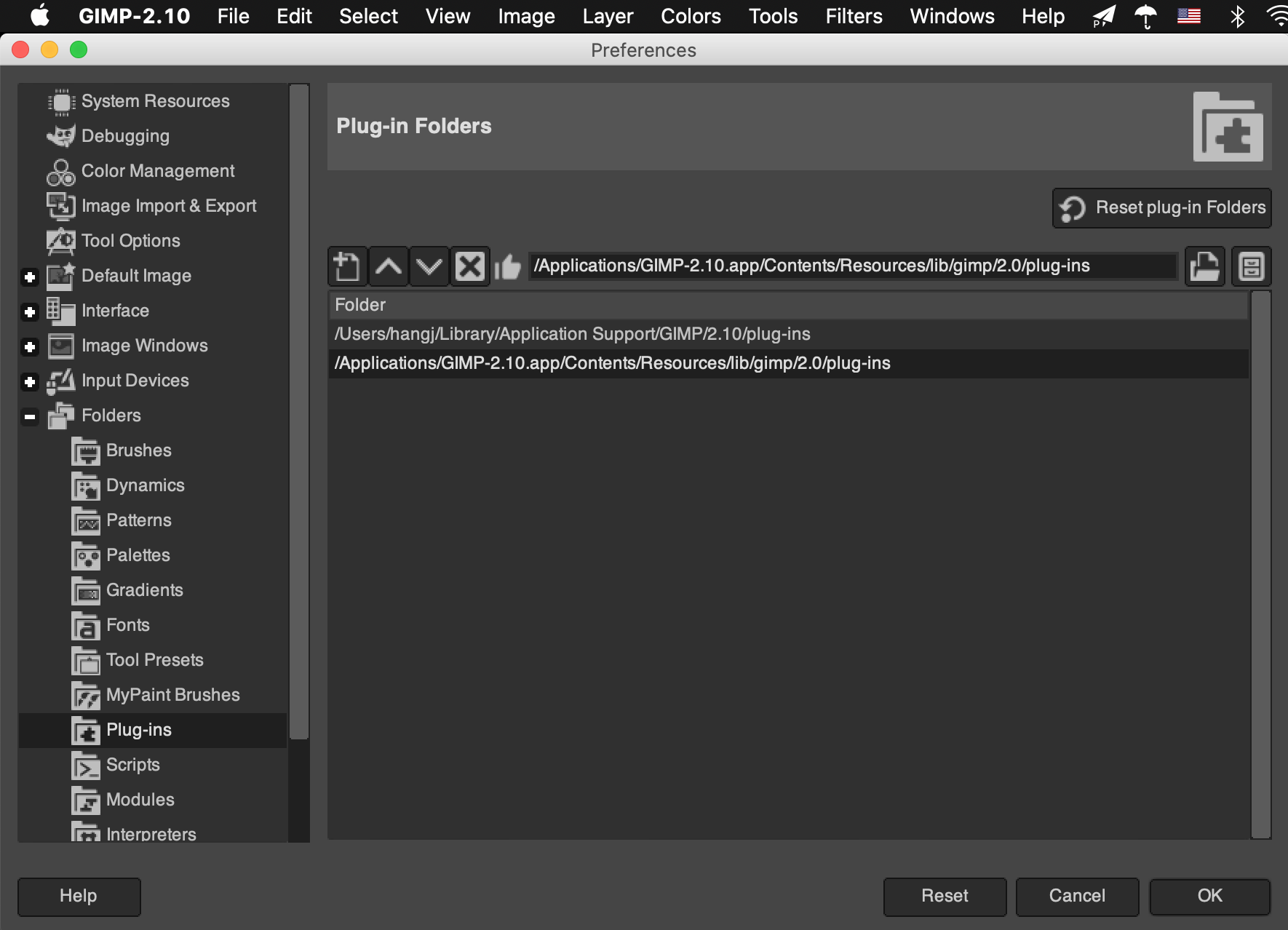
plug-ins 目录在哪?

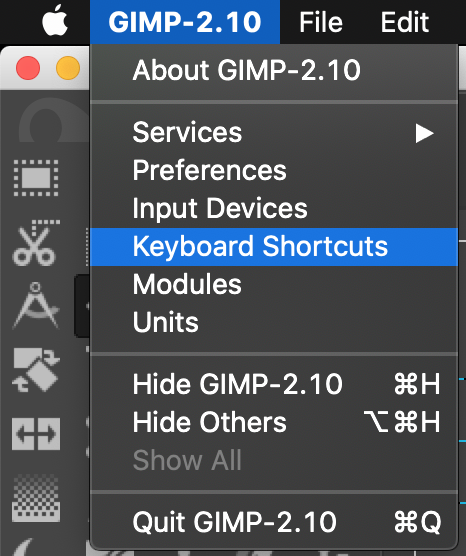
快捷键怎么设置?

输入 equally 找到我们的脚本
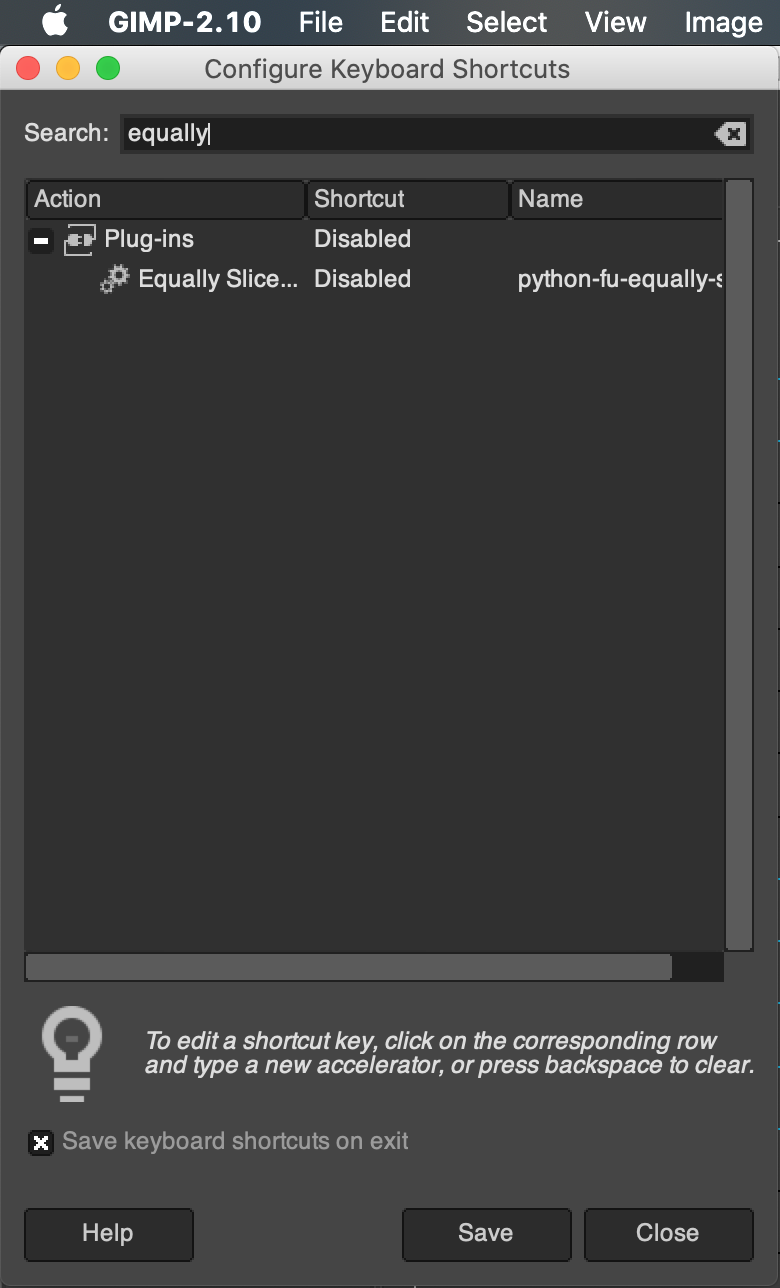
然后自行设置
GIMP 一键均匀添加多条参考线 一键均匀切分图片的更多相关文章
- lnmp一键安装环境添加redis扩展及作为mysql的缓存
lnmp一键安装环境添加redis扩展 Redis-benchmark 压力测试工具Redis-check-aof 检查redis持久化命令文件的完整性Redis-check-du ...
- JS每点击一次添加多少条数据
很久不写文档,平时只写日记,所以对这个有点生疏,如果写的不好别介意. 今天闲的蛋疼,于是要写写白天的东西,并且以后也会一直更新(一直写)下去. 时间太仓促了,这几个月,今天算最晚的一次凌晨1点,吃不消 ...
- mybatis+oracle添加一条数据并返回所添加数据的主键问题
最近做mybatis+oracle项目的时候解决添加一条数据并返回所添加数据的主键问题 controller层 @RequestMapping("/addplan") public ...
- QTableView 添加进度条
记录一下QTableView添加进度条 例子很小,仅供学习 使用QItemDelegate做的实现 有自动更新进度 要在.pro文件里添加 CONFIG += c++ ProgressBarDeleg ...
- struts2上传文件添加进度条
给文件上传添加进度条,整了两天终于成功了. 想要添加一个上传的进度条,通过分析,应该是需要不断的去访问服务器,询问上传文件的大小.通过已上传文件的大小, 和上传文件的总长度来评估上传的进度. 实现监听 ...
- 新建一个DataTable如何手动给其添加多条数据!
早晨起来,想起昨天利用winform做类似于sqlserver数据库导入数据功能的时候,用到了新建一个DataTable手动给其添加多条数据,平时用不到,需要的时候想不起来了,这次不妨把他记下来.以下 ...
- poj 3177 Redundant Paths【求最少添加多少条边可以使图变成双连通图】【缩点后求入度为1的点个数】
Redundant Paths Time Limit: 1000MS Memory Limit: 65536K Total Submissions: 11047 Accepted: 4725 ...
- iOS viewController添加导航条以及返回跳转选择
给单独的viewcontroller或者在Appdelegate的主页面添加导航条,只要在viewcontroller上添加navigationcontroller,在添加此navigationcon ...
- poj3352添加多少条边可成为双向连通图
Road Construction Time Limit: 2000MS Memory Limit: 65536K Total Submissions: 13311 Accepted: 671 ...
随机推荐
- kali操作系统添加中文输入法
今天一通操作真心累啊.想安装搜狗输入法,百度搜索了好多 三步走:https://blog.csdn.net/qq_44110340/article/details/101382732 一顿操作猛如虎, ...
- Vue__npm run build npm run dev
npm run build npm run dev 一.以前一直错的做法 以前,git完项目之后就,执行1.npm install 2.npm run build 3.npm run dev.今天ma ...
- 常用PLC与ifix/intouch驱动地址匹配规则
常用PLC与IFIX /的InTouch驱动地址匹配规则如下(持续更新): 1.施耐德M580<----->Intouch的/ IFIX: AI:400102<-----> 4 ...
- SaltStack 任意文件读写漏洞(CVE-2020-11652)
漏洞影响 SaltStack < 2019.2.4 SaltStack < 3000.2 同CVE-2020-11651 poc git clone https://github.com/ ...
- 2020国防科大综述:3D点云深度学习——综述(3D点云分割部分)
目录 摘要 1.引言: 2.背景 2.1 数据集 2.2评价指标 3.3D点云分割 3.1 3D语义分割 3.1.1 基于投影的方法 多视图表示 球形表示 3.1.2 基于离散的方法 稠密离散表示 稀 ...
- 京东购物小程序 | Taro3 项目分包实践
背景 京东购物小程序作为京东小程序业务流量的主要入口,承载着许多的活动和页面,而很多的活动在小程序开展的同时,也会在京东 APP 端进行同步的 H5 端页面的投放.这时候,一个相同的活动,需要同时开发 ...
- springboot 中 inputStream 神秘消失之谜
序言 最近小明接手了前同事的代码,意料之外.情理之中的遇到了坑. 为了避免掉入同一个坑两次,小明决定把这个坑记下来,并在坑前立一个大牌子,避免其他小伙伴掉进去. HTTPClient 模拟调用 为了把 ...
- Mybatis学习笔记-第一个Mybatis程序
思路 搭建环境 搭建数据库(略) CREATE DDATABASE CREATE TABLE INSERT VALUES 新建项目 普通Maven项目 删除src文件夹 --> 建立父工程 导入 ...
- C++ //this 指针的使用 //1 解决名称冲突 //2 返回对象本身 用 *this
1 //this 指针的使用 2 //1 解决名称冲突 3 //2 返回对象本身 用 *this 4 5 #include <iostream> 6 #include <string ...
- NTP 集群简略部署指南
NTP 集群简略部署指南 by 无若 1. NTP 简介 网络时间协议(英语:Network Time Protocol,简称NTP)是在数据网络潜伏时间可变的计算机系统之间通过分组交换进行时钟同步的 ...