
Automate Screen or Button Taps via Tasker : Simulating keypress events
When using Tasker, sometimes we want to do some automation on screen e.g. screen or button taps.
We can use actions in "Input" category(especially "Dpad" action and "type" Action) to do some simple click/tap.
An example: http://tasker.wikidot.com/auto-usb-mass-storage
Auto USB mass storage when connected

With Tasker, use a trick to automatically enable USB mass storage when USB cable plugged.


Require:

- Android 2.3+

- USB debbuging off

- In fact, the button “Turn on USB storage” must show up when USB cable plugged.

Download this file

Otherwise, you can create the profile yourself with the following steps:

 Click New and select State

Select Hardware Action then USB plugged

 Click + in the bottom left to add an action

Select category Task and Wait

Set  ms and press Done

 Click + in the bottom left to add an action

Select category Input and DPad

Set Button Down and press done

 Click + in the bottom left to add an action

Select category Input and DPad

Set Button Press and press done

 Click + in the bottom left to add an action

Select category Task and Wait

Set  ms and press Done

 Click + in the bottom left to add an action

Select category Input and DPad

Set Button Right and press done

 Click + in the bottom left to add an action

Select category Input and DPad

Set Button Press only If %WIN ~ Turn off USB storage < replace it with your langage

Explanation:

Tasker simulates a tap on the button “Turn on USB storage” when it appears.
Use some type of Script to do this. Yes, script may be the best solution for automation.
2.1 Monkey Script
In order to get the correct coordinates, on your device go to Settings -> dev options and turn on "show pointer location" then you can go into your app and tap on the correct location and it will display the x/y coordinates of the tap which you can input on that script.
Some docs about the monkey tool>>>.
2.2 "Input" command in shell
With "input" command in shell, we can simulate keypress event on Android. The keycode sucks!
More info about "Input" command, here.
Android shell support sendevent and getevent command to grab and generate tap/swipe events on screen.
So we can make a way to do this. The method "listens" to your input actions (screen taps, button presses, etc)
and turns them into a script you can use to reproduce them.
Think of it as something similar to Excel's Macro Recording feature.
Of course, you need have knowledge of basic screen events(refer to tutorial).
TUTORIAL: Remote Control Touch Screen
Solution 1:
1. run getevent ini adb shell2. copy/paste it's output to file on PC3. run script which contents one line cat $1 | gawk --non-decimal-data '{print $1, ("0x"$2)+0, ("0x"$3)+0, ("0x"$4)+0}' | sed 's/://g;s/^/sendevent /g' as convert.sh file.in > file out4. put file.out on SD-card5. Source it with Run Shell action
Note: the solution comes from here. Thanks to Vladimir Oz .
Solution 2:
You can use "Sendevent->Getevent Toolbox" to find a way out.
Simulating keypress events on Android
- During development/testing of the button-drivers itself.
- To implement automated rigorous tests. ( MonkeyTest? )
- To implement/interface additional custom software keyboards.
- Just because we can!
Q. How to generate a hardware-button-press event

    WITHOUT actually pressing any key on the device?
Let us first understand what happens when a hardware button is pressed. Here is what happens when you press a button on an Android device:
- The h/w button triggers an interrupt.
- The ISR of the corresponding driver gets called (in kernel).
- In the ISR, the driver generates an input-event.
- Android-framework (in userspace) gets the notification of the event.
- Android reads the input-event code & type.
- Compares it with the proper "keymap/keylayout" file.
- The proper button is identified.
[ drum-roll... ]
input keyevent <event_code>
Now, before we try to send any keyevent, we need to find out the event-code that maps to the h/w key we want to simulate.
The following table summarizes all the supported keycodes in Android:
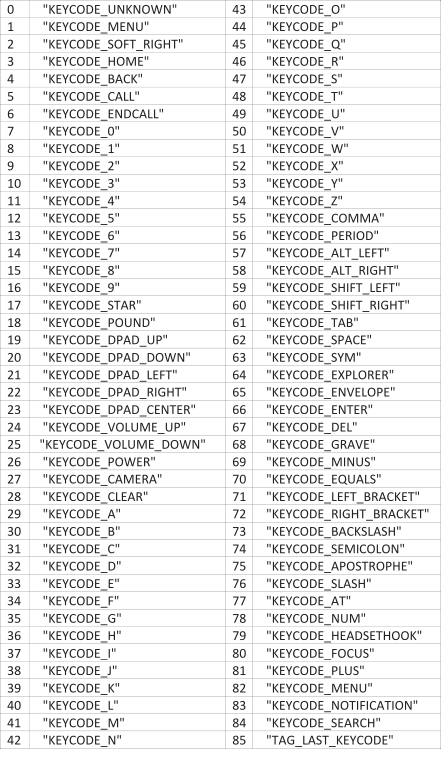
input keyevent <keycode>
The value of keycode can be any of the integer values from the above table.
In case a serial-console is NOT available on your device, you can always run the command via adb as follows:
adb shell input keyevent <keycode>
That's how a hardware-button-press is simulated in software!!
simulate screen tap with tasker
run shell -> input tap x y -> ensure use root is ticked
x y are the coordinates (activate them to show on screen in developer menu in settings)
run shell -> input tap 500 500
run shell -> input swipe 500 500 500 800
run shell -> input swipe 500 500 500 500 s
Emulating touch in Android is apparently possible with shell commands, using Tasker’s Run Shell action.
The command you use is
input tap x y
Where X and Y are coordinates. Root must be checked in the action options, and obviously Tasker needs root access to do this.
As for how you find X and Y, that’s easy:
Go to system settings, developer options, and enable “Show pointer location”.
Use that option to find the X and Y coordinates of whatever you need the touch emulation to press, and write them down.
Then use them in the above command.
You can also emulate swipes, using the following command:
input swipe X1 Y1 X2 Y2
Where X1 Y1 are the star coordinates and X2 Y2 are the end coordinates.
As an example, “input swipe 400 400 100 400″ on my phone swipes the image thumbnails in a Google Play listing.
This works great on my device, but might be dependent on device and/or OS version/ROM.
For long tap use , using the following command:
input swipe x1 y1 x2 y2 s
Set x1 and x2 to the same value and y1 and y2 to the same value to keep your swipe in the same place and set s to the number of milliseconds you want your long press to last.
TIP:
don't forget to turn off the "Show Pointer Location" and "Show Touches" BEFORE running the task.
That caused several reboots for me. Oops!
This is fantastic, only issue I'm having is that it doesn't seem to work with the screen off.. maybe if I remove keyguard?
yeah, have to wake disable key guard/ disable pattern lock, run the emulation,
enable keyguard/enable pattern lock, but totally worth it
Automate Screen or Button Taps via Tasker : Simulating keypress events的更多相关文章
- Simulating Mouse Events in JavaScript
http://marcgrabanski.com/simulating-mouse-click-events-in-javascript/
- Content portal for Pocketables Tasker articles
http://www.pocketables.com/2013/03/overview-of-pocketables-tasker-articles.html I write a lot about ...
- man screen
http://www.gnu.org/software/screen/manual/screen.html Screen User's Manual Next: Overview, Previous: ...
- How To Make A Swipeable Table View Cell With Actions – Without Going Nuts With Scroll Views
How To Make A Swipeable Table View Cell With Actions – Without Going Nuts With Scroll Views Ellen S ...
- bootstrap-modal 学习笔记 源码分析
Bootstrap是Twitter推出的一个开源的用于前端开发的工具包,怎么用直接官网 http://twitter.github.io/bootstrap/ 我博客的定位就是把这些年看过的源码给慢慢 ...
- The Engine Document of JustWeEngine
JustWeEngine - Android FrameWork An easy open source Android Native Game FrameWork. Github Game core ...
- ArcGIS Engine环境下创建自定义的ArcToolbox Geoprocessing工具
在上一篇日志中介绍了自己通过几何的方法合并断开的线要素的ArcGIS插件式的应用程序.但是后来考虑到插件式的程序的配置和使用比较繁琐,也没有比较好的错误处理机制,于是我就把之前的程序封装成一个类似于A ...
- View Focus的处理过程及ViewGroup的mFocused字段分析
通过上篇的介绍,我们知道在对KeyEvent的处理中有非常重要的一环,那就是KeyEvent在focus view的path上自上而下的分发, 换句话说只有focus的view才有资格参与KeyEve ...
- ExtJS笔记 Using Events
Using Events The Components and Classes of Ext JS fire a broad range of events at various points in ...
随机推荐
- pip install 升级时候 出现报asciii码错误的问题。
原因是pip安装python包会加载我的用户目录,我的用户目录恰好是中文的,ascii不能编码.解决办法是: python目录 Python27\Lib\site-packages 建一个文件site ...
- python网络编程--线程锁(互斥锁Mutex)
一:为什么需要线程锁 一个进程下可以启动多个线程,多个线程共享父进程的内存空间,也就意味着每个线程可以访问同一份数据,此时,如果2个线程同时要修改同一份数据,会出现什么状况? 很简单,假设你有A,B两 ...
- Apache Lucene版本迁移指南
http://lucene.apache.org/core/4_0_0/MIGRATE.html 本文详细介绍了lucene的版本升级过程中的重大改进与调整. 比如:灵活的索引改变了低水平的域.词.文 ...
- linux下Ctrl命令组合
1.键盘组合键操作 ctrl-c 发送 SIGINT 信号给前台进程组中的所有进程.常用于终止正在运行的程序. ctrl-z 发送 SIGTSTP 信号给前台进程组中的所有进程,常用于挂起一个进程. ...
- 20165301 2017-2018-2《Java程序设计》课程总结
20165301 2017-2018-2<Java程序设计>课程总结 每周作业链接汇总 预备作业1:我期待的师生关系 预备作业2:学习基础与c语言学习心得 预备作业3: Linux安装及命 ...
- JS验证表单中TEXT文本框中是否含有非法字符
<form id="form" action="" method="post"> <input type="hi ...
- 20165203《Java程序设计》第四周学习总结
教材学习内容总结 第5章 子类与继承 子类的继承性 子类和父类在同一包中的继承性:子类继承父类中不是private的成员变量和方法作为自己的成员变量和方法 子类和父类不在同一包中的继承性:子类只继承父 ...
- 使用EasyWechat快速开发微信公众号支付
前期准备: 申请微信支付后, 会收到2个参数, 商户id,和商户key.注意,这2个参数,不要和微信的参数混淆.微信参数: appid, appkey, token支付参数: merchant_id( ...
- for循环输出菱形
package com.hanqi; public class lingxing { public static void main(String[] args) { for(int m=1;m< ...
- day5模块学习--sys模块
sys模块 sys模块是处理与系统相关的模块,sys(system),下面来看看sys模块常用的方法: 1.sys.argv #命令行参数list,第一个元素是程序本身路径 2.sys ...