
Install Identity management Database
Install Identity management Database
Installing Oracle Fusion Applications > Setting up Identity and Access Management Node > Install Oracle 11g Database (Identity management Database)
Previous: Install Fusion Applications Provisioning Framework on IDM Host
Fusion Applications 11.1.8 also ships with Oracle 11g (11.2.0.3.0) database. You can either install it separately (if you want to install RAC database) or use Fusion provisioning Wizard to create one.
Important Note: In future Identity Management provisioning wizard will have separate option to install Identity Management database but since currently that option is unavailable in IDM Wizard, we will use the the Fusion Provisioning Wizard only to create this database.
To install Applications Transactional Database we need to run Oracle Fusion Applications Provisioning Wizard from <framework_location>/provisioning/bin
<framework_location> is same where we installed the framework in previous post. i.e. /app/fusion
[fusion@idmhost ~]$ cd /app/fusion/provisioning/bin/
We need to temporarily set JAVA_HOME to jdk6 directory shipped with the installation media
[fusion@idmhost bin]$ export JAVA_HOME=/stage/jdk6
[fusion@fmwhost bin]$ ./provisioningWizard.sh
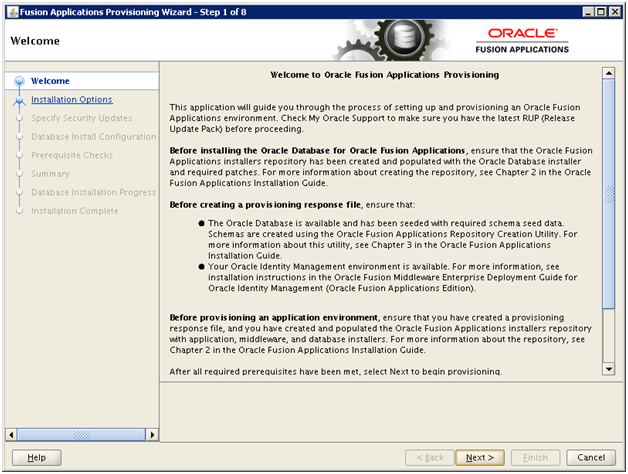
Click Next
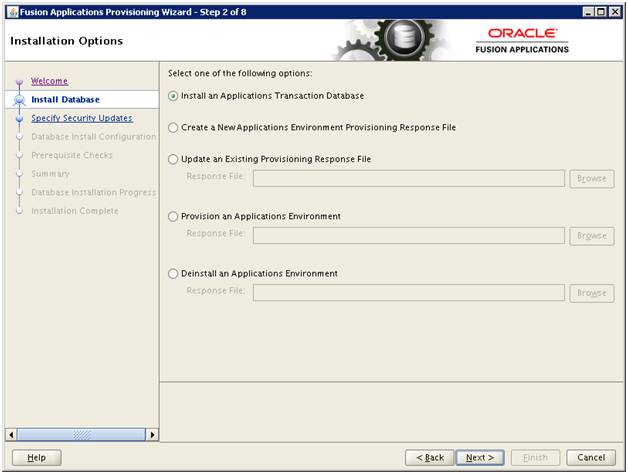
Select “Install an Applications Transactional Database” option. Click Next
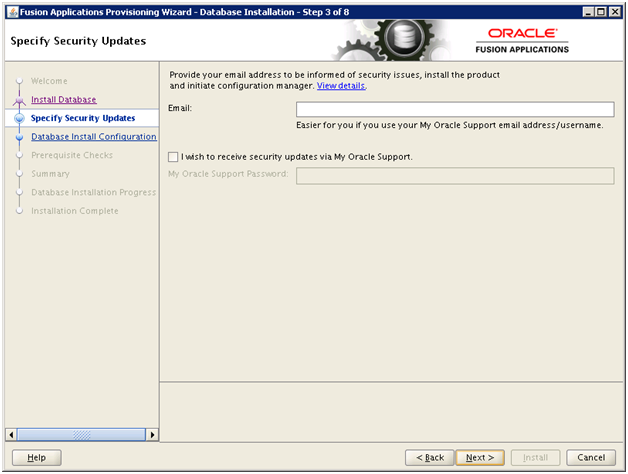
Deselect the checkbox if you wish and click Next
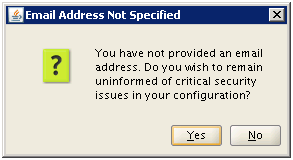
Click Yes
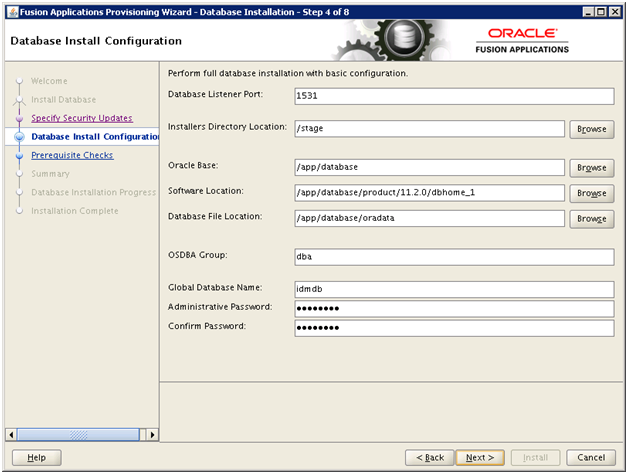
Enter values as mentioned here and click Next.
Port: 1531 (we have changed the default port to avoid port conflict if you want to move it in future to another database host)
Installers directory location: /stage (directory where we created the stage)
Oracle Base: /app/database
Software Location: Will be populated automatically
OSDBA group: dba
Global Database Name: idmdb (you can keep any name you want)
Password: Oracle123 (We have used Oracle123 for any passwords during the installation since it satisfies all requirements during this installation. You can keep any complex password you want)
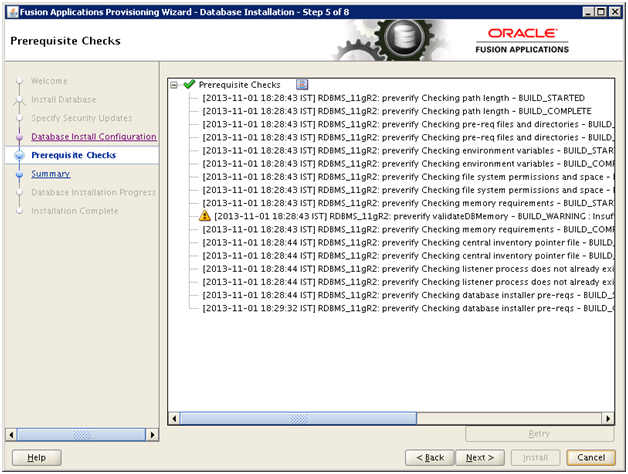
You might see some warning related to memory if you are using less than 26 GB memory for this host. You can ignore this since we are going to reduce the memory target after installation.
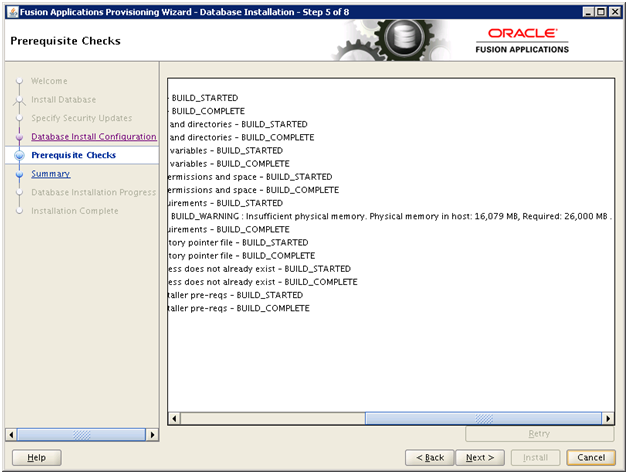
Click Next
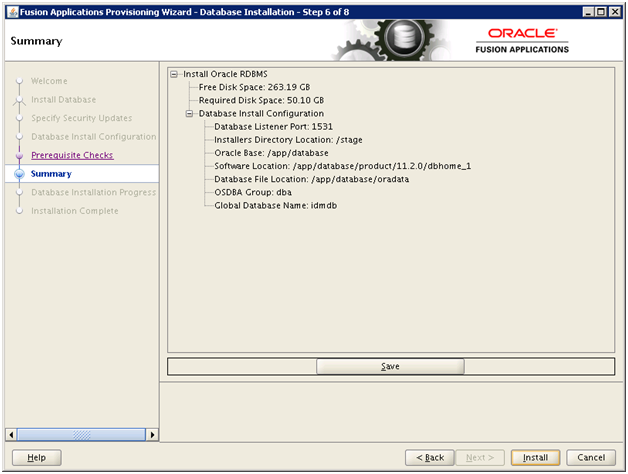
Once prerequisites check is successful, click Next. Save summary if required
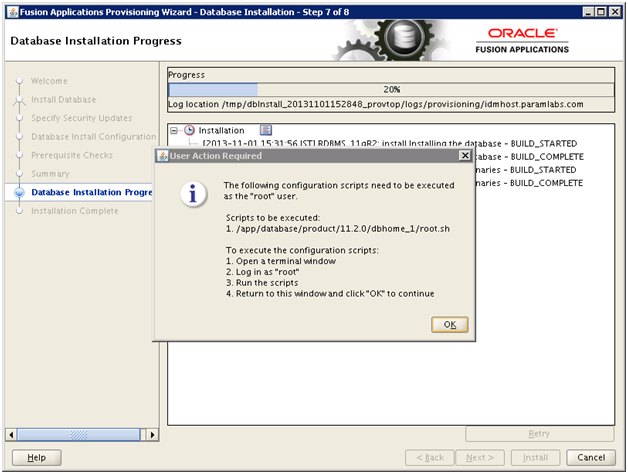
Once Installation completes (20% progress), it will prompt as follows.
Open another window and run the following script as root user.
[root@idmhost ~]# /app/database/product/11.2.0/dbhome_1/root.sh
Check /app/database/product/11.2.0/dbhome_1/install/root_idmhost.paramlabs.com_2013-11-01_18-46-02.log for the output of root script
[root@idmhost ~]# more /app/database/product/11.2.0/dbhome_1/install/root_idmhost.paramlabs.com_2013-11-01_18-46-02.log
Performing root user operation for Oracle 11g
The following environment variables are set as:
ORACLE_OWNER= fusion
ORACLE_HOME= /app/database/product/11.2.0/dbhome_1
Creating /etc/oratab file…
Entries will be added to the /etc/oratab file as needed by
Database Configuration Assistant when a database is created
Finished running generic part of root script.
Now product-specific root actions will be performed.
Finished product-specific root actions.
Click OK
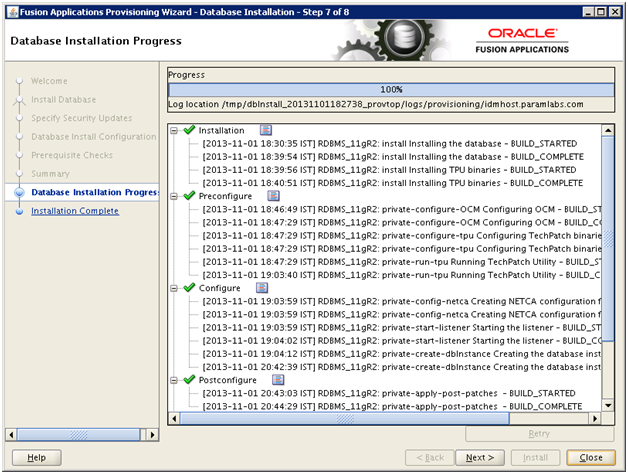
Once installation till validation is complete, click Next
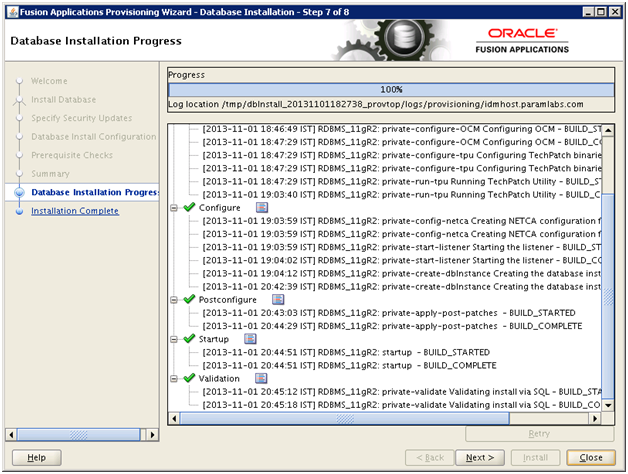
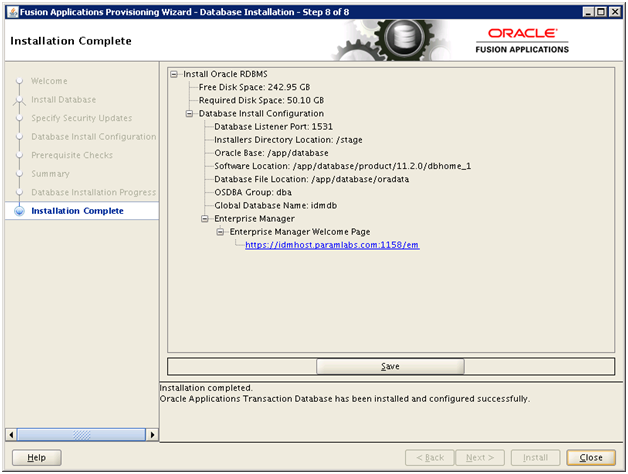
Click Close to complete the installation
Let us install JDK6 as well so that we can set JAVA_HOME to this permanent location.
[fusion@idmhost ~]$ cd /app/fusion/
[fusion@idmhost fusion]$ unzip /stage/installers/jdk/jdk6.zip
Append in .bash_profile of fusion user
ORACLE_HOME=/app/database/product/11.2.0/dbhome_1
export ORACLE_HOME
PATH=$PATH:$ORACLE_HOME/bin
export PATH
ORACLE_SID=idmdb
export ORACLE_SID
JAVA_HOME=/app/fusion/jdk6
export JAVA_HOME
ANT_HOME=/app/fusion/provisioning/ant
export ANT_HOME
Reduce memory size of database
We will reduce the size of SGA and PGA to avoid getting out of memory in server since fusion requires too much memory.
Important Note: We are reducing the SGA and PGA (from 10GB to 2GB). We are doing this since we are running on lesser RAM than required. This is not recommended for production installation but since this is only a demo/development installation, you can safely do this. If you wish to keep it 10GB you can do it but this will increase the swap usage exponentially.
[fusion@idmhost bin]$ sqlplus / as sysdba
SQL> show parameter pga
NAME TYPE VALUE
———————————— ———– ——————————
pga_aggregate_target big integer 4G
SQL> show parameter sga
NAME TYPE VALUE
———————————— ———– ——————————
lock_sga boolean FALSE
pre_page_sga boolean FALSE
sga_max_size big integer 9G
sga_target big integer 9G
SQL> create pfile from spfile;
File created.
SQL> shut immediate;
Database closed.
Database dismounted.
ORACLE instance shut down.
[fusion@idmhost ~]$ cd /app/database/product/11.2.0/dbhome_1/dbs/
[fusion@idmhost dbs]$ cp -pr initidmdb.ora initidmdb.ora.bak
[fusion@idmhost dbs]$ vi initidmdb.ora
Edit the values as follows and add last line as memory_target
#idmdb.__db_cache_size=7482638336
#idmdb.__java_pool_size=67108864
#idmdb.__large_pool_size=33554432
idmdb.__oracle_base=’/app/database’#ORACLE_BASE set from environment
#idmdb.__pga_aggregate_target=4294967296
#idmdb.__sga_target=9663676416
#idmdb.__shared_io_pool_size=536870912
#idmdb.__shared_pool_size=1442840576
#idmdb.__streams_pool_size=33554432
#*.pga_aggregate_target=4294967296
#*.sga_target=9663676416
*.memory_target=3G
Let’s recreate spfile using this pfile.
SQL> create spfile from pfile;
File created.
SQL> startup
Also change the value for open_cursors parameter to 800
SQL> show parameter open_cursors
NAME TYPE VALUE
———————————— ———– ——————————
open_cursors integer 500
SQL> alter system set open_cursors=800 scope=both sid=’*';
System altered.
SQL> show parameter open_cursors
NAME TYPE VALUE
———————————— ———– ——————————
open_cursors integer 800
Install Identity management Database的更多相关文章
- Run Repository Creation Utility (RCU) for Oracle Identity Management components
Run Repository Creation Utility (RCU) for Oracle Identity Management components Installing O ...
- CMDB(Configuration Management Database)资产管理系统和 运维自动化
一.传统运维方式和自动化运维的区别 二.CMDB的介绍 三.CMDB的四种方式 四.项目的目录架构介绍以及配置文件的升级编写 五.比较low的项目架构书写 六.可插拔式收集资产 七.对收集的服务器信息 ...
- P6 Professional Installation and Configuration Guide (Microsoft SQL Server Database) 16 R1
P6 Professional Installation and Configuration Guide (Microsoft SQL Server Database) 16 R1 May ...
- Team Foundation Server 2013 with Update 3 Install LOG
[Info @10:14:58.155] ====================================================================[Info @ ...
- Magic Quadrant for Security Information and Event Management
https://www.gartner.com/doc/reprints?id=1-4LC8PAW&ct=171130&st=sb Summary Security and risk ...
- 关于如何使用Identity的文献
有几篇文件,深入浅出地讲解了如何一步一步的使用Identity,感觉十分有用,留下链接,备查. 1. Configuring Db Connection and Code-First Migratio ...
- Oracle® Database Patch 19121551 - Database Patch Set Update 11.2.0.4.4 (Includes CPUOct2014) - 傲游云浏览
Skip Headers Oracle® Database Patch 19121551 - Database Patch Set Update 11.2.0.4.4 (Includes CPUOct ...
- Microsoft SQL Server Product Samples:Database
从SQL Server 2005 之后示例数据都为AdventureWorks,需要的通过codeplex网站下载.这样设计的目的应该在于是生产库行不必要的用户以及权限分配. 从以下网址访问http: ...
- Database 2 Day DBA guide_Chapter2
website:http://www.oracle.com/webfolder/technetwork/tutorials/obe/db/11g/r2/2day_dba/install/install ...
随机推荐
- Windows系统php5.6安装Imagick库
Windows上的安装坑比较多 1.安装Imagick,需要下载6.9.3之下版本的 http://imagemagick.org/script/download.php 官网都是新版本不可以用 我安 ...
- [BZOJ5338][TJOI2018]xor(可持久化Trie)
可持久化Trie模板题. 建两种可持久化Trie,每个点两棵,一棵对DFS求前缀和,一棵对祖先求前缀和. 或者树剖,不好写多少还多个log. #include<cstdio> #inclu ...
- BZOJ 4945 UOJ #317 NOI2017 游戏 2-SAT 拓扑排序
http://uoj.ac/problem/317 https://www.lydsy.com/JudgeOnline/problem.php?id=4945 我现在的程序uoj的额外数据通过不了,b ...
- 【动态规划+Floyd】OpenJudge3368
OpenJudge上刷水都不会了……这题居然写了一个半小时…… [题目大意] 诸葛亮要征服N城市.然而,City-X在击败City-2,City-3……City-x-1后击败.关羽,张飞,赵云,每个人 ...
- Nodejs线上日志部署
Nodejs 被越来越多的使用到线上系统中,但线上系统没有日志怎么行呢. 一.forever记录日志 我的线上系统使用forever来启动服务,最开始就直接使用了forever来记录 forever ...
- wikioi 1048 石子归并
dp[i][j]=min(dp[i][j],dp[i][k],dp[k+1][j]+sum[i][j]); 表示i-j的最小合并代价. #include <iostream> #inclu ...
- HDU 4718 The LCIS on the Tree (动态树LCT)
The LCIS on the Tree Time Limit: 6000/3000 MS (Java/Others) Memory Limit: 65535/65535 K (Java/Oth ...
- cuda并行编程之求解ConjugateGradient(共轭梯度迭代)丢失dll解决方式
在进行图像处理过程中,我们常常会用到梯度迭代求解大型线性方程组.今天在用cuda对神秘矩阵进行求解的时候.出现了缺少dll的情况: 报错例如以下图: watermark/2/text/aHR0cDov ...
- MVC扩展Filter,通过继承ActionFilterAttribute为登录密码加密
与ActionFilter相关的接口有2个: □ IActionFilter 对action执行前后处理 void OnActionExecuting(ActionExecutingContext f ...
- CAShapeLayer的path动画
CAShapeLayer的path动画 效果 源码 https://github.com/YouXianMing/Animations // // CAShapeLayerPathController ...