
openerp学习笔记 视图(tree\form)中隐藏按钮( 创建、编辑、删除 ),tree视图中启用编辑
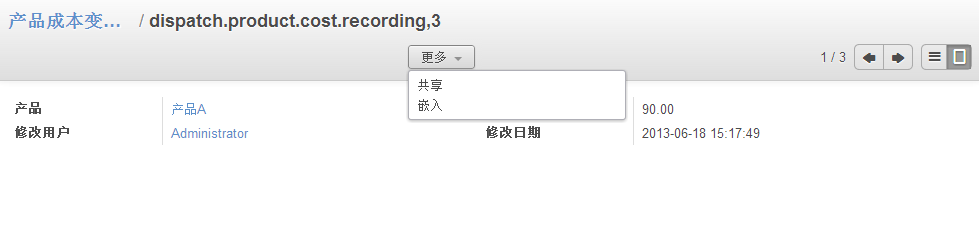
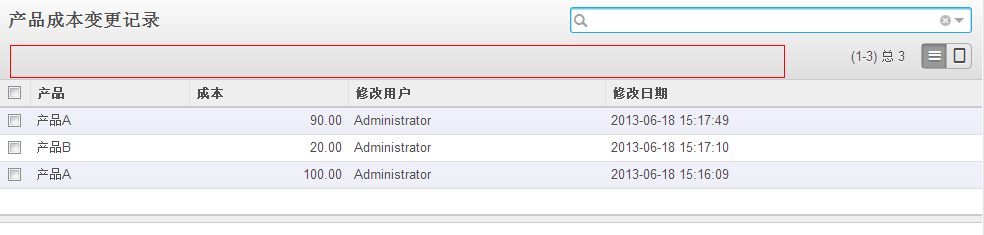
视图(tree\form)中隐藏按钮( 创建、编辑、删除 )
create="false" edit="false" delete="false"
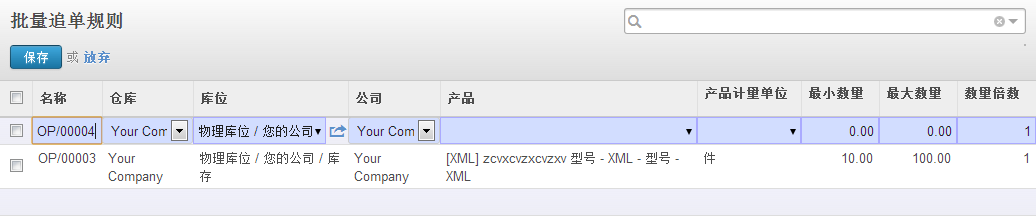
tree视图中启用编辑
editable="top" (新增行在上) 或 editable="bottom" (新增行在下)
代码示例:
<record model="ir.ui.view"
id="dispatch_product_cost_recording_form">
<field
name="name">dispatch.product.cost.recording.form</field>
<field
name="model">dispatch.product.cost.recording</field>
<field
name="type">form</field>
<field name="arch"
type="xml">
<form string="产品成本变更记录" create="false" edit="false"
delete="false">
<field
name="dispatch_product"/>
<field
name="cost"/>
<field
name="create_uid"/>
<field
name="create_date"/>
</form>
</field>
</record>
<record model="ir.ui.view" id="dispatch_product_cost_recording_tree">
<field
name="name">dispatch.product.cost.recording.tree</field>
<field
name="model">dispatch.product.cost.recording</field>
<field
name="type">tree</field>
<field name="arch"
type="xml">
<tree string="产品成本变更记录" create="false" edit="false"
delete="false">
<field
name="dispatch_product"/>
<field
name="cost"/>
<field
name="create_uid"/>
<field
name="create_date"/>
</tree>
</field>
</record>
<record id="view_warehouse_batch_orderpoint_tree" model="ir.ui.view">
<field
name="name">stock.warehouse.batch.orderpoint.tree</field>
<field
name="model">stock.warehouse.orderpoint</field>
<field
name="arch" type="xml">
<tree
string="Reordering Rules"
editable="top">
<field
name="name" />
<field name="warehouse_id"
on_change="onchange_warehouse_id(warehouse_id)"
widget="selection"
groups="stock.group_locations" />
<field
name="location_id" groups="stock.group_locations"
/>
<field name="company_id"
groups="base.group_multi_company"
widget="selection"
/>
<field name="product_id"
on_change="onchange_product_id(product_id)"
/>
<field name="product_uom"
groups="product.group_uom" />
<field
name="product_min_qty" />
<field
name="product_max_qty" />
<field
name="qty_multiple" string="Quantity Multiple"
/>
</tree>
</field>
</record>
openerp学习笔记 视图(tree\form)中隐藏按钮( 创建、编辑、删除 ),tree视图中启用编辑的更多相关文章
- openerp学习笔记 视图样式(表格行颜色、按钮,字段只读、隐藏,按钮状态、类型、图标、权限,group边距,聚合[合计、平均],样式)
表格行颜色: <tree string="请假单列表" colors="red:state == 'refuse';blue:state = ...
- python3.4学习笔记(十五) 字符串操作(string替换、删除、截取、复制、连接、比较、查找、包含、大小写转换、分割等)
python3.4学习笔记(十五) 字符串操作(string替换.删除.截取.复制.连接.比较.查找.包含.大小写转换.分割等) python print 不换行(在后面加上,end=''),prin ...
- 用SQL语句创建和删除Access数据库中的表;添加列和删除列
用SQL语句创建和删除Access数据库中的表;添加列和删除列 Posted on 2009-08-11 13:42 yunbo 阅读(1240) 评论(0) 编辑 收藏 用SQL语句创建和删除Acc ...
- 使用API接口在zabbix系统中登陆、创建、删除agent
一.API的介绍 API(Application Programming Interface,应用程序编程接口)是一些预先定义的函数,目的是提供应用程序与开发人员基于某软件或硬件得以访问一组例程的能力 ...
- openerp学习笔记 视图继承(tree、form、search)
支持的视图类型:form.tree.search ... 支持的定位方法: <notebook position="inside"> ...
- openerp学习笔记 统计、分析、报表(过滤条件向导、分组报表、图形分析、比率计算、追加视图排序)
待解决:图形中当改变分组时,图例不正确 存储比率计算时,分组合计不正确 wizard:过滤条件向导,用于输入过滤条件 wizard/sale_chart.py # -*- cod ...
- openerp学习笔记 搜索视图(自己创建的、自己的、本部门的、本部门及下属部门的、今日的、日期从,日期至、多条件模糊搜索、or、and)
自己创建的: domain="[('create_uid','=',uid)]" 自己的: domain="[('employee_id','=','#kl_user_e ...
- openerp学习笔记 context 的应用
1.在Action中定义,context用于传递搜索条件和分组条件,在搜索视图中默认显示: 示例代码: <record model="ir.actions.act_window&quo ...
- openerp学习笔记 domain 增加扩展支持,例如支持 <field name="domain">[('type','=','get_user_ht_type()')]</field>
示例代码1,ir_action_window.read : # -*- coding: utf-8 -*-from openerp.osv import fields,osv class res_us ...
随机推荐
- 2018.09.20 atcoder Building Cubes with AtCoDeer(枚举)
传送门 有个十分显然的结论,只用枚举前后两个面就可以知道所有的面的颜色. 于是可以O(n2)O(n^2)O(n2)枚举前后两个面然后用map乱搞求贡献. 发现这样算出来会多算两倍(打表证明)于是答案除 ...
- 一个 图片 滚动 飞入的css特效
@keyframes bounceInLeft { from, 60%, 75%, 90%, to {animation-timing-function: cubic-bezier(0.215, 0. ...
- Type mismatch in value from map: expected org.apache.hadoop.io.longWritable
hadoop 编译的程序的报错 执行了命令: hadoop fs -put HTTP_20130313143750.dat /date.dochadoop jar MyDataCount.jar co ...
- 命令行中开启mySQL数据库服务
sudo /Applications/XAMPP/xamppfiles/bin/mysql.server start
- (并查集)Is It A Tree? --POJ--1308
链接: http://poj.org/problem?id=1308 http://acm.hust.edu.cn/vjudge/contest/view.action?cid=82830#probl ...
- (匹配)Antenna Placement --POJ --3020
链接: http://poj.org/problem?id=3020 http://acm.hust.edu.cn/vjudge/contest/view.action?cid=82834#probl ...
- git push/pull时总需要输入用户名密码的解决方案
在提交项目代码或者拉代码的时候,git会让你输入用户名密码,解决方案:(我们公司用的是gitlab) 执行git config --global credential.helper store命令 然 ...
- Delphi for iOS开发指南(6):在iOS应用程序中使用ComboBox组件来从列表中选择某一项
http://blog.csdn.net/delphiteacher/article/details/8924110 Delphi for iOS开发指南(6):在iOS应用程序中使用ComboBox ...
- Java位操作全面总结[ZZ]
Java位操作全面总结 在计算机中所有数据都是以二进制的形式储存的.位运算其实就是直接对在内存中的二进制数据进行操作,因此处理数据的速度非常快.在实际编程中,如果能巧妙运用位操作,完全可以达到四两拨千 ...
- nginx backend 健康检查
ngx_http_proxy_module 模块和ngx_http_upstream_module模块(自带) 严格来说,nginx自带是没有针对负载均衡后端节点的健康检查的,但是可以通过默认自带的n ...