
Hadoop基础总结
一、Hadoop是什么?
Hadoop是开源的分布式存储和分布式计算平台
二、Hadoop包含两个核心组成:
1、HDFS:
分布式文件系统,存储海量数据
a、基本概念
-块(block)
HDFS的文件被分成块进行存储,每个块的默认大小64MB
块是文件存储处理的逻辑单元
-NameNode
管理节点,存放文件元数据,包括:
(1)文件与数据块的映射表
(2)数据块与数据节点的映射表
-DataNode
是HDFS的工作节点,存放数据块
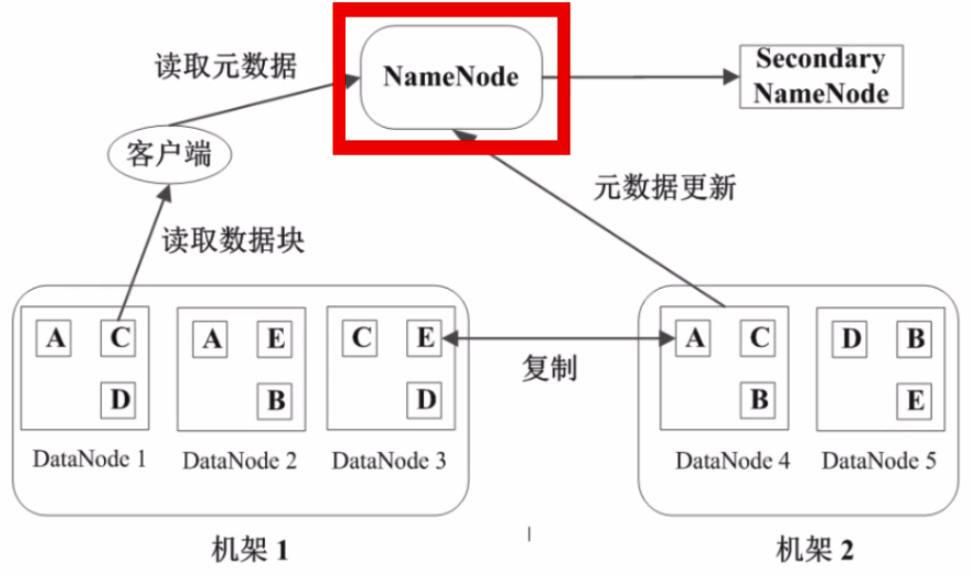
b、数据管理策略
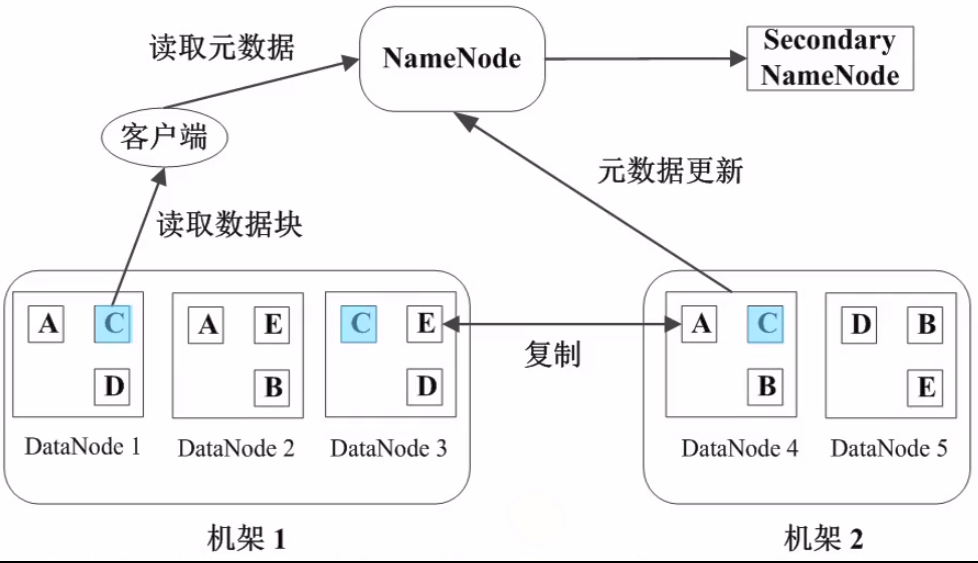
11、数据块副本
每个数据块三个副本,分布在两个机架内的三个节点,以防数据故障丢失
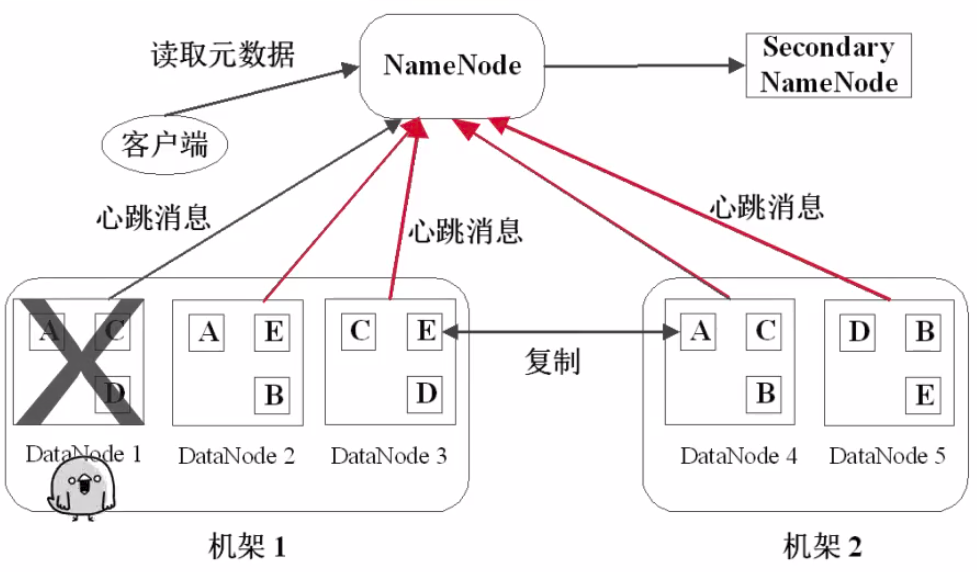
22、心跳检测:
DataNode定期向NameNode发送心跳信息
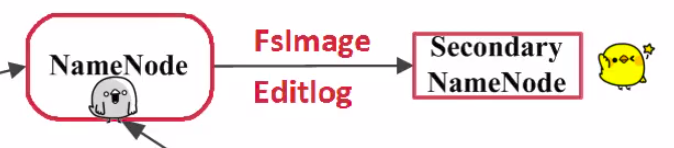
33、二级NameNode(Secondary NameNode)
二级NameNode定期同步元数据映像文件和修改日志,NameNode发生故障时,备胎转正
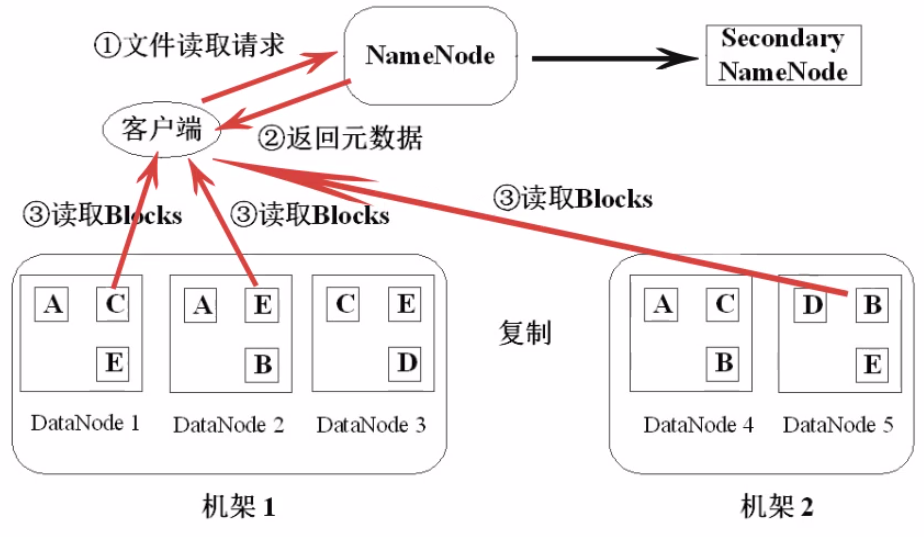
44、HDFS文件读取的流程
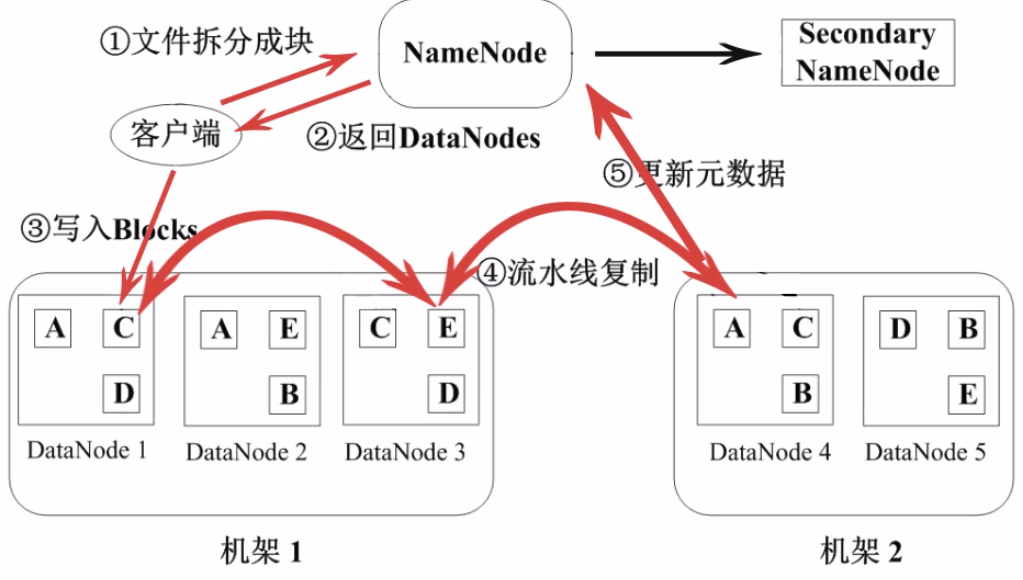
55、HDFS写入文件的流程
66、HDFS的特点
数据冗余,硬件容错
流式的数据访问,一次写入多次读取,一旦写入无法修改,要修改只有删除重写
存储大文件,小文件NameNode压力会很大
77、适用性和局限性
适合数据批量读写,吞吐量高
不适合交互式应用,低延迟很难满足
适合一次写入多次读取,顺序读写
不支持多用户并发写相同文件
2、Mapreduce:并行处理框架,实现任务分解和调度
a、Mapreduce的原理
分而治之,一个大任务分成多个小的子任务(map),由多个节点并行执行后,合并结果(reduce)
b、Mapreduce的运行流程
11、基本概念
-
Job & Task
job → Task(maptask, reducetask)
-
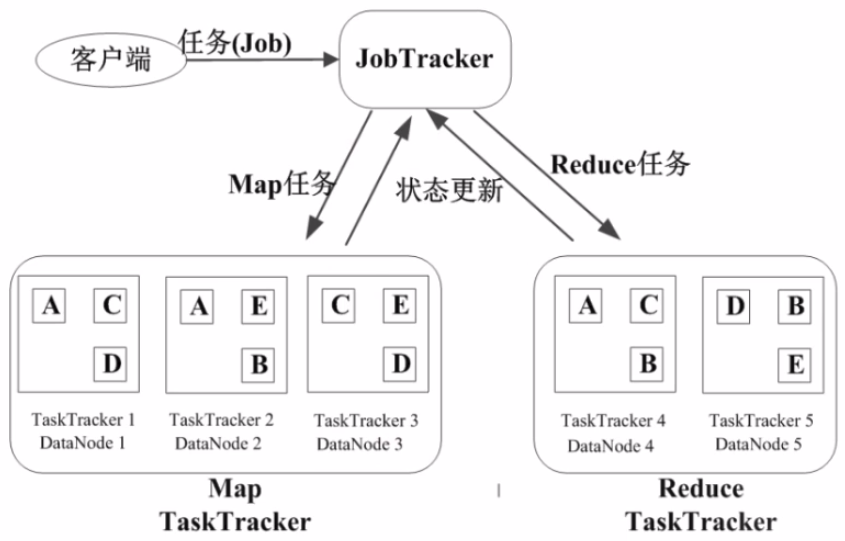
JobTracker
作业任务
分配任务、监控任务执行进度
监控TaskTracker的状态
-
TaskTracker
执行任务
汇报任务状态
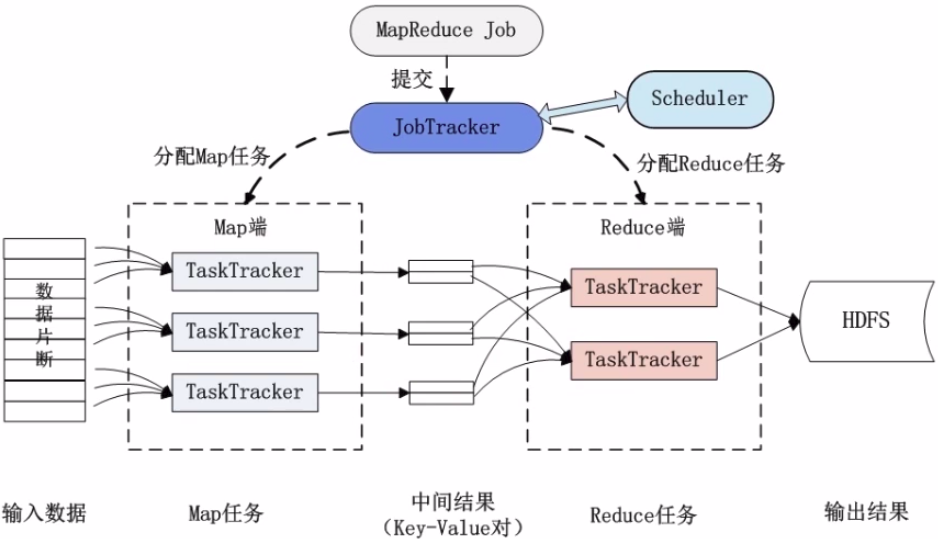
22、作业执行过程
33、Mapreduce的容错机制
重复执行
推测执行
三、可用来做什么
搭建大型数据仓库,PB级数据的存储、处理、分析、统计等业务
如:搜索引擎、商业智能、日志分析、数据挖掘
四、Hadoop优势
1、高扩展
可通过增加一些硬件,使得性能和容量提升
2、低成本
普通PC即可实现,堆叠系统,通过软件方面的容错来保证系统的可靠性
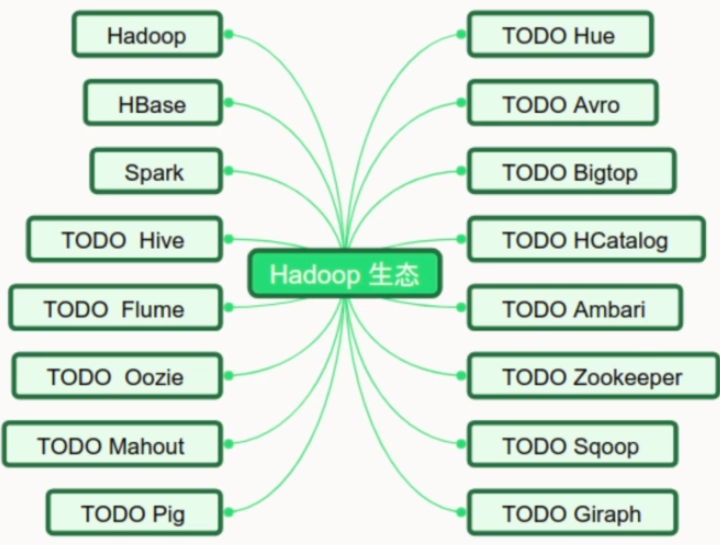
3、成熟的生态圈
如:Hive,
Hbase
五、HDFS操作
1、shell命令操作
常用HDFS
Shell命令:
类Linux系统:ls,
cat, mkdir, rm, chmod, chown等
HDFS文件交互:copyFromLocal、copyToLocal、get(下载)、put(上传)
六、Hadoop生态圈
七、Mapreduce操作实战
本例中为了实现读取某个文档,并统计文档中各单词的数量
先建立hdfs_map.py用于读取文档数据
# hdfs_map.py

import sys

def read_input(file):

    for line in file:

        yield line.split()

def main():

    data = read_input(sys.stdin)

    for words in data:

        for word in words:

            print('{}\t1'.format(word))

if __name__ == '__main__':

    main()
建立hdfs_reduce.py用于统计各单词数量
# hdfs_reduce.py

import sys

from operator import itemgetter

from itertools import groupby

def read_mapper_output(file, separator='\t'):

    for line in file:

        yield line.rstrip().split(separator, 1)

def main():

    data = read_mapper_output(sys.stdin)

    for current_word, group in groupby(data, itemgetter(0)):

        total_count = sum(int(count) for current_word, count in group)

        print('{} {}'.format(current_word, total_count))

if __name__ == '__main__':

    main()
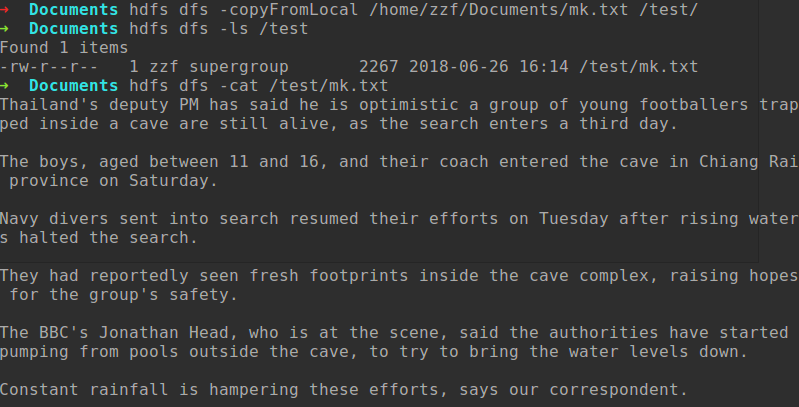
事先建立文档mk.txt,并编辑部分内容,然后粗如HDFS中
在命令行中运行Mapreduce操作
hadoop jar /opt/hadoop-2.9./share/hadoop/tools/lib/hadoop-streaming-2.9..jar -files '/home/zzf/Git/Data_analysis/Hadoop/hdfs_map.py,/home/zzf/Git/Data_analysis/Hadoop/hdfs_reduce.py' -input /test/mk.txt -output /output/wordcount -mapper 'python3 hdfs_map.py' -reducer 'python3 hdfs_reduce.py'
运行如下
 ➜  Documents hadoop jar /opt/hadoop-2.9./share/hadoop/tools/lib/hadoop-streaming-2.9..jar -files '/home/zzf/Git/Data_analysis/Hadoop/hdfs_map.py,/home/zzf/Git/Data_analysis/Hadoop/hdfs_reduce.py' -input /test/mk.txt -output /output/wordcount -mapper 'python3 hdfs_map.py' -reducer 'python3 hdfs_reduce.py'

 # 结果

 // :: INFO Configuration.deprecation: session.id is deprecated. Instead, use dfs.metrics.session-id

 // :: INFO jvm.JvmMetrics: Initializing JVM Metrics with processName=JobTracker, sessionId=

 // :: INFO jvm.JvmMetrics: Cannot initialize JVM Metrics with processName=JobTracker, sessionId= - already initialized

 // :: INFO mapred.FileInputFormat: Total input files to process :

 // :: INFO mapreduce.JobSubmitter: number of splits:

 // :: INFO mapreduce.JobSubmitter: Submitting tokens for job: job_local49685846_0001

 // :: INFO mapred.LocalDistributedCacheManager: Creating symlink: /home/zzf/hadoop_tmp/mapred/local//hdfs_map.py <- /home/zzf/Documents/hdfs_map.py

 // :: INFO mapred.LocalDistributedCacheManager: Localized file:/home/zzf/Git/Data_analysis/Hadoop/hdfs_map.py as file:/home/zzf/hadoop_tmp/mapred/local//hdfs_map.py

 // :: INFO mapred.LocalDistributedCacheManager: Creating symlink: /home/zzf/hadoop_tmp/mapred/local//hdfs_reduce.py <- /home/zzf/Documents/hdfs_reduce.py

 // :: INFO mapred.LocalDistributedCacheManager: Localized file:/home/zzf/Git/Data_analysis/Hadoop/hdfs_reduce.py as file:/home/zzf/hadoop_tmp/mapred/local//hdfs_reduce.py

 // :: INFO mapreduce.Job: The url to track the job: http://localhost:8080/

 // :: INFO mapred.LocalJobRunner: OutputCommitter set in config null

 // :: INFO mapreduce.Job: Running job: job_local49685846_0001

 // :: INFO mapred.LocalJobRunner: OutputCommitter is org.apache.hadoop.mapred.FileOutputCommitter

 // :: INFO output.FileOutputCommitter: File Output Committer Algorithm version is

 // :: INFO output.FileOutputCommitter: FileOutputCommitter skip cleanup _temporary folders under output directory:false, ignore cleanup failures: false

 // :: INFO mapred.LocalJobRunner: Waiting for map tasks

 // :: INFO mapred.LocalJobRunner: Starting task: attempt_local49685846_0001_m_000000_0

 // :: INFO output.FileOutputCommitter: File Output Committer Algorithm version is

 // :: INFO output.FileOutputCommitter: FileOutputCommitter skip cleanup _temporary folders under output directory:false, ignore cleanup failures: false

 // :: INFO mapred.Task:  Using ResourceCalculatorProcessTree : [ ]

 // :: INFO mapred.MapTask: Processing split: hdfs://localhost:9000/test/mk.txt:0+2267

 // :: INFO mapred.MapTask: numReduceTasks:

 // :: INFO mapred.MapTask: (EQUATOR)  kvi ()

 // :: INFO mapred.MapTask: mapreduce.task.io.sort.mb:

 // :: INFO mapred.MapTask: soft limit at

 // :: INFO mapred.MapTask: bufstart = ; bufvoid =

 // :: INFO mapred.MapTask: kvstart = ; length =

 // :: INFO mapred.MapTask: Map output collector class = org.apache.hadoop.mapred.MapTask$MapOutputBuffer

 // :: INFO streaming.PipeMapRed: PipeMapRed exec [/usr/bin/python3, hdfs_map.py]

 // :: INFO Configuration.deprecation: mapred.work.output.dir is deprecated. Instead, use mapreduce.task.output.dir

 // :: INFO Configuration.deprecation: map.input.start is deprecated. Instead, use mapreduce.map.input.start

 // :: INFO Configuration.deprecation: mapred.task.is.map is deprecated. Instead, use mapreduce.task.ismap

 // :: INFO Configuration.deprecation: mapred.task.id is deprecated. Instead, use mapreduce.task.attempt.id

 // :: INFO Configuration.deprecation: mapred.tip.id is deprecated. Instead, use mapreduce.task.id

 // :: INFO Configuration.deprecation: mapred.local.dir is deprecated. Instead, use mapreduce.cluster.local.dir

 // :: INFO Configuration.deprecation: map.input.file is deprecated. Instead, use mapreduce.map.input.file

 // :: INFO Configuration.deprecation: mapred.skip.on is deprecated. Instead, use mapreduce.job.skiprecords

 // :: INFO Configuration.deprecation: map.input.length is deprecated. Instead, use mapreduce.map.input.length

 // :: INFO Configuration.deprecation: mapred.job.id is deprecated. Instead, use mapreduce.job.id

 // :: INFO Configuration.deprecation: user.name is deprecated. Instead, use mapreduce.job.user.name

 // :: INFO Configuration.deprecation: mapred.task.partition is deprecated. Instead, use mapreduce.task.partition

 // :: INFO streaming.PipeMapRed: R/W/S=// in:NA [rec/s] out:NA [rec/s]

 // :: INFO streaming.PipeMapRed: R/W/S=// in:NA [rec/s] out:NA [rec/s]

 // :: INFO streaming.PipeMapRed: Records R/W=/

 // :: INFO streaming.PipeMapRed: MRErrorThread done

 // :: INFO streaming.PipeMapRed: mapRedFinished

 // :: INFO mapred.LocalJobRunner:

 // :: INFO mapred.MapTask: Starting flush of map output

 // :: INFO mapred.MapTask: Spilling map output

 // :: INFO mapred.MapTask: bufstart = ; bufend = ; bufvoid =

 // :: INFO mapred.MapTask: kvstart = (); kvend = (); length = /

 // :: INFO mapred.MapTask: Finished spill

 // :: INFO mapred.Task: Task:attempt_local49685846_0001_m_000000_0 is done. And is in the process of committing

 // :: INFO mapred.LocalJobRunner: Records R/W=/

 // :: INFO mapred.Task: Task 'attempt_local49685846_0001_m_000000_0' done.

 // :: INFO mapred.LocalJobRunner: Finishing task: attempt_local49685846_0001_m_000000_0

 // :: INFO mapred.LocalJobRunner: map task executor complete.

 // :: INFO mapred.LocalJobRunner: Waiting for reduce tasks

 // :: INFO mapred.LocalJobRunner: Starting task: attempt_local49685846_0001_r_000000_0

 // :: INFO output.FileOutputCommitter: File Output Committer Algorithm version is

 // :: INFO output.FileOutputCommitter: FileOutputCommitter skip cleanup _temporary folders under output directory:false, ignore cleanup failures: false

 // :: INFO mapred.Task:  Using ResourceCalculatorProcessTree : [ ]

 // :: INFO mapred.ReduceTask: Using ShuffleConsumerPlugin: org.apache.hadoop.mapreduce.task.reduce.Shuffle@257adccd

 // :: INFO reduce.MergeManagerImpl: MergerManager: memoryLimit=, maxSingleShuffleLimit=, mergeThreshold=, ioSortFactor=, memToMemMergeOutputsThreshold=

 // :: INFO reduce.EventFetcher: attempt_local49685846_0001_r_000000_0 Thread started: EventFetcher for fetching Map Completion Events

 // :: INFO reduce.LocalFetcher: localfetcher# about to shuffle output of map attempt_local49685846_0001_m_000000_0 decomp:  len:  to MEMORY

 // :: INFO reduce.InMemoryMapOutput: Read  bytes from map-output for attempt_local49685846_0001_m_000000_0

 // :: INFO reduce.MergeManagerImpl: closeInMemoryFile -> map-output of size: , inMemoryMapOutputs.size() -> , commitMemory -> , usedMemory ->

 // :: INFO reduce.EventFetcher: EventFetcher is interrupted.. Returning

 // :: INFO mapred.LocalJobRunner:  /  copied.

 // :: INFO reduce.MergeManagerImpl: finalMerge called with  in-memory map-outputs and  on-disk map-outputs

 // :: INFO mapred.Merger: Merging  sorted segments

 // :: INFO mapred.Merger: Down to the last merge-pass, with  segments left of total size:  bytes

 // :: INFO reduce.MergeManagerImpl: Merged  segments,  bytes to disk to satisfy reduce memory limit

 // :: INFO reduce.MergeManagerImpl: Merging  files,  bytes from disk

 // :: INFO reduce.MergeManagerImpl: Merging  segments,  bytes from memory into reduce

 // :: INFO mapred.Merger: Merging  sorted segments

 // :: INFO mapred.Merger: Down to the last merge-pass, with  segments left of total size:  bytes

 // :: INFO mapred.LocalJobRunner:  /  copied.

 // :: INFO streaming.PipeMapRed: PipeMapRed exec [/usr/bin/python3, hdfs_reduce.py]

 // :: INFO Configuration.deprecation: mapred.job.tracker is deprecated. Instead, use mapreduce.jobtracker.address

 // :: INFO Configuration.deprecation: mapred.map.tasks is deprecated. Instead, use mapreduce.job.maps

 // :: INFO streaming.PipeMapRed: R/W/S=// in:NA [rec/s] out:NA [rec/s]

 // :: INFO streaming.PipeMapRed: R/W/S=// in:NA [rec/s] out:NA [rec/s]

 // :: INFO streaming.PipeMapRed: R/W/S=// in:NA [rec/s] out:NA [rec/s]

 // :: INFO streaming.PipeMapRed: Records R/W=/

 // :: INFO streaming.PipeMapRed: MRErrorThread done

 // :: INFO streaming.PipeMapRed: mapRedFinished

 // :: INFO mapred.Task: Task:attempt_local49685846_0001_r_000000_0 is done. And is in the process of committing

 // :: INFO mapred.LocalJobRunner:  /  copied.

 // :: INFO mapred.Task: Task attempt_local49685846_0001_r_000000_0 is allowed to commit now

 // :: INFO output.FileOutputCommitter: Saved output of task 'attempt_local49685846_0001_r_000000_0' to hdfs://localhost:9000/output/wordcount/_temporary/0/task_local49685846_0001_r_000000

 // :: INFO mapred.LocalJobRunner: Records R/W=/ > reduce

 // :: INFO mapred.Task: Task 'attempt_local49685846_0001_r_000000_0' done.

 // :: INFO mapred.LocalJobRunner: Finishing task: attempt_local49685846_0001_r_000000_0

 // :: INFO mapred.LocalJobRunner: reduce task executor complete.

 // :: INFO mapreduce.Job: Job job_local49685846_0001 running in uber mode : false

 // :: INFO mapreduce.Job:  map % reduce %

 // :: INFO mapreduce.Job: Job job_local49685846_0001 completed successfully

 // :: INFO mapreduce.Job: Counters:

     File System Counters

         FILE: Number of bytes read=

         FILE: Number of bytes written=

         FILE: Number of read operations=

         FILE: Number of large read operations=

         FILE: Number of write operations=

         HDFS: Number of bytes read=

         HDFS: Number of bytes written=

         HDFS: Number of read operations=

         HDFS: Number of large read operations=

         HDFS: Number of write operations=

     Map-Reduce Framework

         Map input records=

         Map output records=

         Map output bytes=

         Map output materialized bytes=

         Input split bytes=

         Combine input records=

         Combine output records=

         Reduce input groups=

         Reduce shuffle bytes=

         Reduce input records=

         Reduce output records=

         Spilled Records=

         Shuffled Maps =

         Failed Shuffles=

         Merged Map outputs=

         GC time elapsed (ms)=

         Total committed heap usage (bytes)=

     Shuffle Errors

         BAD_ID=

         CONNECTION=

         IO_ERROR=

         WRONG_LENGTH=

         WRONG_MAP=

         WRONG_REDUCE=

     File Input Format Counters

         Bytes Read=

     File Output Format Counters

         Bytes Written=

 // :: INFO streaming.StreamJob: Output directory: /output/wordcount
查看结果
 ➜  Documents hdfs dfs -cat /output/wordcount/part-

 # 结果

 "Even 1

 "My 1

 "We 1

 (16ft)

 ,

 -member

 -year-old

 5m

 AFP.

 BBC's 1

 Bangkok

 But

 Chiang

 Constant

 Deputy

 Desperate

 Head,

 How

 I'm 1

 Jonathan

 June

 Luang

 Minister

 Myanmar,

 Nang

 Navy

 Non

 October.

 PM

 Post,

 Prawit

 Prime

 Rai

 Rescue

 Royal

 Saturday

 Saturday.

 Thai

 Thailand's 2

 Tham

 The

 They

 Tuesday

 Tuesday.

 Wongsuwon

 a

 able

 according

 after

 afternoon.

 aged

 alive,

 alive," 1

 all

 along

 and

 anything

 are

 areas

 as

 at

 attraction

 authorities

 be

 been

 began

 believed

 between

 bicycles

 border

 boys

 boys,

 briefly

 bring

 but

 by

 camping

 can

 case

 cave

 cave,

 cave.

 cave.According

 ceremony

 chamber

 child,

 coach

 completely

 complex,

 correspondent.

 cross

 crying

 day.

 deputy

 dive

 divers

 down.

 drink."The 1

 drones,

 during

 early

 eat,

 efforts

 efforts,

 enter

 entered

 enters

 equipment

 extensive

 flood

 floods.

 footballers

 footprints

 for

 found

 fresh

 from

 gear,

 get

 group

 group's 1

 had

 halted

 hampered

 hampering

 has

 have

 he

 here

 holding

 hopes

 if

 in

 inaccessible

 include

 inside

 into

 is

 it

 kilometres

 levels

 lies

 local

 making

 many

 may

 missing.

 must

 navy

 near

 network.

 night

 not

 now," 1

 of

 officials.

 on

 one

 optimistic

 our

 out

 outside

 parent

 pools

 poor

 prayer

 preparing

 province

 pumping

 rainfall

 rainy

 raising

 re-enter

 relatives

 reported

 reportedly

 rescue

 resumed

 return.

 rising

 runs

 safe

 safety.

 said

 said,

 says

 scene,

 scuba

 search

 search.

 searching

 season,

 seen

 sent

 should

 small

 sports

 started

 still

 stream

 submerged,

 team

 teams

 the

 their

 them

 these

 they

 third

 though

 thought

 through

 to

 tourist

 train

 trapped

 trapped?

 try

 underground.

 underwater

 unit

 up

 use

 visibility

 visitors

 was

 water

 waters

 were

 which

 who

 with

 workers

 you

 young
八、思考一: 如何通过Hadoop存储小文件?
1、应用程序自己控制
2、archive
3、Sequence
File / Map
File
4、CombineFileInputFormat***
5、合并小文件,如HBase部分的compact
思考二:当有节点故障时,Hadoop集群是如何继续提供服务的,如何读和写?
思考三:哪些时影响Mapreduce性能的因素?
Hadoop基础总结的更多相关文章
- [转]《Hadoop基础教程》之初识Hadoop
原文地址:http://blessht.iteye.com/blog/2095675 Hadoop一直是我想学习的技术,正巧最近项目组要做电子商城,我就开始研究Hadoop,虽然最后鉴定Hadoop不 ...
- 《Hadoop基础教程》之初识Hadoop
Hadoop一直是我想学习的技术,正巧最近项目组要做电子商城,我就开始研究Hadoop,虽然最后鉴定Hadoop不适用我们的项目,但是我会继续研究下去,技多不压身. <Hadoop基础教程> ...
- [转载] 《Hadoop基础教程》之初识Hadoop
转载自http://blessht.iteye.com/blog/2095675 Hadoop一直是我想学习的技术,正巧最近项目组要做电子商城,我就开始研究Hadoop,虽然最后鉴定Hadoop不适用 ...
- hadoop基础教程免费分享
提起Hadoop相信大家还是很陌生的,但大数据呢?大数据可是红遍每一个角落,大数据的到来为我们社会带来三方面变革:思维变革.商业变革.管理变革,各行业将大数据纳入企业日常配置已成必然之势.阿里巴巴创办 ...
- Hadoop基础-Hadoop的集群管理之服役和退役
Hadoop基础-Hadoop的集群管理之服役和退役 作者:尹正杰 版权声明:原创作品,谢绝转载!否则将追究法律责任. 在实际生产环境中,如果是上千万规模的集群,难免一个一个月会有那么几台服务器出点故 ...
- Hadoop基础-镜像文件(fsimage)和编辑日志(edits)
Hadoop基础-镜像文件(fsimage)和编辑日志(edits) 作者:尹正杰 版权声明:原创作品,谢绝转载!否则将追究法律责任. 一.查看日志镜像文件(如:fsimage_00000000000 ...
- 实训任务02:Hadoop基础操作
实训任务02:Hadoop基础操作 班级 学号 姓名 实训1:创建测试文件上传HDFS,并显示内容 需求说明: 在本地计算机上创建测试文件helloH ...
- Hadoop基础-MapReduce入门篇之编写简单的Wordcount测试代码
Hadoop基础-MapReduce入门篇之编写简单的Wordcount测试代码 作者:尹正杰 版权声明:原创作品,谢绝转载!否则将追究法律责任. 本文主要是记录一写我在学习MapReduce时的一些 ...
- Hadoop基础-通过IO流操作HDFS
Hadoop基础-通过IO流操作HDFS 作者:尹正杰 版权声明:原创作品,谢绝转载!否则将追究法律责任. 一.上传文件 /* @author :yinzhengjie Blog:http://www ...
- 指导手册03:Hadoop基础操作
指导手册03:Hadoop基础操作 Part 1:查看Hadoop集群的基本信息1.查询存储系统信息(1)在WEB浏览器的地址栏输入http://master:50070/ 请查看自己的Hadoop集 ...
随机推荐
- Android热补丁技术—dexposed原理简析(阿里Hao)
本文由嵌入式企鹅圈原创团队成员.阿里资深工程师Hao分享. 上篇文章<Android无线开发的几种常用技术>我们介绍了几种android移动应用开发中的常用技术,其中的热补丁正在被越来越多 ...
- Paxos与zookeeper
1,什么是Paxos算法? Paxos算法是分布式计算领域中一个非常重要的算法,主要解决分布式系统如何就某个值(决议)达成一致的问题.一个典型的场景是分布式数据库的一致问题:如果分布式数据库的各个节点 ...
- chrome 概述
Chrome, Firebug, Filddle 调试:http://www.zhihu.com/question/35667558/answer/63936233 Chrome开发者工具系列: ht ...
- 【转】如何使用BehaviorSDK
原文地址:http://blogs.msdn.com/b/windows8devsupport/archive/2014/10/24/behaviorsdk.aspx 前言 在开发过程中,程序员一般通 ...
- Spring Boot 2 实践记录之 组合注解原理
Spring 的组合注解功能,网上有很多文章介绍,不过都是介绍其使用方法,鲜有其原理解析. 组合注解并非 Java 的原生能力.就是说,想通过用「注解A」来注解「注解B」,再用「注解B」 来注解 C( ...
- C#使用Linq对DataGridView进行模糊查找
针对DataGridView中已进行过数据绑定,即已向DataGridView中添加了一些数据,可以结合Linq查询,并让匹配查询的行高亮显示,如下图: 具体实现如下: [csharp] ...
- c#快速导出到Excel
导出到Excel,基本是很多单据的标配功能了.笔者之前将Datagridview的数据导出到Excel时,将数据一个单元格一个单元格的写入,效率奇慢, 1030条数据花费了将近70s的时间.后来借鉴了 ...
- WP8里dll类库(SDK)实现多语言多主题
近日在做一个sdk项目,因为要实现多语言切换,单独类库多语言这方面的实现不是很多,故整理如下. 1.添加AppResource.resx(英文)和AppResource-zh-CN.resx 假设我们 ...
- Hessian——轻量级远程调用方案
Hessian是caucho公司开发的一种基于二进制RPC协议(Remote Procedure Call protocol)的轻量级远程调用框架.具有多种语言的实现,但用的最多的当然是Java实现 ...
- JQuery Mobile - 需要注意问题!
一,JQuery Mobile 和 JQuery 版本对接,一定要选用和当前JQuery Mobile 对应版本的JQuery . 二,在台式机的模拟器和真机中的显示结果可能不一样.我在台式机中使用的 ...