
spring-boot+swagger实现WebApi文档
1、引用依赖包
<dependency>

    <groupId>io.springfox</groupId>

    <artifactId>springfox-swagger2</artifactId>

    <version>2.5.0</version>

</dependency

<dependency>

    <groupId>io.springfox</groupId>

    <artifactId>springfox-swagger-ui</artifactId>

    <version>2.5.0</version>

</dependency>
2、新建 SwaggerConfig 类
package cn.com.xxx.config;

import io.swagger.annotations.ApiOperation;

import org.springframework.context.annotation.Configuration;

import springfox.documentation.builders.RequestHandlerSelectors;

import springfox.documentation.spi.DocumentationType;

import springfox.documentation.spring.web.plugins.Docket;

import springfox.documentation.swagger2.annotations.EnableSwagger2;

@Configuration

@EnableSwagger2

public class SwaggerConfig {

    public Docket swaggerSpringMvcPlugin(){

        return  new Docket(DocumentationType.SWAGGER_2)

                        .select()

                        .apis(RequestHandlerSelectors.withMethodAnnotation(ApiOperation.class))

                        .build();

    }

}
3、配置接口类
package cn.com.xxx.controller;

import cn.com.xxx.dao.AccountDao;

import cn.com.xxx.po.T_Account;

import io.swagger.annotations.Api;

import io.swagger.annotations.ApiOperation;

import org.springframework.beans.factory.annotation.Autowired;

import org.springframework.web.bind.annotation.PathVariable;

import org.springframework.web.bind.annotation.RequestMapping;

import org.springframework.web.bind.annotation.RequestMethod;

import org.springframework.web.bind.annotation.RestController;

@Api(value = "")

@RestController

@RequestMapping(value = "/api/test")

public class ApiTestController {

    @Autowired

    private AccountDao accountDao;

    @ApiOperation(nickname = "获取人员信息",value = "账号")

    @RequestMapping(value =  "/getAccountByUserName/{userName}",method =  RequestMethod.GET)

    public T_Account getAccountByUserName(@PathVariable("userName") String userName){

        return  accountDao.findUserInfoByUserName(userName);

    }

}
4、配置spring boot启动类
package cn.com.xxx;

import org.mybatis.spring.annotation.MapperScan;

import org.slf4j.Logger;

import org.slf4j.LoggerFactory;

import org.springframework.boot.SpringApplication;

import org.springframework.boot.autoconfigure.SpringBootApplication;

import org.springframework.stereotype.Controller;

import org.springframework.web.bind.annotation.RequestMapping;

import org.springframework.web.bind.annotation.RequestMethod;

import org.springframework.web.bind.annotation.ResponseBody;

import org.springframework.web.bind.annotation.RestController;

import java.util.ArrayList;

import java.util.List;

/**

 * Hello world!

 *

 */

@MapperScan(basePackages = {"cn.com.xxx.dao"})

@SpringBootApplication(scanBasePackages = {"cn.com.xxx"})

public class App

{

    private  static  final Logger logger = LoggerFactory.getLogger(App.class);

    public static void main( String[] args )

    {

        logger.info("开始启动");

        SpringApplication.run(App.class,args);

        logger.info("启动结束");

    }

}
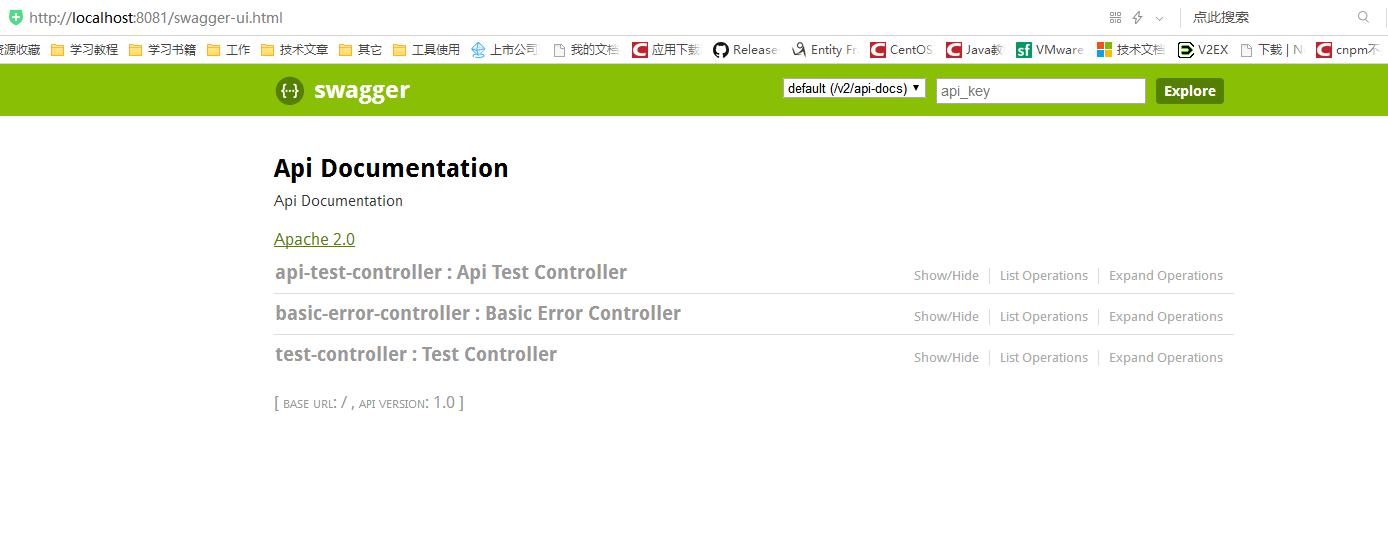
5、启动spring boot并访问:http://localhost:端口/swagger-ui.html
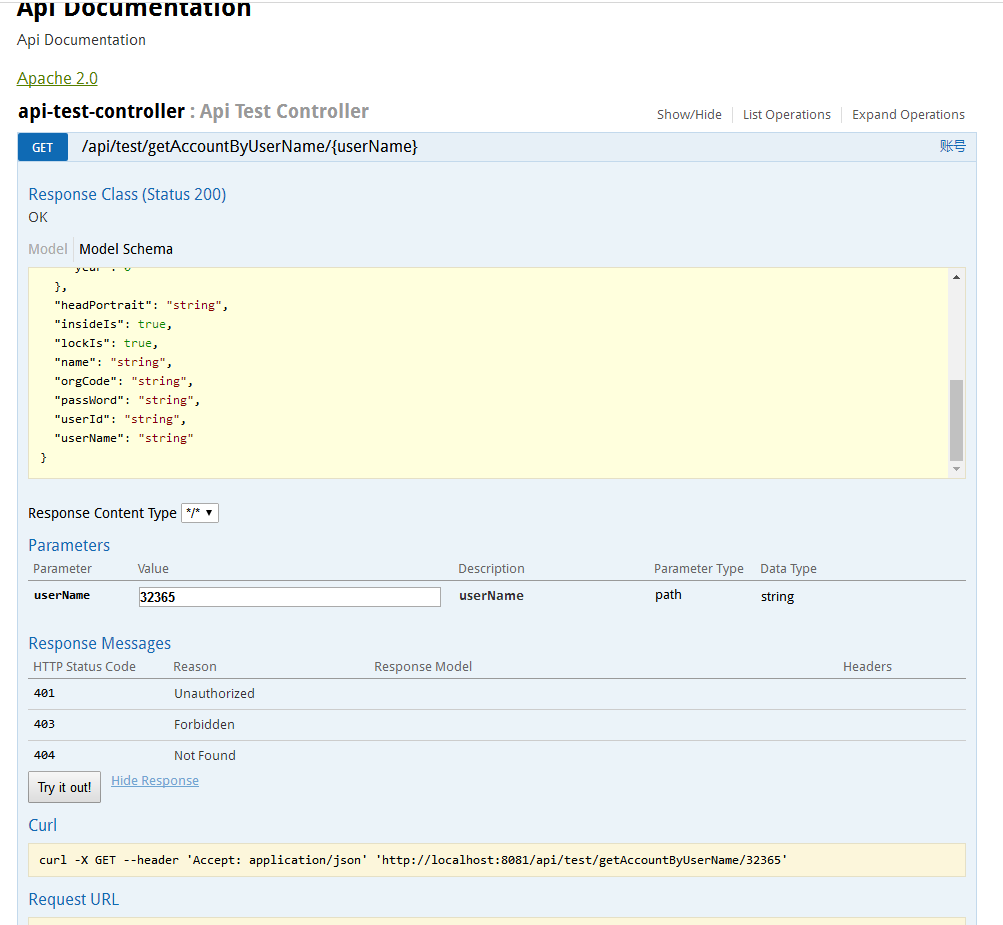
6、输入测试数据并获取结果
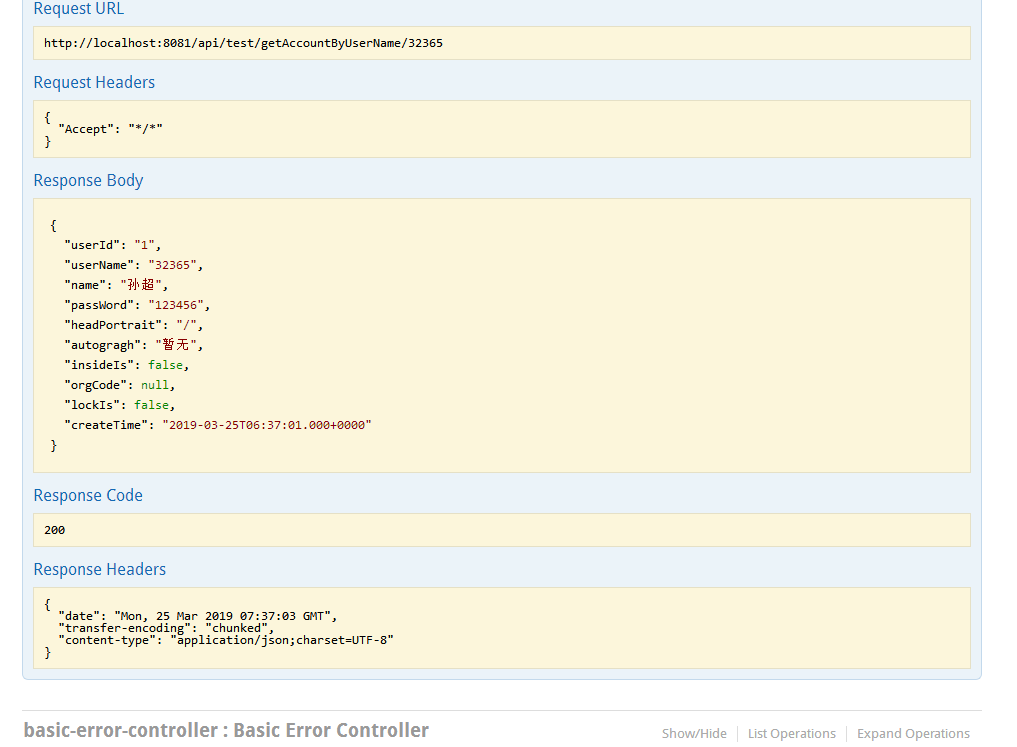
至此集成spring+swagger集成结束。
spring-boot+swagger实现WebApi文档的更多相关文章
- Spring Boot项目使用Swagger2文档教程
[本文版权归微信公众号"代码艺术"(ID:onblog)所有,若是转载请务必保留本段原创声明,违者必究.若是文章有不足之处,欢迎关注微信公众号私信与我进行交流!] 前言 Sprin ...
- PCB DotNetCore Swagger生成WebAPI文档配置方法
在.net framework框架下可以使用WebApiTestClientWebApi生成WebAPI接口文档与方便接口测试用,而在DotnetCore却没有找到这个工具了,baidu查找一下发现有 ...
- swagger ui和spring boot集成生成api文档
作者:小莫链接:https://www.zhihu.com/question/28119576/answer/134580038来源:知乎著作权归作者所有.商业转载请联系作者获得授权,非商业转载请注明 ...
- Spring Boot 基础教程系列学习文档
Spring Boot基础教程1-Spring Tool Suite工具的安装 Spring Boot基础教程2-RESTfull API简单项目的快速搭建 Spring Boot基础教程3-配置文件 ...
- Spring Boot属性文件配置文档(全部)
This sample file is meant as a guide only. Do not copy/paste the entire content into your applicatio ...
- Swagger生成WebAPI文档
WebAPI2.0 项目可以使用Swagger能够轻易查看API文档,查看以下配置 1.打开程序包管理控制台输入: Install-Package Swashbuckle 2.在对应项目里的App_S ...
- 【原】Spring Boot 配置swagger2没有文档解决方案
@Bean public Docket customImplementation(){ return new Docket(DocumentationType.SWAGGER_2) .select() ...
- 运用Swagger 添加WebAPI 文档
1. Go to Web link https://www.nuget.org/packages/Swashbuckle/ and check which version do we want. 2. ...
- 使用Swagger 搭建高可读性ASP.Net WebApi文档
一.前言 在最近一个商城项目中,使用WebApi搭建API项目.但开发过程中,前后端工程师对于沟通接口的使用,是非常耗时的.之前也有用过Swagger构建WebApi文档,但是API文档的可读性并不高 ...
随机推荐
- virtualbox+vagrant学习-3-Vagrant Share-1-简介
Vagrant Share 通过 ngrok 内网穿透功能实现让全世界人可以访问虚拟机的服务 Vagrant Share允许你与世界上的任何人共享您的Vagrant环境,几乎支持你在任何网络环境中使用 ...
- 图片保持比例,padding的妙用
要保持图片的比例不变 这一张图片在不同分辨率(1980px, 1364px,移动端400px)下均保持了一定的比例不变. 方法: padding以及margin的上下(margin-top | mar ...
- Java动态代理学习
动态代理类 Java动态代理类位于java.lang.reflect包下,一般主要涉及到以下两个类: 1.Interface InvocationHandler 该接口中仅定义了一个方法: Objec ...
- python matplotlib quiver——画箭头、风场
理解参考:https://blog.csdn.net/liuchengzimozigreat/article/details/84566650 以下实例 import numpy as np impo ...
- [转]地图投影的N种姿势
此处直接给出原文链接: 1.地图投影的N种姿势 2.GIS理论(墨卡托投影.地理坐标系.地面分辨率.地图比例尺.Bing Maps Tile System)
- HDU 2955 变形较大的01背包(有意思,新思路)
题目链接:http://acm.hdu.edu.cn/showproblem.php?pid=2955 Robberies Time Limit: 2000/1000 MS (Java/Others) ...
- oracle 表的创建与管理 约束
在 Oracle 之中数据表就被称为数据库对象,而对象的操作语法一共有三种:· 创建对象:CREATE 对象类型 对象名称 [选项]:· 删除对象:DROP 对象类型 对象名称 [选项]:· 修改对象 ...
- redis持久化机制之AOF与RDB
什么是redis Redis是一种面向“key-value”类型数据的分布式NoSQL数据库系统,具有高性能.持久存储.适应高并发应用场景等优势.它虽然起步较晚,但发展却十分迅速. redis为何需要 ...
- 使用CURL模拟表单上传文件
//以下代码适合PHP7.x PHP5.6$file = new CURLFile('./127.zip','application/octet-stream');$file->setMimeT ...
- win7上代码连接hadoop出现错误 :org.apache.hadoop.util.NativeCrc32.nativeComputeChunkedSumsByteArray(II[BI[BIILjava/lang/String;JZ)V
在idea和eclipse中调试hadoop中hdfs文件,之前好好的,结果突然就出现java.lang.UnsatisfiedLinkError: org.apache.hadoop.util.Na ...