
python matplotlib quiver——画箭头、风场
理解参考:https://blog.csdn.net/liuchengzimozigreat/article/details/84566650
以下实例
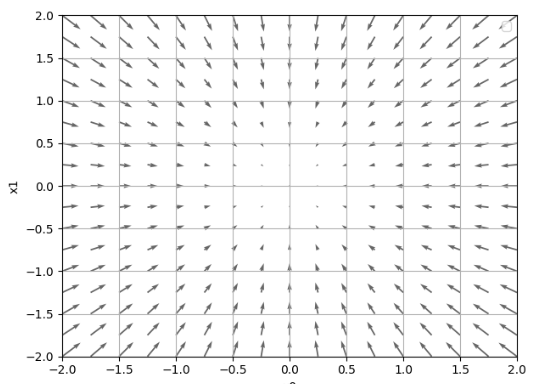
import numpy as np

import matplotlib.pyplot as plt

def function(x):

    return np.sum(x**2)#return x[0]**2 + x[1]**2

def _numerical_gradient_no_batch(f,x):

    h = 1e-4

    grad = np.zeros_like(x)

    for idx in range(x.size):

        tmp_va1 = x[idx]

        x[idx] = float(tmp_va1) + h

        fxh1 =f(x)

        x[idx] = tmp_va1 -h

        fxh2 = f(x)

        grad[idx] = (fxh1- fxh2)/(2*h)

        x[idx] = tmp_va1

    print("grad:"+str(grad))

    return grad

def numerical_gradient(f,X):

    if X.ndim == 1:

        return _numerical_gradient_no_batch(f,X)

    else:

        grad = np.zeros_like(X)

        for idx,x in enumerate(X):

            grad[idx] = _numerical_gradient_no_batch(f,x)

        return grad

def function_2(x):

    if x.ndim == 1:

        return np.sum(x **2)

    else:

        return np.sum(x**2,axis=1)

def tangent_line(f,x):

    d = numerical_gradient(f,x)

    print(d)

    y = f(x) - d * x

    return lambda t : d * t + y

print(_numerical_gradient_no_batch(function_2,np.array([3.0,4.0])))

print(numerical_gradient(function_2,np.array([3.0,4.0])))

print(numerical_gradient(function_2,np.array([[3.0,4.0],[0.0,2.0],[3.0,0.0]])))

if __name__ =='__main__':

    x0= np.arange(-2,2.5,0.25)

    x1=np.arange(-2,2.5,0.25)

    X,Y= np.meshgrid(x0,x1)

    X = X.flatten()

    Y = Y.flatten()

    grad = numerical_gradient(function_2,np.array([X,Y]))

    plt.figure()

    plt.quiver(X,Y,-grad[0],-grad[1],angles="xy",color="#666666")

    plt.xlim([-2,2])

    plt.ylim([-2,2])

    plt.xlabel('x0')

    plt.ylabel('x1')

    plt.grid()

    plt.legend()

    plt.draw()

    plt.show()
python matplotlib quiver——画箭头、风场的更多相关文章
- Python matplotlib pylab 画张图
from pylab import * w1 = 1 w2 = 25 fs = 18 y = np.arange(-2,2,0.001) x = w1*y*log(y)-1.0/w2*exp(-(w2 ...
- Python - matplotlib 数据可视化
在许多实际问题中,经常要对给出的数据进行可视化,便于观察. 今天专门针对Python中的数据可视化模块--matplotlib这块内容系统的整理,方便查找使用. 本文来自于对<利用python进 ...
- 转:使用 python Matplotlib 库 绘图 及 相关问题
使用 python Matplotlib 库绘图 转:http://blog.csdn.net/daniel_ustc/article/details/9714163 Matplotlib ...
- 安装python Matplotlib 库
转:使用 python Matplotlib 库 绘图 及 相关问题 使用 python Matplotlib 库绘图 转:http://blog.csdn.net/daniel_ustc ...
- 在matlab 画箭头
[转载]在matlab 画箭头 原文地址:在matlab 画箭头作者:纯情小郎君 完整见链接http://www.mathworks.com/matlabcentral/fx_files/14056/ ...
- python matplotlib 中文显示参数设置
python matplotlib 中文显示参数设置 方法一:每次编写代码时进行参数设置 #coding:utf-8import matplotlib.pyplot as pltplt.rcParam ...
- python matplotlib plot 数据中的中文无法正常显示的解决办法
转发自:http://blog.csdn.net/laoyaotask/article/details/22117745?utm_source=tuicool python matplotlib pl ...
- python matplotlib画图产生的Type 3 fonts字体没有嵌入问题
ScholarOne's 对python matplotlib画图产生的Type 3 fonts字体不兼容,更改措施: 在程序中添加如下语句 import matplotlib matplotlib. ...
- 菱形实现气泡Bubble,菱形画箭头,菱形画三角形
菱形实现气泡Bubble,菱形画箭头,菱形画三角形 >>>>>>>>>>>>>>>>>>&g ...
随机推荐
- Visualizing LSTM Layer with t-sne in Neural Networks
LSTM 可视化 Visualizing Layer Representations in Neural Networks Visualizing and interpreting represent ...
- SqlSugarClientHelper
using SqlSugar; using System; using System.Collections.Generic; using System.Configuration; using Sy ...
- request对象方法
1.html <html> <head> <meta http-equiv="Content-Type" content="text/htm ...
- redis介绍(7)高级用法
redis的过期策略以及内存淘汰机制 分析:这个问题其实相当重要,到底redis有没用到家,这个问题就可以看出来.比如你redis只能存5G数据,可是你写了10G,那会删5G的数据.怎么删的,这个问题 ...
- CSS 小结笔记之三种样式表
CSS 引入共有三种方式:内部样式表,内联样式(行内样式)表,外部样式表,当然也可以使用多重样式 内联样式 <div style="color:red;font-size:20px&q ...
- poj_3628 Bookshelf 2
Description Farmer John recently bought another bookshelf for the cow library, but the shelf is gett ...
- 远程桌面报错解决:No Remote Desktop License Servers Available
摘 要 用户发来反馈,使用部门Windows跳板机报错:The remote session was disconnected because there are no Remote Desktop ...
- mysql性能优化-慢查询分析、优化索引和配置 (慢查询日志,explain,profile)
mysql性能优化-慢查询分析.优化索引和配置 (慢查询日志,explain,profile) 一.优化概述 二.查询与索引优化分析 1性能瓶颈定位 Show命令 慢查询日志 explain分析查询 ...
- ETL探索之旅
ETL(Ectract Transform Load) 抽取-转换-加载 ETL 商业软件: Informatica IBM DataStage Microsoft SSIS Oracle ODI ...
- Linux 正则表达式详解
正则表达式(REGULAR):为处理大量的字符串而定义的一套规则和方法,为了处理大量字符串而生 常见命令参数 基础正则表达式 . :有且只有任意一个字符(包括空格) * :重复前面任意0或者多个字符 ...