
使用autoconfig
1. 增加maven 依赖
 <properties>

        <maven.compiler.target>1.8</maven.compiler.target>

        <maven.compiler.source>1.8</maven.compiler.source>

        <java.version>1.8</java.version>

        <project.build.sourceEncoding>UTF-8</project.build.sourceEncoding>

        <project.reporting.outputEncoding>UTF-8</project.reporting.outputEncoding>

        <mockito-all.version>1.10.19</mockito-all.version>

        <spring-boot.version>1.5.9.RELEASE</spring-boot.version>

        <maven-antrun.version>1.8</maven-antrun.version>

        <pandora-boot.version>-release</pandora-boot.version>

        <pandora-boot-maven-plugin.version>xxx</pandora-boot-maven-plugin.version>

        <autoconfig-maven-plugin.version>1.2-fixcompress-SNAPSHOT</autoconfig-maven-plugin.version>

    </properties>
<build>

        <pluginManagement>

            <plugins>

                <plugin>

                    <artifactId>maven-antrun-plugin</artifactId>

                    <version>${maven-antrun.version}</version>

                </plugin>

                <plugin>

                    <groupId>com.taobao.pandora</groupId>

                    <artifactId>pandora-boot-maven-plugin</artifactId>

                    <version>${pandora-boot-maven-plugin.version}</version>

                </plugin>

                <plugin>

                    <groupId>com.alibaba.citrus.tool</groupId>

                    <artifactId>autoconfig-maven-plugin</artifactId>

                    <version>${autoconfig-maven-plugin.version}</version>

                </plugin>

            </plugins>

        </pluginManagement>

    </build>
<build>

        <plugins>

            <plugin>

                <groupId>com.taobao.pandora</groupId>

                <artifactId>pandora-boot-maven-plugin</artifactId>

                <executions>

                    <execution>

                        <phase>package</phase>

                        <goals>

                            <goal>repackage</goal>

                        </goals>

                    </execution>

                </executions>

            </plugin>

            <plugin>

                <groupId>com.alibaba.citrus.tool</groupId>

                <artifactId>autoconfig-maven-plugin</artifactId>

                <executions>

                    <execution>

                        <phase>package</phase>

                        <goals>

                            <goal>autoconfig</goal>

                        </goals>

                    </execution>

                </executions>

            </plugin>

            <!-- 解压fat jar到target/${project-name}目录 -->

            <plugin>

                <artifactId>maven-antrun-plugin</artifactId>

                <executions>

                    <execution>

                        <phase>package</phase>

                        <configuration>

                            <tasks>

                                <unzip

                                    src="${project.build.directory}/${project.build.finalName}.${project.packaging}"

                                    dest="${project.build.directory}/abc" />

                            </tasks>

                        </configuration>

                        <goals>

                            <goal>run</goal>

                        </goals>

                    </execution>

                </executions>

            </plugin>

        </plugins>

    </build>
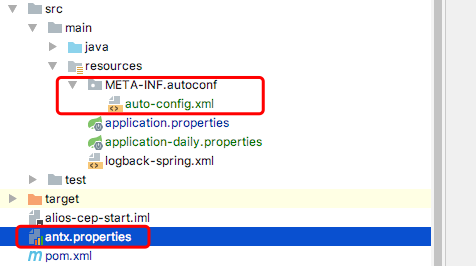
auto-config.xml 内容
<?xml version="1.0" encoding="UTF-8"?>

<config>

    <group name="default">

        <property name="spring.profiles.active" defaultValue="local" description="config env"/>

    </group>

    <script>

        <generate template="application.properties"/>

    </script>

</config>
application.properties 内容
project.name=sdfs

spring.profiles.active=${spring.profiles.active}
-Dautoconfig.userProperties=/abc/def/antx.properties
使用autoconfig的更多相关文章
- mvn filter autoconfig 产生自动配置
可以使用filter, 也可以使用autoconfig 详细请见 http://www.openwebx.org/docs/autoconfig.html
- maven auto-config 多环境自动打包
摘自:http://doc.okbase.net/bjhecwq/archive/118121.html maven有许多优秀的插件,最近在研究打包中替换多重环境的配置,同事介绍使用阿里的auto-c ...
- Maven插件实现的autoconfig机制(转)
autoconfig这种机制在软件开发和发布的过程中是非常方便也是非常必要的一种动态替换配置信息的一种手段,一种很贴切的比喻:这个就像在windows下面安装一个软件时,我们按照安装向导给我们弹出提示 ...
- Lenovo E46A-Win 7_无线灯亮但无法启动(耽误3天以上您信吗.....)问题: wlan autoconfig 依赖服务或组无法启动
Lenovo E46A-Win 7_无线灯亮但无法启动(耽误3天以上您信吗.....)问题: wlan autoconfig 依赖服务或组无法启动 提示: windows7 无线连接服务wlan au ...
- autoconfig操作小结
1.添加maven配置在pom文件中 <profile> <id>prod</id> <properties> < ...
- spring auto-config
spring security auto-config auto-config配置 <http auto-config="true"> </http> 自动 ...
- alibaba druid 在springboot start autoconfig 下的bug
alibaba druid 在springboot start autoconfig下的bug 标签(空格分隔):druid springboot start autoconfig 背景 发现.分析过 ...
- 在R12下加载Java Bean,配置FORMS_WEB_CONFIG_FILE文件/通过AutoConfig实现Form Server配置文件的修改
1.定位模版文件$AD_TOP/bin/adtmplreport.sh contextfile=$CONTEXT_FILE target=$FORMS_WEB_CONFIG_FILE以上命令,通过查看 ...
- Spring boot 继承 阿里 autoconfig 配置环境参数
前提:基于springboot 项目 1. 配置pom.xml 文件 <plugin> <groupId>com.alibaba.citrus.tool</groupId ...
- AutoConfig工具使用
下载安装Auto工具包: http://code.taobao.org/mvn/repository/com/alibaba/citrus/tool/antx-autoconfig/1.0.9/ant ...
随机推荐
- ORA-06502: PL/SQL: 数字或值错误 : 字符串缓冲区太小解决办法
1.今天写的存储过程在执行过程中,报如下错误. exec PRO_T_008pro_update_add_delete(17,1,1,1,1,45.0,54.0,45.0,45.0,45.0,54.0 ...
- gcc 内联汇编
http://www.cnblogs.com/zhuyp1015/archive/2012/05/01/2478099.html
- shader 4 杂 一些和函数名词、数据结构
Normal: 法线 Normao mapping: 法线贴图 Lighting mapping: 光照贴图 Bump mapping: 凹凸贴图:模拟粗糙外表面的技术. FX-Water ...
- WCF服务端调用client.
wcf服务端 1,新建一个"windows窗口程序"名称为WCFServer2. 2.然后加入一个"WCF服务"名称为Service1. 详细步骤为:解决方式试 ...
- Error launching remote program: No such file or directory
iPhone真机调试报如下错误时,关掉Xcode,重新启动就可以了,注意是关掉Xcode,彻底关掉.Error launching remote program: No such file or di ...
- C#编程(五)----流程控制
流控制(控制语句) 程序的代码不是按照从上往下执行的,是按照控制语句执行的. 条件语句 C#中有两个控制语句:if语句还有switch语句 1.if语句 C#中继承了C和C++中的if语句,语法直 ...
- Python Post img
from poster.encode import multipart_encode from poster.streaminghttp import register_openers import ...
- strncpy实现
#include<stdio.h> char *my_strncpy(char *dest,char *src,int n) { int i; ;i<n && src ...
- Oracle—RMAN完全恢复
一.RMAN完全恢复的相关概念 1.在RMAN完全恢复中主要使用两个命令,一个是restore,另一个是recover. 2.可以在三个级别恢复,数据库,表空间,数据文件. 3.RMAN中应对于各种情 ...
- Terrain tessellation &&Threaded Rendering Vk
https://github.com/NVIDIAGameWorks/GraphicsSamples/tree/master/samples/es3aep-kepler/TerrainTessella ...