
Salesforce学习之路(十三)Aura案例实战分析
Aura相关知识整合:
Salesforce学习之路(十一)Aura组件属性<aura:attribute />
1. Parent组件
parentAura.cmp
<!--Parent component-->

<!--controller类名:ParentAuraController-->

<!--force:appHostable: 该组件可作为Lightning Experience的导航元素-->

<!--flexipage:availabeForAllPageTypes: 可在Lightning App Builder中使用,也做作为Page使用-->

<!--access=global: 该组件在所有的Orgs中都可以被引用-->

<aura:component controller="ParentAuraController"

                implements="force:appHostable,flexipage:availableForAllPageTypes"

                access="global">

    <aura:attribute name="displayMonths" type="String[]" />

    <aura:attribute name="selectedDisplayMonth" type="String" />

    <aura:attribute name="displayMonth" type="String" default="Last 6 Months"/>

    <aura:attribute name="read" type="Boolean" default="false" />

    <!--组件初始化操作-->

    <aura:handler name="init" value="{!this}" action="{!c.handleInit}" />

    <div class="white">

        <lightning:layout multipleRows="true">

            <lightning:layoutItem size="4" padding="around-small">

                <!--下拉框选择组件,selectedDisplayMonth为下拉框选择的值,displayMonths为下拉框值列表-->

                <!--onchange: selectedDisplayMonth值改变时,调用controller.js中changeDisplayMonth函数-->

                <lightning:select name="displayMonthId" label="Select display months" aura:id="displayMonthId"

                    value="{!v.selectedDisplayMonth}" required="true" onchange="{!c.changeDisplayMonth}">

                    <aura:iteration items="{!v.displayMonths}" var="displayMonth">

                        <option text="{!displayMonth}"></option>

                    </aura:iteration>

                </lightning:select>

            </lightning:layoutItem>

            <lightning:layoutItem size="6" padding="around-small">

                <div class="slds-p-top--large">

                    <!--按钮组件,label为界面显示值;onclick: 点击按钮时触发controller.js中applyHandle函数-->

                    <!--display: true表示按钮灰掉,无法操作;false表示正常工作-->

                    <lightning:button label="parentApply" onclick="{!c.applyHandle}" disabled="false" />

                </div>

            </lightning:layoutItem>

        </lightning:layout>

        <lightning:layout multipleRows="true">

            <lightning:layoutItem size="12" padding="around-small">

            <li>

                <!--三元表达式-->

                <aura:if isTrue="{!v.read}">

                    you can read it.

                    <aura:set attribute="else">

                        you cannot read it.

                    </aura:set>

                </aura:if>

            </li>

            <li>displayMonth in parent: {!v.displayMonth}</li>

            </lightning:layoutItem>

        </lightning:layout>

        <lightning:layout multipleRows="true">

            <lightning:layoutItem size="12" padding="around-small">

                <!--实例化childAura组件-->

                <c:childAura childDisplayMonth="{!v.displayMonth}" />

            </lightning:layoutItem>

        </lightning:layout>

    </div>

</aura:component>
parentAura.css
.THIS {

    background-color: grey;

}

.THIS.white {

    background-color: white;

}
parentAuraController.js
({

    handleInit: function (cmp, event, helper) {

        // 初始化组件时,调用Help.js中getDisplayMonths函数,获取下拉框值列表

        helper.getDisplayMonths(cmp);

    },

    changeDisplayMonth: function (cmp, event, helper) {

        console.log("displayMonths: " + cmp.get('v.displayMonths'))

        console.log("selected displayMonth: " + cmp.get('v.selectedDisplayMonth'));

    },

    applyHandle: function (cmp, event, helper) {

        // 点击parentApply按钮时,将下拉框选中的值赋值给属性displayMonth

        cmp.set('v.displayMonth', cmp.get('v.selectedDisplayMonth'));

        // 点击parentApply按钮时,将true赋值给属性read.

        cmp.set('v.read', "true");

        console.log("after click apply, displayMonth: " + cmp.get('v.displayMonth'));

    }

})
parentAuraHelper.js
({

    getDisplayMonths : function(cmp) {

        // 获取controll.cls类中getDisplayMonths函数

        var action = cmp.get("c.getDisplayMonths");

        // 为该函数设置回调函数

        action.setCallback(this, function (response) {

            var status = response.getState();

            console.log("get displayMonths: " + status);

            // 判断调用controller.cls类getDisplayMonths函数的响应状态码

            if (status == "SUCCESS") {

                // 解析controller.cls传回的响应,并赋值给变量repsonseBody

                var responseBody = JSON.parse(response.getReturnValue());

                // 将变量responseBody赋值给组件属性displayMonths(下拉框值列表)

                cmp.set("v.displayMonths", responseBody);

            }

        });

        // 执行获取数据行动

        $A.enqueueAction(action);

    }

})
ParentAuraController.cls
public with sharing class ParentAuraController {

    @AuraEnabled

    public static String getDisplayMonths() {

        List<String> displayMonths = new List<String>();

        displayMonths.add('Last 6 Months');

        displayMonths.add('Last 12 Months');

        displayMonths.add('Last 18 Months');

        displayMonths.add('Last 36 Months');

        // 将响应序列化为Json格式

        return JSON.serialize(displayMonths);

    }

}
2. Child组件
childAura.cmp
<!--Child component-->

<aura:component>

    <aura:attribute name="childDisplayMonth" type="String" default="child"/>

    <div class="slds-p-top--large">

        <lightning:layout multipleRows="false">

            <lightning:layoutItem size="4" padding="around-small">

                displayMonth in child: {!v.childDisplayMonth}

            </lightning:layoutItem>

            <lightning:layoutItem size="4" padding="around-small">

                <lightning:button label="childApply" onclick="{!c.applyHandle}" disabled="false" />

            </lightning:layoutItem>

        </lightning:layout>

    </div>

</aura:component>
childAura.css
.THIS {

    background-color: LightSkyBlue;

}
childController.js
({

    applyHandle : function(component, event, helper) {

        component.set('v.childDisplayMonth', 'Last 36 Months');

    }

})
3. 结果分析
加载后如下图所示:
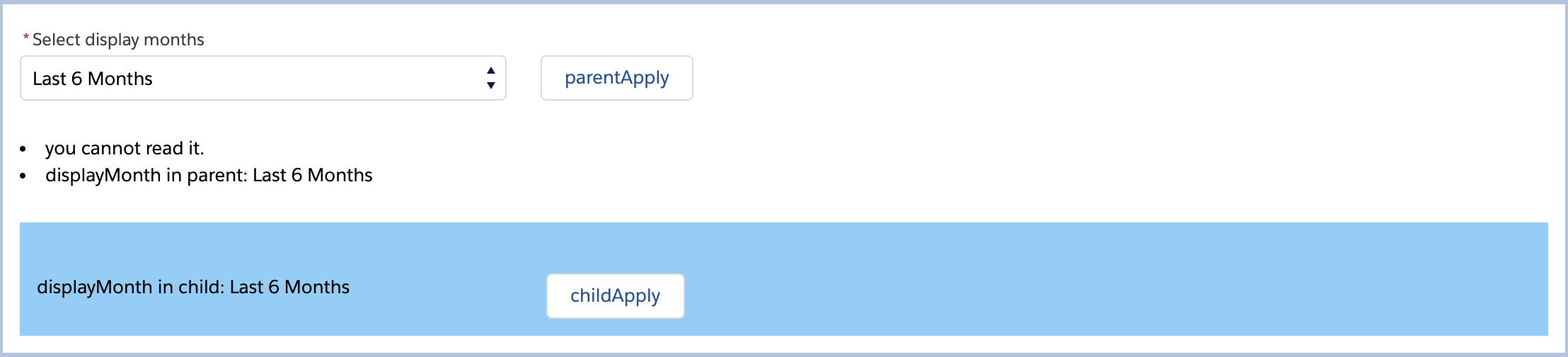
分析:
- 初始化parentAura组件时,从controller.cls中获取displayMonths值列表["Last 6 Months", "Last 12 Months", "Last 18 Months", "Last 36 Months"],默认加载第一个值,所以下拉框中为Last 6 Months.
- read属性的默认值设为false,所以三元表达式中选择else项,打印:you cannot read it.
- displayMonth的默认值设置为Last 6 Months, 打印:displayMonth in parent: Last 6 Months.
- 在parentAura组件中初始化childAura组件时,传递childDisplayMonth值等于displayMonth,所以该属性值为Last 6 Months,而不使用默认值child,打印displayMonth in child: Last 6 Months.
更换下拉框值,并点击parentApply按钮:
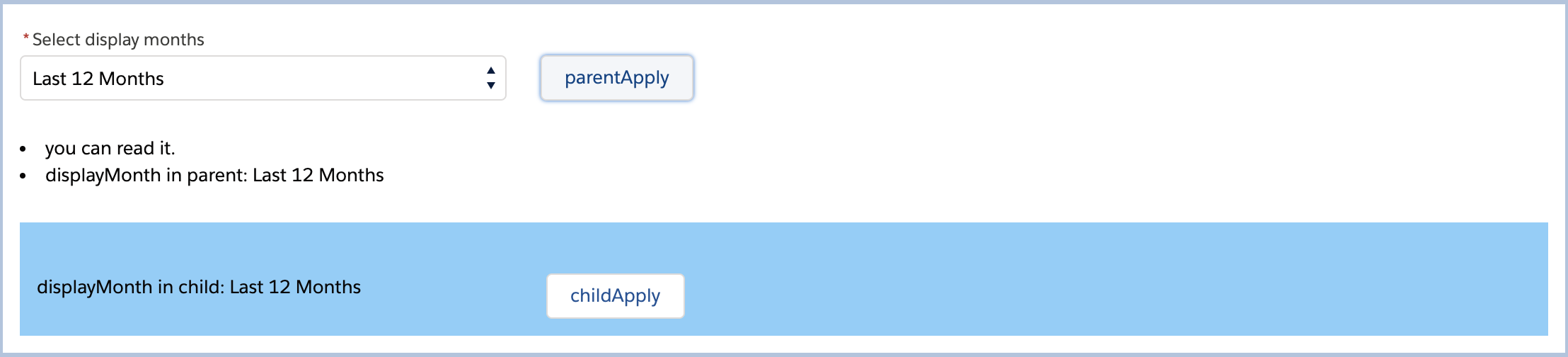
分析:
- 下拉框选择Last 12 Months,点击parentApply按钮时,调用parentAuraController.js中applyHandle函数。该函数中,将selectedDisplayMonth赋值给displayMonth,打印:displayMonth in parent: Last 12 Months;将read属性重新赋值为true,所以三元表达式中选择if项,打印:you can read it.
- 在parentAura组件中实例化childAura组件时,赋值childDisplayMonth采用的是绑定的方式{!**},所以修改parentAura组件中displayMonth属性值时,同步修改childAura组件中childDisplayMonth值。(自己可以尝试非绑定方式,查看结果如何)
点击childParent按钮:
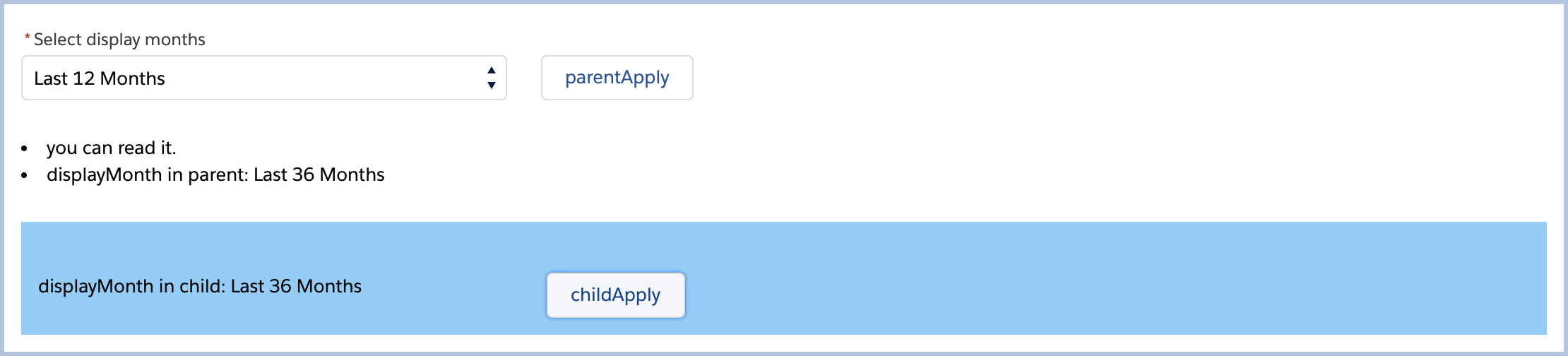
分析:
- 点击childApply按钮,触发childAura组件childAuraController.js的applyHandle函数,该函数重新赋值属性childDisplayMonth等于Last 36 Months,打印:displayMonth in child: Last Months
- 在parentAura组件中实例化childAura组件时,赋值childDisplayMonth采用的是绑定的方式{!**},所以修改childAura组件中childDisplayMonth属性值时,同步修改parentAura组件中displayMonth值。(自己可以尝试非绑定方式,查看结果如何)
作者:吴家二少
博客地址:https://www.cnblogs.com/cloudman-open/
本文欢迎转载,但未经作者同意必须保留此段声明,且在文章页面明显位置给出原文连接
Salesforce学习之路(十三)Aura案例实战分析的更多相关文章
- Salesforce学习之路-developer篇(五)一文读懂Aura原理及实战案例分析
1. 什么是Lightning Component框架? Lightning Component框架是一个UI框架,用于为移动和台式设备开发Web应用程序.这是一个单页面Web应用框架,用于为Ligh ...
- Salesforce学习之路-developer篇(五)Aura组件原理及常用属性
很喜欢曾经看到的一句话:以输出倒逼输入.以输出的形式强制自己学习,确实是高效的学习方式,真的很棒.以下仅为个人学习理解,如有错误,欢迎指出,共同学习. 1. 什么是Lightning Componen ...
- Salesforce学习之路(十)Aura组件工作原理
很喜欢曾经看到的一句话:以输出倒逼输入.以输出的形式强制自己学习,确实是高效的学习方式,真的很棒.以下仅为个人学习理解,如有错误,欢迎指出,共同学习. 1. 什么是Lightning Componen ...
- Salesforce学习之路-developer篇(三)利用Visualforce Page实现页面的动态刷新案例学习
Visualforce是一个Web开发框架,允许开发人员构建可以在Lightning平台上本地托管的自定义用户界面.其框架包含:前端的界面设计,使用的类似于HTML的标记语言:以及后端的控制器,使用类 ...
- Salesforce学习之路(十一)Aura组件属性<aura:attribute />
1. <aura:attribute />语法 Aura组件属性类似与Apex中类的成员变量(或者说Java中类的成员变量).他们是组件在特定的实例上设置的类型化字段,可以使用表达式语法从 ...
- Salesforce学习之路(十二)Aura组件表达式
1. 表达式语法 在上篇文章组件属性示例中,新建了一个属性whom, 引用该属性时使用了表达式:{!v.whom},负责该属性的动态输出. 语法:{!expression} 上述示例中,我们的属性名称 ...
- Salesforce学习之路-admin篇
Salesforce是一款非常强大的CRM(Customer Relationship Management)系统,国外企业使用十分频繁,而国内目前仅有几家在使用(当然,国内外企使用的依旧较多),因此 ...
- Salesforce学习之路(十)Org的命名空间
1. 命名空间的适用场景 每个组件都是命名空间的一部分,如果Org中设置了命名空间前缀,那么需使用该命名空间访问组件.否则,使用默认命名空间访问组件,系统默认的命名空间为“c”. 如果Org没有创建命 ...
- Salesforce学习之路(九)Org的命名空间
1. 命名空间的适用场景 每个组件都是命名空间的一部分,如果Org中设置了命名空间前缀,那么需使用该命名空间访问组件.否则,使用默认命名空间访问组件,系统默认的命名空间为"c". ...
随机推荐
- 机器学习:IB1算法的weka源码详细解析(1NN)
机器学习的1NN最近邻算法,在weka里叫IB1,是因为Instance Base 1 ,也就是只基于一个最近邻的实例的惰性学习算法. 下面总结一下,weka中对IB1源码的学习总结. 首先需要把 ...
- .NET Core ORM 类库Petapoco中对分页Page添加Order By对查询的影响
最近一直在使用Petapoco+Entity Framework Core结合开发一套系统. 使用EFCore进行Code First编码,使用PMC命令生成数据库表的信息. 使用Petapoco进行 ...
- eclipse安装相关
一 安装相关 1.下载eclipse(这里我下载了个简单版本) https://www.eclipse.org/downloads/packages/
- Java代码优化建议
总结日常Java开发常见优化策略,持续更新. 尽可能使用局部变量 调用方法时传递的参数以及在调用中创建的临时变量都保存在栈中,速度较快,其他变量,如静态变量.实例变量等,都在堆中创建,速度较慢.另外, ...
- 『嗨威说』算法设计与分析 - 动态规划思想小结(HDU 4283 You Are the One)
本文索引目录: 一.动态规划的基本思想 二.数字三角形.最大子段和(PTA)递归方程 三.一道区间动态规划题点拨升华动态规划思想 四.结对编程情况 一.动态规划的基本思想: 1.1 基本概念: 动态规 ...
- Mybatis源码阅读 之 玩转Executor
承接上篇博客, 本文探究MyBatis中的Executor, 如下图: 是Executor体系图 本片博客的目的就是探究如上图中从顶级接口Executor中拓展出来的各个子执行器的功能,以及进一步了解 ...
- 基础安全术语科普(三)——RAT
什么是RAT? RAT 即 Remote Access Tools (远程管理工具或远程访问工具)的缩写.通俗点说就是木马病毒. RAT 分为两部分——客户端 与 服务端. RAT的工作原理? 服务端 ...
- 云开发如何解决serverless对端的最后一公里问题
前端圈从来不缺少新的技术.点子和话题,有些留下来了而有些则转瞬即逝.在决定一种新技术是否能够长久的所有因素里,最核心的必然是自身实力过硬能够经受住实践检验.而除此之外,这项技术所解决问题的广泛程度.受 ...
- PHPStorm IntelliJ IDEA 代码缩进风格设置
关于缩进风格,我还是觉得4空格比tab好 File -> Settings -> Editor -> Code Style: 如图,把Detect and use exsiting ...
- 判断是否存在UI被触摸
) || (Input.touchCount > && Input.GetTouch().phase == TouchPhase.Began)) { #if UNITY_ANDR ...