
一个基于vue的时钟
前两天写了一个基于vue的小钟表,给大家分享一下。
其中时针和分针使用的是图片,结合transform制作;表盘刻度是通过transform和transformOrigin配合画的;外面的弧形框框,啊哈哈,也是用的图片。具体的看里面的注释就好了,感觉写的还算清楚,啊哈哈~
能帮到你的话,点个赞呗?
预览图:
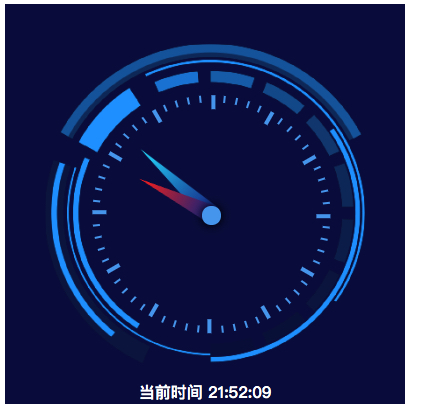
效果的话,可以看这里
https://jhcan333.github.io/can-Share/demos-tips/clockDemo.html
github 地址在这里
https://github.com/JHCan333/can-Share/blob/master/demos-tips/clockDemo.html
<!DOCTYPE html>

<html>

<head>

    <meta charset="UTF-8">

    <title>一个基于vue的时钟小demo</title>

    <script src="https://cdn.jsdelivr.net/npm/vue/dist/vue.js"></script>

    <style>

        .jhc-hour-needle {

            z-index: 5;

            width: 6%;

            height: 25%;

            position: absolute;

            left: 49%;

            bottom: 47%;

            transform-origin: center bottom;

            background: url(https://jhcan333.github.io/can-Share//image/clock/hourPoint.png) no-repeat;

            background-size: 100% 100%;

        }

        .jhc-min-needle {

            z-index: 2;

            width: 6%;

            height: 30%;

            position: absolute;

            left: 49%;

            bottom: 47%;

            transform-origin: center bottom;

            background: url(https://jhcan333.github.io/can-Share//image/clock/minPoint.png) no-repeat;

            background-size: 100% 100%;

        }

        .jhc-clock-area {

            width: 400px;

            height: 400px;

            position: relative;

            background: #050842;

        }

        .jhc-clock-back {

            width: 100%;

            height: 100%;

            position: absolute;

            top: 0px;

            left: 0px;

            background: url(https://jhcan333.github.io/can-Share//image/clock/clockBack.png) no-repeat;

            background-size: 100% 100%;

        }

        .jhc-clock-title {

            color: #fff;

            position: absolute;

            bottom: 10px;

            width: 100%;

            text-align: center;

            font-weight: bold;

        }

        .jhc-clock-dot {

            width: 6%;

            height: 6%;

            border-radius: 50%;

            position: absolute;

            background-color: #509fef;

            z-index: 20;

            left: 49%;

            top: 50.5%;

            box-shadow: 0px 0px 10px 1px #000;

        }

    </style>

</head>

<body>

<div id="app">

</div>

<script>

    var app = new Vue({

        el: '#app',

        template:

            `<div ref="area" :class="clockArea">

                <div :style="cssClock">

                    <div :style="cssDotWrap">

                        <div :style="Object.assign({},{

                                transform: 'rotateZ('+i*6+'deg)',

                                height: i%5==0?longDot.height:shourtDot.height,

                                width: i%5==0?longDot.width:shourtDot.width,

                            },cssDot)"

                             v-for="(dot,i) in 60"

                        ></div>

                    </div>

                    <div :style="Object.assign({},{

                                                transform: 'rotateZ('+hour+'deg)'

                                            })"

                         :class="hourNeedle"

                    ></div>

                    <div :style="Object.assign({},{

                                            transform: 'rotateZ('+min+'deg)'

                                        })"

                         :class="minNeedle"

                    ></div>

                    <div :class="clockDot"></div>

                    <div :class="clockBack"></div>

                </div>

                <div :class="clockTitle" :style="style">当前时间 {{timeDisplayArea}}</div>

            </div>`,

        data () {

            return {

                prefixCss: 'jhc-', // css 前缀

                cssClock: { //整个钟的盒子

                    position: 'absolute',

                    width: '100%',

                    height: '100%',

                    borderRadius: '50%',

                },

                cssDotWrap: { //装刻度的盒子

                    width: '100%',

                    height: '100%'

                },

                cssDot: { //刻度们

                    position: 'absolute',

                    backgroundColor: '#509fef'

                },

                longDot: { //长刻度

                    width: '3px',

                    height: '10px'

                },

                shourtDot: { //短刻度

                    width: '1px',

                    height: '5px'

                },

                timer: null, //用来标记自适应大小的timer

                updateTimer: null, // 更新时钟的timer

                style: {

                    bottom: '1px'

                }, //时钟的title的style

                scale:0.8, // 时钟占外层的百分比

                currTime: new Date() //当前日期对象

            }

        },

        created () {

            this.currTime = new Date()

            clearInterval(this.updateTimer)

            this.updateTimer = setInterval(() => {

                this.currTime = new Date()

            }, 1000)

        },

        mounted () {

            //设置时钟的大小

            this.setSize()

        },

        beforeDestroy () {

            clearInterval(this.updateTimer)

        },

        methods: {

            //设置钟表的型号大小

            setSize () {

                let width = this.getWidth()

                let height = this.getHeight()

                //时钟占外层的百分比

                let scale = this.scale

                //获取较短边

                let shortLth = width

                if (width > height) {

                    shortLth = height

                }

                //对时钟的直径做处理

                shortLth = shortLth * scale

                //获取到顶部和左部的距离

                let paddingW = (width - shortLth) / 2

                let paddingH = (height - shortLth) / 2

                //设置钟表整体的大小以及位置

                this.setStates('cssClock', {

                    height: shortLth + 'px',

                    width: shortLth + 'px',

                    top: paddingH + 'px',

                    left: paddingW + 'px',

                })

                //设置刻度所围绕区域的位置

                this.setStates('cssDotWrap', {

                    transform: `translate(${shortLth * 0.52}px,${shortLth * 0.16}px)` // 0.52 和 0.16 是我一点一点挪出来的,啊哈哈

                })

                //设置长短刻度的半径,以及尺寸

                let dotRadius = shortLth * 0.75 / 2 - 1

                let longDotWidth = Math.floor(dotRadius / 25) || 2

                let longDotHeight = Math.floor(dotRadius / 8) || 6

                let shortDotWidth = Math.floor(dotRadius / 50) || 1

                let shortDotHeight = Math.floor(dotRadius / 16) || 3

                //短刻度

                this.shourtDot = {

                    width: shortDotWidth + 'px',

                    height: shortDotHeight + 'px'

                }

                //长刻度

                this.longDot = {

                    width: longDotWidth + 'px',

                    height: longDotHeight + 'px'

                }

                //设置刻度旋转点的位置

                this.setStates('cssDot', {

                    transformOrigin: `${0}px ${dotRadius}px`

                })

            },

            getWidth () { //获取指定容器的宽度

                return this.getRef('area').offsetWidth || 200

            },

            getHeight () { //获取指定容器的高度

                return this.getRef('area').offsetHeight || 200

            },

            getRef (ref) { // 获取指定 ref 对象

                return this.$refs && this.$refs[ref] || {}

            },

            //模仿 react 的states

            setStates (prop, data) {

                let cache = this[prop]

                this[prop] = Object.assign({}, cache, JSON.parse(JSON.stringify(data)))

            },

        },

        computed: {

            sec () { //将当前秒数转化为秒针旋转的度数

                return this.currTime.getSeconds() * 6

            },

            min () { //将当前的分钟数转化为分针旋转的度数

                return this.currTime.getMinutes() * 6 + this.currTime.getSeconds() / 60 * 6

            },

            hour () { //将当前的小时数转化为时针旋转的度数

                return this.currTime.getHours() * 30 + this.currTime.getMinutes() / 60 * 30

            },

            timeDisplayArea(){ // 时间展示区

                let hours = this.currTime.getHours() > 9 ? this.currTime.getHours() : ('0' + this.currTime.getHours())

                let minutes = this.currTime.getMinutes() > 9 ? this.currTime.getMinutes() : ('0' + this.currTime.getMinutes())

                let seconds = this.currTime.getSeconds() > 9 ? this.currTime.getSeconds() : ('0' + this.currTime.getSeconds())

                return hours + ':' + minutes + ':' + seconds

            },

            hourNeedle () { //时针的class

                return `${this.prefixCss}hour-needle`

            },

            minNeedle () { //分针的class

                return `${this.prefixCss}min-needle`

            },

            clockArea () { //表盘的区域

                return `${this.prefixCss}clock-area`

            },

            clockBack () { //时钟的背景(外框图片)

                return `${this.prefixCss}clock-back`

            },

            clockTitle () { //时钟的title的class

                return `${this.prefixCss}clock-title`

            },

            clockDot () { //时钟的中心点

                return `${this.prefixCss}clock-dot`

            }

        },

    })

</script>

</body>

</html>
欢迎大家评论留言,请多多指教!
最近在搞一个和前端程序员相关的公号,除了技术分享之外,也增加了对于职业发展、生活记录之类的文章,欢迎大家关注,一起聊天、吐槽,一起努力工作,认真生活!

一个基于vue的时钟的更多相关文章
- 使用webpack4搭建一个基于Vue的组件库
组内负责的几个项目都有一些一样的公共组件,所以就着手搭建了个公共组件开发脚手架,第一次开发 library,所以是参考着 iview 的配置来搭建的.记录如何使用webpack4搭建一个library ...
- 新建一个基于vue.js+Mint UI的项目
上篇文章里面讲到如何新建一个基于vue,js的项目(详细文章请戳用Vue创建一个新的项目). 该项目如果需要组件等都需要自己去写,今天就学习一下如何新建一个基于vue.js+Mint UI的项目,直接 ...
- 一个基于vue的仪表盘demo
最近写了一个基于vue的仪表盘,其中 主要是和 transform 相关的 css 用的比较多.给大家分享一下,喜欢的话点个赞呗?嘿嘿 截图如下: 实际效果查看地址:https://jhcan333. ...
- 一个基于Vue.js+Mongodb+Node.js的博客内容管理系统
这个项目最初其实是fork别人的项目.当初想接触下mongodb数据库,找个例子学习下,后来改着改着就面目全非了.后台和数据库重构,前端增加了登录注册功能,仅保留了博客设置页面,但是也优化了. 一.功 ...
- Vue3教程:一个基于 Vue 3 + Vant 3 的商城项目开源啦!
之前发布过一篇文章,告诉大家我要开发一个 Vue3 的商城项目并开源到 GitHub 上,供大家练手和学习,随后也一直有收到留言和反馈,问我开发到哪里了,什么时候开源之类的问题,今天终于可以通知大家, ...
- 发布自己第一个npm 组件包(基于Vue的文字跑马灯组件)
一.前言 总结下最近工作上在移动端实现的一个跑马灯效果,最终效果如下: 印象中好像HTML标签的'marquee'的直接可以实现这个效果,不过 HTML标准中已经废弃了'marquee'标签 既然HT ...
- 优秀的基于VUE移动端UI框架合集
1. vonic 一个基于 vue.js 和 ionic 样式的 UI 框架,用于快速构建移动端单页应用,很简约,是我喜欢的风格 star 2.3k 中文文档 在线预览 2.vux 基于WeUI和Vu ...
- 一款基于Vue的扩展性组件库 VV-UI
github: https://github.com/VV-UI/VV-UI 演示地址: https://vv-ui.github.io/VV-UI/#/meta-info 1. LoadingBar ...
- Vue Admin - 基于 Vue & Bulma 后台管理面板
Vue Admin 是一个基于 Vue 2.0 & Bulma 0.3 的后台管理面板(管理系统),相当于是 Vue 版本的 Bootstrap 管理系统,提供了一组通用的后台界面 UI 和组 ...
随机推荐
- c# 20160721
ctrl y =>反撤销 ctrl m m 隐藏当前代码段 重载运算符语法 把事件处理程序注册为 click事件的监听程序 [newButton.click+=newButton_click] ...
- nginx配置ssl证书实现https加密请求详解
原文链接:http://www.studyshare.cn/software/details/1175/0 一.加密方式 1.对称加密 所谓对称加密即:客户端使用一串固定的秘钥对传输内容进行加密,服务 ...
- nodejs简单抓包工具
就是简简单单写程序的我为什么需要抓包? 其实在平时写demo的时候需要用到一些图片和文本的资源的,但是需求量比较大,这个时候就想去网站上面直接复制啊,然后图片另存为啊,什么的一系列繁琐的操作. 但是现 ...
- springboot的整合springMvc中的postman的post中的form-data和raw区别
package com.example.demomap.Controller; import com.example.demomap.pojo.ParaEntity; import org.sprin ...
- python 38 线程队列与协程
目录 1. 线程队列 1.1 先进先出(FIFO) 1.2 后进先出(LIFO)堆栈 1.3 优先级队列 2. 事件event 3. 协程 4. Greenlet 模块 5. Gevent模块 1. ...
- Java异常机制及异常处理建议
1.Java异常机制 异常指不期而至的各种状况,如:文件找不到.网络连接失败.非法参数等.异常是一个事件,它发生在程序运行期间,干扰了正常的指令流程.Java通过API中Throwable类的众多子类 ...
- HDU 6055
题意略. 思路:要你找出所有正多边形,其实是唬人的,整点的正多边形只有正方形,具体证明可以参考 2017国家队论文集-<正多边形>-杨景钦 详见代码: #include<bi ...
- tomcat8 编写字符编码Filter过滤器无效问题
做一个解决全站的字符编码过滤器,过滤器类和配置如下: 过滤器类: package com.charles.web.filter; import java.io.IOException; import ...
- 从0到1体验Jenkins+Docker+Git+Registry实现CI自动化发布
一.前言 Jenkins是一款开源 CI&CD 软件,用于自动化各种任务,包括构建.测试和部署软件.Jenkins 支持各种运行方式,可通过系统包.Docker 或者通过一个独立的 Java ...
- rocketmq 部署启动指南-Docker 版
最近学习使用 rocketmq,需要搭建 rocketmq 服务端,本文主要记录 rocketmq 搭建过程以及这个过程踩到的一些坑. 准备工作 在搭建之前,我们需要做一些准备工作,这里我们需要使用 ...