
Downgrade extraction on phones running Android 7/8/9
Now it's more and more difficult for forensic tools to extract evidence from smartphone running Android 7 and above. Maybe you could acquire physical image in Bootloader mode or by Smart ADB. Don't celebrate too early. Let me remind you of "FDE". The fact is that if forensic tools could not decode this physical image, such image is just like a meaningless "black box" you have in hand.
No way to gain root privileges from phones running Android 7 and above . What else can be done? Fortunately once you got the pattern/password , you could enable USB debugging and change any settings you want to make "Downgrade extraction" possible. That's the key to get the evidence from certain Apps you want.
Let's take WeChat on a phone running Android Pie for example.

First we hava to download an old version apk file of WeChat. Then we want to uninstall original version of WeChat on this phone without data loss. The most important thing is remember the parameter "-k" when uninstall WeChat . So we could keep all data of WeChat safe and sound.
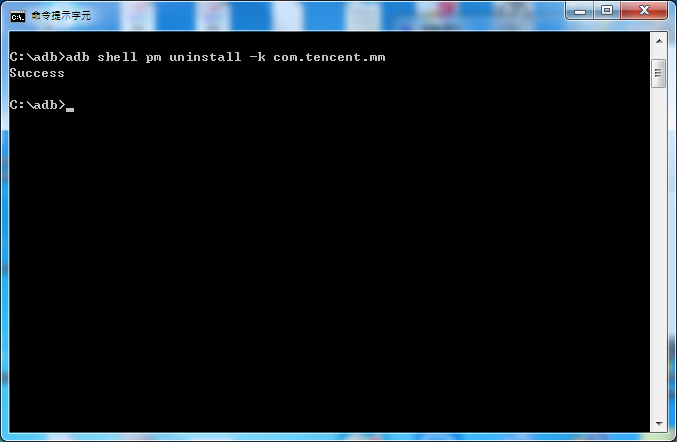
What the next? Install old version WeChat apk? No, it won't work unless you reboot this phone first.
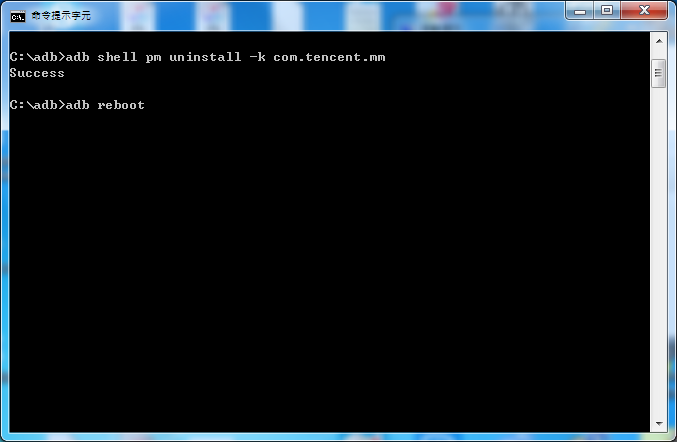
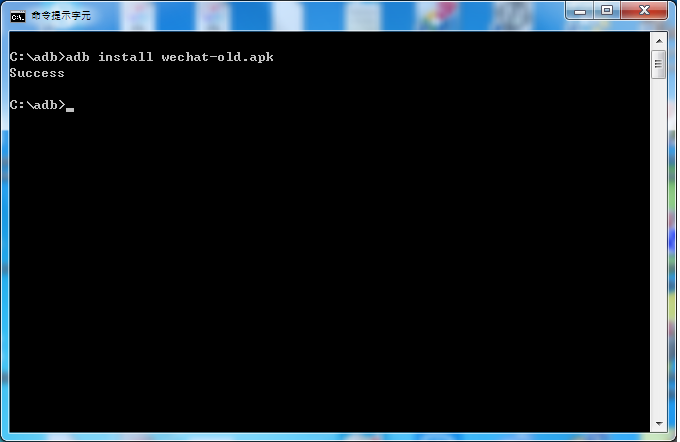
After rebooting we could use adb command to install older version WeChat apk. What kind of older version of WeChat apk you need? Of course the version enable adb backup permission. What? you are not sure? All you have to do is to take a look at its manifest.xml and you could see the allowBackup permission. Let's install and the result is "success". Is it surprise you? Keep in mind that do not click WeChat now!
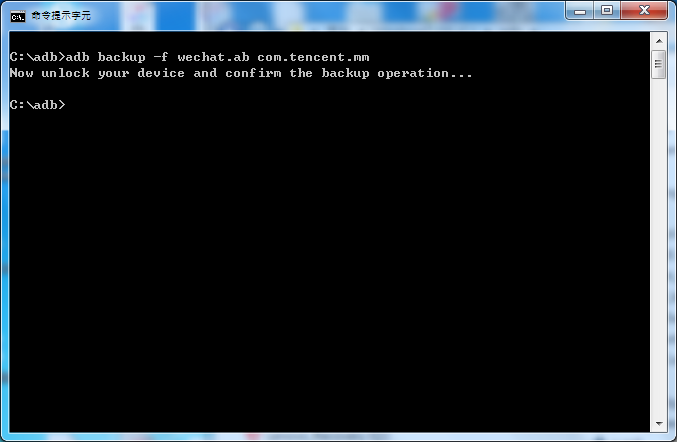
Now we could use adb backup to extract WeChat. The output file is a .ab file. You have to convert this .ab to a .tar file.
How to deal with a .ab file? You could take advantage of android backup extractor jar file to unpack .ab file.
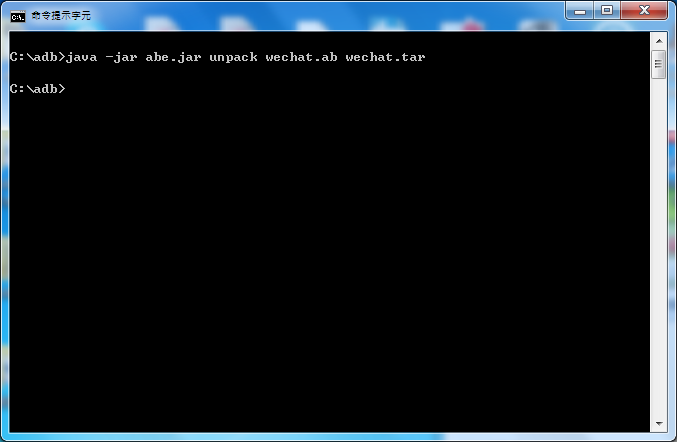
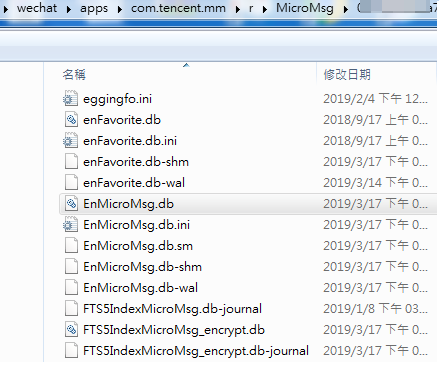
Unzip this .tar file and make sure you got the database file containing chat history. Yes, that's it. Don't forget that EnMicroMsg.db is an encrypted file. All you have to do is to look at my earlier post and you will know what to do.
Downgrade extraction on phones running Android 7/8/9的更多相关文章
- eclipse - An internal error occurred during: "Running Android Lint"
概述 也不晓得为什么,编译eclipse,设置打开,就自动报错: An internal error occurred during: "Running Android Lint" ...
- Eclipse出现"Running Android Lint has encountered a problem"解决方式
近期打开Eclipse的时候,总是发生这种一个错误:"Running Android Lint has encountered a problem".截图例如以下: . 可是Ecl ...
- How to extract WeChat chat messages from a smartphone running Android 7.x or above
A friend of mine she was frustarted in extracting WeChat chat messages from suspect's smartphone run ...
- Eclipse出现"Running Android Lint has encountered a problem"解决方案
安装eclipse for android 时候的错误记录,转载自:http://blog.csdn.net/chenyufeng1991/article/details/47442555 (1)打开 ...
- 解决启动Eclipse后提示’Running android lint’错误的问题
打开项目的AndroidManifest.xml文件,android:targetSdkVersion="21"改为“20”或以下的值.由于Android L为预览版本,版本号还是 ...
- running android lint has encountered a problem
最近写学习android编程的的时候,每次保存.java文件的时候,总会跳出如下错误 解决:
- Android开发之错误:elicpse运行时弹出Running Android Lint has encountered a problem failed, nullpointerexception
昨天安装了下Android Studio,把SDK路径指向了ADT目录下的SDK目录.同时FQ出去更新了下SDK.然后今天运行eclipse的时候,弹出错误,同时在工程的名称处有错误提醒,但是代码中没 ...
- running android lint has encountered a
近期写学习android编程的的时候,每次保存.java文件的时候,总会跳出例如以下错误 这个错误不是属于程序错误,把它关掉对于编程没有不论什么影响,但每次见到这个就是不爽,希望大神可以解决一下,谢谢 ...
- ADT "Running Android Lint" has encountered a problem
解决办法: Window--->Preferences----->Android--------> LInt Error Checking----->when saving f ...
随机推荐
- RobotFramework + HTTP接口自动化实现
一. 什么是自动化测试? 1. 定义 自动化测试是把以人为驱动的测试行为转化为机器执行的一种过程,也可以说是软件测试的一种技术手段. 2. 常见工具 Appium ...
- JDK源码分析系列---String,StringBuilder,StringBuffer
JDK源码分析系列---String,StringBuilder,StringBuffer 1.String public final class String implements java.io. ...
- Codeforces 348B:Apple Tree(DFS+LCM+思维)
http://codeforces.com/contest/348/problem/B 题意:给一棵树,每个叶子结点有w[i]个苹果,每个子树的苹果数量为该子树所有叶子结点苹果数量之和,要使得每个结点 ...
- scrapy基础知识之 使用FormRequest.from_response()方法模拟用户登录:
通常网站通过 实现对某些表单字段(如数据或是登录界面中的认证令牌等)的预填充 使用Scrapy抓取网页时,如果想要预填充或重写像用户名.用户密码这些表单字段, 可以使用 FormRequest.fro ...
- python 3.7 新特性 - popitem
百度上大多文章说 popitem 随机删除字典的一个键值对 python 3.7 官方文档已经说了,popitem 删除字典最后一个添加进去的键值对
- 百度小程序自定义通用toast组件
百度小程序Toast组件 author: @TiffanysBear 百度小程序自定义通用toast组件 BdToast百度小程序自定义通用组件-github地址 需求 手百小程序的toast仅支持在 ...
- [Lydsy2017年4月月赛]抵制克苏恩题解
考试的时候以为就是简单的概率期望题,考完后知道是简单的概率期望DP题,完美爆零. 这道题数据范围很小,很容易让人想到状压,不过貌似没什么可压的.那么只能说明这道题复杂度很高了,状态数组f[o][i][ ...
- [01] HEVD 双机调试环境搭建
[01] HEVD 双机调试环境搭建 span::selection, .CodeMirror-line > span > span::selection { background: #d ...
- JS代码实现复制功能
本人没什么基础看了好久百度,不知道为什么在百度上问一个js实现copy功能会多出那么多代码出来,感觉废话一堆效果还没能达到需要复制 的效果. 然而在我看来,js复制代码 无非就那么几句罢了.原生cop ...
- JQuery学习笔记(3)——节点操作 节点查找
插入节点 内部插入 所谓的内部插入,就是指在节点里面的插入,而外部插入,则是在节点外面插入. append() prepend() appendTo() prependTo() append和prep ...