
Ubuntu18.04 instsall XMind_8 and crack
1.dowload XMind_8 linux install zip
wget https://www.xmind.cn/xmind/downloads/xmind-8-update8-linux.zip   # download xmind8 linux tarball

wget https://eastasia1-mediap.svc.ms/transform/zipcontent?provider=spo&inputFormat=rar&cs=fFNQTw&docid=https%3A%2F%2Fwhuteducn-my.sharepoint.com%3A443%2F_api%2Fv2.0%2Fdrives%2Fb!-AlaD0iokkmTJVnhL6b7OQIQypljKdBKgxPhdFDqJj7wZDwsLO7bRK0kIqJsJ3R8%2Fitems%2F01AUAJOYZ6JZ6XOXEV6ZAYEH7V4VORIDHJ%3Fversion%3DPublished&access_token=eyJ0eXAiOiJKV1QiLCJhbGciOiJub25lIn0.eyJhdWQiOiIwMDAwMDAwMy0wMDAwLTBmZjEtY2UwMC0wMDAwMDAwMDAwMDAvd2h1dGVkdWNuLW15LnNoYXJlcG9pbnQuY29tQGRiOTBmMGNkLThlNzEtNDExZS1hYmYzLTExODY3NGQ1MDliNyIsImlzcyI6IjAwMDAwMDAzLTAwMDAtMGZmMS1jZTAwLTAwMDAwMDAwMDAwMCIsIm5iZiI6IjE1Njg3NzY3NzkiLCJleHAiOiIxNTY4Nzk4Mzc5IiwiZW5kcG9pbnR1cmwiOiJEbmhodjVKV2RHUlRqekhEcWhoL0Y4MHhsWWRSRnBOcjRtU243d1hLb0ZnPSIsImVuZHBvaW50dXJsTGVuZ3RoIjoiMTE5IiwiaXNsb29wYmFjayI6IlRydWUiLCJjaWQiOiJaV00wT0RBMU9XWXRNakJpWXkwNU1EQXdMVGd6TWpJdE16Z3hOakpoTnpKbE1HUTQiLCJ2ZXIiOiJoYXNoZWRwcm9vZnRva2VuIiwic2l0ZWlkIjoiTUdZMVlUQTVaamd0WVRnME9DMDBPVGt5TFRrek1qVXROVGxsTVRKbVlUWm1Zak01IiwibmFtZWlkIjoiMCMuZnxtZW1iZXJzaGlwfHVybiUzYXNwbyUzYWFub24jOGU1NTg4ZTU1YjA4ZDkxODQzY2E1NmIxNTlhOTA5MWQ4NTllNTA4MDE0ZDhjNjVkNjIwNTg1NGNhYTU3OWI4OSIsIm5paSI6Im1pY3Jvc29mdC5zaGFyZXBvaW50IiwiaXN1c2VyIjoidHJ1ZSIsImNhY2hla2V5IjoiMGguZnxtZW1iZXJzaGlwfHVybiUzYXNwbyUzYWFub24jOGU1NTg4ZTU1YjA4ZDkxODQzY2E1NmIxNTlhOTA5MWQ4NTllNTA4MDE0ZDhjNjVkNjIwNTg1NGNhYTU3OWI4OSIsInNoYXJpbmdpZCI6ImkrUjZLa29xMkVpb2loYWdkeTl6eWciLCJ0dCI6IjAiLCJ1c2VQZXJzaXN0ZW50Q29va2llIjoiMiJ9.T3R2alpiQkdia0tURnJaY1pjbUJKaWM5OEl1QmJ3TVQzQUlwVm9tUEpLaz0    #download crack jar for xmind
2. unzip the xmind install tarball
mkdir /opt/xmind_8

chown lenmom:lenmom /opt/xmind_8

unzip ./xmind--update8-linux.zip -d /opt/xmind_8
3. unzip the crack jar rar
rar x ./思维导图.rar /opt/xmind_8
4. locate XMind.ini in /opt/xmind_8
add the following contents in the ini file:
-javaagent:/opt/xmind_8/XMind_amd64/XMindCrack.jar
5. edit /etc/hosts
vim /etc/hosts
add the following content at the end of file:
# XMind_8

127.0.0.1 www.xmind.net
6. open xmind8 and register
click menu help->serial No, and input register info
mail: x@iroader.me

sn:

XAka34A2rVRYJ4XBIU35UZMUEEF64CMMIYZCK2FZZUQNODEKUHGJLFMSLIQMQUCUBXRENLK6NZL37JXP4PZXQFILMQ2RG5R7G4QNDO3PSOEUBOCDRYSSXZGRARV6MGA33TN2AMUBHEL4FXMWYTTJDEINJXUAV4BAYKBDCZQWVF3LWYXSDCXY546U3NBGOI3ZPAP2SO3CSQFNB7VVIY123456789012345
7. restart xmind8
8. create launch shell
create run.sh which located in the install root dir of xmind8.
cd /opt/xmind_8/

touch run.sh

vim run.sh
add the following content in this file:
#!/bin/bash

# tis file launchs the xmind application

CURRENT_PATH=$(cd `dirname $`; pwd)

echo "xmind root dir is: "${CURRENT_PATH}

cd ${CURRENT_PATH}/XMind_amd64 && ./XMind
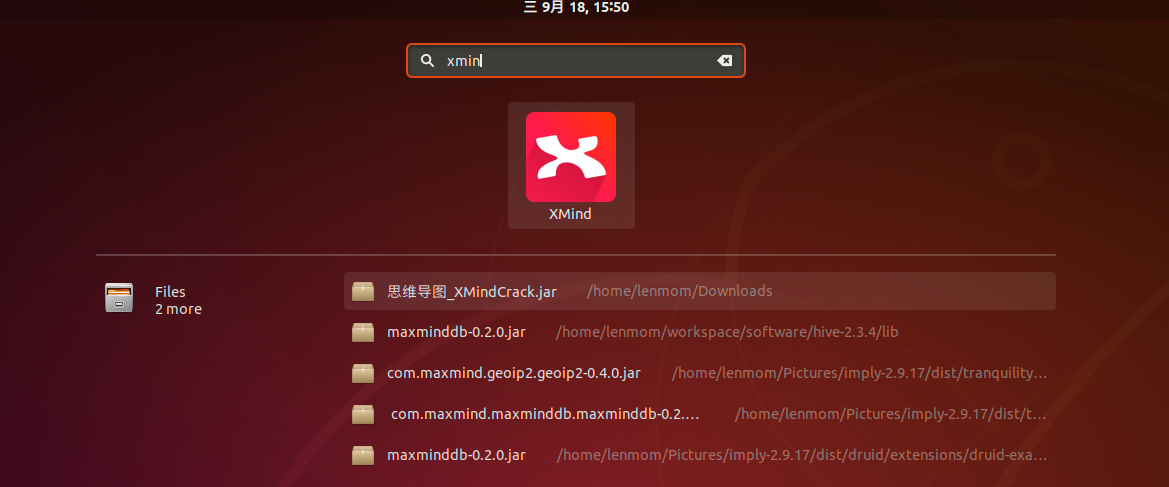
9. add desktop file
cd /usr/share/applications

touch xmind.desktop

vim xmind.desktop
add the following content in this file:
[Desktop Entry]

Name=XMind

Exec=/opt/xmind_8/run.sh

Icon=/opt/xmind_8/xmind2.png

Type=Application

Categories=Utility;TextEditor;Development;IDE;

Keywords=xmind;
Note: the file xmind2.png is a shortcut icon which I found from the internet, do set it yourself.

Ubuntu18.04 instsall XMind_8 and crack的更多相关文章
- Ubuntu18.04教程
pre.ctl { font-family: "Liberation Mono", monospace } h1 { margin-bottom: 0.21cm } h1.west ...
- Ubuntu18.04美化主题(mac主题)
前端时间Ubuntu18.04LTS发布,碰巧之前用的Ubuntu16.04出了一点问题,懒得解决,索性就换了Ubuntu18.04. 成果: 参考博客:https://www.cnblogs.com ...
- 给Ubuntu18.04安装mac os主题
安装完的效果: 参考: https://linuxhint.com/gnome-tweak-tool-ubuntu-17-10/ ----------------------------------- ...
- Ubuntu18.04 Desktop Entry
1.Desktop Entry 是什么? 我们都知道,在Windows里软件在安装的时候都会询问是不是要在开始菜单和桌面创建快捷方式,这样就不用在使用软件的时候去安装目录启动,而是直接去开始菜单点击相 ...
- Ubuntu18.04(linux)安装MySQL
安装 mysql sudo apt-get --purge remove mysql-server mysql-common mysql-client sudo apt-get install mys ...
- ubuntu-18.04 设置开机启动脚本-亲测有效
ubuntu-18.04不能像ubuntu14一样通过编辑rc.local来设置开机启动脚本,通过下列简单设置后,可以使rc.local重新发挥作用. 2.将下列内容复制进rc-local.servi ...
- c/c++ 多线程 ubuntu18.04 boost编译与运行的坑
多线程 boost编译与运行的坑 背景:因为要使用boost里的多线程库,所以遇到了下面的坑. 系统版本:ubuntu18.04 一,安装boost 1,去boost官网下载 boost_1_XX_0 ...
- win10下安装ubuntu18.04
在win10下安装Ubuntu18.04,双系统共存.Ubuntu 18.04 使用的是Gnome桌面. 查看系统的启动模式: Win+R打开运行,输入msinfo32,回车查看系统信息.在BIOS模 ...
- ubuntu18.04安装mysql
ubuntu18.04中,默认情况下mysql默认包含在apt软件存储库中,要安装它只需要更新服务器上的包索引并安装默认包apt-get. 1.安装mysql sudo apt-get update ...
随机推荐
- 【Python学习】Python3 基础语法
==================================================================================================== ...
- css cursor效果图
效果图: <!DOCTYPE html> <html lang="zh-cmn-Hans"> <head> <meta charset=& ...
- c++ templat乱测
该上机实验环境 linux mint IDE:qt5.11 代码复制到windows下vs2017报错,提示char* 类型不能直接赋值字符串 在linux mint下可以运行,测试目的:检验复 ...
- NOI.ac模拟赛20181021 ball sequence color
T1 ball 可以发现每次推动球时,是将每个球的位置 −1-1−1 ,然后把最左边的球放到 P−1P-1P−1 处. 记个 −1-1−1 次数,再用set维护就好了. #include <bi ...
- codevs:2849 素数判定 3:输入一个正整数x(3<=x<=100000),判断x是否是质数,如果是质数则输出信息“prime”,否则输出“composite”。
#include<iostream>#include<cstdio>#include<cmath>using namespace std;int a[2];int ...
- shell编程题(三)
将一目录下所有的文件的扩展名改为bak #! /bin/bash for i in `ls` do mv $i ${i%%.*}.bak done ${i%%.*} 截掉一个变量字符串第一个" ...
- const关键字与数组、指针
目录 const关键字 const修饰数组 const修饰指针 用两个const修饰指针 @ 开始回顾C基础知识.C中使用指针是很危险的事情,一个不慎就会造成程序崩溃,因此对于传入函数的参数进行保护就 ...
- 模板 - 数学 - 数论 - 扩展Euler定理
费马(Fermat)小定理 当 \(p\) 为质数,则 \(a^{p-1}\equiv 1 \mod p\) 反之,费马小定理的逆定理不成立,这样的数叫做伪质数,最小的伪质数是341. 欧拉(Eule ...
- Linux 之数组
数组 和其他编程语言一样,Shell 也支持数组.数组(Array)是若干数据的集合,其中的每一份数据都称为元素(Element). Shell 并且没有限制数组的大小,理论上可以存放无限量的数据.和 ...
- Redis 3.2.100 配置注意
新装服务器外网连接报错 /Interactive, Initializing/NotStarted, last: NONE, origin: BeginConnectAsync, outstandin ...