
移动端 1px 像素边框问题的解决方案(Border.css)
前言
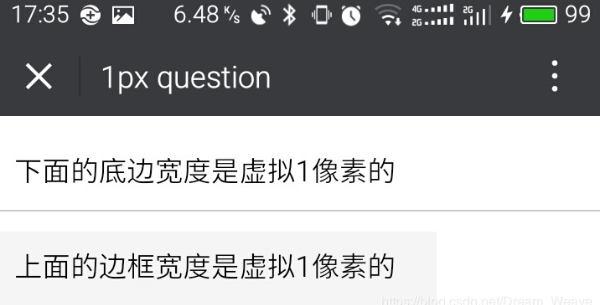
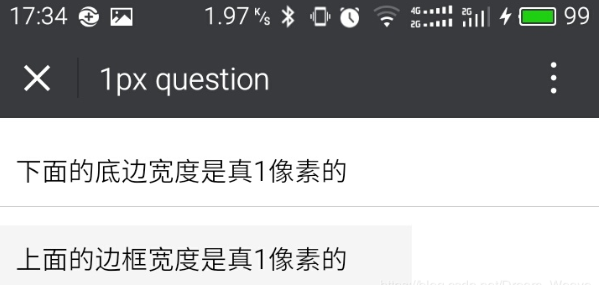
关于什么是移动端1像素边框问题,先上两张图,大家就明白了。
解决方案
将以下代码放在border.css文件中,然后引入
常用className

border:整个盒子都有边框

border-top:上边框

border-right:右边框

border-bottom:下边框

border-left:左边框

**使用:<div class="border-top"></div>**
border.css【注意】
使用时注意:该class名字只作用于(display:block)的块级元素上,其它看不到效果
想改变边框颜色的话,将代码中的所有颜色统一全部替换成你需要的颜色
代码:
@charset "utf-8";

.border,

.border-top,

.border-right,

.border-bottom,

.border-left,

.border-topbottom,

.border-rightleft,

.border-topleft,

.border-rightbottom,

.border-topright,

.border-bottomleft {

    position: relative;

}

.border::before,

.border-top::before,

.border-right::before,

.border-bottom::before,

.border-left::before,

.border-topbottom::before,

.border-topbottom::after,

.border-rightleft::before,

.border-rightleft::after,

.border-topleft::before,

.border-topleft::after,

.border-rightbottom::before,

.border-rightbottom::after,

.border-topright::before,

.border-topright::after,

.border-bottomleft::before,

.border-bottomleft::after {

    content: "\0020";

    overflow: hidden;

    position: absolute;

}

/* border

 * 因,边框是由伪元素区域遮盖在父级

 * 故,子级若有交互,需要对子级设置

 * 定位 及 z轴

 */

.border::before {

    box-sizing: border-box;

    top: ;

    left: ;

    height: %;

    width: %;

    border: 1px solid #eaeaea;

    transform-origin:  ;

}

.border-top::before,

.border-bottom::before,

.border-topbottom::before,

.border-topbottom::after,

.border-topleft::before,

.border-rightbottom::after,

.border-topright::before,

.border-bottomleft::before {

    left: ;

    width: %;

    height: 1px;

}

.border-right::before,

.border-left::before,

.border-rightleft::before,

.border-rightleft::after,

.border-topleft::after,

.border-rightbottom::before,

.border-topright::after,

.border-bottomleft::after {

    top: ;

    width: 1px;

    height: %;

}

.border-top::before,

.border-topbottom::before,

.border-topleft::before,

.border-topright::before {

    border-top: 1px solid #eaeaea;

    transform-origin:  ;

}

.border-right::before,

.border-rightbottom::before,

.border-rightleft::before,

.border-topright::after {

    border-right: 1px solid #eaeaea;

    transform-origin: % ;

}

.border-bottom::before,

.border-topbottom::after,

.border-rightbottom::after,

.border-bottomleft::before {

    border-bottom: 1px solid #eaeaea;

    transform-origin:  %;

}

.border-left::before,

.border-topleft::after,

.border-rightleft::after,

.border-bottomleft::after {

    border-left: 1px solid #eaeaea;

    transform-origin:  ;

}

.border-top::before,

.border-topbottom::before,

.border-topleft::before,

.border-topright::before {

    top: ;

}

.border-right::before,

.border-rightleft::after,

.border-rightbottom::before,

.border-topright::after {

    right: ;

}

.border-bottom::before,

.border-topbottom::after,

.border-rightbottom::after,

.border-bottomleft::after {

    bottom: ;

}

.border-left::before,

.border-rightleft::before,

.border-topleft::after,

.border-bottomleft::before {

    left: ;

}

@media (max--moz-device-pixel-ratio: 1.49), (-webkit-max-device-pixel-ratio: 1.49), (max-device-pixel-ratio: 1.49), (max-resolution: 143dpi), (max-resolution: .49dppx) {

    /* 默认值,无需重置 */

}

@media (min--moz-device-pixel-ratio: 1.5) and (max--moz-device-pixel-ratio: 2.49), (-webkit-min-device-pixel-ratio: 1.5) and (-webkit-max-device-pixel-ratio: 2.49), (min-device-pixel-ratio: 1.5) and (max-device-pixel-ratio: 2.49), (min-resolution: 144dpi) and (max-resolution: 239dpi), (min-resolution: .5dppx) and (max-resolution: .49dppx) {

    .border::before {

        width: %;

        height: %;

        transform: scale(.);

    }

    .border-top::before,

    .border-bottom::before,

    .border-topbottom::before,

    .border-topbottom::after,

    .border-topleft::before,

    .border-rightbottom::after,

    .border-topright::before,

    .border-bottomleft::before {

        transform: scaleY(.);

    }

    .border-right::before,

    .border-left::before,

    .border-rightleft::before,

    .border-rightleft::after,

    .border-topleft::after,

    .border-rightbottom::before,

    .border-topright::after,

    .border-bottomleft::after {

        transform: scaleX(.);

    }

}

@media (min--moz-device-pixel-ratio: 2.5), (-webkit-min-device-pixel-ratio: 2.5), (min-device-pixel-ratio: 2.5), (min-resolution: 240dpi), (min-resolution: .5dppx) {

    .border::before {

        width: %;

        height: %;

        transform: scale(.);

    }

    .border-top::before,

    .border-bottom::before,

    .border-topbottom::before,

    .border-topbottom::after,

    .border-topleft::before,

    .border-rightbottom::after,

    .border-topright::before,

    .border-bottomleft::before {

        transform: scaleY(.);

    }

    .border-right::before,

    .border-left::before,

    .border-rightleft::before,

    .border-rightleft::after,

    .border-topleft::after,

    .border-rightbottom::before,

    .border-topright::after,

    .border-bottomleft::after {

        transform: scaleX(.);

    }

}
.
移动端 1px 像素边框问题的解决方案(Border.css)的更多相关文章
- 【H5开发基础】移动端1像素边框问题的解决方案
自从乔帮主提出retina屏以来.可练就了不少前端兄弟的像素眼,有强迫症的伙伴们日子可就煎熬了.为了画出真正的1像素边框,前端猿们也是受尽各浏览器的虐待了. 关于什么是移动端1像素边框问题,先上两张图 ...
- 移动端一像素边框解决方案[css scale]
新建一个border.css的文件,然后将代码复制粘贴,然后引用border.css样式文件,然后给需要添加边框的元素,加相应的类样式. tips: border-bottom[一像素下边框]:bor ...
- 移动端1px像素解决方式,从1px像素问题剖析像素及viewport
在移动端web开发过程中,如果你对边框设置border:1px,会发现,边框在某些手机机型上面显示的1px比实际感觉会变粗,这也就是1像素问题.如下图是对桌面浏览器和移动端border设置1px的比较 ...
- 移动端1px的边框
我们知道,在移动端存在物理像素(physical pixel)和设备独立像素(density-independent pixel)的概念.物理像素也称为设备像素,它是显示设备中一个最微小的物理部件,每 ...
- 移动端1px线适配问题-------适配各种编译CSS工具 stylus sass styled-componet实现方法
其实在stylus与sass中实现移动端1像素线各个手机设备的适配问题的原理是一样的, 首先我还是先介绍一下原理和所依赖的方法 原理:其实他们都是通过css3的媒体查询来实现的 步骤思路: 1.给目标 ...
- stylus解决移动端1像素边框的问题
首先 我是借用了yo框架的border和他的媒体查询组合 这两个分别是在yo>lib>core>classes>_border.scss(用来获取yo框架封装的border) ...
- 移动web 1像素边框
实现方法 border-image 图片 实现 这篇文章是腾讯github上的解决方案border-image来实现的 链接走起 <使用border-image实现类似iOS7的1px底边> ...
- 移动端1px边框解决方案
在retina屏中,像素比为2(iPhone6/7/8)或3(iPhone6Plus/7Plus/8Plus),1px的边框看起来比真的1px更宽. 使用伪类加transform的方式 元素本身不定义 ...
- 移动端1px边框实现
问题描述:移动端iPhone上的1px边框看起来像2px那么粗.问题分析:不同的手机有不同的像素密度,在window对象中有一个devicePixelRatio属性,它可以反应设备的像素与css中的像 ...
随机推荐
- 用简单的JS代码制作计算器
代码+注释一共不到200行,是练习交流的必备良药 主界面如下: 操作示意图: 以下是代码部分 HTML: <div> <table class="window"& ...
- YYCache 的整体架构类图

- [转帖]美团在Redis上踩过的一些坑-5.redis cluster遇到的一些问题
美团在Redis上踩过的一些坑-5.redis cluster遇到的一些问题 博客分类: redis 运维 redis clustercluster-node-timeoutfailover 转载请 ...
- 洛谷P5017:摆渡车——题解
https://www.luogu.org/problem/P5017 参考:https://www.luogu.org/blog/ztyluogucpp/solution-p5017 我想我大概是废 ...
- SQL分类之DCL:管理用户、授权
DCL:管理用户.授权 SQL分类: DDL:操作数据库和表 DML:增删改表中的数据 DQL:查询表中的数据 DCL:管理用户.授权 DBA:数据库管理员 DCL:管理用户.授权 1.管理用户 1. ...
- 命令创建.net core3.0 web应用详解(超详细教程)
原文:命令创建.net core3.0 web应用详解(超详细教程) 你是不是曾经膜拜那些敲几行代码就可以创建项目的大神,学习了命令创建项目你也可以成为大神,其实命令创建项目很简单. 1.cmd命令行 ...
- Git教程-安装与创建版本库
Git是一个分布式版本控制系统,他通过命令行使用的工具,Github是提供Git仓库托管服务的网站 安装参考: https://www.liaoxuefeng.com/wiki/89604348802 ...
- java 泛型和object比较
引言 我们使用object和泛型做形参,都是为了让这个方法能接收更多类型的对象,让程序变得更健壮,代码复用率更高.当我们回看自己写的代码时会发现,好像使用泛型的地方使用object也可以,使用obje ...
- Vue3.0报错error: Unexpected console statement (no-console) 解决办法
写项目过程中用ESLint遵守代码规范很有必要,但是对于一些规范也很是无语,比如:‘Unexpected console statement (no-console)’,连console都不能用,这就 ...
- js进度条源码下载—js进度条代码
现在很多网站会用到进入网站特效,到网页没有加载完成的时候,会有一个loding特效,加载完了之后才能看到页面,今天就带着做一个js进度条效果,今天要做的效果是纯js进度条加载,没有用到框架,方便大家进 ...