
Kubernetes Dashboard 安装与认证
1、安装dashboard
$ kubectl apply -f https://raw.githubusercontent.com/kubernetes/dashboard/v1.10.1/src/deploy/recommended/kubernetes-dashboard.yaml
(images地址记得改掉,因为墙,你懂得)
1.2, 配置ingress 映像域名xxx.dashboard.qing.cn(必须是https)
2 、创建admin token
#cat dashboard-adminuser.yaml
apiVersion: v1

kind: ServiceAccount

metadata:

  name: admin-user

  namespace: kube-system

---
apiVersion: rbac.authorization.k8s.io/v1

kind: ClusterRoleBinding

metadata:

  name: admin-user

roleRef:

  apiGroup: rbac.authorization.k8s.io

  kind: ClusterRole

  name: cluster-admin

subjects:

- kind: ServiceAccount

  name: admin-user

  namespace: kube-system

#kubectl apply -f dashboard-adminuser.yaml
#kubectl -n kube-system describe secret $(kubectl -n kube-system get secret | grep admin-user | awk '{print $1}')
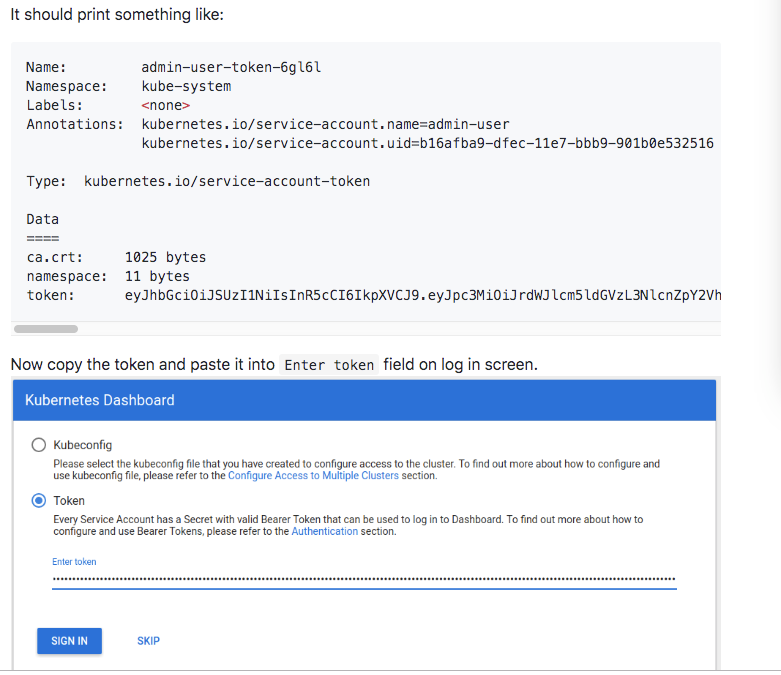
复制 token登陆即可
3、增加只读帐号token
#cat read-user-sa-rbac.yaml
apiVersion: v1
kind: ServiceAccount
metadata:
name: dashboard-read-user
namespace: kube-system
---
apiVersion: rbac.authorization.k8s.io/v1
kind: ClusterRoleBinding
metadata:
name: dashboard-read-binding
roleRef:
apiGroup: rbac.authorization.k8s.io
kind: ClusterRole
name: dashboard-read-clusterrole
subjects:
- kind: ServiceAccount
name: dashboard-read-user
namespace: kube-system
---
apiVersion: rbac.authorization.k8s.io/v1
kind: ClusterRole
metadata:
name: dashboard-read-clusterrole
rules:
- apiGroups:
- ""
resources:
- configmaps
- endpoints
- persistentvolumeclaims
- pods
- replicationcontrollers
- replicationcontrollers/scale
- serviceaccounts
- services
- nodes
- persistentvolumeclaims
- persistentvolumes
verbs:
- get
- list
- watch
- apiGroups:
- ""
resources:
- bindings
- events
- limitranges
- namespaces/status
- pods/log
- pods/status
- replicationcontrollers/status
- resourcequotas
- resourcequotas/status
verbs:
- get
- list
- watch
- apiGroups:
- ""
resources:
- namespaces
verbs:
- get
- list
- watch
- apiGroups:
- apps
resources:
- daemonsets
- deployments
- deployments/scale
- replicasets
- replicasets/scale
- statefulsets
verbs:
- get
- list
- watch
- apiGroups:
- autoscaling
resources:
- horizontalpodautoscalers
verbs:
- get
- list
- watch
- apiGroups:
- batch
resources:
- cronjobs
- jobs
verbs:
- get
- list
- watch
- apiGroups:
- extensions
resources:
- daemonsets
- deployments
- deployments/scale
- ingresses
- networkpolicies
- replicasets
- replicasets/scale
- replicationcontrollers/scale
verbs:
- get
- list
- watch
- apiGroups:
- policy
resources:
- poddisruptionbudgets
verbs:
- get
- list
- watch
- apiGroups:
- networking.k8s.io
resources:
- networkpolicies
verbs:
- get
- list
- watch
- apiGroups:
- storage.k8s.io
resources:
- storageclasses
- volumeattachments
verbs:
- get
- list
- watch
- apiGroups:
- rbac.authorization.k8s.io
resources:
- clusterrolebindings
- clusterroles
- roles
- rolebindings
verbs:
- get
- list
- watch
Kubernetes Dashboard 安装与认证的更多相关文章
- kubernetes dashboard 安装
环境:CentOS Linux release 7.3.1611 (Core)IP:192.168.0.103 [1]组件安装yum install device-mapperyum install ...
- kubernetes dashboard 安装时出现9090: getsockopt: connection refused错误
转载于:https://blog.csdn.net/lucy06/article/details/79082302 安装kubernetes dashboard时,出现错误: Error: 'dia ...
- Kubernetes dashboard安装
1. To download Dashboard plugin deployment YAML file from internet. #cd /home #mkdir k8s #cd k8s # w ...
- install kubernetes dashboard 安装 kubernetes dashboard 详细
参考: http://www.bubuko.com/infodetail-2242562.html http://www.cnblogs.com/zhenyuyaodidiao/p/6500897.h ...
- Kubernetes入门(二)——Dashboard 安装
Kubernetes集群搭建完成后,可以通过命令行方式可以了解集群资源的使用情况,但是这种方式比较笨拙且不直观,因此考虑给集群安装Dashboard,这样能更直观了解集群状态.本文Dashboard的 ...
- Kubernetes 及安装注意事项
Docker Desktop for Mac/Windows开启Kubernetes 及安装注意事项 Table of Contents 1 解决方案 2 注意事项 2.1 Choose Kubeco ...
- K8s+dashboard安装部署【h】
系统安装使用虚拟机安装两个centos系统,在/etc/hosts里增加两行192.168.140.128 kuber-master192.168.140.129 kuber-node1 关闭防火墙s ...
- kubernetes学习笔记之十一:kubernetes dashboard认证及分级授权
第一章.部署dashboard 作为Kubernetes的Web用户界面,用户可以通过Dashboard在Kubernetes集群中部署容器化的应用,对应用进行问题处理和管理,并对集群本身进行管理.通 ...
- kubernetes Dashboard 使用RBAC 权限认证控制
kubernetes RBAC实战 环境准备 先用kubeadm安装好kubernetes集群,[包地址在此](https://market.aliyun.com/products/56014009/ ...
随机推荐
- 三元運算子回傳lambda expression
紀錄一下 假如我想要透過三元運算子?: 傳回lambda expression 要明確轉型
- [笔记] C# 如何获取文件的 MIME Type
MIME Type 为何物: MIME 参考手册 svn.apache.org/repos/asf/httpd/httpd/trunk/docs/conf/mime.types 常规方式 对于有文件后 ...
- mac中使用expect脚本,让iTerms保存密码登录ssh
最近工作中需要使用ssh连接到centos服务器中,以前公司都是直接配的私钥就可以免密登录了.这里还用的密码. 由于,我一直用的是iTerm2,所以在网上搜索了下,找到了一种方案,那就是expect脚 ...
- Java生鲜电商平台-系统报表设计与架构
Java生鲜电商平台-系统报表设计与架构 说明:任何一个运行的平台都需要一个很清楚的报表来显示,那么作为Java开源生鲜电商平台而言,我们应该如何设计报表呢?或者说我们希望报表来看到什么数据呢? ...
- 小鸟初学Shell编程(六)变量赋值
变量的意义 我们在使用Linux命令或脚本的时候,会有一些输出,那么这些输出的信息可以用变量临时存储,以备我们下一条命令或脚本使用. 变量的定义 变量的定义建议用一个有意义的英文单词来代表变量,不要使 ...
- python_机器学习_最临近规则分类(K-Nearest Neighbor)KNN算法
1. 概念: https://scikit-learn.org/stable/modules/neighbors.html 1. Cover和Hart在1968年提出了最初的临近算法 2. 分类算法( ...
- 渗透技巧——Windows系统的帐户隐藏
渗透技巧——Windows系统的帐户隐藏 2017-11-28-00:08:55 0x01 帐户隐藏的方法 该方法在网上已有相关资料,本节只做简单复现 测试系统:·Win7 x86/WinXP 1. ...
- FCOS及其和Faster R-CNN的区别
RetinaNet,SSD,YOLOv3,Faster R-CNN等都是Anchor-based的检测器,即需要预定义的Anchor boxes来进行训练.FCOS是一种Anchor-free和Pro ...
- 201871010118-唐敬博《面向对象程序设计(java)》第十周学习总结
博文正文开头格式:(2分) 项目 内容 这个作业属于哪个课程 https://www.cnblogs.com/nwnu-daizh/ 这个作业的要求在哪里 https://www.cnblogs.co ...
- pip安装指定版本的程序的命令
pip安装指定版本的程序的命令 pip install -i https://pypi.douban.com/simple/ django==1.10.3 或者 pip install django= ...