
Kubernetes Dashboard 安装与认证
1、安装dashboard
$ kubectl apply -f https://raw.githubusercontent.com/kubernetes/dashboard/v1.10.1/src/deploy/recommended/kubernetes-dashboard.yaml
(images地址记得改掉,因为墙,你懂得)
1.2, 配置ingress 映像域名xxx.dashboard.qing.cn(必须是https)
2 、创建admin token
#cat dashboard-adminuser.yaml
apiVersion: v1

kind: ServiceAccount

metadata:

  name: admin-user

  namespace: kube-system

---
apiVersion: rbac.authorization.k8s.io/v1

kind: ClusterRoleBinding

metadata:

  name: admin-user

roleRef:

  apiGroup: rbac.authorization.k8s.io

  kind: ClusterRole

  name: cluster-admin

subjects:

- kind: ServiceAccount

  name: admin-user

  namespace: kube-system

#kubectl apply -f dashboard-adminuser.yaml
#kubectl -n kube-system describe secret $(kubectl -n kube-system get secret | grep admin-user | awk '{print $1}')
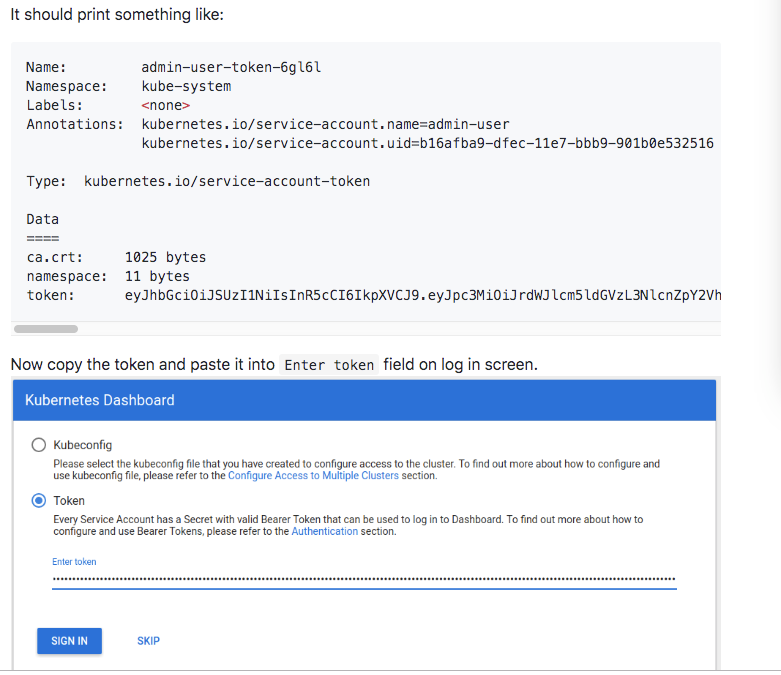
复制 token登陆即可
3、增加只读帐号token
#cat read-user-sa-rbac.yaml
apiVersion: v1
kind: ServiceAccount
metadata:
name: dashboard-read-user
namespace: kube-system
---
apiVersion: rbac.authorization.k8s.io/v1
kind: ClusterRoleBinding
metadata:
name: dashboard-read-binding
roleRef:
apiGroup: rbac.authorization.k8s.io
kind: ClusterRole
name: dashboard-read-clusterrole
subjects:
- kind: ServiceAccount
name: dashboard-read-user
namespace: kube-system
---
apiVersion: rbac.authorization.k8s.io/v1
kind: ClusterRole
metadata:
name: dashboard-read-clusterrole
rules:
- apiGroups:
- ""
resources:
- configmaps
- endpoints
- persistentvolumeclaims
- pods
- replicationcontrollers
- replicationcontrollers/scale
- serviceaccounts
- services
- nodes
- persistentvolumeclaims
- persistentvolumes
verbs:
- get
- list
- watch
- apiGroups:
- ""
resources:
- bindings
- events
- limitranges
- namespaces/status
- pods/log
- pods/status
- replicationcontrollers/status
- resourcequotas
- resourcequotas/status
verbs:
- get
- list
- watch
- apiGroups:
- ""
resources:
- namespaces
verbs:
- get
- list
- watch
- apiGroups:
- apps
resources:
- daemonsets
- deployments
- deployments/scale
- replicasets
- replicasets/scale
- statefulsets
verbs:
- get
- list
- watch
- apiGroups:
- autoscaling
resources:
- horizontalpodautoscalers
verbs:
- get
- list
- watch
- apiGroups:
- batch
resources:
- cronjobs
- jobs
verbs:
- get
- list
- watch
- apiGroups:
- extensions
resources:
- daemonsets
- deployments
- deployments/scale
- ingresses
- networkpolicies
- replicasets
- replicasets/scale
- replicationcontrollers/scale
verbs:
- get
- list
- watch
- apiGroups:
- policy
resources:
- poddisruptionbudgets
verbs:
- get
- list
- watch
- apiGroups:
- networking.k8s.io
resources:
- networkpolicies
verbs:
- get
- list
- watch
- apiGroups:
- storage.k8s.io
resources:
- storageclasses
- volumeattachments
verbs:
- get
- list
- watch
- apiGroups:
- rbac.authorization.k8s.io
resources:
- clusterrolebindings
- clusterroles
- roles
- rolebindings
verbs:
- get
- list
- watch
Kubernetes Dashboard 安装与认证的更多相关文章
- kubernetes dashboard 安装
环境:CentOS Linux release 7.3.1611 (Core)IP:192.168.0.103 [1]组件安装yum install device-mapperyum install ...
- kubernetes dashboard 安装时出现9090: getsockopt: connection refused错误
转载于:https://blog.csdn.net/lucy06/article/details/79082302 安装kubernetes dashboard时,出现错误: Error: 'dia ...
- Kubernetes dashboard安装
1. To download Dashboard plugin deployment YAML file from internet. #cd /home #mkdir k8s #cd k8s # w ...
- install kubernetes dashboard 安装 kubernetes dashboard 详细
参考: http://www.bubuko.com/infodetail-2242562.html http://www.cnblogs.com/zhenyuyaodidiao/p/6500897.h ...
- Kubernetes入门(二)——Dashboard 安装
Kubernetes集群搭建完成后,可以通过命令行方式可以了解集群资源的使用情况,但是这种方式比较笨拙且不直观,因此考虑给集群安装Dashboard,这样能更直观了解集群状态.本文Dashboard的 ...
- Kubernetes 及安装注意事项
Docker Desktop for Mac/Windows开启Kubernetes 及安装注意事项 Table of Contents 1 解决方案 2 注意事项 2.1 Choose Kubeco ...
- K8s+dashboard安装部署【h】
系统安装使用虚拟机安装两个centos系统,在/etc/hosts里增加两行192.168.140.128 kuber-master192.168.140.129 kuber-node1 关闭防火墙s ...
- kubernetes学习笔记之十一:kubernetes dashboard认证及分级授权
第一章.部署dashboard 作为Kubernetes的Web用户界面,用户可以通过Dashboard在Kubernetes集群中部署容器化的应用,对应用进行问题处理和管理,并对集群本身进行管理.通 ...
- kubernetes Dashboard 使用RBAC 权限认证控制
kubernetes RBAC实战 环境准备 先用kubeadm安装好kubernetes集群,[包地址在此](https://market.aliyun.com/products/56014009/ ...
随机推荐
- 动画展现十大经典排序算法(附Java代码)
0.算法概述 0.1 算法分类 十种常见排序算法可以分为两大类: 比较类排序:通过比较来决定元素间的相对次序,由于其时间复杂度不能突破O(nlogn),因此也称为非线性时间比较类排序. 非比较类排序: ...
- Spring Cloud Ribbon客户端负载均衡(四)
序言 Ribbon 是一个客户端负载均衡器(Nginx 为服务端负载均衡),它赋予了应用一些支配 HTTP 与 TCP 行为的能力,可以得知,这里的客户端负载均衡也是进程内负载均衡的一种.它在 Spr ...
- 进程间通信的信道与控制(io机制)
进程间通信 = 信道 + 控制(状态) + io 信道: 1.流式信道: 2.队列信道: 3.共享内存信道: 控制机制: 数据就绪状态的通知与数据获取机制. 1.信号: 2.循环: 3.io机制
- 何谓SQLSERVER参数嗅探(转载)
大家听到“嗅探”这个词应该会觉得跟黑客肯定有关系吧,使用工具嗅探一下参数,然后截获,脱裤o(∩_∩)o .事实上,我觉得大家太敏感了,其实这篇文章跟数据库安全没有什么关系,实际上跟数据库性能调优有关相 ...
- vs 本地调试(IIS)
参考地址:https://blog.csdn.net/qq_18979049/article/details/78613878 一.情景描述 1.有的项目需要部署才能进行真实情况模拟(例如微信公众号) ...
- Server2016 IIS安装配置
- C# - VS2019 WinFrm程序调用ZXing.NET实现条码、二维码和带有Logo的二维码的识别
前言 C# WinFrm程序调用ZXing.NET实现条码.二维码和带有Logo的二维码的识别. ZXing.NET导入 GitHub开源库 ZXing.NET开源库githib下载地址:https: ...
- windows下安装pip教程
下载地址是:https://pypi.python.org/pypi/pip#downloads 下载完成之后,解压到一个文件夹,用CMD控制台进入解压目录,输入: python setup.py i ...
- GIT版本管理工具教程
目录 GIT版本管理工具教程 一 Git初始化 二 简单指令使用 基本操作 简单总结 三 Git进阶 Git三大区域 Git回滚 Git分支 Git工作流 四 Github代码管理仓库 第一步:注册G ...
- 在 Docker 中已运行的 container 如何修改 run 时的 env
https://www.cnblogs.com/xiaouisme/p/9837221.html 首先不推荐这样做,如需修改配置,应删掉重新部署. 其次,可以进行如下操作(未测试,不知道仅重启 con ...