
Spring Cloud(5):Hystrix的使用
熔断:类似生活中的保险丝,电流过大就会熔断
降级:类似生活中的旅行,行李箱只有那么大,所以要抛弃一些非必需的物品
熔断降级应用:
某宝双十一商品下单,用户量巨大,于是考虑抛弃相关商品推荐等模块,确保该商品信息和下单功能通畅
熔断和降级的区别以及联系:
1.两者都是为了防止系统崩溃,提高可用性
2.最终给用户的体验是某些功能暂时不可用
3.服务熔断一般是由下游服务故障导致的,服务降级一般是从系统整体负荷考虑,由调用方控制
Hystrix的使用:
基于上一篇Feign的使用:https://www.cnblogs.com/xuyiqing/p/10869026.html
订单服务Order-Service中加入依赖
        <dependency>

            <groupId>org.springframework.cloud</groupId>

            <artifactId>spring-cloud-starter-netflix-hystrix</artifactId>

        </dependency>
在启动类中加入注解
package org.dreamtech.orderservice;

import org.springframework.boot.SpringApplication;

import org.springframework.boot.autoconfigure.SpringBootApplication;

import org.springframework.cloud.client.circuitbreaker.EnableCircuitBreaker;

import org.springframework.cloud.client.loadbalancer.LoadBalanced;

import org.springframework.cloud.openfeign.EnableFeignClients;

import org.springframework.cloud.openfeign.ribbon.LoadBalancerFeignClient;

import org.springframework.context.annotation.Bean;

import org.springframework.web.client.RestTemplate;

@SpringBootApplication

@EnableFeignClients

@EnableCircuitBreaker

public class OrderServiceApplication {

    public static void main(String[] args) {

        SpringApplication.run(OrderServiceApplication.class, args);

    }

    @Bean

    @LoadBalanced

    public RestTemplate restTemplate() {

        return new RestTemplate();

    }

}
Controller层进行修改
package org.dreamtech.orderservice.controller;

import com.netflix.hystrix.contrib.javanica.annotation.HystrixCommand;

import org.dreamtech.orderservice.service.ProductOrderService;

import org.springframework.beans.factory.annotation.Autowired;

import org.springframework.web.bind.annotation.RequestMapping;

import org.springframework.web.bind.annotation.RequestParam;

import org.springframework.web.bind.annotation.RestController;

import java.util.HashMap;

import java.util.Map;

@RestController

@RequestMapping("/api/order")

public class OrderController {

    private final ProductOrderService productOrderService;

    @Autowired

    public OrderController(ProductOrderService productOrderService) {

        this.productOrderService = productOrderService;

    }

    @RequestMapping("/save")

    @HystrixCommand(fallbackMethod = "saveOrderFail")

    public Object save(@RequestParam("user_id") int userId, @RequestParam("product_id") int productId) {

        Map<String, Object> data = new HashMap<>();

        data.put("code", 0);

        data.put("data", productOrderService.save(userId, productId));

        return data;

    }

    private Object saveOrderFail(int userId, int productId) {

        Map<String, Object> msg = new HashMap<>();

        msg.put("code", -1);

        msg.put("msg", "请稍后重试");

        return msg;

    }

}
注意:saveOrderFail方法的参数必须和save的参数一致
依次启动Eureka-Server->Product-Service->Order-Service
访问:http://localhost:8781/api/order/save?user_id=1&product_id=4
正常显示:
{"code":0,"data":{"id":0,"productName":"\"iPhone4 data from port=8771\"","tradeNo":"13933d59-34fd-473a-8dbe-f114bc9fd2b9","price":4444,"createTime":"2019-05-17T03:54:12.682+0000","userId":1,"userName":null}}
这时候我关闭Product-Service,模拟熔断
再次访问:http://localhost:8781/api/order/save?user_id=1&product_id=4
显示:
{"msg":"请稍后重试","code":-1}
说明Hystrix配置和使用成功!
Feign结合Hystrix的使用:
配置Feign允许Hystrix
feign:

  hystrix:

    enabled: true
FeignClient加入fallback处理
package org.dreamtech.orderservice.service;

import org.dreamtech.orderservice.fallback.ProductClientFallback;

import org.springframework.cloud.openfeign.FeignClient;

import org.springframework.web.bind.annotation.RequestMapping;

import org.springframework.web.bind.annotation.RequestParam;

@FeignClient(name = "product-service",fallback = ProductClientFallback.class)

public interface ProductClient {

    @RequestMapping("/api/product/find")

    String findById(@RequestParam(value = "id")int id);

}
ProductClientFallback
package org.dreamtech.orderservice.fallback;

import org.dreamtech.orderservice.service.ProductClient;

import org.springframework.stereotype.Component;

@Component

public class ProductClientFallback implements ProductClient {

    @Override

    public String findById(int id) {

        System.out.println("Feign调用Product-Service异常");

        return null;

    }

}
启动项目,访问:http://localhost:8781/api/order/save?user_id=1&product_id=3成功
关闭Product-Service,访问http://localhost:8781/api/order/save?user_id=1&product_id=3
显示
{"msg":"请稍后重试","code":-1}
并且在控制台打印
Feign调用Product-Service异常
服务异常报警通知:
只是熔断和降级是不够了,还需要报警机制
由于访问量较大,要做到只报警一次,那么需要进行标识
通常实现原理基于缓存,比如Redis
        <dependency>

            <groupId>org.springframework.boot</groupId>

            <artifactId>spring-boot-starter-data-redis</artifactId>

        </dependency>
配置
spring:

  application:

    name: order-service

  redis:

    host: 127.0.0.1

    database: 0

    port: 6379

    timeout: 2000
代码
package org.dreamtech.orderservice.controller;

import com.netflix.hystrix.contrib.javanica.annotation.HystrixCommand;

import org.apache.commons.lang.StringUtils;

import org.dreamtech.orderservice.service.ProductOrderService;

import org.springframework.beans.factory.annotation.Autowired;

import org.springframework.data.redis.core.StringRedisTemplate;

import org.springframework.web.bind.annotation.RequestMapping;

import org.springframework.web.bind.annotation.RequestParam;

import org.springframework.web.bind.annotation.RestController;

import java.util.HashMap;

import java.util.Map;

import java.util.concurrent.TimeUnit;

@RestController

@RequestMapping("/api/order")

public class OrderController {

    private final ProductOrderService productOrderService;

    private final StringRedisTemplate redisTemplate;

    @Autowired

    public OrderController(ProductOrderService productOrderService, StringRedisTemplate redisTemplate) {

        this.productOrderService = productOrderService;

        this.redisTemplate = redisTemplate;

    }

    @RequestMapping("/save")

    @HystrixCommand(fallbackMethod = "saveOrderFail")

    public Object save(@RequestParam("user_id") int userId, @RequestParam("product_id") int productId) {

        Map<String, Object> data = new HashMap<>();

        data.put("code", 0);

        data.put("data", productOrderService.save(userId, productId));

        return data;

    }

    private Object saveOrderFail(int userId, int productId) {

        String saveOrderKey = "save-order";

        String sendValue = redisTemplate.opsForValue().get(saveOrderKey);

        new Thread(() -> {

            if (StringUtils.isBlank(sendValue)) {

                // TODO 由于没有短信发送接口,模拟发送短信

                System.out.println("短信发送成功");

                redisTemplate.opsForValue().set(saveOrderKey, "save-order-fail", 20, TimeUnit.SECONDS);

            } else {

                System.out.println("已经发送过短信,20秒内不重复发送");

            }

        }).start();

        Map<String, Object> msg = new HashMap<>();

        msg.put("code", -1);

        msg.put("msg", "请稍后重试");

        return msg;

    }

}
测试
启动项目,访问http://localhost:8781/api/order/save?user_id=1&product_id=3没有问题
关闭Product-Service再访问,控制台打印:
Feign调用Product-Service异常

短信发送成功
再次访问:
Feign调用Product-Service异常

已经发送过短信,20秒内不重复发送
等待20秒访问:
Feign调用Product-Service异常

短信发送成功
成功
或者更进一步,拿到IP,发送短信
package org.dreamtech.orderservice.controller;

import com.netflix.hystrix.contrib.javanica.annotation.HystrixCommand;

import org.apache.commons.lang.StringUtils;

import org.dreamtech.orderservice.service.ProductOrderService;

import org.springframework.beans.factory.annotation.Autowired;

import org.springframework.data.redis.core.StringRedisTemplate;

import org.springframework.web.bind.annotation.RequestMapping;

import org.springframework.web.bind.annotation.RequestParam;

import org.springframework.web.bind.annotation.RestController;

import javax.servlet.http.HttpServletRequest;

import java.util.HashMap;

import java.util.Map;

import java.util.concurrent.TimeUnit;

@RestController

@RequestMapping("/api/order")

public class OrderController {

    private final ProductOrderService productOrderService;

    private final StringRedisTemplate redisTemplate;

    @Autowired

    public OrderController(ProductOrderService productOrderService, StringRedisTemplate redisTemplate) {

        this.productOrderService = productOrderService;

        this.redisTemplate = redisTemplate;

    }

    @RequestMapping("/save")

    @HystrixCommand(fallbackMethod = "saveOrderFail")

    public Object save(@RequestParam("user_id") int userId, @RequestParam("product_id") int productId, HttpServletRequest request) {

        Map<String, Object> data = new HashMap<>();

        data.put("code", 0);

        data.put("data", productOrderService.save(userId, productId));

        return data;

    }

    private Object saveOrderFail(int userId, int productId,HttpServletRequest request) {

        String saveOrderKey = "save-order";

        String sendValue = redisTemplate.opsForValue().get(saveOrderKey);

        String ip = request.getRemoteAddr();

        new Thread(() -> {

            if (StringUtils.isBlank(sendValue)) {

                // TODO 由于没有短信发送接口,模拟发送短信

                System.out.println("短信发送成功,紧急情况,用户下单失败!来自于IP:"+ip);

                redisTemplate.opsForValue().set(saveOrderKey, "save-order-fail", 20, TimeUnit.SECONDS);

            } else {

                System.out.println("已经发送过短信,20秒内不重复发送");

            }

        }).start();

        Map<String, Object> msg = new HashMap<>();

        msg.put("code", -1);

        msg.put("msg", "请稍后重试");

        return msg;

    }

}
Hystrix自定义配置:
关闭超时时间(实际情况不要用)
hystrix:

  command:

    default:

      execution:

        timeout:

          enabled: false
修改超时时间为4秒:
hystrix:

  command:

    default:

      execution:

        isolation:

          thread:

            timeoutInMilliseconds: 4000
不过Feign默认超时时间少于4秒,所以对Feign也进行修改:
feign:

  hystrix:

    enabled: true

  client:

    config:

      default:

        connectTimeout: 4000

        readTimeout: 4000
感觉YML的配置真的不舒服,不如继续用PROPERTIES
Hystrix-Dashboard:对Hystrix过程和结果的可视化界面
Hystrix-Dashboard的使用:
加入依赖:不只是Dashboard,还依赖于SpringBoot的监控Actuator
        <dependency>

            <groupId>org.springframework.cloud</groupId>

            <artifactId>spring-cloud-starter-netflix-hystrix-dashboard</artifactId>

        </dependency>

        <dependency>

            <groupId>org.springframework.boot</groupId>

            <artifactId>spring-boot-starter-actuator</artifactId>

        </dependency>
在启动类中加入注解:@EnableHystrixDashboard
package org.dreamtech.orderservice;

import org.springframework.boot.SpringApplication;

import org.springframework.boot.autoconfigure.SpringBootApplication;

import org.springframework.cloud.client.circuitbreaker.EnableCircuitBreaker;

import org.springframework.cloud.client.loadbalancer.LoadBalanced;

import org.springframework.cloud.netflix.hystrix.dashboard.EnableHystrixDashboard;

import org.springframework.cloud.openfeign.EnableFeignClients;

import org.springframework.context.annotation.Bean;

import org.springframework.web.client.RestTemplate;

@SpringBootApplication

@EnableFeignClients

@EnableCircuitBreaker

@EnableHystrixDashboard

public class OrderServiceApplication {

    public static void main(String[] args) {

        SpringApplication.run(OrderServiceApplication.class, args);

    }

    @Bean

    @LoadBalanced

    public RestTemplate restTemplate() {

        return new RestTemplate();

    }

}
启动后访问:http://localhost:8781/hystrix
根据提示输入http://localhost:8781/actuator/hystrix.stream,发现报错:
Unable to connect to Command Metric Stream.
而且我如我直接访问http://localhost:8781/actuator/hystrix.stream也会显示404
解决:配置文件
management:

  endpoints:

    web:

      exposure:

        include: "*"
原因:配置Actuator开启全部端点
启动后访问:http://localhost:8781/hystrix
根据提示输入http://localhost:8781/actuator/hystrix.stream
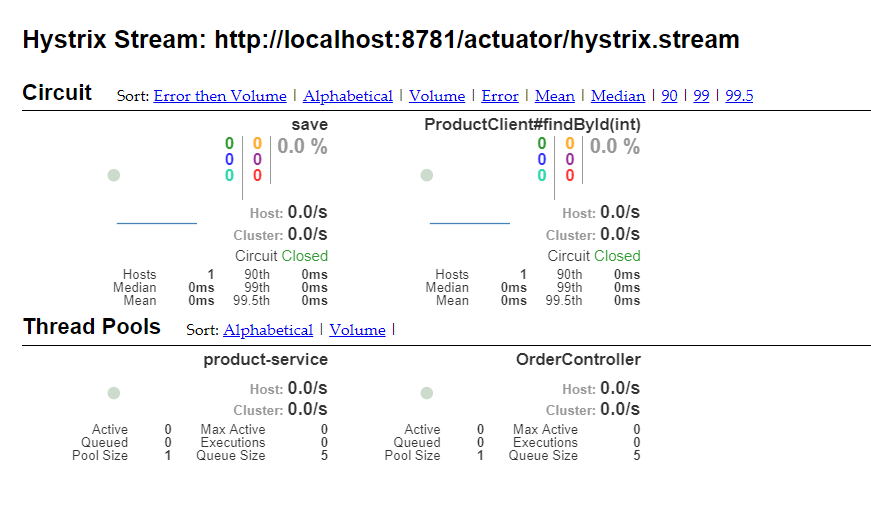
或者直接访问:http://localhost:8781/actuator/hystrix.stream不会报错
Spring Cloud(5):Hystrix的使用的更多相关文章
- Spring Cloud中Hystrix、Ribbon及Feign的熔断关系是什么?
导读 今天和大家聊一聊在Spring Cloud微服务框架实践中,比较核心但是又很容易把人搞得稀里糊涂的一个问题,那就是在Spring Cloud中Hystrix.Ribbon以及Feign它们三者之 ...
- Spring Cloud中Hystrix 线程隔离导致ThreadLocal数据丢失问题分析
最近spring boot项目中由于使用了spring cloud 的hystrix 导致了threadLocal中数据丢失,其实具体也没有使用hystrix,但是显示的把他打开了,导致了此问题. 导 ...
- 笔记:Spring Cloud Feign Hystrix 配置
在 Spring Cloud Feign 中,除了引入了用户客户端负载均衡的 Spring Cloud Ribbon 之外,还引入了服务保护与容错的工具 Hystrix,默认情况下,Spring Cl ...
- 架构师系列文:通过Spring Cloud组件Hystrix合并请求
在前文里,我们讲述了通过Hystrix进行容错处理的方式,这里我们将讲述通过Hystrix合并请求的方式 哪怕一个URL请求调用的功能再简单,Web应用服务都至少会开启一个线程来提供服务,换句话说,有 ...
- 从零开始学spring cloud(十一) -------- hystrix监控
一.官方文档阅读 服务启动后,可以通过/health和hystrix.stream查看效果,实际上,访问上述两个地址,会出现404,这是因为spring boot版本的问题, 我在这里使用的sprin ...
- Spring Cloud断路器Hystrix
在微服务架构中,存在着那么多的服务单元,若一个单元出现故障,就会因依赖关系形成故障蔓延,最终导致整个系统的瘫痪,这样的架构相较传统架构就更加的不稳定.为了解决这样的问题,因此产生了断路器模式. 什么是 ...
- Spring Cloud 关于 hystrix 的异常 fallback method wasn't found
在 Spring Cloud 中使用断路器 hystrix 后,可能会遇到异常:com.netflix.hystrix.contrib.javanica.exception.FallbackDefin ...
- Spring Cloud之Hystrix服务保护框架
服务保护利器 微服务高可用技术 大型复杂的分布式系统中,高可用相关的技术架构非常重要. 高可用架构非常重要的一个环节,就是如何将分布式系统中的各个服务打造成高可用的服务,从而足以应对分布式系统环境中的 ...
- spring cloud(五) hystrix
开启feign 熔断 hystrix 整合hystrix-dashboard监控面板 1. 服务调用者boot工程 pom引入依赖 <!-- hystrix-dashboard 监控依赖 ...
- Spring Cloud 之 Hystrix.
一.概述 在微服务架构中,我们将系统拆分成了很多服务单元,各单元的应用间通过服务注册与订阅的方式互相依赖.由于每个单元都在不同的进程中运行,依赖通过远程调用的方式执行,这样就有可能因为网络原因或是依 ...
随机推荐
- vue-element:文件上传七牛之key和异步的问题
效果图: html 代码: <el-form-item label="Excel文件" :label-width="formLabelWidth" pro ...
- STM32 (基础语法)笔记
指针遍历: char *myitoa(int value, char *string, int radix){ int i, d; int flag = 0; char *ptr = string; ...
- 关于docker入门教程
简介:docker入门教程 docker入门教程翻译自docker官方网站的Docker getting started 教程,官方网站:https://docs.docker.com/linux/s ...
- Farseer.net轻量级ORM开源框架 V1.x 入门篇:视图的数据操作
导航 目 录:Farseer.net轻量级ORM开源框架 目录 上一篇:Farseer.net轻量级ORM开源框架 V1.x 入门篇:视图实体类映射 下一篇:Farseer.net轻量级ORM开源 ...
- VS2015 update3 安装 asp.net core 失败
CMD 命令下执行: C:\DotNetCore\DotNetCore.1.0.0-VS2015Tools.Preview2.exe SKIP_VSU_CHECK=1
- QQ感叹号是什么鬼?原来是服务器波动,腾讯官方来辟谣了
今天晚上很多网友在用QQ发送消息的时候发现,自己发送的消息一直是感叹号❗到底是怎么回事呢?是消息都发不出去了吗?马浩周通过手机测试后发现,其实消息是可以发出去的,而官方手机QQ出来已经通知了,是服务器 ...
- CAD参数绘制半径标注(com接口)
主要用到函数说明: _DMxDrawX::DrawDimRadial 绘制一个半径标注.详细说明如下: 参数 说明 DOUBLE dCenterX 被标注的曲线的中点X值 DOUBLE dCenter ...
- CSS 实现斑马条纹
Part.1 linear-gradient() linear-gradient() 函数用于创建一个线性渐变的 "图像".为了创建一个线性渐变,你需要设置一个起始点和一个方向(指 ...
- docker 入门学习
一 : docker 安装(linux-centos7) 安装docker要求 1.docker只支持在64位cup架构计算机上运行,目前不支持32位cup. 2.建议系统的linux内核版本在3.1 ...
- 转:函数调用的区别:_cdecl以及_stdcall
函数调用的几个概念:_stdcall,_cdecl.... 1._stdcall是Pascal程序的缺省调用方式,通常用于Win32 Api中,函数采用从右到左的压栈方式,自己在退出时清空堆栈.VC将 ...