
PCB 内层负片散热PAD Symbols尺寸更改方法
如下图这是我们熟悉的内层负片散热PAD Symbols,我们CAM制作时,为了满足PCB工厂生产制作能力,,会优化散热PAD尺寸,让热PAD的尺寸符合制作规范要求,通常我们只关注散热PAD的3个指标即可(外环,内环,开口),只要将这3个参数优化到位就可以了。
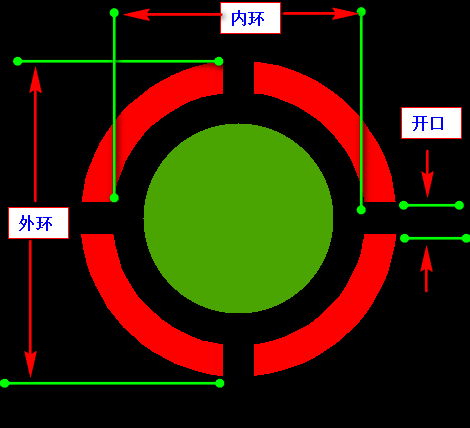
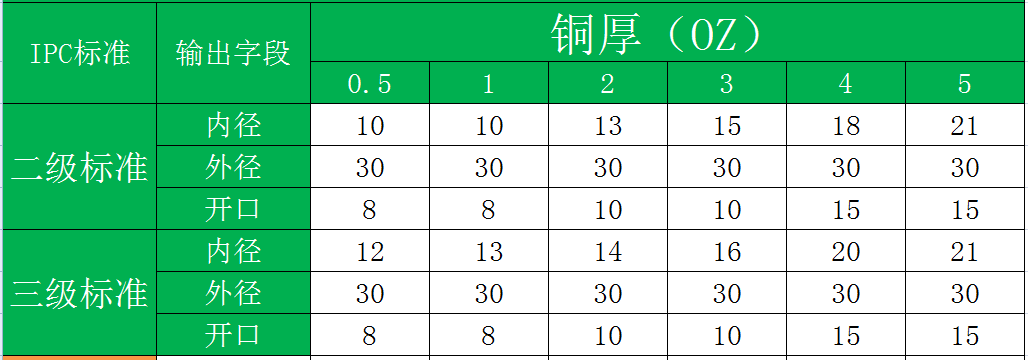
常规散热PAD 尺寸规范:(在此规范中:内径与外径,是基于孔的尺寸再预大值)
一.问题来了,我们如何更改散热PAD的尺寸
因为在CAM软件中,有N种的散热PAD类型,每一种散热PAD的Symbols对应的是一串文本,如:ths5000x3000x0x4x1000, rc_ths5000x3000x0x4x1000x500xr1000, 我们关注的3个参数就藏在这个串文本中,那直接更改是不可能了。
我们要解决这个问题。我们必须弄清楚,标准散热PAD的Symbols有多少种,每一种散热PAD 3关键参数(外环,内环,开口)所在这串文本位置, 我们可以要建立个散热PAD类,将原始Symbols字符串分解,并提取3个关键参数值, 这样才可以检测这个原始散热PAD尺寸是否符合要求了,符合要求就不更改,不符合要求就更改。
二.一共有多少种散热PAD,每个散热PAD的参数是什么?
共有7种标准散热PAD Symbols
1.Symbols名示例:
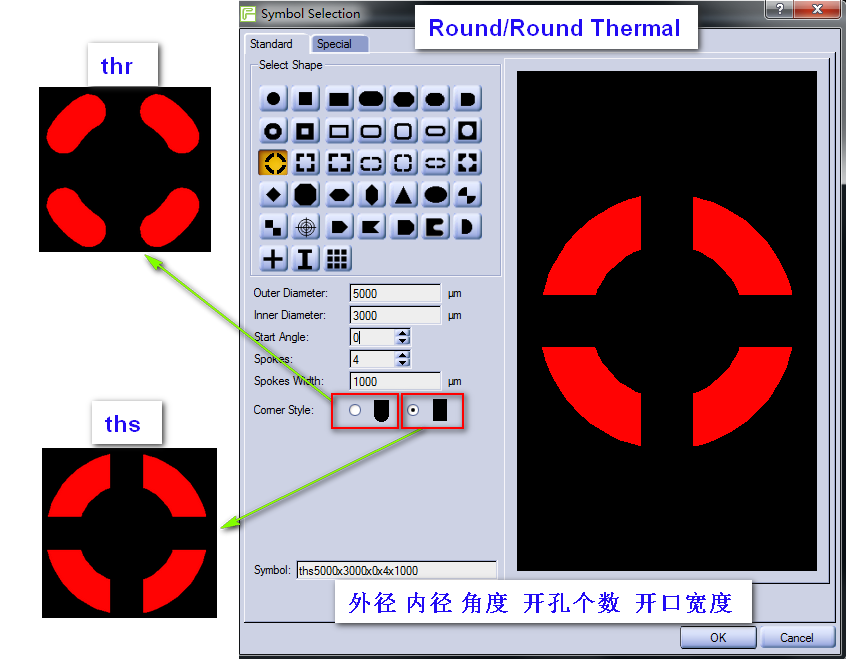
1. ths5000x3000x0x4x1000
外径 内径 角度 开口个数 开口宽度 thr ths
2. s_tho5000x3000x45x4x1000 外径
内径 角度 开口个数 开口宽度 s_thr s_ths s_tho
3. s_ths5000x4000x0x4x500xr1000
外径 内径 角度 开口个数 开口宽度 外圆角半径 s_ths
4. sr_ths5000x3000x0x4x1000
外径 内径 角度 开口个数 开口宽度 sr_ths
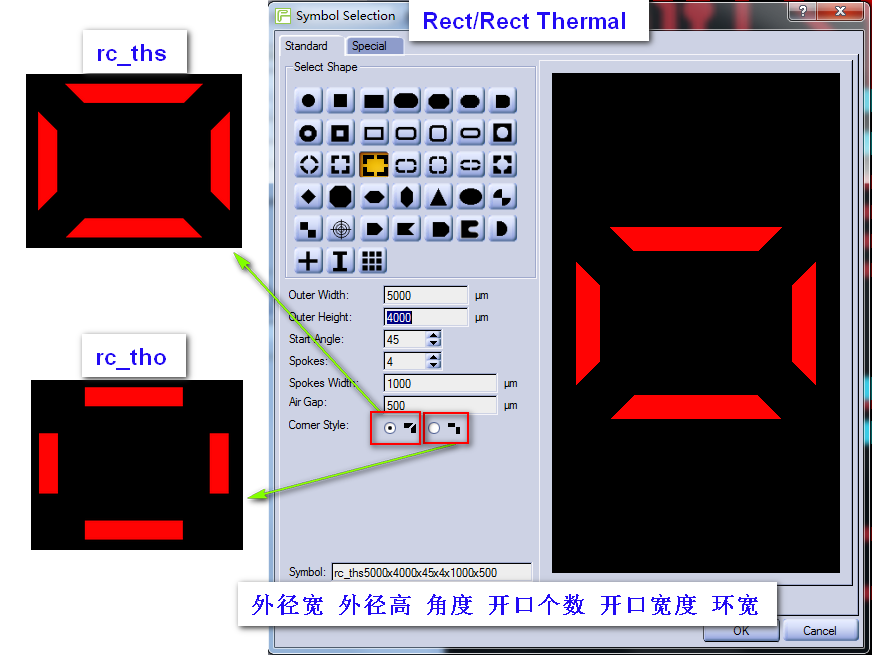
5. rc_ths5000x3000x45x4x1000x500
外径宽 外径高 角度 开口个数 开口宽度 环宽 rc_ths rc_tho
6. rc_ths5000x3000x0x4x1000x500xr1000
外径宽 外径高 角度 开口个数 开口宽度 环宽 外圆角半径 rc_ths
7. oblong_ths5000x3000x0x4x500x500xs
外径宽 外径高 角度 开口个数 开口宽度 环宽 尾随标识 oblong_ths(*)xs oblong_ths(*)xr
2.Symbols参数图示:


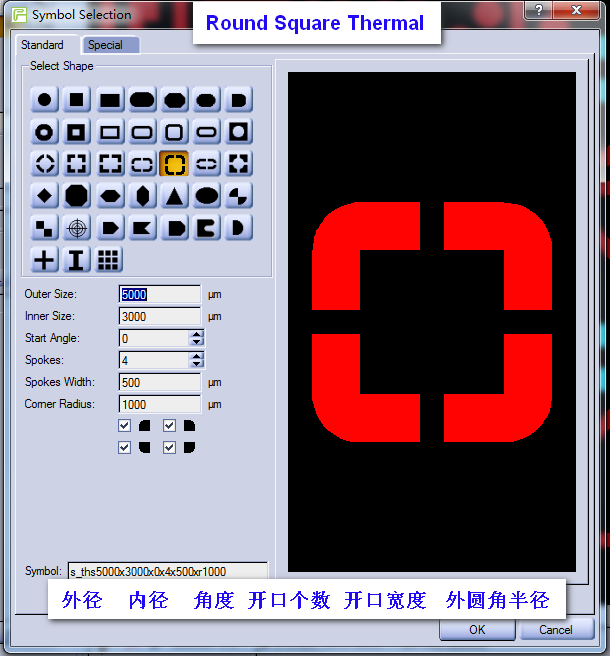
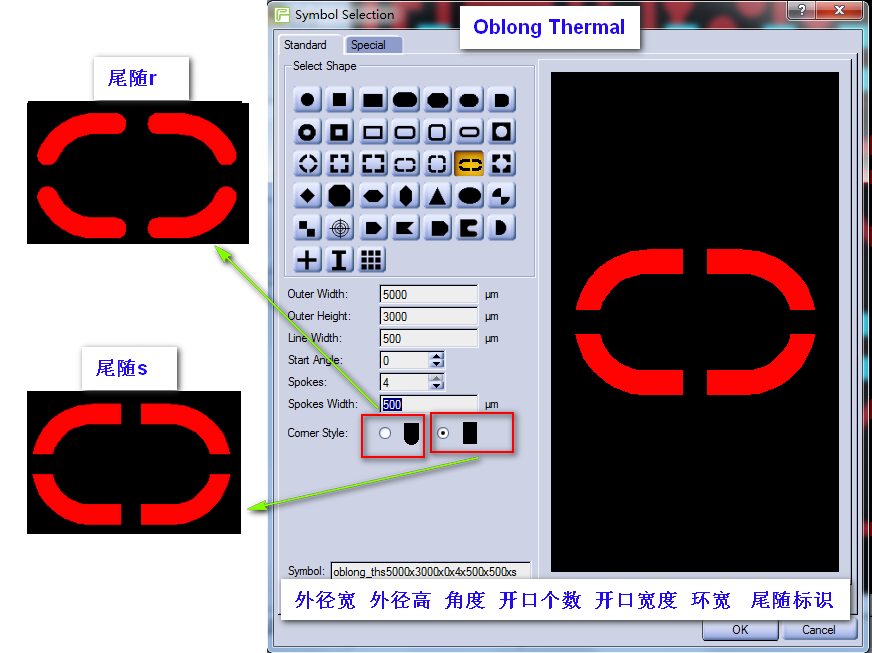
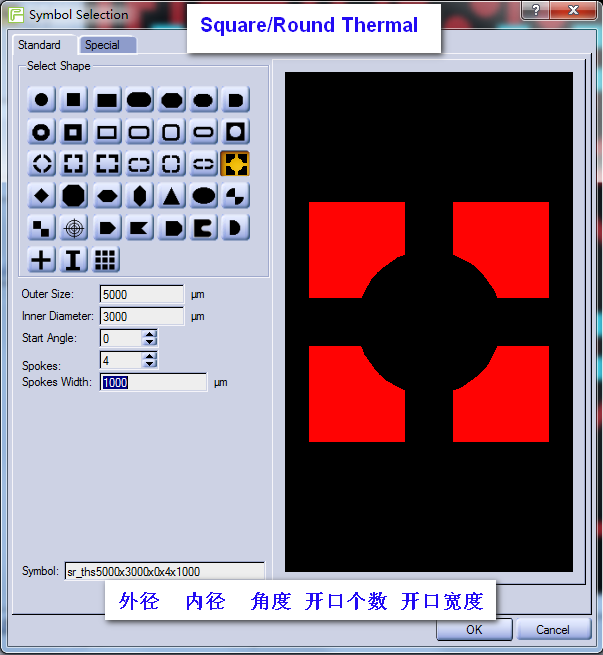
三.代码实现更改散热PAD symbols尺寸
1.更改散热PAD symbols类:
 public class symbolsThr

    {

        /// <summary>

        /// 是否外形尺寸(即无外径长宽)

        /// </summary>

        public bool isOuterSize

        {

            get

            {

                return _isOuterSize;

            }

            set

            {

                this._isOuterSize = value;

            }

        }

        private bool _isOuterSize = true;

        /// <summary>

        /// 散热PAD 外径

        /// </summary>

        public double OuterSize

        {

            get

            {

                return _OuterSize;

            }

            set

            {

                this._OuterSize = value;

                this._OuterWidthSize = this._OuterSize;

                this._OuterHeightSize = this._OuterSize;

                this._isOuterSize = true;

            }

        }

        private double _OuterSize;

        /// <summary>

        /// 散热PAD 外径宽

        /// </summary>

        public double OuterWidthSize

        {

            get

            {

                return _OuterWidthSize;

            }

            set

            {

                this._OuterWidthSize = value;

                this._isOuterSize = false;

            }

        }

        private double _OuterWidthSize;

        /// <summary>

        /// 散热PAD 外径高

        /// </summary>

        public double OuterHeightSize

        {

            get

            {

                return _OuterHeightSize;

            }

            set

            {

                this._OuterHeightSize = value;

                this._isOuterSize = false;

            }

        }

        private double _OuterHeightSize;

        /// <summary>

        /// 散热PAD 内径  即(外径-环宽*2)

        /// </summary>

        public double InnerSize

        {

            get

            {

                return _InnerSize;

            }

            set

            {

                this._InnerSize = value;

                this._RingWidth = (this._OuterSize - this._InnerSize) * 0.5;

            }

        }

        private double _InnerSize;

        /// <summary>

        /// 散热PAD 环宽

        /// </summary>

        public double RingWidth

        {

            get

            {

                return _RingWidth;

            }

            set

            {

                this._RingWidth = value;

                this._InnerSize = this._OuterSize - this._RingWidth * ;

            }

        }

        private double _RingWidth;

        /// <summary>

        /// 散热PAD  开口宽

        /// </summary>

        public double GapWidth

        {

            get

            {

                return _GapWidth;

            }

            set

            {

                this._GapWidth = value;

            }

        }

        private double _GapWidth;

        /// <summary>

        /// 散热PAD  角度

        /// </summary>

        public double Angle { get; set; }

        /// <summary>

        /// 散热PAD  开口个数

        /// </summary>

        public double GapCount { get; set; }

        /// <summary>

        /// 散热PAD  外圆角半径

        /// </summary>

        public double OuterRoundRadius { get; set; }

        /// <summary>

        /// 散热PAD  尾随标识

        /// </summary>

        public string SymbolsEndString { get; set; } = "";

        private string _SymbolsStart;

        /// <summary>

        /// 初始化

        /// </summary>

        /// <param name="SymbolsName">原散热PAD symbols</param>

        public symbolsThr(string SymbolsName)

        {

            List<string> symbolsStartList = new List<string>() { "thr", "ths", "s_thr", "s_ths", "s_tho", "sr_ths", "rc_ths", "rc_tho", "rc_ths", "oblong_ths" };

            SymbolsName = SymbolsName.Trim().ToLower();

            int symbolsID = symbolsStartList.FindIndex(tt => SymbolsName.StartsWith(tt));

            if (symbolsID >= )

            {

                _SymbolsStart = symbolsStartList[symbolsID];

                var MathesList = Regex.Matches(SymbolsName, "\\d+\\.?\\d*");

                if (symbolsID >= )

                {

                    this.OuterWidthSize = double.Parse(MathesList[].Value);

                    this.OuterHeightSize = double.Parse(MathesList[].Value);

                    this.Angle = double.Parse(MathesList[].Value);

                    this.GapCount = double.Parse(MathesList[].Value);

                    this.GapWidth = double.Parse(MathesList[].Value);

                    this.RingWidth = double.Parse(MathesList[].Value);

                    if (MathesList.Count ==  && _SymbolsStart == "rc_ths")

                        this.OuterRoundRadius = double.Parse(MathesList[].Value);

                    if (_SymbolsStart == "oblong_ths")

                        this.SymbolsEndString = SymbolsName.Substring(SymbolsName.Length - , );

                }

                else

                {

                    this.OuterSize = double.Parse(MathesList[].Value);

                    this.InnerSize = double.Parse(MathesList[].Value);

                    this.Angle = double.Parse(MathesList[].Value);

                    this.GapCount = double.Parse(MathesList[].Value);

                    this.GapWidth = double.Parse(MathesList[].Value);

                    if (MathesList.Count ==  && _SymbolsStart == "s_ths")

                        this.OuterRoundRadius = double.Parse(MathesList[].Value);

                }

            }

        }

        /// <summary>

        /// 获取Symbols

        /// </summary>

        /// <returns></returns>

        public string GetSymbolsThr

        {

            get

            {

                string symbolsName = "";

                if (_isOuterSize)

                {

                    symbolsName = $"{this._SymbolsStart}{this.OuterSize}x{this._InnerSize}x{this.Angle}x{this.GapCount}x{this.GapWidth}";

                    symbolsName += this.OuterRoundRadius < 0.01 ? "" : $"xr{this.OuterRoundRadius}";

                }

                else

                {

                    symbolsName = $"{this._SymbolsStart}{this.OuterWidthSize}x{this.OuterHeightSize}x{this.Angle}x{this.GapCount}x{this.GapWidth}x{this.RingWidth}";

                    symbolsName += this.OuterRoundRadius < 0.01 ? "" : $"xr{this.OuterRoundRadius}";

                    symbolsName += string.IsNullOrEmpty(SymbolsEndString) ? "" : $"x{this.SymbolsEndString}";

                }

                return symbolsName;

            }

        }

        /// <summary>

        /// 更改圆形(方形)散热PAD

        /// </summary>

        /// <param name="OuterSize_">外形</param>

        /// <param name="InnerSize_">内径</param>

        /// <param name="GapWidth_">开口宽度</param>

        /// <returns></returns>

        public string SetThrSize(double OuterSize_, double InnerSize_, double GapWidth_)

        {

            this.OuterSize = (this.OuterSize < OuterSize_) ? OuterSize_ : this.OuterSize;

            this.InnerSize = (this.InnerSize < InnerSize_) ? InnerSize_ : this.InnerSize;

            this.GapWidth = (this.GapWidth < GapWidth_) ? GapWidth_ : this.GapWidth;

            return this.GetSymbolsThr;

        }

        /// <summary>

        /// 更改矩形散热PAD

        /// </summary>

        /// <param name="OuterWidthSize_">外径宽</param>

        /// <param name="OuterHeightSize_">外径高</param>

        /// <param name="RingWidth_">环宽</param>

        /// <param name="GapWidth_">开口宽度</param>

        /// <returns></returns>

        public string SetThrSize(double OuterWidthSize_, double OuterHeightSize_, double RingWidth_, double GapWidth_)

        {

            this.OuterWidthSize = (this.OuterWidthSize < OuterWidthSize_) ? OuterWidthSize_ : this.OuterWidthSize;

            this.OuterHeightSize = (this.OuterHeightSize < OuterHeightSize_) ? OuterHeightSize_ : this.OuterHeightSize;

            this.RingWidth = (this.RingWidth < RingWidth_) ? RingWidth_ : this.RingWidth;

            this.GapWidth = (this.GapWidth < GapWidth_) ? GapWidth_ : this.GapWidth;

            return this.GetSymbolsThr;

        }

    }
2.调用例子:
            symbolsThr symThr = new symbolsThr("s_ths5000x4000x0x4x500xr1000");

            string symbols = symThr.SetThrSize(, , ); //更改:外径  内径  开口   改后symbls为  s_ths6000x5000x0x4x1000xr1000
PCB 内层负片散热PAD Symbols尺寸更改方法的更多相关文章
- PCB genesis短槽加引导孔实现方法
一.何为短槽 短槽通常定义:槽长小于2倍槽宽 如:槽长1.8mm,槽宽1.0mm 二.为什么要加短槽加引孔呢 短槽孔在钻孔时孔易偏斜导致槽长偏短, 当槽长宽比越小,则受力越不均匀,在钻第2个 ...
- WCF X.b 操作引用了已经从 Y.b 操作导出的消息元素 [http://tempuri.org/:b]。可以通过更改方法名称或使用 OperationContractAttribute 的 Name 属性更改其中一个操作的名称...
详细错误如下: 很可能由 IncludeExceptionDetailInFaults=true 创建的 ExceptionDetail,其值为: System.InvalidOperationExc ...
- Chem 3D模型的参数值更改方法
在化学绘图软件ChemOffice 15.1中有个专门用于绘制三维结构的组件,就是Chem 3D.通过这个组件用户可以绘制3D模型并可以通过这个组件来计算一些化学数据.在使用Chem 3D组件过程中, ...
- Thinkphp自定义生成缩略图尺寸的方法
Thinkphp自定义生成缩略图尺寸的方法,本实例中生成两张不同尺寸的图片:第一张是大图350*350,第二张 50*50的缩略图 Image类是Thinkphp系统自带的,可以研究下,这个缩略图类很 ...
- MFC exe文件生成的图标更改方法
MFC exe文件生成的图标更改方法 https://blog.csdn.net/txwtech/article/details/92980545
- Python镜像源集合——镜像源更改方法
python在线安装库时会较慢,那是因为python的默认镜像源在国外,因此会慢:而国内有很多可以用的python镜像源,将python镜像源更改为国内的,则可以大大加快python库的安装速度. 1 ...
- Allegro PCB -内层分割,比如电源层需要分割几种电源
内层分割,比如电源层需要分割几种电源. (1).点击Display -> Assign Color 在Option中,先取一种颜色作为高亮显示的颜色. (2).在Find中,选Net,点击mor ...
- IOS 获取网络图像尺寸 更改 图像色彩值 什么一套方法灰色
直接在代码 头文件 // 图片处理 0 半灰色 1 灰度 2 深棕色 3 反色 +(UIImage*)imageWithImage:(UIImage*)image grayLevelType:(UII ...
- PCB genesis自制孔点 Font字体实现方法
一.先看genesis原有Font字体 在PCB工程CAM加孔点字体要求时,通常我们直接用Geneis软件给我们提供了2种孔点字体canned_57与canned_67,但此字体可能不能满足各个工厂个 ...
随机推荐
- Java基础——异常
一.什么是异常 异常的英文单词是exception,字面翻译就是“意外.例外”的意思,也就是非正常情况.事实上,异常本质上是程序上的错误,包括程序逻辑错误和系统错误.比如使用空的引用.数组下标越界. ...
- 在TWaver的Tree节点上画线
论坛上有同学提出如何在tree上画引导线,之前我们Flex已经实现此功能,现在最新版的HTML5也将添加此功能.先看看效果:详细的使用方法可以参考我们开发手册中可视化视图组件#Tree引导线一章,下面 ...
- P1091 合唱队形题解(洛谷,动态规划LIS,单调队列)
先上题目 P1091 合唱队形(点击打开题目) 题目解读: 1.由T1<...<Ti和Ti>Ti+1>…>TK可以看出这题涉及最长上升子序列和最长下降子序列 2 ...
- 阿里云ECS屏蔽25端口,官方建议使用465 SSL端口发送邮件
阿里云ECS VPC网络,搭建了zabbix,想通过三方邮件系统发送邮件,本机开虚拟机测试发邮件一切正常,到阿里ECS的时候邮件各种发不出去,到处找原因,最后度娘告诉了我真想,原来阿里把25端口屏蔽 ...
- MySQL数据库grant授权命令
MySQL数据库grant授权命令 制作人:全心全意 grant授权命令的使用 grant授权命令使用语法: grant 权限 on 数据库对象 to 用户 grant 权限 on 数据库对象 to ...
- vs2012+ winform+.net4.0发布如何在xp上运行
今天在英文版vs2013打包发布4.0(非4.0 client)的winform时,遇到了在xp上无法运行的情况,.net framework 4.0在xp上已安装.在打包前,winform工程,即菜 ...
- C语言结构体用法
结构体的定义: 方法一: struct student { char name[10]; int age; int number; }; struct student stu1; 方法二: struc ...
- SpringMVC中@Controller和@RequestMapping用法和其他常用注解(转)
一.简介 在SpringMVC 中,控制器Controller 负责处理由DispatcherServlet 分发的请求,它把用户请求的数据经过业务处理层处理之后封装成一个Model ,然后再把该Mo ...
- [bzoj1867][Noi1999][钉子和小球] (动态规划)
Description Input 第1行为整数n(2<=n<=50)和m(0<=m<=n).以下n行依次为木板上从上至下n行钉子的信息,每行中‘*’表示钉子还在,‘.’表示钉 ...
- Oracle学习总结(4)——MySql、SqlServer、Oracle数据库行转列大全
MySql行转列 以id分组,把name字段的值打印在一行,逗号分隔(默认) select CustomerDrugCode,group_concat(AuditItemName) from noau ...