
[Android Studio]SQLScout插件安装破解
以下内容为原创,欢迎转载,转载请注明
来自天天博客:http://www.cnblogs.com/tiantianbyconan/p/5972138.html
[Android Studio]SQLScout插件安装破解
0. 写在前面
想当初很长一段时间内不想用Android Studio而喜欢用Intellij IDEA(旗舰版)其中一个原因就是因为Intellij IDEA(旗舰版)自带Database Explorer功能便于调试,终于找到了这个Android Studio的插件可以用了,下载试用,满意!就是这个感觉!可惜需要付费,还有点小贵--,囊中羞涩,所以只好亲自手动破解,大家好孩子别轻易尝试。。。
1. 安装SQLScout插件
打开
Android StudioSettings(on Windows and Linux) orPreferences(Mac)PluginsBrowse Repositories...
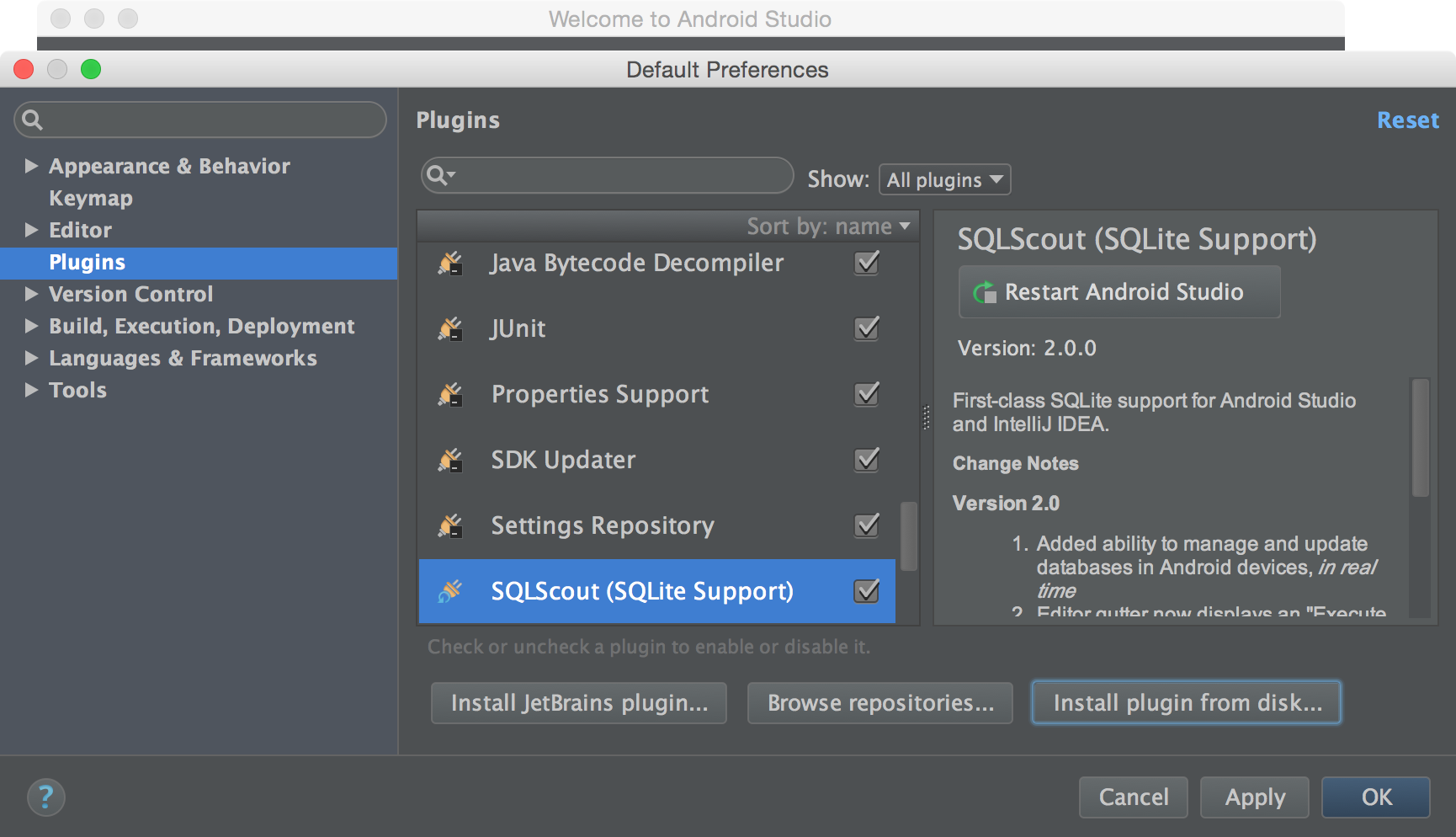
选择
SQLScout并安装
2. 激活SQLScout
在试用期过后,需要购买一个商业证书来激活SQLScout。
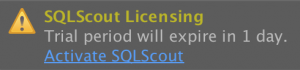
通过这里 [购买商业证书] (https://www.idescout.com/secure/buy),然后点击Activate按钮。
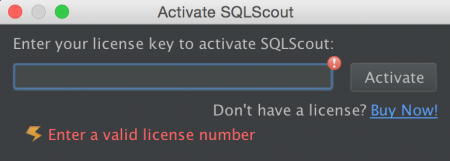
3. 破解
注意:以下破解只供学习讨论,请勿传播
3.1 破解SQLScout 2.0.4
for Android Studio 2.1 and IntelliJ IDEA 2016.1
通过前面的方法安装SQLScout插件之后,进入Intellij IDEA插件安装目录:
~/Library/Application Support/AndroidStudio/SQLScout/lib/反编译SQLScout.jar
进入com/idescout/sqlite/license/,修改License.class。
License.java如下:
package com.idescout.sqlite.license;

import com.google.common.annotations.VisibleForTesting;
import com.google.common.collect.Lists;
import com.intellij.ide.IdeEventQueue;
import com.intellij.openapi.components.ServiceManager;

import org.jetbrains.annotations.NotNull;
import org.jetbrains.annotations.Nullable;

import java.util.List;
import java.util.concurrent.TimeUnit;

public class License {
    @NotNull
    private final m a = new m();
    @NotNull
    private final k b = new k();
    @NotNull
    private final List<j> c = Lists.newArrayList();
    @NotNull
    private final LicenseCheck.Type d = LicenseCheck.Type.COMMERCIAL;
    public static int e;
    private static final String[] f = new String[4];

    @NotNull
    public static License getInstance() {
        License license = null;
        try {

            if ((license = (License) ServiceManager.getService(License.class)) == null) {
                throw new IllegalStateException(String.format(f[0], new Object[]{f[2], f[1]}));
            }
        } catch (IllegalStateException localIllegalStateException) {
            throw localIllegalStateException;
        }
        return license;
    }

    private License() {
        this.c.add(this.b);
        this.c.add(this.a);
        int i = (int) TimeUnit.MINUTES.toMillis(1L);
        IdeEventQueue.getInstance().addIdleListener(new i(this), i);
    }

    private void a() {
    }

    private void a(@NotNull com.intellij.openapi.project.Project paramProject) {
    }

    boolean b() {
        return false;
    }

    public boolean isValidLicense() {
        return true;
    }

    public boolean isValidLicense(@Nullable com.intellij.openapi.project.Project arg1) {
        return true;
    }

    @VisibleForTesting
    void c() {
        this.b.c();
    }

    void a(@NotNull String paramString)
            throws Throwable {
    }

    void a(@NotNull Throwable paramThrowable, @org.jetbrains.annotations.Nullable com.intellij.openapi.project.Project paramProject) {
    }

    static void a(License paramLicense) {
        paramLicense.a();
    }

    static m b(License paramLicense) {
        return paramLicense.a;
    }

    static k c(License paramLicense) {
        return paramLicense.b;
    }
}然后编译该文件复制License.class文件,替换原来的License.class。
然后jar cvf SQLScout.jar ./*打包jar。
最后替换~/Library/Application Support/AndroidStudio/SQLScout/lib/下的SQLScout.jar文件,重启Android Studio。
3.2 破解SQLScout 2.0.6
方法与破解2.0.4一样,License.class替换如下:
package com.idescout.sqlite.license;

import com.google.common.annotations.VisibleForTesting;
import com.intellij.openapi.components.ServiceManager;
import com.intellij.openapi.project.Project;

import org.jetbrains.annotations.NotNull;
import org.jetbrains.annotations.Nullable;

import java.util.ArrayList;
import java.util.List;

public class License {
    @NotNull
    private final h a;
    @NotNull
    private final f b;
    @NotNull
    private final List<e> c;
    @NotNull
    private final LicenseCheck.Type d;
    private static final String[] e = new String[11];

    @NotNull
    public static License getInstance() {
        License license;
        try {
            license = (License) ServiceManager.getService((Class) License.class);
            if (license == null) {
                throw new IllegalStateException("error by wangjie");
            }
        } catch (IllegalStateException ex) {
            throw ex;
        }
        return license;
    }

    private License() {
        this.a = new h();
        this.b = new f();
        this.c = new ArrayList<e>();
        this.d = LicenseCheck.Type.COMMERCIAL;
        this.c.add(this.b);
        this.c.add(this.a);
//        IdeEventQueue.getInstance().addIdleListener(this::d, (int) TimeUnit.MINUTES.toMillis(1L));
    }

    private void a() {
    }

    private void a(@NotNull final Project project) {
    }

    boolean b() {
        return false;
    }

    public boolean isValidLicense() {
        return true;
    }

    public boolean isValidLicense(@Nullable final Project p0) {
        return true;
    }

    @VisibleForTesting
    void c() {
        this.b.c();
    }

    void a(@NotNull final String s) throws Throwable {
    }

    void a(@NotNull final Throwable t, @Nullable final Project project) {
    }

    private void d() {
    }

    static h a(final License license) {
        return license.a;
    }

    static f b(final License license) {
        return license.b;
    }

}
3.3 破解文件下载
使用方式,下载下面的
SQLScout.jar,替换~/Library/Application Support/AndroidStudio../SQLScout/lib/SQLScout.jar文件,重启AndroidStudio即可。
3.3.1 SQLScout 2.0.4:
支持Android Studio 2.1 和 IntelliJ IDEA 2016.1.
SQLScout.jar下载:
https://github.com/wangjiegulu/wangjiegulu.github.com/tree/master/file/SQLScout/2.0.4
3.3.2 SQLScout 2.0.6:
支持Android Studio 2.2
SQLScout.jar下载:
https://github.com/wangjiegulu/wangjiegulu.github.com/tree/master/file/SQLScout/2.0.6
[Android Studio]SQLScout插件安装破解的更多相关文章
- Android Studio常用插件续
这个月因为各种事情在忙,包括赶项目,回老家,还有准备旅游的事,所以应该写不了四篇博客了.今天介绍一下关于Android Studio 的几个好用的插件,都是我在用的,它们或能帮你节省时间,或者让你心情 ...
- Android studio 1.x 安装完毕后无法打开问题解决方案
Android Studio 1.0正式发布,给Android开发者带来了不小的惊喜,再也不用为繁琐的环境配置而烦恼,从某一层面上说这降低了android开发门槛. 不过貌似只能开心一会儿,因为and ...
- android studio 学习之一 安装和基本使用
一.简介 Android Studio 是一个Android集成开发工具,基于IntelliJ IDEA. 类似 Eclipse ADT,Android Studio 提供了集成的 Android 开 ...
- Android Studio加入插件(Genymotion)
官方模拟器的龟速已让我们无力吐槽.幸好有genymotion这款逆天的Android虚拟机,它有着高速的开启速度,良好的交互界面. 是Android开发必备的良品.甚至有些玩家已经用genymotio ...
- Android Studio入门(安装-->开发调试)
写在前面的话:本文来源:http://blog.csdn.net/yanbober/article/details/45306483 目标:Android Studio新手–>下载安装配置–&g ...
- Android Studio 工具插件
1.Android Studio 翻译插件,可以将英文翻译为中文. https://github.com/Skykai521/ECTranslation 2.Android Studio之Androi ...
- Android项目实战(十九):Android Studio 优秀插件: Parcelable Code Generator
Android Studio 优秀插件系列: Android Studio 优秀插件(一):GsonFormat Android Studio 优秀插件(二): Parcelable Code Gen ...
- Android开发实战(十八):Android Studio 优秀插件:GsonFormat
Android Studio 优秀插件系列: Android Studio 优秀插件(一):GsonFormat Android Studio 优秀插件(二): Parcelable Code Gen ...
- Windows环境下Android Studio v1.0安装教程
Windows环境下Android Studio v1.0安装教程 准备工具 JDK安装包. 要求:JDK 7以及以上版本. Android Studio安装文件. Windows: exe(包含SD ...
随机推荐
- 周末聊聊IT人员的人脉观:关于帮妹子找兼职有感
背景: 前几天,有个认识了好几年的网友,现在是大学生,在厦门读大一,说和她同学要一起到广州找兼职,看我有没有介绍. 像我这么积极热心善良的人,就说帮她找找看,结果问了几次,没消息,只好诚实的回复人家, ...
- .NET面试题系列[4] - C# 基础知识(2)
2 类型转换 面试出现频率:主要考察装箱和拆箱.对于有笔试题的场合也可能会考一些基本的类型转换是否合法. 重要程度:10/10 CLR最重要的特性之一就是类型安全性.在运行时,CLR总是知道一个对象是 ...
- 轻量级通信引擎StriveEngine —— C/S通信demo(附源码)
前段时间,有几个研究ESFramework的朋友对我说,ESFramework有点庞大,对于他们目前的项目来说有点“杀鸡用牛刀”的意思,因为他们的项目不需要文件传送.不需要P2P.不存在好友关系.也不 ...
- Visual Studio 2015 移动跨平台开发初体验
微软换了新 CEO 后变化很大,对我们团队最有利的消息就是 Visual Studio 2015 支持移动应用跨平台开发. 还记不记得很早之前,Xamarin 宣布与微软成为合作伙伴的消息.显然,Xa ...
- 在ASP.NET MVC5中实现具有服务器端过滤、排序和分页的GridView
背景 在前一篇文章<[初学者指南]在ASP.NET MVC 5中创建GridView>中,我们学习了如何在 ASP.NET MVC 中实现 GridView,类似于 ASP.NET web ...
- 关于python中的flush问题
今天写了一个控制台下的进度条小程序,遇到了关于flush的问题,在这里小小的总结一下. 首先在要flush的字符串必须后边加上'\r'(回车) 将数据送入缓冲区这样在新打印字符的时候就可以将原来的显示 ...
- ubuntu 启动MySql和安装python的MySQLdb模块
ubuntu一般会自己预安装mysql,你只需 /etc/init.d/mysql start|stop|restart|reload|force-reload|status 命令便可以实现mysq ...
- dom 操作
1.dom 的查找 (1)根据id 查找 var object = document.getElementById("id 值"): (2)根据 name 查找:返回 dom 对象 ...
- Uncaught RangeError: Maximum call stack size exceeded 调试日记
异常处理汇总-前端系列 http://www.cnblogs.com/dunitian/p/4523015.html 开发道路上不是解决问题最重要,而是解决问题的过程,这个过程我们称之为~~~调试 记 ...
- CSS3与页面布局学习总结(五)——Web Font与Sprite
一.web font web font是应用在web中的一种字体技术,在CSS中使用font-face定义新的字体.先了解操作系统中的字体: a).安装好操作系统后,会默认安装一些字体,这些字体文件描 ...