
Absolute positioning
The programmer specifies the position and the size of each widget in pixels. When you use absolute positioning, we have to understand the following limitations:
- The size and the position of a widget do not change if we resize a window
- Applications might look different on various platforms
- Changing fonts in our application might spoil the layout
- If we decide to change our layout, we must completely redo our layout, which is tedious and time consuming
The following example will position widgets in absolute coordinates.
#!/usr/bin/python

# -*- coding: utf-8 -*-

"""

ZetCode PyQt4 tutorial

This example shows three labels on a window

using absolute positioning.

author: Jan Bodnar

website: zetcode.com

last edited: October 2011

"""

import sys

from PyQt4 import QtGui

class Example(QtGui.QWidget):

    def __init__(self):

        super(Example, self).__init__()

        self.initUI()

    def initUI(self):

        lbl1 = QtGui.QLabel('ZetCode', self)

        lbl1.move(15, 10)

        lbl2 = QtGui.QLabel('tutorials', self)

        lbl2.move(35, 40)

        lbl3 = QtGui.QLabel('for programmers', self)

        lbl3.move(55, 70)

        self.setGeometry(300, 300, 250, 150)

        self.setWindowTitle('Absolute')

        self.show()

def main():

    app = QtGui.QApplication(sys.argv)

    ex = Example()

    sys.exit(app.exec_())

if __name__ == '__main__':

    main()
We use the move() method to position our widgets. In our case these are labels. We position them by providing the x and y coordinates. The beginning of the coordinate system is at the left top corner. The x values grow from left to right. The y values grow from top to bottom.
lbl1 = QtGui.QLabel('Zetcode', self)

lbl1.move(15, 10)
The label widget is positioned at x=15 and y=10.
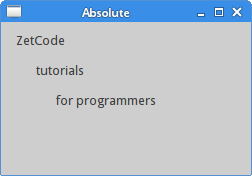 Figure: Absolute positioning
Absolute positioning的更多相关文章
- CSS魔法堂:Absolute Positioning就这个样
前言 当我们以position:absolute之名让元素脱离Normal flow的控制后,以为通过left和top属性值即可让元素得以无限的自由时,却发现还有各种神秘的力量左右着它的来去,于是我们 ...
- 绝对定位( Absolute positioning )
绝对定位( Absolute positioning ) 之前在介绍定位体系的时候,已经简单的介绍了绝对定位和固定定位.一般情况下,这两种定位的元素, 在 3D 的可视化模型中,处于浮动元素的上方,或 ...
- css使absolute相对于父容器进行定位而不是以body(为什么绝对定位(absolute)的父级元素必须是相对定位(relative))
借知乎的回答如下解释: 首先,我想告诉你的是,如果父级元素是绝对定位(absolute)或者没有设置,里面的绝对定位(absolute)自动以body定位.这句话是错的.正确的是:只要父级元素设了po ...
- CSS魔法堂:小结一下Box Model与Positioning Scheme
前言 对于Box Model和Positioning Scheme中3种定位模式的细节,已经通过以下几篇文章记录了我对其的理解和思考. <CSS魔法堂:重新认识Box Model.IFC.B ...
- Relative 定位与Absolute 定位实例
一直没有弄懂相对定位与绝对定位之间的关系,今天特来学习一下.本实践都是在360浏览器下测试所得. <!DOCTYPE html> <html> <head> < ...
- 脱离文档流两操作,float和position:absolute的区别
文档流:将窗体自上而下分成一行行, 并在每行中按从左至右的顺序排放元素,块状元素独占一行,内联元素不独占一行: CSS中脱离文档流,也就是将元素从普通的布局排版中拿走,其他盒子在定位的时候,会当做脱离 ...
- 【代码笔记】Web-CSS-CSS Positioning
一,效果图. 二,代码. <!DOCTYPE html> <html> <head> <meta charset="utf-8"> ...
- html 元素定位position-relative, absolute, fixed, static
看到这个,你有什么想法? Difference between static and relative positioning 如果你能完全看明白,那几本上css 元素定位的东西基本都会了.本文也不用 ...
- float和position:absolute脱离文本流的区别
float和position:absolute脱离文本流的区别原创 paediatrician 最后发布于2016-09-19 10:43:05 阅读数 5375 收藏展开 文档流:将窗体自上而下分成 ...
随机推荐
- HDU 1011 Starship Troopers 树形+背包dp
http://acm.hdu.edu.cn/showproblem.php?pid=1011 题意:每个节点有两个值bug和brain,当清扫该节点的所有bug时就得到brain值,只有当父节点被 ...
- 数位dp小结以及模板
这里是网址 别人的高一啊QAQ.... 嗯一般记忆化搜索是比递推好写的所以我写的都是dfs嗯......(因为我找不到规律啊摔,还是太菜.....) 显然这个东西的条件是非常的有套路..但是不管怎么样 ...
- JDK源码(1.7) -- java.util.ListIterator<E>
java.util.ListIterator<E> 源码分析(JDK1.7) ------------------------------------------------------- ...
- asp.net调用存储过程2
创建一个只有输入参数的存储过程 create procedure proc_user@name varchar(20),@Password varchar(100)as select * from l ...
- leetcode76. Minimum Window Substring
leetcode76. Minimum Window Substring 题意: 给定字符串S和字符串T,找到S中的最小窗口,其中将包含复杂度O(n)中T中的所有字符. 例如, S ="AD ...
- CodeM资格赛2
题目描述 组委会正在为美团点评CodeM大赛的决赛设计新赛制. 比赛有 n 个人参加(其中 n 为2的幂),每个参赛者根据资格赛和预赛.复赛的成绩,会有不同的积分.比赛采取锦标赛赛制,分轮次进行,设某 ...
- Intellij Idea使用及配置
1.JDK设置及修改工程JDKFile-->Project Structure: project SDK--New a jsdk默认JDKFile ->Other Settings-> ...
- .apk文件的MIME类型
IIS7中下载apk文件会报404错误. 找到:IIS目录,MIME类型 添加.apk文件的MIME类型. 文件扩展名:.apk MIME类型:application/vnd.android.pack ...
- iOS开发之int,NSInteger,NSUInteger,NSNumber的使用
1.首先先了解下NSNumber类型: 苹果官方文档地址:https://developer.apple.com/library/ios/documentation/Cocoa/Reference/F ...
- How to Distinguish a Physical Disk Device from an Event Message
https://support.microsoft.com/en-us/help/159865 https://support.microsoft.com/en-us/help/244780/inf ...