
Android——Intent(意图)

//Intent的属性
  Intent in1 = new Intent();

  ComponentName componentName = new ComponentName(this,Activity2.class);

  in1.setComponent(componentName);//设置显示意图

  in1.setAction(Intent.ACTION_DIAL);//用特别的字符串规定一些功能的Activity 实现隐式意图 唯一性

  in1.addFlags(1);//自己规定标记  多个

  in1.addCategory("");//多个

  //in1.setDataAndTypeAndNormalize();Type

  Intent intent = new Intent(this,Activity2.class);
main_layout.xml
<Button

        android:layout_width="wrap_content"

        android:layout_height="wrap_content"

        android:text="隐式意图调用"

        android:textSize="30dp"

        android:onClick="onclick5"

        />

    <Button

        android:layout_width="wrap_content"

        android:layout_height="wrap_content"

        android:text="隐式意图调用打电话"

        android:textSize="30dp"

        android:onClick="onclick6"

        />

    <Button

        android:layout_width="wrap_content"

        android:layout_height="wrap_content"

        android:text="隐式意图直接拨打电话"

        android:textSize="30dp"

        android:onClick="onclick7"

        />

    <Button

        android:layout_width="wrap_content"

        android:layout_height="wrap_content"

        android:text="回到桌面"

        android:textSize="30dp"

        android:onClick="onclick8"

        />
MainActivity.java
//隐式意图的监听

       public void onclick5(View view)

    {

        //只有action的隐式意图

        Intent intent = new Intent("hello");

        startActivity(intent);

    }

    public void onclick6(View view)

    {

        //action的隐式意图

        //传数据  data Uri

        Uri uri = Uri.parse("tel:110");

        Intent intent = new Intent(Intent.ACTION_DIAL,uri);

        startActivity(intent);

    }

    public void onclick7(View view)

    {

        //action的隐式意图

        //传数据  data Uri

        Uri uri = Uri.parse("tel:110");

        Intent intent = new Intent(Intent.ACTION_CALL,uri);

        startActivity(intent);

    }

    public void onclick8(View view)

    {

        //action的隐式意图

        //回到桌面

        Intent intent = new Intent(Intent.ACTION_MAIN);

        intent.addCategory(Intent.CATEGORY_HOME);

        startActivity(intent);

    }
AndroidManifext.xml
<?xml version="1.0" encoding="utf-8"?>

<manifest xmlns:android="http://schemas.android.com/apk/res/android"

    package="com.example.chenshuai.test321">

    <uses-permission android:name="android.permission.CALL_PHONE" />

    <application

        android:allowBackup="true"

        android:icon="@mipmap/ic_launcher"

        android:label="测试"

        android:supportsRtl="true"

        android:theme="@style/AppTheme">

        <activity android:name=".MainActivity"

            android:launchMode="standard">

            <intent-filter>

                <action android:name="android.intent.action.MAIN" />

                <category android:name="android.intent.category.LAUNCHER" />

            </intent-filter>

        </activity>

        <activity android:name=".Activity2">

            <intent-filter>

                <action android:name="hello" />

                <category android:name="android.intent.category.DEFAULT" />

            </intent-filter>

        </activity>

        <activity android:name=".Activity3">

            <intent-filter>

                <action android:name="hello" />

                <category android:name="android.intent.category.DEFAULT" />

            </intent-filter>

        </activity>

    </application>

</manifest>
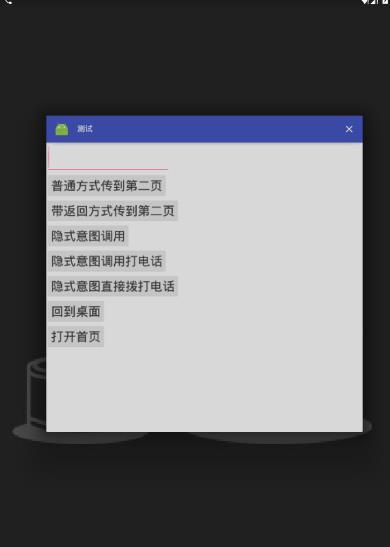
效果



Android——Intent(意图)的更多相关文章
- Android 之 Intent(意图)
Intent是 Android中重要的桥梁之一,它分为显式意图和隐式意图.接下来分别针对这两种意图进行讲解. 显式意图:通过指定一组数据或动作,激活应用内部的 activity:(相比隐式意图,此做法 ...
- android intent 隐式意图和显示意图(activity跳转)
android中的意图有显示意图和隐式意图两种, 显示意图要求必须知道被激活组件的包和class 隐式意图只需要知道跳转activity的动作和数据,就可以激活对应的组件 A 主activity B ...
- Android组件--意图(Intent)
1. 隐示调用和显示调用 参考资料:http://blog.csdn.net/harvic880925/article/details/38399723 1.概念 1). 显式意图: 能从intent ...
- android:Intent匹配action,category和data原则
1.当你在androidmanifest里面定义了一个或多个action时 你使用隐式意图其他activity或者service时,规定你隐式里面的action必须匹配XML中定义的action,可以 ...
- Android Intent
Intent在Android中的重要性不言而喻.本文主要总结下Intent使用过程中需要注意的一些问题. 1.隐式Intent AndroidManifest.xml声明时<intent-fil ...
- Android总结篇系列:Android Intent
Intent在Android中的重要性不言而喻.本文主要总结下Intent使用过程中需要注意的一些问题. 1.隐式Intent AndroidManifest.xml声明时<intent-fil ...
- Android Intent (可通过URL启动 Activity)
Intent分为两大类: (1)显性的(Explicit) (2)隐性的(Implicit) 对于隐性意图,在某些时候, 应用程序只是想启动具有某种特征的组件, 并不想和某个特定的组件耦合. 使用In ...
- [Android] Intent详解
[转]http://www.cnblogs.com/engine1984/p/4146621.html [正文] Intent组件虽然不是四大组件,但却是连接四大组件的桥梁,学习好这个知识,也非常的重 ...
- Intent(意图)
Intent的中文意思是“意图,目的”的意思,可以理解为不同组件之间通信的“媒介”或者“信使”. 目标组件一般要通过Intent来声明自己的条件,一般通过组件中的<intent-filter&g ...
随机推荐
- 【云计算】Docker 镜像如何设置语言环境?bash: warning: setlocale: LC_ALL: cannot change locale (en_US)
解决方案: # set default language environment RUN locale-gen en_US.UTF- \ && dpkg-reconfigure loc ...
- 如何用 js 递归输出树型
<!DOCTYPE html> <html xmlns="http://www.w3.org/1999/xhtml"> <head> <m ...
- Java 并发:内置锁 Synchronized
摘要: 在多线程编程中,线程安全问题是一个最为关键的问题,其核心概念就在于正确性,即当多个线程訪问某一共享.可变数据时,始终都不会导致数据破坏以及其它不该出现的结果. 而全部的并发模式在解决问题时,採 ...
- Xcode 生成 ipa包
原地址:http://zengwu3915.blog.163.com/blog/static/2783489720136213239916/ app store的审核收费的需要二周,免费的需要一个月左 ...
- Box layout
Layout management with layout classes is much more flexible and practical. It is the preferred way t ...
- ssh 安装笔记
debian 6.0 的一台32位机器,aptitude search openssh-server-x509 没结果(其他机同样源配置是有结果的),于是上内部源下载openssh-server-x5 ...
- Jquery重新学习之九[Ajax运用总结C]
前两篇文章主要介绍Jquery如何利用Ajax进行操作数据,主要介绍调用的方法:其中Jquery.ajax()是Jquery中最底层的方法:Jquery还定义的一个方法跟几个事件为Jquery.aja ...
- 解决Html.CheckBoxFor中”无法将类型 bool 隐式转换为 bool。存在一个显式转换..."的方法
在后面加.Value属性 @Html.CheckBoxFor(m => m.IsComment.Value, new { style = "vertical-align: middle ...
- 调试Felix Framework
这里是指用Eclipse调试Felix Framework自身. 1. 首先安装Eclipse Java EE,然后再安装Java Source Attacher,这样才会在Jar文件的右键菜单“属性 ...
- android 自己定义组合控件
自己定义控件是一些android程序猿感觉非常难攻破的难点,起码对我来说是这种,可是我们能够在网上找一些好的博客关于自己定义控件好好拿过来学习研究下,多练,多写点也能找到感觉,把一些原理弄懂,今天就讲 ...