
/etc/profile、~/.bash_profile等几个文件的执行过程
分类: LINUX
2012-04-26 17:44:55

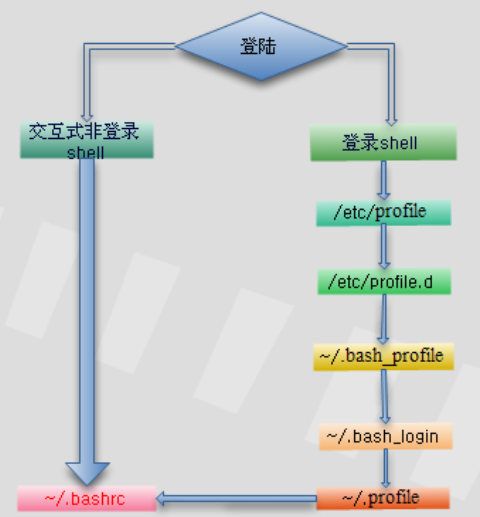
关于登录linux时,/etc/profile、~/.bash_profile等几个文件的执行过程。
在登录Linux时要执行文件的过程如下:
在 刚登录Linux时,首先启动 /etc/profile 文件,然后再启动用户目录下的 ~/.bash_profile、 ~/.bash_login或 ~/.profile文件中的其中一个,执行的顺序为:~/.bash_profile、 ~/.bash_login、 ~/.profile。如果 ~/.bash_profile文件存在的话,一般还会执行 ~/.bashrc文件。因为在 ~/.bash_profile文件中一般会有下面的代码:
if [ -f ~/.bashrc ] ; then
. ./bashrc
fi
~/.bashrc中,一般还会有以下代码:
if [ -f /etc/bashrc ] ; then
. /etc/bashrc
fi
所以,~/.bashrc会调用 /etc/bashrc文件。最后,在退出shell时,还会执行 ~/.bash_logout文件。
执 行顺序为:/etc/profile -> (~/.bash_profile | ~/.bash_login | ~/.profile) -> ~/.bashrc ->/etc/bashrc -> ~/.bash_logout
关于各个文件的作用域,在网上找到了以下说明:
(1)/etc/profile: 此文件为系统的每个用户设置环境信息,当用户第一次登录时,该文件被执行. 并从/etc/profile.d目录的配置文件中搜集shell的设置。
(2)/etc/bashrc: 为每一个运行bash shell的用户执行此文件.当bash shell被打开时,该文件被读取。
(3)~/.bash_profile: 每个用户都可使用该文件输入专用于自己使用的shell信息,当用户登录时,该文件仅仅执行一次!默认情况下,他设置一些环境变量,执行用户的.bashrc文件。
(4)~/.bashrc: 该文件包含专用于你的bash shell的bash信息,当登录时以及每次打开新的shell时,该该文件被读取。
(5)~/.bash_logout: 当每次退出系统(退出bash shell)时,执行该文件. 另外,/etc/profile中设定的变量(全局)的可以作用于任何用户,而~/.bashrc等中设定的变量(局部)只能继承/etc /profile中的变量,他们是"父子"关系。
(6)~/.bash_profile 是交互式、login 方式进入 bash 运行的~/.bashrc 是交互式 non-login 方式进入 bash 运行的通常二者设置大致相同,所以通常前者会调用后者。
我 做了个实验,在/etc/profile,/etc/bashrc,~/.bashrc和~/.bash_profile文件的最后追加同一个变量分别赋 予不同的值,实验结果表明变量最后的值为~/.bash_profile里的值。(4个文件都没有修改其他设置,都是安装系统后的默认值。)
再有就是4个文件都追加一个值到同一个文件,开机后查看该文件内容的顺序为:
/etc/profile
~/.bash_profile
~/.bashrc
/etc/bashrc
----------------------
其他文章:
redhat bash 初始化设置
先说明三个概念
登录shell
正常登录程序启动的shell.既登录成功后紧接着给登录用户启动的shell.
非登录交互式shell
这个shell的工作方式是交互式的,等用户输入,然后执行,再等用户输入。显然登录shell就是一个交互式shell。
如下,我们可获得一个交互式非登录shell:
[root@localhost ~]# bash
[root@localhost ~]# pwd
/root
非交互式shell
为运行一个shell脚本启动的shell.
以FC5的bash为例,跟shell环境配置相关的文件以下几个,
/etc/profile
/etc/profile.d/*.sh
/etc/bashrc
~/.bash_profile
~/.bashrc
有时你会发现定义一个别名,有时好像在任意一个文件里定义都可以起作用,有时好像又不起作用,那是为什么呢?这些配置文件各自互责了什么工作?相互的关系是怎么样的?跟前面介绍的不同种类的shell的关系是如何的呢?下面对每个文件单独进行说明。
/etc/profile
Linux规定,当启动一个登录shell会执行这个脚本. 测试过程如下:
把LIST的定义加到/etc/profile文件的未尾并保存. 如下:
alias LIST='ls -l'
把所有其它shell配置文件或目录改名,这样系统就找不到那些shell脚本了,不会执行,重而避免其它配置文件的干扰。如下:
[root@localhost ~]# mkdir /etc/profile.bak
[root@localhost ~]# mv /etc/profile.d/* -t /etc/profile.bak/
[root@localhost ~]# mv /etc/bashrc /etc/bashrc.bak
[root@localhost ~]# mv ~/.bash_profile ~/.bash_profile.bak
[root@localhost ~]# mv ~/.bashrc ~/.bashrc.bak
交互式shell,并测试过程如下:
[root@localhost ~]# bash
bash-3.1# LIST
bash: LIST: command not found
bash-3.1# exit
exit
[root@localhost ~]#
显然启动一个普通交互式shell的时候, shell配置文件/etc/profile不起作用
非交互式shell, 测试过程如下:
为了验证先写一个测试脚本,如下:
#!/bin/bash
LIST
把这个脚本保存为t.sh并加下可执行权限:
[root@localhost ~]# chmod a x t.sh
[root@localhost ~]# ./t.sh
./t.sh: line 2: LIST: command not found
[root@localhost ~]#
显然启动一个非交互式shell时,shell配置文件/etc/profile不起作用
登录shell,并测试过程如下:
Last login: Wed Nov 19 10:22:23 2008 from 192.168.0.97
-bash-3.1# LIST
total 160
drwxr-xr-x 2 root root 4096 Aug 14 12:24 Desktop
-rw-r--r-- 1 root root 3211 Nov 6 10:15 Session.vim
drwxr-xr-x 2 root root 4096 Nov 10 10:58 a
-rw-r--r-- 1 root root 126 Nov 12 12:42 a.txt
-rw-r--r-- 1 root root 261 Nov 6 15:23 a.zip
-rw-r--r-- 1 root root 157 Nov 6 15:23 aa.zip
-rw------- 1 root root 1054 Aug 14 11:59 anaconda-ks.cfg
-rw-r--r-- 1 root root 691 Nov 18 10:09 b.txt
-rw-r--r-- 1 root root 31671 Aug 14 11:58 install.log
-rw-r--r-- 1 root root 4155 Aug 14 11:50 install.log.syslog
-rw------- 1 root root 20310 Nov 17 13:51 mbox
drwxr-xr-x 2 root root 4096 Nov 17 17:22 shell
-rwxrwxrwx 1 root root 65 Nov 19 10:11 t.sh
drwxr-xr-x 14 root root 4096 Nov 5 15:34 test
-bash-3.1#
显然启动一个登录shell时,shell配置文件/etc/profile会起作用
~/.bash_profile
这个文件跟/etc/profile起作用的时机是一样的,都是只在启动一个登录shell的时候才会被source,跟/etc/profile不同的是,这里的配置只影响单个用户,不对其它用户产生影响。
/etc/bashrc与~/.bashrc
从字面上我们可以理解这两个文件应该跟根bash相关,即 只要你启动了一个bash类型的shell这两文件的配置就将发生作用。如果你的shell是sh、csh或是ksh这两个文件将不起作用。按前面的介 绍,可能很会猜测/etc/bashrc与~/.bashrc的关系跟/etc/profile与~/.bash_profile的关系一样,一个是全局 的,一个是针对单个用户的。从结果上看确实是这样的,但实现过程却是不一样的。启动一个bash时直接source ~/.bashrc, 而这~/.bashrc里面会source /etc/bashrc。
/etc/profile.d/*.sh
在fc5下这里的脚本会在/etc/profile里或是~/.bashrc里同时source, 所以这里的设置都是一些不同分类的全局环境设置。
总结在FC5下一个登录bash的环境初始全过程是:
/etc/profile
|
--/etc/profile.d/*
~/.bash_profile
|
--~/.bashrc
|
--/etc/bashrc
|
--/etc/profile.d/*
一个普通交互式bash的初始全过程是:
~/.bashrc
|
--/etc/bashrc
|
--/etc/profile.d/*
对于非交互式bash的初始全过程是:
不重新source 任何新的shell脚本,只继承当前shell的设置.
/etc/profile、~/.bash_profile等几个文件的执行过程的更多相关文章
- linux下系统启动时,几个配置文件 /etc/profile、~/.bash_profile 等几个文件的执行过程,先后顺序
1. 在登录Linux时要执行文件的过程如下: 在刚登录Linux时, 首先启动 /etc/profile 文件, 然后再启动用户目录下的 ~/.bash_profile. ~/.bash_login ...
- 【转】Linux 之 /etc/profile、~/.bash_profile 等几个文件的执行过程
原文网址:http://blog.csdn.net/ithomer/article/details/6322892 在登录Linux时要执行文件的过程如下:在刚登录Linux时,首先启动 /etc/p ...
- linux环境变量设置 以及 source命令 Linux 之 /etc/profile、~/.bash_profile 等几个文件的执行过程 Linux 设置环境变量
定制环境变量 环境变量是和Shell紧密相关的,用户登录系统后就启动了一个Shell.对于Linux来说一般是bash,但也可以重新设定或切换到其它的Shell.环境变量文件:/etc/profil ...
- /etc/profile ~/.bash_profile ~/.bashrc 等文件的执行过程 和 区别
/etc/profile :系统的所有用户共享 ~/.bash_profile:仅针对当前用户有效 我的电脑只用于开发,因此全部配置/etc/profile 参考链接: https://blog.cs ...
- 一个 java 文件的执行过程详解
平时我们都使用 idea.eclipse 等软件来编写代码,在编写完之后直接点击运行就可以启动程序了,那么这个过程是怎么样的? 总体过程 我们编写的 java 文件在由编译器编译后会生成对应的 cla ...
- linux下 /etc/profile、~/.bash_profile ~/.profile的执行过程
关于登录linux时,/etc/profile.~/.bash_profile等几个文件的执行过程. 在登录Linux时要执行文件的过程如下: 在刚登录Linux时,首先启动 /etc/profile ...
- [转] linux下 /etc/profile、~/.bash_profile ~/.profile的执行过程
分类: linux 2015-03-13 16:24 1572人阅读 评论(0) 收藏 举报linuxprofile关于登录linux时,/etc/profile.~/.bash_profile等几个 ...
- 【总结】/etc/rc.d/rc.local 与 /etc/profile .bash_profile .bashrc 文件执行顺序
登陆shell与交互式非登陆shell的区别 登录shell 所谓登录shell,指的是当用户登录系统时所取的那个 shell.登录shell属于交互式shell. 登录shell将查找4个不同的启动 ...
- Linux系统profile、bashrc、bash_profile等环境设置文件的使用
一.前言 关于bash的环境设置文件,分为系统设置和个人设置,一般来说建议用户直接修改个人的设置. 本文测试环境为:centos6.5. 二.系统设置值 1. /etc/sysconfig/i18n ...
随机推荐
- 一些非常好的VC++/MFC开源项目链接
Introduction List of some of the best Open Source projects written in VC++/MFC. Background Codeproje ...
- 05:Sysbench压测-innodb_deadlock_detect参数对性能的影响
目录 sysbench压测-innodb_deadlock_detect参数对性能的影响 一.OLTP测试前准备 二.进行OLTP测试 三.测试结果解读: 四.关于测试后的结论: 五.关于测试后的性能 ...
- Jquery获取用户控件页面中控件的值
$('#<%= txt_P_name.ClientID%>').val()
- Window app遇到的问题
Windows下两个应用之间进行UDP通讯,必须要先互相发送过数据,才能收到其他的数据.解决方法: <Capabilities> <Capability Name="int ...
- TOTAL COMMAND自定义快捷键
- Mysql--可用的 MySQL 产品和专业服务
一.MySQL Community Edition(社区版):MySQL Community Edition is the freely downloadable version of the wor ...
- 【Oracle】Oracle数据库DATABASE LINK 的命名
当前数据库的GLOBAL_NAMES参数设置为 TRUE,使用DATABASE LINK 时,DATABASE LINK的名称必须与被连接库的 GLOBAL_NAME一致. 而要建多个 DBLINK到 ...
- SWFUpload初体验 For Struts1.x
SWFUpload是一个客户端文件上传工具,最初由Vinterwebb.se开发,它通过整合Flash与JavaScript技术为WEB开发者提供了一个具有丰富功能继而超越传统<input ty ...
- 使用EXCEL绘制三维地图(超简单的五分钟绘制地图方法,妈妈再也不用担心我不会画地图啦~)
博主为从区域规划转行地图学的小学渣一枚,最近处理数据希望对结果进行三维可视化,意外发现从小用到大的EXCEL可以绘制地图且功能非常强大,在这里做一下简单介绍,希望可以给看官提供些许帮助.那下面就开始吧 ...
- i++的原子性问题
一.什么是原子性 简单的可以理解为:操作是不可再分割的,比如: int i=0; 但是i++的操作是可以再分的,比如: i++ //分解后 i=i+i 上面的代码在多线程环境下取值是有问题的,比如: ...